Migrating a power plant's operational and maintenance data from SAP PM, IBM Maximo, or decades of spreadsheets into a modern AI-driven analytics platform is one the most consequential — and most frequently mishandled — IT decisions in the power generation sector. The data at stake is not generic operational data it the institutional knowledge of your plant. Every PM schedule in Maximo encodes years of engineering judgment about how frequently a specific asset at your specific facility needs attention. Every work order history in SAP PM documents which failure modes your turbines actually experience, in what sequence, and under what operating conditions. Every equipment record in your asset register carries calibration history, nameplate data, and maintenance parameter settings that took years to populate and validate. Migrating to a modern AI-driven platform without a structured data preservation strategy is not just a technical risk — it is a risk to your plant's operational safety, reliability program continuity, and regulatory compliance posture. iFactory's data migration program for power plant deployments is specifically designed to preserve this institutional knowledge through the migration: extracting, validating, transforming, and loading your legacy data with the completeness and traceability that your regulatory and operational obligations require. For an immediate conversation about your specific migration requirements,
What Data Is at Risk in a Power Plant Legacy Migration
Power plant maintenance professionals routinely underestimate how much institutional knowledge is embedded in legacy CMMS and analytics platforms — and how little of it is automatically preserved during a platform migration without structured ETL processes. The following data categories represent the highest risk during unstructured migrations.
Unstructured vs. iFactory-Managed Migration: What the Difference Looks Like in Practice
The gap between an unstructured migration and iFactory's managed ETL process becomes visible immediately after go-live — and the consequences of the unstructured approach take 12–18 months to fully repair. Here is the operational reality of each approach.
Legacy System Migration Profiles: SAP PM, Maximo, and Spreadsheet Environments
Each legacy platform presents different migration challenges — different data structures, different export formats, and different completeness issues that iFactory's migration team has resolved across multiple power plant deployments. Book a Demo to confirm the migration path for your specific legacy system and version.
iFactory's Five-Phase Migration Process: From Legacy Extraction to Validated Go-Live
iFactory's migration team connects to your legacy system and performs a complete data quality audit — identifying every asset record, PM schedule, work order, calibration record, and parts list in the source system, along with every data quality issue that must be resolved before migration. This includes duplicate asset records, inconsistent equipment naming conventions, PM schedules with missing task lists, and calibration records without date linkages. The audit produces a Data Quality Report that quantifies exactly what exists, what is clean, what requires remediation, and what cannot be migrated without plant team input. No migration begins until the scope is fully understood. Book a migration assessment
Every data element from the legacy system is mapped to its corresponding element in iFactory's data model — asset classes, functional locations, PM schedule types, work order categories, failure codes, and parts classifications. Where the legacy model does not map directly (which is common with SAP PM's functional location vs. equipment distinction, or Maximo's multi-site asset hierarchy), the transformation rules are documented and reviewed with the plant's maintenance engineering team before any data transformation begins. The transformation specification becomes the contractual basis for migration acceptance — if transformed data does not match the specification, the migration is not accepted.
The ETL process extracts all legacy data per the agreed scope, applies the transformation rules from Phase 2, and loads the result into a staging environment that mirrors iFactory's production data model. The staging environment is then made available to the plant's maintenance team for validation — your engineers can browse the migrated asset hierarchy, check PM schedules for frequency accuracy, review work order history completeness, and verify calibration record linkages before any data goes live. The staging environment is the safety net: if your team identifies errors, they are corrected in the staging environment and the ETL is re-run before production load.
Plant engineers perform structured acceptance testing against defined criteria: asset count match (every asset in the legacy system present in iFactory), PM schedule frequency accuracy (all schedules within the agreed tolerance of legacy source), work order count match (all work orders within the agreed history window migrated), and calibration record completeness (all calibration records with valid dates and instrument IDs linked to asset records). Acceptance testing is complete when the plant team signs off on all acceptance criteria. Only then does the production load proceed. The Migration Acceptance Report becomes part of the facility's change management documentation — important for regulatory and audit purposes.
The production data load is scheduled during a plant maintenance window — typically a weekend or planned outage period — to minimize operational disruption. The legacy system is frozen at the point of data cutover to prevent new data entering it, and all new work orders, PM completions, and calibration records are created in iFactory from that point forward. The legacy system remains accessible in read-only archive mode for a defined period — typically 90 days — giving staff access to historical data during the transition while the team builds familiarity with iFactory. iFactory's work order history begins building from Day 1 of go-live, and AI anomaly detection models begin training on the migrated historical baseline immediately. Book a Demo to review the go-live process for your facility.
How iFactory Connects Legacy Data to AI Analytics — The Integration That Makes Migration Worthwhile
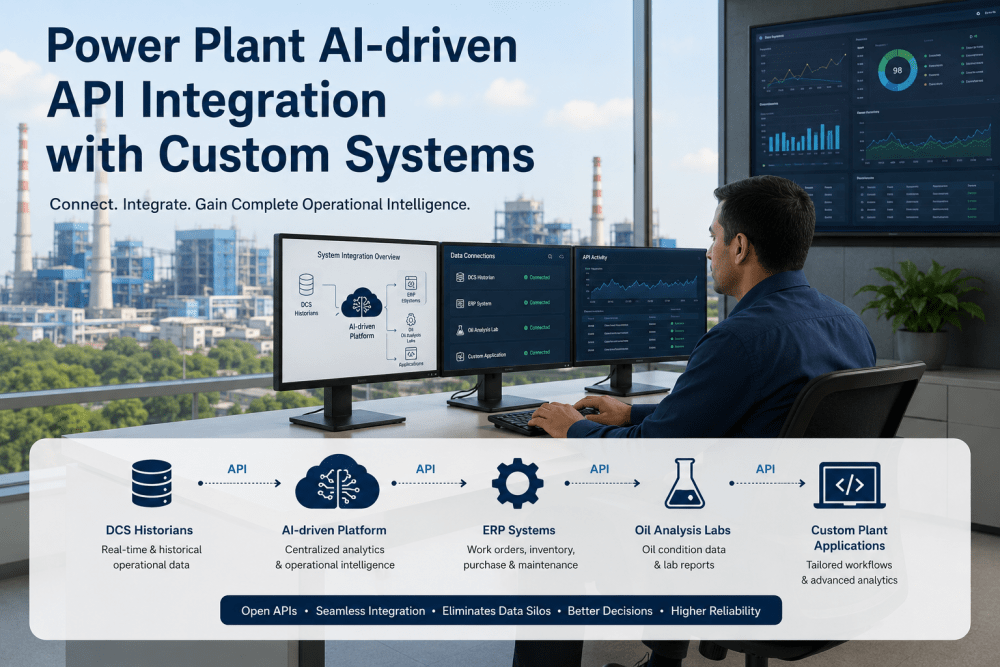
The reason a structured data migration matters is not just data preservation — it is that the quality of the historical data you bring into iFactory determines how quickly and how accurately iFactory's AI anomaly detection models can begin identifying developing equipment problems. Without work order history, the AI has no baseline of what normal failure patterns look like at your facility. Without calibration records linked to your asset hierarchy, the predictive maintenance scheduling system cannot build reliable condition-based schedules. Without PM schedule history, the AI cannot distinguish maintenance-induced performance changes from genuine equipment degradation trends. The migration is the foundation for the AI — and iFactory's deployment is specifically structured to ensure that foundation is solid before analytics activation begins.
Expert Perspective on Power Plant Data Migration
I have overseen three CMMS migrations at two different plants over my career, and the lesson from each one is the same: the technical migration is the easy part. The hard part is preserving the institutional knowledge that your maintenance engineers put into the system over years — the custom PM frequencies that were tuned to your specific equipment configuration, the failure code taxonomy that your reliability team developed to capture the failure modes your machines actually experience, the calibration intervals that were adjusted based on your instruments' actual drift rates rather than manufacturer defaults. None of that knowledge is automatically preserved in a standard data export. It lives in the data model that your team built, and if you don't have a structured ETL process that respects and preserves that model, you lose it. The second lesson: never go live on a new CMMS without your maintenance engineers having validated the migrated PM schedules against the source system. I have seen facilities go live with PM schedules that were imported at wrong frequencies — monthly schedules that became weekly, annual overhauls that disappeared entirely. Those errors don't announce themselves; they just silently degrade your reliability program until a failure event exposes them. A structured migration with acceptance testing prevents exactly that scenario. The platforms that do this well save you 12–18 months of rework after go-live. The ones that don't create problems that outlast the migration project by years.
Frequently Asked Questions — Power Plant Data Migration to iFactory
Migrate Your Power Plant's Legacy Data to iFactory — Without Losing the Institutional Knowledge Your Reliability Program Depends On
iFactory's structured five-phase migration program preserves every PM schedule, work order record, calibration certificate, and asset hierarchy relationship from SAP PM, Maximo, Oracle EAM, Infor EAM, or spreadsheet environments — with plant team validation before go-live and 90 days of legacy archive access during the transition.