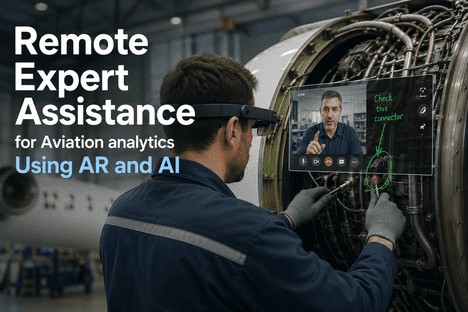
The phone rings on the line technician's bench. An A320 is on the ground at a secondary hub with a hydraulic fault. The nearest certified engine specialist is 1,200 kilometers away — minimum 48 hours before they can be on site. Every hour the aircraft stays grounded costs the operator $50,000 or more. The traditional playbook says: describe the symptoms over the phone, email a PDF of the manual page, hope the technician interprets it correctly on the first pass. The new playbook says: the specialist joins the technician's field of view within 15 minutes, annotates the actual component with digital overlays, and walks through the procedure step by step — as if standing in the same hangar bay. Augmented reality and AI-driven remote expert assistance are not experimental technologies in aviation maintenance. They are operational today, and they are cutting mean time to repair by 40 percent while delivering first-time fix rates that traditional phone support cannot approach.
AR AND AI REMOTE ASSISTANCE
Remote Expert Assistance for Aviation Analytics
Using AR and AI to Connect Field Technicians With Specialists Instantly
How augmented reality and artificial intelligence are replacing phone-based troubleshooting with real-time visual guidance, AI pre-diagnostics, and audit-ready session documentation — eliminating the distance between expertise and the aircraft.
40%
Reduction in mean time to repair
15 min
Expert joins remotely vs 24-72 hr travel
78%
First-time fix rate with AR-guided sessions
THE REMOTE ASSISTANCE STACK
Three Technologies That Replace Physical Presence
Remote expert assistance is not a single feature. It is a structured stack of three integrated capabilities — each solving a distinct failure point in traditional phone-based troubleshooting.
1
Augmented Reality Visual Guidance
Smart glasses or mobile devices project digital annotations, wiring diagrams, and component callouts directly onto the physical surface the technician is working on. The expert draws, circles, and labels in real time. The technician sees it overlaid on the actual equipment — not on a separate screen. This eliminates the single biggest failure point in phone support: miscommunication through verbal description.
30-40% faster task completion with AR overlays
2
AI Pre-Diagnostics and Fault Hypothesis
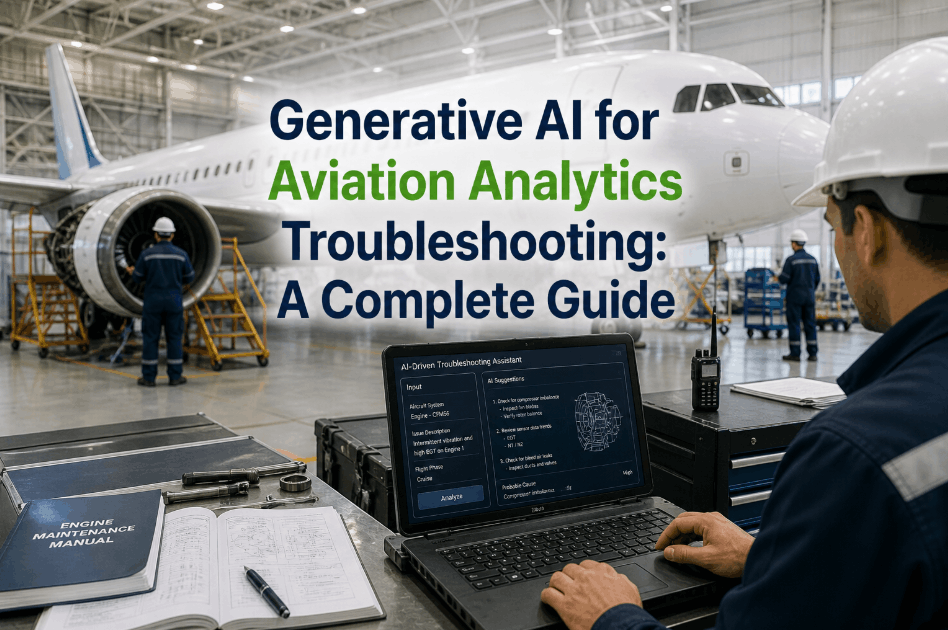
AI models analyze fault codes, sensor readings, and maintenance history before the expert even joins the session. The technician arrives at the fault location with ranked hypotheses — not a blank page. The expert reviews machine-generated candidates and confirms or redirects within minutes, cutting diagnostic time from hours to minutes.
Zero-start diagnosis eliminated
3
Auto-Documented Session Records
Every remote session generates a structured maintenance record automatically — timestamps, technician actions, expert notes, photographs, AMM references, and digital sign-off. The record is audit-ready the moment the session closes and stored directly against the aircraft work order. No post-call notes. No retrospective documentation effort after the aircraft is released.
Audit-ready records at session close
THE COST OF DISTANCE
What Physical Presence Requirements Actually Cost
The traditional model of flying an expert to a remote station is not just expensive — it is a structural bottleneck that cascades delay across the entire network. The numbers below represent the real operational cost of relying on physical presence for troubleshooting support.
24-72 hr
Expert response window with physical travel
Getting an OEM technical representative or senior specialist on site typically takes one to three days depending on location, visa requirements, and specialist availability.
$50K+
Per hour AOG cost for widebody aircraft
Every hour without expert guidance means misdiagnosis, repeat inspections, and extended dispatch delays that cascade across the network at enormous cost.
42%
Industry average first-time fix rate without expert support
Technicians troubleshooting without visual expert guidance misdiagnose faults more than half the time, requiring repeat calls, escalations, and extended ground time.
2.4x
Error rate of junior vs experienced technicians
With 40% of the global maintenance workforce approaching retirement by 2030, junior technicians are increasingly assigned tasks beyond their experience — without structured expert backup.
PHONE SUPPORT
Verbal description only
High miscommunication risk
Starts from zero each call
No visual context
Post-call notes lost or incomplete
VS
AR + AI REMOTE EXPERT
Live shared visual with AR annotation
AI surfaces fault hypotheses before session
OEM expert joins within 15 minutes
Annotated directly on the physical component
Auto-generated audit-ready session record
REAL-WORLD IMPACT
What MRO Facilities Are Achieving With AR Remote Assistance
3.5 hr
Faster per-engine repair
An MRO facility using AR remote assist for fan blade repairs reduced per-engine repair time by 3.5 hours while achieving 100% first-time quality rate with zero rejections.
100%
First-time quality rate achieved
With AR annotations guiding every step of the repair, the facility eliminated rework entirely on guided procedures — a result that manual phone-based support had never achieved.
95%
Technician favorability rating
Technicians using AR remote assistance report overwhelming preference over phone support — citing clarity of guidance, reduced stress, and faster fault resolution.
Zero
Recorded errors with AR-supported work
Across deployed AR remote assistance programs, documented error rates for AR-guided procedures have been consistently zero — a record that traditional methods cannot match.
IFACTORY REMOTE ASSIST MODULE
Connect Your Field Technicians to Expert Guidance in Under 15 Minutes
iFactory's Remote Assist Module combines AR annotations, AI pre-diagnostics, multi-party telepresence, and auto-documented session records into a single platform connected to your asset register and work order system. Start with tablets and smartphones — no new hardware procurement required.
COMPARISON
Traditional Phone Support vs AR-Assisted Remote Expert
| Aspect |
Traditional Phone / Email Support |
AR-Assisted Remote Expert With iFactory |
| Expert Visibility |
None — verbal description only, high interpretation risk |
Real-time shared visual with live AR annotation overlay |
| Guidance Precision |
Described step by step with frequent miscommunication |
Annotated directly on the physical component in the technician's view |
| Pre-Diagnosis |
Starts from zero — expert asks for symptom description again |
AI surfaces ranked fault hypotheses before the session begins |
| Documentation |
Post-call notes — incomplete, unstructured, easily lost |
Auto-generated, timestamped, AMM-referenced record at session close |
| Resolution Time |
Hours to days with multiple escalations and callbacks |
Minutes to 2 hours — first-contact resolution is the target |
| OEM Involvement |
Physical travel required — 24 to 72 hour response window |
OEM specialist joins remotely within 15 minutes |
| Knowledge Retention |
Verbal — lost when the call ends, no institutional record |
Session recorded, replayable, stored against asset history |
HOW IT WORKS
What an AR Remote Assistance Session Looks Like in Practice
Step 1
AI Pre-Diagnosis
The technician scans the fault code or enters the symptom. iFactory's AI analyzes the aircraft's maintenance history, sensor data, and known failure patterns to surface the three most probable root causes — ranked by likelihood before any human joins the session.
Step 2
Expert Session Initiation
The technician initiates a remote session from a tablet, smartphone, or smart glasses. The nearest available certified expert receives the request with the aircraft's complete context — tail number, fault code, AI hypothesis, and open work orders — pre-loaded. No time lost re-establishing history.
Step 3
AR-Guided Troubleshooting
The expert sees exactly what the technician sees through the live camera feed. Using AR annotation tools, the expert draws circles, arrows, and labels directly on the physical component in the technician's field of view. Wiring diagrams, torque values, and AMM references appear as digital overlays.
Step 4
Auto-Documentation and Sign-Off
Every action, annotation, and decision is timestamped and logged. When the fault is resolved, the session record — complete with photographs, expert notes, AMM references, and digital signatures — is automatically attached to the work order. Audit-ready at session close. No post-event paperwork.
FAQ
Common Questions About AR Remote Expert Assistance
What hardware does a technician need to participate in AR remote assistance? ▼
AR remote assistance is hardware-agnostic. Technicians can join sessions from smart glasses (RealWear, Vuzix), ruggedized tablets, or standard smartphones. Most MRO operations begin with tablets and smartphones because they require no new hardware procurement — deployment can start within days of platform activation. Smart glasses are preferred for hands-free operation during active maintenance tasks where both hands need to stay on the aircraft. iFactory's Remote Assist Module adapts to the device available at each station. A stable mobile or Wi-Fi connection with at least 5 Mbps upload speed is the primary infrastructure requirement for full video and AR overlay sessions.
How does AR remote assistance handle connectivity issues in remote hangar environments? ▼
iFactory's Remote Assist Module is designed for real-world conditions where connectivity is not always stable. The platform caches the most recent expert guidance, current task step, and any instructions delivered before the connection dropped — allowing the technician to continue working against the last confirmed guidance state. When connectivity restores, the session resumes and the documentation record reconciles automatically. For operations in known low-connectivity environments, pre-loaded troubleshooting guides and step-by-step task cards are available offline via the iFactory mobile app, ensuring the technician is never left without structured support.
Is AR remote assistance documentation accepted by regulatory authorities during audits? ▼
Yes. iFactory maps every remote assistance session to the applicable AMM task number. Expert guidance, technician actions, photographs, part references, and digital sign-offs are documented against the correct procedure reference — not as a freestanding note. Session records include the AMM revision used, which steps were completed, any deviations authorized, and who approved them. The resulting maintenance record is structured the way regulators expect to see it: a traceable, task-referenced activity log. FAA AC 120-78B and EASA Part-145 both permit electronic documentation tools provided they maintain an auditable record equivalent to paper — which iFactory is specifically designed to deliver.
ELIMINATE THE DISTANCE BETWEEN EXPERTISE AND THE AIRCRAFT
See How iFactory's Remote Assist Module Connects Your Team to Expert Guidance Instantly
iFactory combines AR annotations, AI pre-diagnostics, multi-party telepresence, and auto-documented session records in one platform. Start with the devices you already own. Your first remote session live in days, not weeks.