Operator Self-Service AI on the Shop Floor — One Question, One Answer
By Henry Green on June 5, 2026
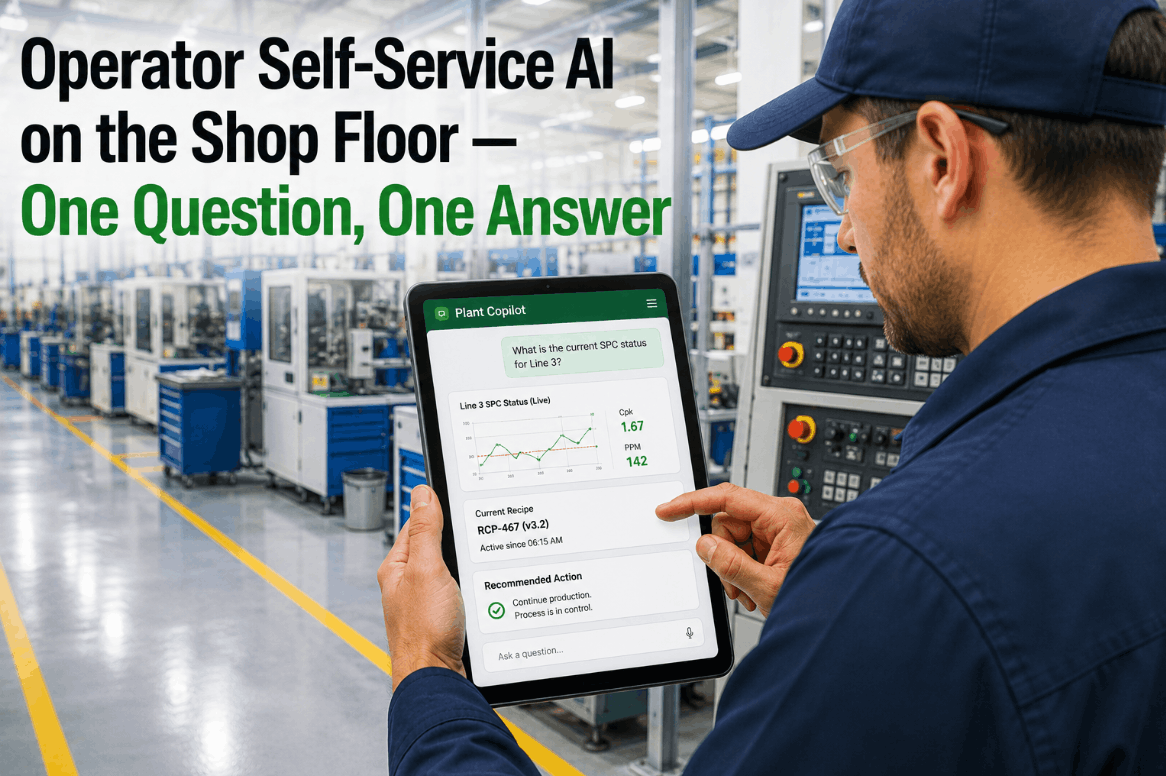
On the modern plant floor, the most expensive delay isn't equipment failure — it's the thirty minutes an operator spends waiting for an engineer to answer a question that the data already knows. What is the current SPC status on Line 3? Which recipe version is active right now? Should I write that parameter change to the PLC or escalate it? These are not complex questions — but without the right tool in hand, they become bottlenecks that compound across every shift, every cell, every line. iFactory AI's Operator Self-Service AI, delivered through the Plant Copilot interface on the operator's tablet, closes this gap. Operators ask in plain language; the system returns live SPC data, active recipe versions, PLC write recommendations, and guided next actions — right at the point of work, without waiting for anyone. Book a Demo to see Plant Copilot running on a live shop floor environment.
Shop Floor AI · SPC · Recipe Control · PLC Writes · Operator Tablet
Operator Self-Service AI on the Shop Floor — One Question, One Answer
iFactory AI's Plant Copilot puts plain-language Q&A on SPC data, recipe versions, PLC writes, and recommended actions directly on the operator's tablet — eliminating expert dependency for routine production decisions.
<10 secAverage time from operator question to AI answer — live SPC, recipe, and PLC data
30–45 minTypical wait time eliminated per shift when operators depend on engineers for routine data access
Plain LangNatural-language interface — no SCADA training or SQL knowledge required for operators
Tablet-FirstDesigned for the shop floor form factor — rugged tablet, gloves, fast answer, back to work
Why Frontline Operators Are the Most Underserved Users in the Modern Plant
Engineering teams have SCADA dashboards. Quality departments have QMS platforms. Operations managers have ERP and MES reporting suites. The one group that generates the most production data — and needs the most real-time answers — is the operator on the floor, and they are typically the last to get a tool that actually answers their questions. Most plants still route operator questions through a chain: ask the team lead, who calls the process engineer, who pulls the data from the historian, who emails back twenty minutes later. Meanwhile, the line either keeps running with a potential issue or gets stopped unnecessarily while the answer is in transit.
iFactory AI's Plant Copilot is built for the operator as the primary user. Not a dashboard they have to interpret. Not a reporting tool that requires training. A plain-language interface where they type or speak the question they actually have — and get the data-backed answer they need to act. Book a Demo to see how operators interact with Plant Copilot in a real production environment.
The Expert Dependency Bottleneck
When operators cannot self-serve answers to routine production questions, every question becomes a workflow interruption — for the operator, for the engineer, and for the line. At scale, this is not a minor friction; it is a structural throughput constraint.
30–45 min per shift lost to avoidable wait time
Recipe and SPC Data Locked Behind Systems
Active recipe versions, current SPC status, and control limit trends live in systems that operators are not trained to navigate. The data exists — but it requires SCADA access, historian queries, or QMS login to retrieve it. Most operators don't have all three.
3–5 systems typically required to answer one production question
PLC Parameter Changes Without Guidance
Operators who recognize a process drift condition often know that a parameter adjustment is needed — but have no clear guidance on what value to write, whether it is within approved limits, or whether to escalate vs. act. Uncertainty leads to either inaction or undocumented manual adjustments.
Undocumented manual adjustments — the most common audit finding
Knowledge Loss at Shift Change and Retirement
Experienced operators carry critical process knowledge in their heads — the parameters that drift on a hot afternoon, the alarm that can be ignored versus the one that needs immediate escalation. When they retire or rotate shifts, that knowledge leaves with them unless it is captured and made accessible to everyone.
40%+ of U.S. manufacturers report critical skill gaps from workforce turnover
The Connected Worker Gap in U.S. Manufacturing
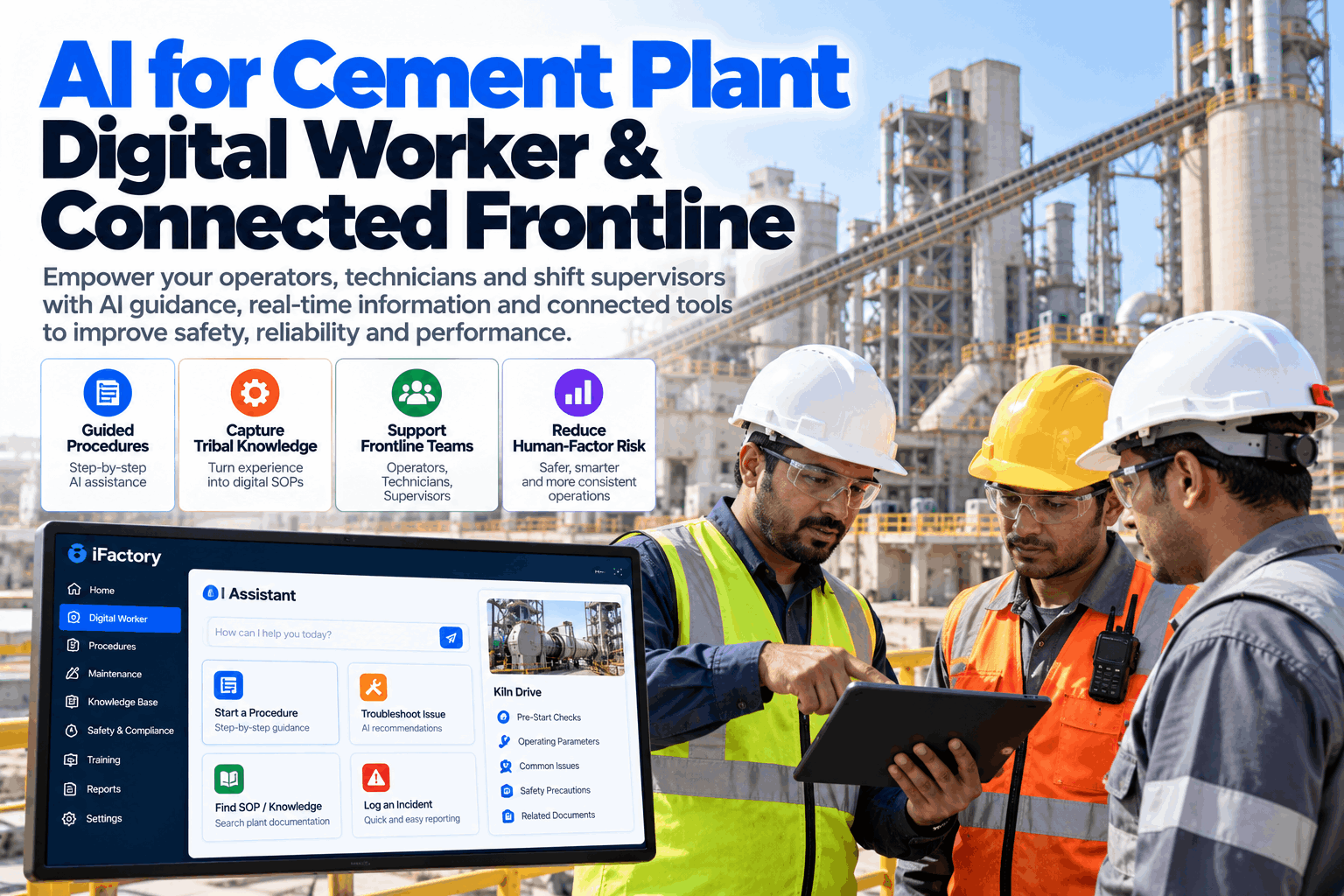
Office workers have had AI assistants for years. The frontline operator on the shop floor — who makes the actual production decisions that determine output quality, yield, and equipment health — is still working from paper binders, radio calls, and memory. iFactory AI's Plant Copilot brings the same self-service intelligence to the operator's tablet, with the production data context that generic AI tools cannot provide.
How Plant Copilot Works: Plain Language In, Production Intelligence Out
iFactory AI's Plant Copilot is not a search engine over documents. It is a connected intelligence layer that has live access to your SCADA data, MES work orders, SPC control charts, recipe management system, and PLC parameter tables — and returns answers that are grounded in your plant's actual current state. The interaction model is designed for the operator, not the data analyst.
Operator Types or Speaks a Plain-Language Question
The operator opens Plant Copilot on their tablet and types — or dictates — a question in the language they already use: "Is Line 4 still in control on fill weight?" or "What recipe version is running on Cell 7 right now?" No special syntax, no system-specific terminology required.
Plant Copilot Queries Live Production Systems
The AI interprets the question, identifies which connected systems hold the relevant data — SCADA historian, SPC engine, recipe management, MES, or PLC tag database — and queries them in real time. No manual data pull, no dashboard navigation, no waiting for a report to run.
AI Returns a Structured, Actionable Answer
The response includes the data the operator asked for — current SPC status, active recipe version, latest parameter readings — along with a recommended action if the data indicates a condition requiring response. Answers are plain English, not raw data dumps that require interpretation.
Operator Acts — With Full Audit Trail
If the action involves a PLC write within approved limits, the operator confirms and the system executes with a timestamped, signed record. If escalation is required, Plant Copilot generates the escalation notification with the supporting data already attached — no manual documentation needed.
What Operators Ask — What Plant Copilot Answers
"Is Line 3 fill weight in statistical control?"
Returns live SPC chart status, last 20 subgroup values, current Cpk, and whether any Western Electric rules are violated — with a yes/no answer and recommended action.
"What recipe version is active on Cell 7?"
Returns the currently active recipe version number, when it was loaded, who authorized it, and whether it matches the work order specification for the current production run.
"Can I adjust the seal temperature on this unit?"
Returns the current value, approved adjustment range from the master recipe, and whether the proposed change is within operator authority or requires engineering sign-off before PLC write.
"Alarm 442 just fired — what do I do?"
Returns the alarm definition, historical context (how often it fires, typical root causes), and the step-by-step response procedure from the current SOP — no manual hunting required.
Plant Copilot Capabilities: SPC, Recipe, PLC Writes, and Recommended Actions
iFactory AI's Plant Copilot is not a single-function tool. It is an integrated intelligence layer across the four data domains that frontline operators interact with most — statistical process control, recipe management, PLC parameter control, and recommended action guidance. Each domain is connected to live plant data, not static documentation.
Live SPC Status and Control Chart Access
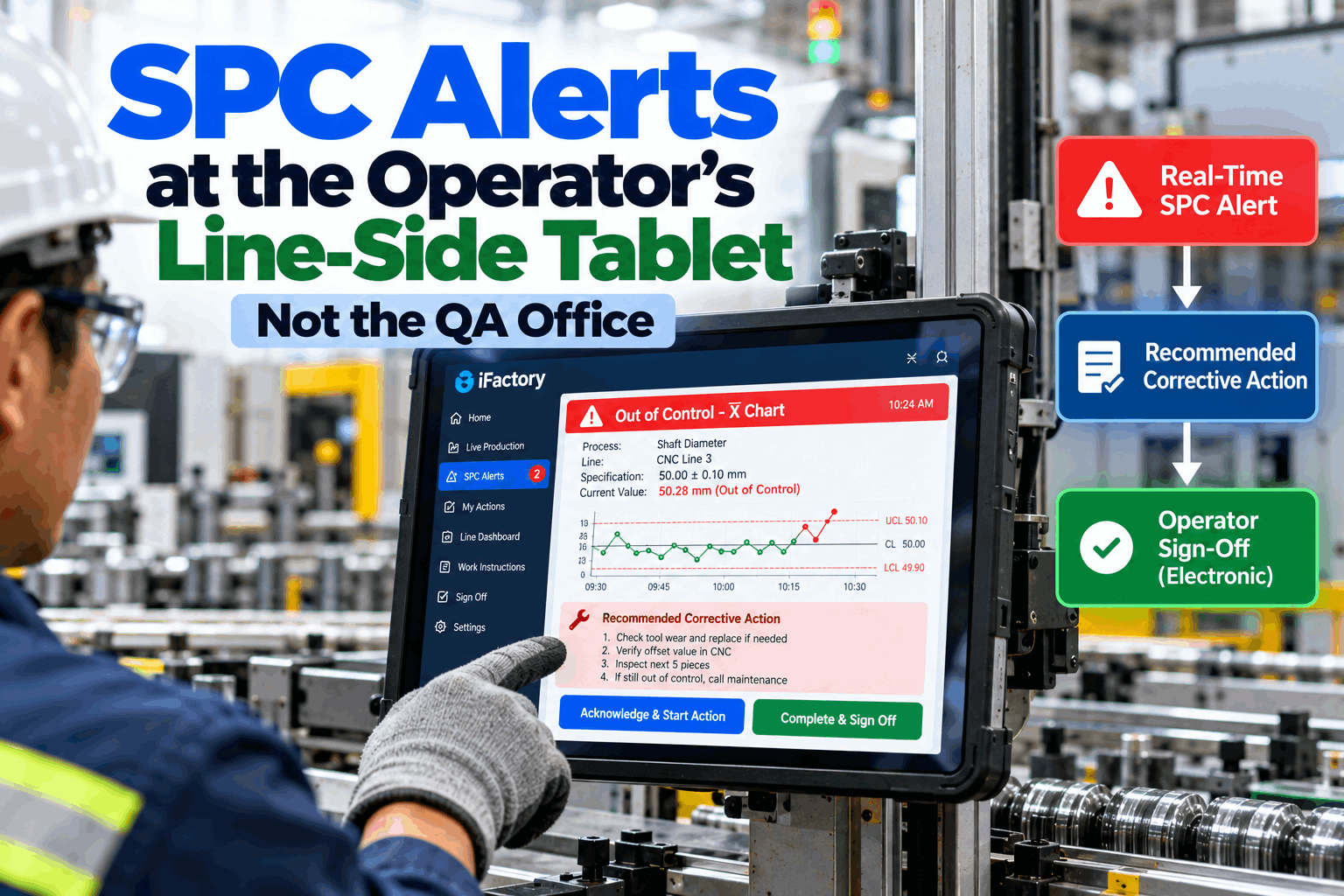
Operators ask about SPC status in plain language and receive the current control chart status — in-control, out-of-control, warning — along with the specific rule violation, affected characteristic, and the recommended response. SPC data is pulled from the live SPC engine, not a static report generated hours ago.
Real-Time SPC
Active Recipe Version Visibility
Recipe management queries return the currently active version, its authorization history, the work order it was loaded for, and any parameter deviations from the master specification. Operators can confirm recipe correctness without accessing the recipe management system directly.
Recipe Intelligence
Guided PLC Parameter Writes
When a process condition requires a parameter adjustment, Plant Copilot identifies the relevant PLC tag, confirms the current value, shows the approved adjustment range, and — where the change is within operator authority — executes the write with a full audit record. Out-of-authority changes generate an escalation with the supporting data pre-attached.
PLC Write Support
Recommended Actions from Live Context
Plant Copilot doesn't just return data — it interprets the current condition and recommends the next action, drawing from the plant's SOP library, historical response records, and the current process state. Recommendations are specific to the line, the product, and the current shift context — not generic troubleshooting scripts.
AI Guidance
Alarm Response and Escalation Guidance
When an alarm fires, Plant Copilot returns the definition, historical context, and the step-by-step response procedure from the current SOP — in under ten seconds. If escalation is required, the system generates the escalation message with the alarm data, timestamp, and process context already included, so the engineer receives a complete picture immediately.
Alarm Intelligence
Shift Knowledge Capture and Handover
At shift end, Plant Copilot compiles a structured handover summary from the shift's Plant Copilot interactions — decisions made, parameters adjusted, escalations raised, and any open conditions. This replaces the memory-dependent verbal handover with a documented, searchable record that the incoming operator can query directly.
Knowledge Retention
Want to see Plant Copilot answer real operator questions from live production data? Book a Demo and we'll configure the session around your specific production environment and operator workflows.
Before and After: Operator Workflows with Plant Copilot
The operational impact of operator self-service AI is most visible at the workflow level — where the time, accuracy, and documentation profile of routine production decisions change fundamentally. The comparison below reflects the difference between a conventional expert-dependent workflow and the Plant Copilot-enabled self-service model.
Scroll to compare
Operator Scenario
Without Plant Copilot
With iFactory Plant Copilot
Check SPC status on a critical characteristic
Radio call to quality tech — 15–30 min wait for someone to pull the chart
Plain-language question → live SPC status, Cpk, and recommended action in under 10 seconds
Confirm active recipe version
Log into recipe management system — if they have access — or call process engineering
Ask Plant Copilot → active version, authorization, and work order match confirmed instantly
Respond to an unfamiliar alarm
Search paper binder, call team lead, wait for verbal guidance — 20–40 min resolution time
Ask Plant Copilot → alarm definition, historical root causes, step-by-step SOP response returned in seconds
Make a PLC parameter adjustment
Undocumented manual entry, or wait for engineer — no automatic record of change made
Guided write with range validation, operator confirmation, and automatic timestamped audit record
Shift handover to incoming operator
Verbal walkthrough — knowledge loss depends on what the outgoing operator remembers to mention
Structured Plant Copilot summary — all decisions, adjustments, and open conditions documented automatically
Understand current OEE performance
Check the production board — if updated — or ask the supervisor who checks the MES
Ask Plant Copilot → current OEE with top loss event identified and first corrective action suggested
Expert Perspective: What Frontline AI Should and Should Not Do on the Shop Floor
The single most important design principle for operator-facing AI on the shop floor is this: the AI must make the operator more capable, not more dependent. When operators get answers from a system that they cannot interrogate or understand, you have replaced one dependency — on the engineer — with another — on the AI. The right model is a tool that explains what it is seeing, shows the operator the underlying data, and builds their process knowledge over time rather than replacing it. The second failure mode I see in most operator AI implementations is context collapse — the system gives an answer that is technically correct for a standard production scenario but misses the specific condition on the floor at that moment. The operator asks about alarm 442 and gets the standard SOP response, but what they actually needed to know is that alarm 442 on this unit after a hot ambient day has a different root cause than on a cool morning, and that experienced operators compensate differently. A connected AI — one that has access to the SCADA history, the current ambient conditions, and the maintenance record for this specific unit — can give that contextualized answer. A document retrieval system cannot. The plants achieving real operator productivity gains with AI are those that give the AI live production system access, not just a document library. The result is an operator who resolves issues in minutes that used to require an engineer, and who builds the process intuition to recognize patterns earlier over time. That is what operator self-service AI is supposed to deliver.
— Senior Operations Technology Consultant · 20 Years U.S. Discrete and Process Manufacturing · Former Plant Manager, Fortune 500 Consumer Goods · Industry 4.0 Advisory Board Member · ISA Certified Automation Professional
What Manufacturers Achieve with Operator Self-Service AI
30–45 min
Per-Shift Time Recovered
Eliminated wait time when operators self-serve routine production answers instead of routing through engineers and supervisors
90%+
PLC Write Documentation Rate
Guided, auto-recorded parameter changes replace undocumented manual adjustments — closing the most common audit gap in process manufacturing
<10 sec
Alarm Response Time
From alarm notification to step-by-step response guidance — versus 20–40 minutes for the conventional paper binder and radio call workflow
Day 1
New Operator Effectiveness
New operators perform at experienced-operator levels on routine decisions from their first shift — because Plant Copilot carries the institutional knowledge
Put Plant Copilot in Every Operator's Hands — Starting with Your Highest-Friction Workflow
iFactory AI's Operator Self-Service AI is already running in U.S. manufacturing facilities across discrete, process, and hybrid production environments. We configure demonstrations around your specific production data, operator questions, and plant systems — so you see Plant Copilot answering real questions, not generic demos.
Does Plant Copilot work with our existing SCADA, MES, and SPC systems — or does it require replacement?
Plant Copilot integrates with your existing systems via OPC UA, REST APIs, and historian connections — it reads from your live SCADA, SPC, and MES data without requiring replacement of any existing infrastructure.
How does the system prevent operators from making unauthorized PLC parameter changes?
Every PLC write is validated against approved parameter ranges defined in the master recipe before execution; changes outside operator authority generate an escalation with the data pre-attached rather than executing the write.
How long does it take to train operators to use Plant Copilot?
Most operators are self-sufficient within one shift — the plain-language interface requires no SCADA training, system navigation skills, or technical background to use effectively.
Is Plant Copilot available on mobile and ruggedized tablet devices used on the shop floor?
Yes — Plant Copilot is designed for tablet-first deployment and supports standard Android and iOS devices, including ruggedized industrial tablets, with a touch-optimized interface built for gloved operation.
Can Plant Copilot capture and preserve knowledge from experienced operators who are retiring or rotating out?
Yes — Plant Copilot captures operator interaction patterns, response decisions, and process adjustments over time, building a structured knowledge base that new operators can query directly from their first shift.