A single turbine blade failure cost one nuclear plant $468 million. A bearing that ran 2°C hotter than normal for three weeks shut down a 500MW gas unit for 45 days. These weren't unpredictable disasters — they were detectable ones. The sensors existed. The data existed. The connection between detection and action didn't. This guide walks you through deploying IoT sensors across power plant equipment the right way — from sensor selection to network architecture to CMMS integration — so every reading becomes a maintenance decision, not a missed signal.
Why Power Plants Need IoT Monitoring Now
$2.4M
Average annual cost of preventable equipment failures per plant
35–50%
Reduction in unplanned downtime with strategic IoT deployment
85%
Of large plants will have IoT sensors on core assets by 2026
<18 mo
Typical payback period for well-scoped sensor deployments
Phase 1: Asset Criticality Assessment
Not every piece of equipment needs a sensor. The first step is identifying which assets carry the highest consequence of failure — where unplanned downtime costs the most, takes the longest to repair, or poses the greatest safety risk.
Map all rotating equipment
Turbines, generators, pumps, fans, compressors — these fail most frequently and benefit most from vibration monitoring
Rank by downtime cost per hour
A gas turbine trip can cost $50,000–$150,000/hour in lost generation. Prioritize assets where minutes matter
Identify single points of failure
Equipment with no backup or redundancy gets priority — one failure takes the entire unit offline
Review 24-month failure history
Which assets have caused the most unplanned outages? Target repeat offenders first
Flag safety-critical systems
Boiler pressure vessels, steam lines, fuel systems — where failure creates hazard, not just cost
Document existing instrumentation gaps
Where are operators relying on manual rounds, clipboard readings, or intuition instead of continuous data?
Asset Priority Matrix
High Downtime Cost
MonitorScheduled sensors
Deploy FirstContinuous monitoring
Low Downtime Cost
Manual RoundsExisting processes OK
MonitorPeriodic data collection
Phase 2: Sensor Selection by Equipment Type
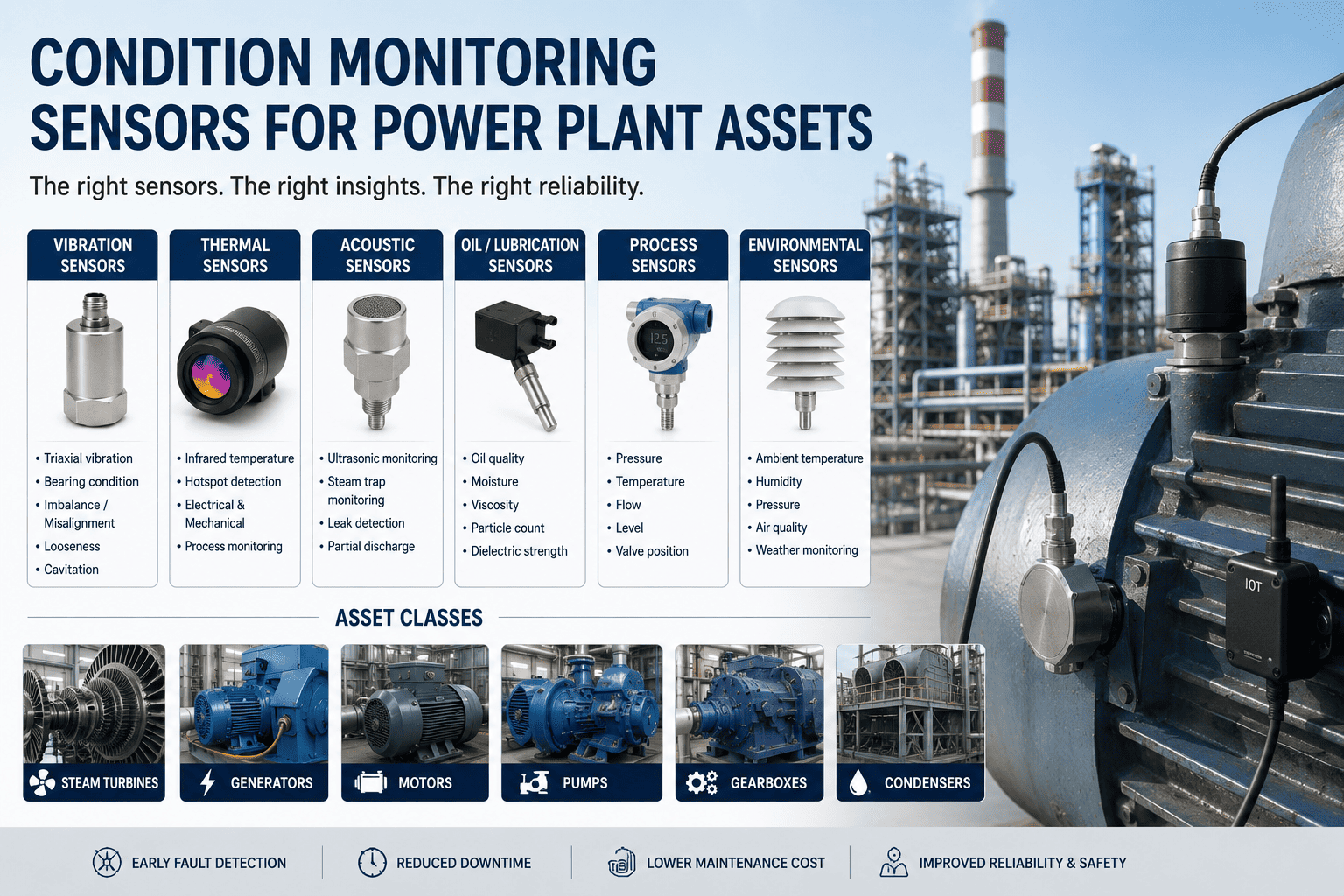
Different equipment demands different sensor types. A vibration sensor that works perfectly on a pump bearing is useless for detecting boiler tube degradation. Here's what to deploy where — and what each sensor actually detects.
Gas & Steam Turbines
Highest Priority — $50K–$150K/hr downtime cost
Vibration
Bearing wear, blade imbalance, shaft misalignment, torsional stress
Temperature
Bearing overheating, exhaust anomalies, cooling system failures
Pressure
Steam inlet/outlet conditions, lube oil pressure drops
Speed / RPM
Rotor speed deviations, trip condition monitoring
Boilers & HRSGs
Temperature
Tube wall temps, superheater/reheater outlet, feedwater
Pressure
Drum pressure, steam line pressure, draft measurements
Flow
Steam flow rates, feedwater flow, fuel flow
pH / Chemistry
Water treatment quality, corrosion indicators, dissolved oxygen
Generators
Vibration
Rotor imbalance, stator looseness, bearing degradation
Temperature
Winding temps, bearing temps, hydrogen coolant temperature
Electrical
Current, voltage, power factor, partial discharge
Pumps, Fans & Compressors
Vibration
Bearing failure, cavitation, impeller damage, misalignment
Temperature
Motor winding heat, bearing surface temperature
Current
Motor load changes indicating mechanical binding or wear
Phase 3: Network Architecture Design
Sensors are useless without a reliable network to carry their data. Power plants present unique challenges — electromagnetic interference from generators, extreme temperatures near boilers, and vast distances between equipment. Your network architecture must account for all of it.
Layer 1
Sensor / Field Level
Wireless sensors on equipment communicate via industrial protocols. Battery-powered units last 5–10 years. Hardwired sensors for safety-critical points.
LoRaWAN
WirelessHART
Zigbee
4-20mA (wired)
Layer 2
Edge / Gateway Level
Edge gateways aggregate sensor data locally. Process time-critical anomalies in real time (<10ms latency). Filter noise before transmitting to cloud.
MQTT
OPC UA
Modbus TCP
Edge Computing
Layer 3
Platform / Cloud Level
Cloud platform stores historical data, runs AI/ML analytics, and feeds insights to your CMMS. Long-term trending and cross-asset pattern detection.
REST API
Cloud Storage
AI Analytics
CMMS Integration
Survey RF environment in each plant area
Generators, switchgear, and VFDs create EMI that can disrupt wireless signals — test before committing to protocol
Choose wired for safety-critical, wireless for everything else
Turbine protection and boiler trips need hardwired 4-20mA. Condition monitoring can use wireless LoRaWAN or WirelessHART
Plan for redundancy on critical paths
Dual gateways for turbine and generator zones. Single gateway failure shouldn't blind you to your most expensive assets
Isolate OT network from IT network
Air-gapped or DMZ-separated networks prevent cybersecurity risks from crossing into operational systems
Deploy edge computing for latency-critical decisions
Vibration spikes on a turbine bearing need millisecond response — can't wait for cloud round-trip
Ensure encrypted data transmission end-to-end
IoT-targeted cyberattacks surged 400% in recent years. Every sensor-to-cloud path must be encrypted
Phase 4: CMMS Integration — Where Data Becomes Action
Sensors that feed dashboards create awareness. Sensors that feed a CMMS create action. The difference between a plant that monitors equipment and a plant that prevents failures is whether sensor data automatically triggers maintenance workflows.
Sensor Layer
Vibration rises 3x baseline on Feed Pump B bearing
Edge Processing
Edge gateway confirms anomaly persists >5 minutes, not transient noise
iFactory CMMS
Work order auto-generated: Priority 2, assigned to duty mechanic, vibration trend attached
Technician Action
Mobile alert received. Reviews trend data, asset history, and recommended procedure on-site
Map every sensor to a CMMS asset record
Each sensor must link to a specific equipment ID so work orders route correctly with full history
Define alarm thresholds by equipment and failure mode
A 2°C bearing temp rise on a turbine is critical. Same rise on a cooling water pump may be normal
Configure auto-generated work order templates
Pre-built templates for each fault type — include diagnostic steps, spare parts list, and safety procedures
Set priority escalation rules
Vibration at 2x baseline = P3 inspection. At 5x baseline = P1 immediate shutdown advisory
Enable closed-loop verification
After repair, sensor data confirms fix. Work order auto-closes when readings return to normal range
Build trend dashboards for reliability engineers
Long-term sensor data in CMMS enables pattern analysis — catch degradation curves weeks before failure
Connect Every Sensor to Every Work Order — Automatically
iFactory's AI-powered CMMS integrates with your IoT sensor network to turn every anomaly into a tracked, prioritized maintenance action. No alarms lost. No failures missed.
Phase 5: Deployment & Commissioning Timeline
A phased rollout reduces risk and builds confidence. Start with your highest-criticality assets, prove value, then expand. Most plants achieve full deployment in 12–16 weeks.
Weeks 1–3
Site Survey & Planning
Asset criticality assessment complete
Sensor types selected per equipment
Network architecture designed
Mounting locations identified
Weeks 4–6
Pilot Installation
Deploy sensors on 3–5 critical assets
Install edge gateways and validate connectivity
Connect to CMMS and test work order generation
Calibrate thresholds against real operating data
Weeks 7–10
Expansion & Tuning
Roll out sensors to remaining priority assets
Fine-tune alarm thresholds to eliminate false positives
Train maintenance teams on mobile work order workflows
Validate data accuracy against manual readings
Weeks 11–16
Full Production & Optimization
All target assets monitored continuously
Predictive models trained on baseline data
ROI tracking dashboard live in CMMS
Continuous improvement loop established
Common Pitfalls to Avoid
01
Deploying sensors everywhere at once
Start with 5–10 highest-criticality assets. Prove value, then scale
02
Feeding data to dashboards but not work orders
If sensor data doesn't create a maintenance action, it's just noise
03
Skipping the OT/IT network separation
Sensor networks on the same network as corporate IT invite cyberattacks
04
Setting thresholds too tight — alarm fatigue
Start conservatively. Tighten gradually as you learn your equipment's normal behavior
05
Forgetting to train the maintenance team
Technicians need to trust and use the system. Invest in training from day one
Frequently Asked Questions
Turn Sensor Data into Maintenance Intelligence
iFactory bridges the gap between your IoT sensor network and your maintenance team — automatically generating work orders, tracking repairs, and verifying fixes through real-time data.





.png)