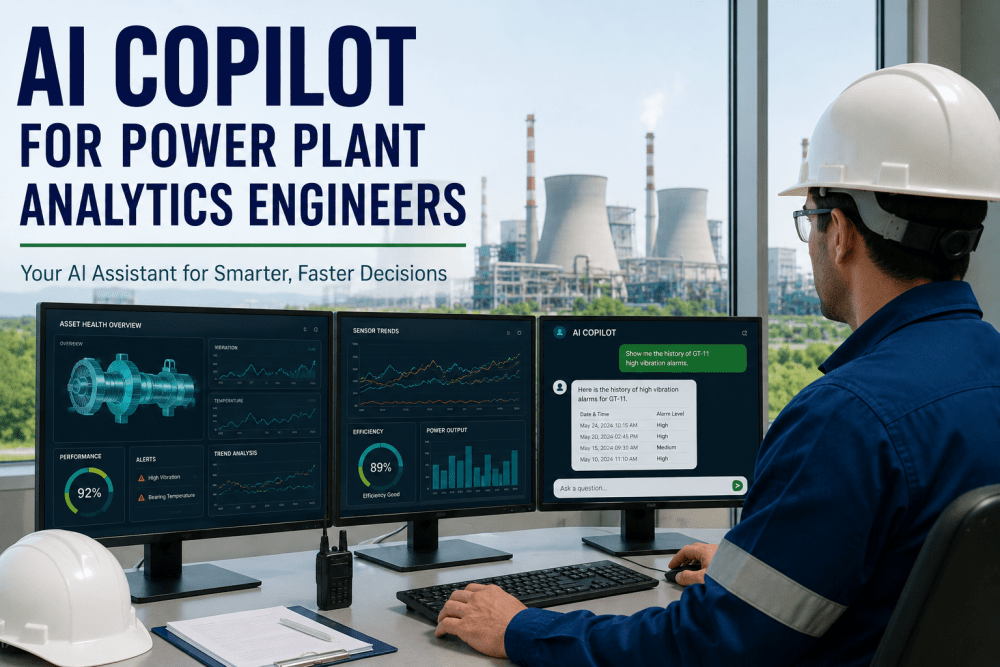
AI Copilot for Power Plant analytics Engineers

By Alistair Fenwick on May 23, 2026

ai-copilot-analytics-engineer-power-plant

The average power plant reliability engineer spends 2.4 hours every day on what is charitably called "data preparation" — pulling tag histories from the PI server, cross-referencing work order records in the CMMS, manually comparing current vibration trends against prior event signatures, and assembling the contextual picture that makes sensor deviation meaningful rather than ambiguous. That is 12 hours per week, or roughly 30 percent of a senior engineer's productive time, consumed by work that is fundamentally about retrieving and assembling information rather than applying expertise to it. The information was always there. The barrier was the effort required to access it in the form needed to answer the actual question: is this deviation worth acting on, and if so, what action is indicated?

An AI analytics copilot changes that ratio by giving engineers a conversational interface to the platform's full data environment — equipment history, sensor trends, failure mode libraries, work order records, and benchmark comparisons — so that retrieving and synthesizing information takes seconds rather than hours. The engineer asks the question. The copilot assembles the data picture, applies the relevant analytical models, and returns a structured answer with supporting evidence. What changed is not the engineer's expertise — it is how much of the working day that expertise gets applied to actual reliability decisions rather than to data hunting. For power plant operations leaders evaluating AI-driven platforms, the copilot capability is not a feature alongside predictive analytics. It is the interface that determines how much of the platform's analytical intelligence actually reaches the engineer in time to change a maintenance decision.


AI Copilot for Analytics Engineers — 2026

AI Copilot for Power Plant Analytics Engineers

Query asset history, interpret sensor trends, and get failure mode recommendations — all through a conversational interface inside your AI-driven platform. No SQL. No tag hunting. No spreadsheet assembly.

2.4 hrs/day

Average time senior reliability engineers spend retrieving, assembling, and formatting data before they can apply their expertise to an actual reliability question at the typical 200–400 MW facility

30% of engineer time

Share of a reliability engineer's working week consumed by data preparation tasks that an AI copilot handles in under 60 seconds — freeing that capacity for higher-value failure prevention work

Under 60 seconds

Average time for an AI copilot to retrieve tag history, cross-reference CMMS records, classify failure mode probability, and return a structured recommendation — vs. 2.4 hours manually

What an AI Analytics Copilot Actually Does — and Doesn't Do

The term "copilot" covers a wide range of software capabilities in industrial settings, and the practical difference between a genuinely useful copilot and an expensive search interface depends on a few specific architectural choices. The clearest way to define what an AI analytics copilot does is to describe the workflow it replaces — and where it still requires the engineer's judgment to produce an actionable outcome.


01

Natural Language Query Interpretation

The engineer types or speaks a question in plain operational language — "What is the vibration trend on GT-01 bearing 3 over the last 90 days, and how does it compare to the event signature from the 2023 bearing replacement?" — and the copilot interprets the intent, identifies the relevant tags and records, and retrieves the data without requiring the engineer to know tag names, historian query syntax, or CMMS record identifiers.

Interface: Conversational — No SQL, No Tag Syntax Required
02

Cross-System Data Assembly

The copilot simultaneously pulls from multiple data sources — the historian for sensor trends, the CMMS for maintenance history and prior work order findings, the platform's failure mode library for pattern matching, and any OEM service bulletins relevant to the equipment class — and assembles them into a unified analytical context without the engineer switching between applications or manually merging records. This cross-system assembly is the specific capability that eliminates the majority of the 2.4 hours per day of manual data preparation.

Sources: Historian + CMMS + Failure Mode Library + OEM Bulletins
03

Failure Mode Pattern Matching and Probability Assessment

Against the assembled data picture, the copilot applies the platform's failure mode classification models — comparing the current sensor trend pattern against the library of confirmed failure progressions for that equipment class and returning a probability-weighted list of candidate failure modes with the supporting evidence for each. This is analytical interpretation, not data retrieval — the copilot applies domain knowledge to produce a structured finding rather than presenting raw data for the engineer to interpret manually.

Output: Ranked Failure Mode Candidates With Evidence Chains
04

Maintenance Recommendation With Supporting Rationale

The copilot generates a structured maintenance recommendation — inspection scope, timing urgency, parts considerations, and procedure reference — with the full supporting rationale visible to the engineer. The recommendation is a starting point for the engineer's judgment, not a final determination: the engineer can accept the recommendation, modify it based on operational context the copilot does not have access to, or challenge the underlying evidence chain. The critical improvement is that the engineer is starting from a fully assembled, analytically informed position rather than from a blank page.

Output: Structured Recommendation + Full Evidence Chain
05

Follow-Up Query and Iterative Refinement

The copilot maintains conversational context across a session — the engineer can ask follow-up questions ("What was the repair cost last time we had this failure mode on GT-01?" or "How does this bearing's vibration trend compare to the other two units?") without re-establishing the analytical context from scratch. Each follow-up builds on the prior exchange, allowing the engineer to refine their understanding of the situation through dialogue rather than through successive manual data pulls.

Behavior: Stateful Conversation With Contextual Memory

Want to see how a conversational copilot interface works against your specific equipment and data environment? Book a 30-minute live demo with iFactory's power generation analytics team.

Copilot Query Capabilities: What Engineers Can Ask and What They Get Back

The operational value of an AI copilot is best understood through the specific question-answer scenarios that represent the highest-value use cases for reliability engineers at power plants. The table below maps representative query types to the data sources assembled, the analytical output produced, and the engineer time displaced compared to the manual workflow that achieves the equivalent result.

Query Type
Data Sources Assembled
Analytical Output
Manual Time Displaced
"Show me vibration trend for GT-01 bearing 3 vs. last failure"
Historian (90-day vibration spectral), CMMS (2023 bearing replacement work order + prior event signature)
Trend overlay chart + failure progression comparison + similarity score
45–90 min manual PI query + CMMS search + manual chart assembly
"What failure modes are consistent with rising 2X vibration on the steam turbine generator end?"
Failure mode library (2X vibration signatures), vibration spectral history, shaft alignment records, coupling inspection history
Ranked failure mode list (angular misalignment, coupling wear, bearing preload change) with probability scores and evidence for each
60–120 min manual research + expert consultation + spreadsheet comparison
"How has GT-02's heat rate degraded since the last outage and what is the estimated compressor wash benefit?"
Historian (heat rate, compressor inlet/exit conditions), maintenance records (last outage date), fleet benchmark (equivalent units post-outage)
Heat rate degradation trend + fouling contribution estimate + projected wash benefit in BTU/kWh and $/month fuel cost
90–180 min performance engineer analysis + spreadsheet calculation + fleet comparison
"What maintenance is overdue or coming due in the next 30 days across the gas turbine fleet?"
CMMS (PM schedule records, last completion dates, work order status), maintenance interval library, operating hours accumulated
Ranked overdue/upcoming list by consequence severity, with estimated completion time requirements and resource implications
30–60 min CMMS report generation + manual sorting + priority ranking
"Has the lube oil temperature deviation on unit 3 been seen before, and what happened last time?"
Historian (current and historical lube oil temperature), CMMS (prior events with similar signatures), event investigation records
Historical analog events with timestamps, contributing factors identified, corrective actions taken, and outcome for each prior occurrence
60–90 min manual CMMS search + historian comparison + event record review
"Draft a summary of GT-01's condition for the operations review meeting this afternoon"
All active findings, recent work order completions, outstanding PM items, heat rate trend, availability history for the period
Formatted condition summary with active findings ranked by priority, recent maintenance status, and trend narrative — ready for review or export
30–60 min manual report assembly from multiple systems

Want to see how a conversational copilot interface works against your specific equipment and data environment? Book a 30-minute live demo with iFactory's power generation analytics team.

Copilot vs. Dashboard vs. Direct Historian Query: Where Each Belongs

An AI copilot is not a replacement for every data access tool in the reliability engineer's workflow. Understanding where each tool delivers the highest value — and where each has limitations — is essential for deploying them effectively rather than expecting the copilot to replace analytical workflows it is not designed for.

Analytics Dashboard
Best For
Continuous fleet monitoring and status overview
Strength
Persistent real-time visibility across all assets simultaneously
Limitation
Cannot answer ad hoc contextual questions or cross-reference multiple data sources
User
Operations supervisors, shift managers, plant directors
Copilot Complement
Copilot provides deep-dive on items flagged by dashboard
vs
AI Copilot Interface
Best For
Ad hoc investigation, failure mode analysis, cross-system queries
Strength
Assembles multi-source context and applies analytical models to a specific question
Limitation
Not designed for passive continuous monitoring — question-driven, not ambient
User
Reliability engineers, maintenance planners, plant chemists, outage planners
Dashboard Complement
Dashboard surfaces alerts; copilot answers "what does this mean and what should I do?"
2.4 hrs
Daily Engineer Time Recovered
From data preparation work displaced by copilot — returned to failure prevention and maintenance quality improvement
12x
Faster Context Assembly
Average time ratio between manual multi-system data assembly and equivalent copilot query response
88%
Engineer Recommendation Acceptance
Share of copilot-generated maintenance recommendations engineers approved without significant modification — vs. 71% for dashboard-only alert follow-ups
Day 14
Typical First Useful Query
Average time from historian connection to engineers using copilot for active reliability decisions — no training period required beyond initial orientation
3x
Investigation Depth per Hour
Engineers with copilot access complete approximately three times more complete failure investigations per hour than those relying on direct historian and CMMS access alone
$140K
Annual Engineer Productivity Value
Estimated annual value of recovered engineering capacity at a 200–400 MW facility — based on average senior reliability engineer fully loaded cost and 2.4 hours daily recovery

See the Copilot Answer Your Actual Reliability Questions Live

iFactory's demo walks through real query scenarios against live power plant data — including failure mode identification, heat rate analysis, and maintenance planning queries — in your specific equipment context.

Expert Review: What Reliability Engineers Say About Working With an AI Copilot

Expert Perspective

I have been doing power plant reliability work for nineteen years. For most of that time, the actual expertise in the job — pattern recognition, failure mode reasoning, maintenance decision judgment — was surrounded on all sides by data assembly work that required significant time but contributed nothing to the quality of the decision. You pulled the tag trends from PI. You looked up the last three work orders in Maximo. You checked the OEM bulletin you remembered seeing six months ago. You put it all in a spreadsheet so you could look at it together. Then you started actually thinking about the problem. The copilot collapses that assembly phase into a single conversational exchange. I type a question and 40 seconds later I have the same assembled data picture that used to take me an hour to build. The reasoning is still mine — the copilot does not tell me what to think about the data — but I spend my reasoning capacity on the problem rather than on the information retrieval that precedes the problem. After 14 months of using it daily, here is what I have learned matters most for reliability engineers evaluating copilot tools.

The quality of the failure mode library determines the quality of the analytical output. A copilot that retrieves data is useful. A copilot that retrieves data and then applies a well-maintained, equipment-specific failure mode taxonomy to classify what the data means — that is the capability that saves the three-day investigation cycle on an ambiguous vibration deviation. Before committing to any platform, ask specifically how their failure mode library is built, how frequently it is updated, and how it handles equipment classes at your specific facility. Generic failure mode libraries produce generic analytical outputs that still require an expert to interpret.
CMMS integration depth determines whether the copilot answers operational questions or just sensor questions. The most valuable copilot queries are the ones that connect sensor data to maintenance history — showing me not just that bearing 3 vibration is elevated, but that this is the third time in 18 months, that the prior two events were attributed to coupling wear by the maintenance crew, and that coupling inspection is overdue based on operation count. That connection requires deep, bidirectional CMMS integration, not just a data connector. Verify that the copilot can access work order text, technician findings, and PM completion status — not just equipment identifiers.
The most important copilot capability for institutional knowledge preservation is historical analog query. When an experienced engineer retires, what walks out the door is not their ability to pull data from PI — anyone can learn that. What walks out is their memory of the 14 prior events they have worked through at the facility, the contextual patterns they recognize, and the judgment they developed from those experiences. A copilot with access to a well-documented historical event record can surface that institutional memory — showing a newer engineer that the current vibration signature is similar to the 2021 generator end bearing event, what was found, and what was done. That capability alone justifies the platform investment at facilities facing significant workforce turnover in the next five years.
Senior Reliability Engineer Combined Cycle and Simple Cycle Fleet — U.S. Southeast Region — 19 Years Power Generation — Certified Reliability Leader, SMRP

Conclusion

The AI analytics copilot is the interface between the platform's analytical intelligence and the engineers who need to act on it. Predictive analytics, failure mode classification, and condition-based maintenance recommendations have limited operational value if the engineer who needs to make a maintenance decision spends two hours assembling data before they can evaluate a finding. The copilot closes that gap by making the platform's entire data environment accessible through a conversational interface that delivers a fully assembled, analytically interpreted answer to any reliability question in under 60 seconds.

For power plant operations leaders, the copilot capability is not primarily a productivity tool — though the recovery of 2.4 hours of engineering time per day at $140,000 annual value per engineer is a real and measurable return. The deeper value is what engineers do with that recovered capacity: more complete failure investigations, more frequent cross-unit comparisons, more rigorous pre-outage condition assessments, and better-prepared maintenance decisions across every shift. At facilities facing workforce transitions and lean staffing environments, the copilot also preserves institutional knowledge in the historical event record that is accessible to every engineer regardless of their tenure at the facility — making the analytical depth of the most experienced engineer available to the newest one through the same conversational interface.

Ready to see what an AI copilot returns for your specific reliability questions? Schedule your live copilot demonstration with iFactory's power generation analytics team.

Frequently Asked Questions

No. The copilot is designed to interpret plain operational language — the way a reliability engineer would phrase a question to a knowledgeable colleague, not the way they would phrase a database query. Engineers can use equipment tag names when they know them, but they can also use operational descriptions ("the high-pressure steam turbine on unit 2"), time references in natural language ("since the last outage," "over the past 90 days"), and failure descriptions in engineering terminology ("the 2X vibration increase on the generator end"). The system resolves these natural language references to specific tags, equipment records, and time windows without requiring the engineer to know the exact identifiers. Engineers who have used the copilot report that useful queries become natural within the first two or three sessions — typically within the first week of access.
The copilot is transparent about the boundaries of its data access. When a question involves information that is not in its connected data sources — a verbal conversation, a field observation not yet entered in the CMMS, or an external document not integrated with the platform — it returns the best available answer from connected sources and explicitly notes what information is missing and where the engineer could add it to improve future responses. The platform includes a structured field observation entry interface that allows engineers and technicians to log informal findings in a format the copilot can subsequently reference. Over time, systematic use of this entry capability significantly expands the copilot's ability to incorporate contextual plant knowledge that would otherwise remain informal and inaccessible.
The copilot can generate a fully-formed draft work order from a conversational session — including equipment identification, failure mode classification, recommended inspection scope, estimated repair duration, parts requirements based on the identified failure mode, and priority classification. The engineer reviews the draft, modifies it as needed based on operational context, and with a single confirmation the work order is submitted to the CMMS as an active record. For facilities configured with autonomous dispatch, high-confidence findings can be configured to route directly to the CMMS without manual review for specific pre-approved workflow categories. The work order generation capability from copilot sessions is available for SAP Plant Maintenance, IBM Maximo, and Infor EAM through native integrations — no custom development required.
The copilot interface is fully available on mobile — designed specifically for use during field rounds, where the highest-value queries often arise. When a technician or engineer identifies something anomalous during a round — an unusual noise, an unexpected temperature reading, an observation that does not match the expected equipment condition — they can immediately query the copilot from the field without returning to a workstation. The mobile copilot accesses the same connected data sources and returns the same analytical quality as the desktop interface, with an interface optimized for single-hand use in field conditions. Voice input is supported on mobile for engineers who prefer to speak queries rather than type them while conducting a field inspection. Copilot sessions started in the field can be continued at the desktop without losing conversational context.
The copilot operates entirely within the iFactory platform's data security perimeter — it does not route queries or plant data to external AI services, third-party language model providers, or any external system. The natural language processing and analytical reasoning capabilities are self-contained within the iFactory platform deployment, whether cloud, on-premise, or hybrid. In cloud deployments, all copilot processing occurs within the customer's dedicated cloud tenant under the standard data processing agreement. No plant data is used to train shared models, and no query content or response data is shared with other customers. Access to the copilot interface is controlled through the platform's role-based permission system — engineers see only the data they have been granted access to, and copilot responses respect those access controls. For facilities subject to NERC CIP, iFactory provides documentation supporting the access control and audit log requirements applicable to the copilot's interaction with plant data.

Give Your Reliability Engineers 2.4 Hours Back Every Day

iFactory's AI copilot gives power plant engineers a conversational interface to the platform's full data environment — delivering failure mode analysis, maintenance recommendations, and historical context in under 60 seconds, on desktop or mobile, from the office or the field.
Share This Story, Choose Your Platform!