Choosing between iFactory and IBM Maximo for power plant analytics is not a comparison between two EAM systems, it is a choice between a legacy database designed in the 1980s and an AI-native platform purpose-built for the future of industrial intelligence.book a demo
See How iFactory Compares to IBM Maximo for Power Plant Analytics
iFactory's AI-native platform delivers predictive maintenance, real-time IoT fusion, and computer vision capabilities that IBM Maximo cannot match, purpose-built for the complexity of modern power generation.
Why the iFactory vs Maximo Decision Matters for Power Plant Analytics
The core difference between iFactory and IBM Maximo is architectural philosophy. Maximo was designed as an enterprise asset management database to track work orders, spare parts, and maintenance history. Engineering teams that book a demo consistently report that the hands-on comparison reveals gaps in Maximo's analytics capabilities that no add-on module can fully close.
AI & Predictive Analytics
Core Difference: Maximo uses rule-based thresholds and requires the separate Maximo Monitor add-on for any predictive capability. iFactory features native causal AI that directly ingests sensor data and provides 180-day failure predictions with specific intervention recommendations.
IoT & Sensor Architecture
Core Difference: Maximo connects to IoT data through the separate IBM Maximo Monitor and Watson IoT platform, adding significant cost and complexity. iFactory includes 200+ native protocol adapters for DCS, SCADA, PLC, and vibration systems with zero-code configuration.
Deployment & Time to Value
Core Difference: Maximo implementations typically require 6 to 18 months with extensive consulting engagement. iFactory deploys in 8 to 12 weeks with pre-trained power sector models and a purpose-built template library for generation assets.
Total Cost of Ownership
Core Difference: Beyond license fees, Maximo requires add-on modules for IoT, AI, mobile, and analytics. iFactory includes all capabilities in a single platform with transparent subscription pricing and a typical payback period of under 9 months.
We ran Maximo for over a decade across our combined-cycle fleet. It was fine for tracking work orders but completely blind to what was actually happening inside our turbines. When we saw iFactory identify a combustion liner degradation pattern in our vibration data 60 days before it would have caused a forced outage, the decision was immediate. Maximo tells you what happened yesterday. iFactory tells you what will happen tomorrow.
iFactory vs IBM Maximo: Direct Feature Comparison for Power Plant Analytics
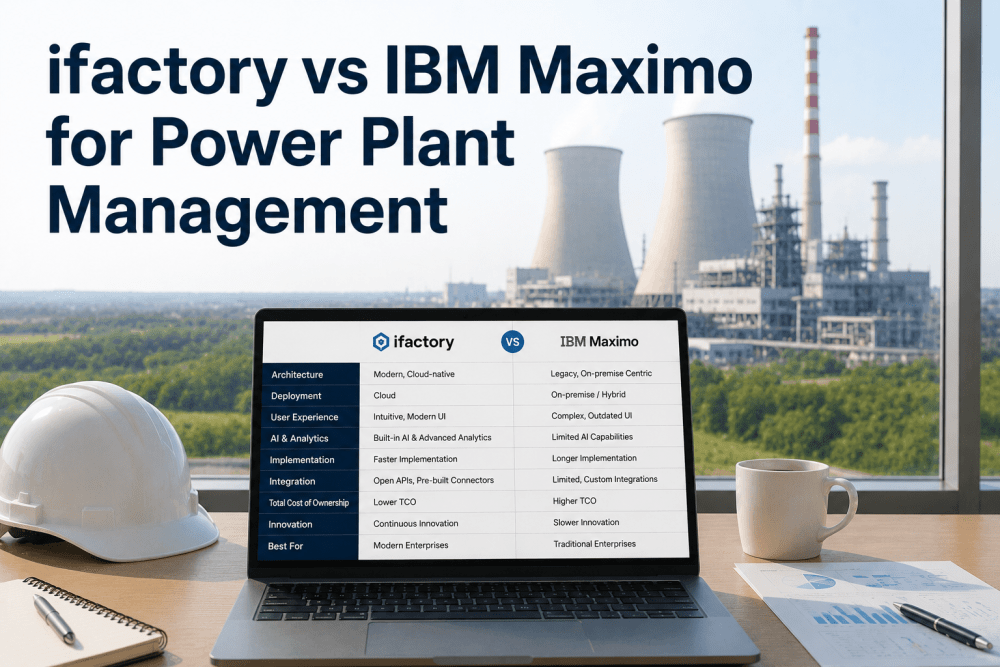
The table below provides a direct, feature-level comparison across the capabilities that matter most to power generation analytics and reliability engineering teams Each criterion reflects real-world requirements gathered from plant operations, maintenance, and engineering leadership. To see how these differences apply to your specific generation fleet configuration, book a demo with one of our power sector engineers.
| Evaluation Criteria | iFactory AI | IBM Maximo |
|---|---|---|
| AI Failure Prediction | Causal AI with 180-day failure foresight | Threshold-based alerts via Maximo Monitor add-on |
| IoT Sensor Fusion | 200+ native protocol adapters, zero-code setup | Requires separate Watson IoT platform integration |
| Computer Vision | Built-in thermal and visual AI for defect detection | Not available |
| Multi-Site Fleet Dashboard | Unified native view across all generation sites | Requires MAS (Maximo Application Suite) upgrade |
| Predictive Maintenance Models | Pre-trained on gas turbine, steam, and renewable assets | Custom build required per asset class |
| Compliance Automation | EPA, NERC, and ISO auto-reporting built in | Manual reporting or custom add-on development |
| Deployment Timeline | 8 to 12 weeks for pilot deployment | 6 to 18 months typical implementation |
| Mobile Workforce App | Native mobile with offline mode and AI guidance | Available via Maximo Mobile separate license |
| Architecture | Cloud-native, multi-tenant SaaS | On-premise or cloud via MAS subscription |
| OEE Impact | 22% average improvement | 5 to 8% typical improvement |
| Payback Period | Under 9 months | 18 to 36 months |
What iFactory Delivers That IBM Maximo Cannot
IBM Maximo remains a capable work order management system, but it was never architected for the age of AI-driven industrial intelligence. Maximo treats data as a record of the past. iFactory treats data as a signal of the future. Power generation teams that book a demo consistently cite the transparency of the AI models and the speed of deployment as the two capabilities that Maximo cannot replicate at any price point.
Phased Migration Strategy: From Maximo to iFactory
Migrating from an established Maximo deployment to a modern AI-native platform requires a structured approach that preserves historical data integrity while accelerating time to value with new AI capabilities. iFactory's implementation team follows a proven three-phase migration methodology that has been refined across dozens of power generation clients. For teams evaluating their migration readiness, book a demo to receive a tailored migration assessment and timeline for your specific plant configuration.
Assessment, Data Mapping & Integration Planning
Audit existing Maximo configuration, data models, and integration points. Map asset hierarchies, work order history, and spare parts catalogs to iFactory's data schema. Define coexistence strategy and data synchronization requirements. Timeline: 3 to 4 weeks.
Pilot Deployment on Critical Generation Assets
Deploy iFactory in parallel with Maximo on 2 to 3 high-impact generation assets. Connect IoT sensors, train AI models on plant-specific operating data, and validate prediction accuracy against historical failure records. Timeline: 8 to 12 weeks.book a demo
Full Migration, Workforce Training & Maximo Retirement
Roll out iFactory across all generation assets. Migrate remaining work order history and compliance records. Conduct role-based workforce training and transition from parallel operation to iFactory as the single source of truth. Timeline: 4 to 6 months.
iFactory vs IBM Maximo — Frequently Asked Questions
What are the main differences between iFactory and IBM Maximo for power plant analytics?
IBM Maximo is a legacy EAM platform designed for work order management and asset tracking. Its analytics capabilities require multiple expensive add-on modules including Maximo Monitor and Watson IoT. iFactory is an AI-native platform purpose-built for predictive maintenance, IoT sensor fusion, and computer vision, with all capabilities included in a single platform.
Can iFactory replace IBM Maximo without losing historical data?
Yes. iFactory's migration toolkit includes automated data import adapters for Maximo that preserve work order history, asset hierarchies, spare parts catalogs, and compliance records. The platform supports parallel operation during the transition period, ensuring zero data loss and continuous access to historical records for auditing and trend analysis.
Does iFactory integrate with IBM Maximo if we want a phased migration approach?
Yes. iFactory features bidirectional API connectors for IBM Maximo, enabling data synchronization between both platforms during the migration period. Predictive alerts generated by iFactory can create work orders in Maximo, and Maximo work order status updates can flow back to iFactory for unified reporting. This allows a risk-free phased migration.
What is the typical cost comparison between iFactory and IBM Maximo for a multi-site fleet?
IBM Maximo's total cost of ownership includes base licensing, Maximo Monitor add-on for IoT, Watson Studio for AI, Maximo Mobile for field access, and significant consulting fees for implementation. iFactory includes all capabilities in a single subscription with no add-on modules required. Our clients typically achieve a 40 to 60 percent reduction in total analytics platform costs compared to a fully configured Maximo deployment.
How long does it take to migrate from IBM Maximo to iFactory?
A full migration from Maximo to iFactory follows a phased approach. The initial assessment and data mapping phase takes 3 to 4 weeks, followed by an 8-to-12-week pilot on critical generation assets. Full enterprise rollout across all sites is typically completed within 4 to 6 months, significantly faster than the 12-to-18-month timelines associated with Maximo upgrades or reimplementations.
Ready to Move Beyond Maximo's Limitations?
iFactory's AI-native platform delivers predictive intelligence, IoT sensor fusion, and computer vision that IBM Maximo cannot provide. Book a demo to see the difference demonstrated on your own power plant data.