iFactory · Plant Safety For safety officers, department & plant heads

Permits, LOTO and audits on a phone, paperless

Safety observations, incidents, work permits with LOTO, training and audits for the whole plant — reported on a phone or by an area's QR code, owned through a workflow, and escalated when late.

  • Report on a phone or by an area's QR — no sign-in for workers
  • Permits approved per department, each placing its own LOTO lock
  • Items assigned by severity and escalated up the org chart when late
ISO 45001 record-keeping LOTO permits No hardware needed
Start free trial→ 14-day trial · no card required
Permit PTW-318Conveyor 3 · Packaging · this shift
Hot work
Department lockState
ElectricalIsolated · R. Mehta
Locked
MechanicalGuard removed · lockout applied
Locked
Control room (CCR)Awaiting clearance
Open
Can't close while any lock is on2 locks on
QR scan an area →
report, no sign-in
Safety that people actually use

Why paper and ERP safety screens fail on the floor

A clipboard in a drawer and a login nobody has don't get used where the hazard is. Plant Safety puts observations, permits, LOTO, incidents, training and audits on a phone — owned through a workflow and escalated when late.

QR
report, no sign-in

Scan an area's code to report in under a minute.

1 day
critical target

High 3 · medium 7 · low 15 days, changeable in Settings.

24 hr
to escalate

Unacknowledged in 24h emails the supervisor.

0
hardware needed

Existing phones and printed QR codes — that's it.

An observation from the phone to a verified fix — report, assign, fix with after photo, verify
Observations

An observation, from the phone to a verified fix

Reporters pick the type, area, photo, line and severity in under a minute — scanning the area's code needs no sign-in. The safety officer sends it to a department, which assigns it with a target date set by severity; the fixer adds an after photo, and the reporter verifies it.

  • Reported → assigned → acknowledged → fixed → verified
  • Or reopened with a reason; overdue items are flagged
  • Late items escalated by email up the org chart
Permits to work

Permits to work, with each department's own lock

Work permits run by type, with checklists and ordered approvals — and each department approves and places its own LOTO lock. A live board shows open permits by area, validity runs per shift with extension requests, and a permit cannot close while any lock is on.
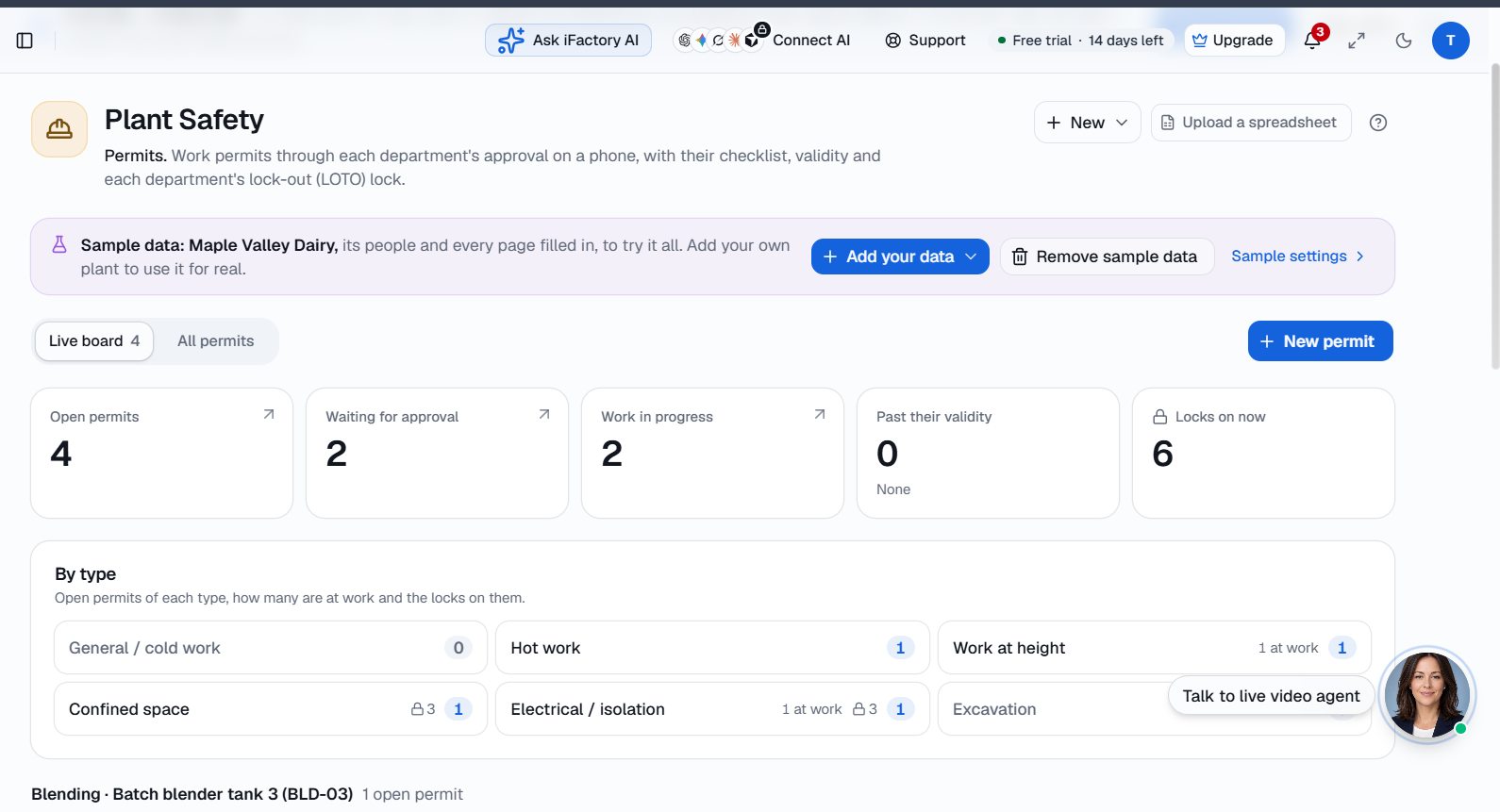
  • Raised → approved → isolated → CCR approval → cleared
  • Each department's lock is on or off; all must clear to close
  • A live board of open permits by area, per shift
Work permits with checklists, ordered approvals and LOTO locks, on a live board by area
Escalation that follows your org chart

Nothing sits late in silence

A target date is set the moment an item is assigned, by its severity. Miss an acknowledgement or a date, and the item climbs the org chart by email — supervisor, then section head, then department head, daily until it's fixed.

1Not acknowledged · 24 h

Assignee's supervisor

The supervisor is emailed when the item hasn't been acknowledged within a day.

2Past target · day 1

Section head

Once the target date passes, the section head is emailed the first day.

3Still open

Department head

It then reaches the department head, emailed daily until it's fixed.

Critical1 day
High3 days
Medium7 days
Low15 days
How it works

Three steps from a hazard spotted to a record kept

1

Report from a phone or an area's QR

Pick the type, area, photo, line and severity in under a minute. Scanning the area's code needs no sign-in.

2

Review, assign, fix, verify

The safety officer sends it to a department, which assigns it with a target date by severity. The fixer adds an after photo; the reporter verifies. Late items escalate by email.

3

Permits, training and audits too

Permits get approvals and locks, incidents are investigated to root cause, training is acknowledged individually, and every audit "no" becomes an observation.
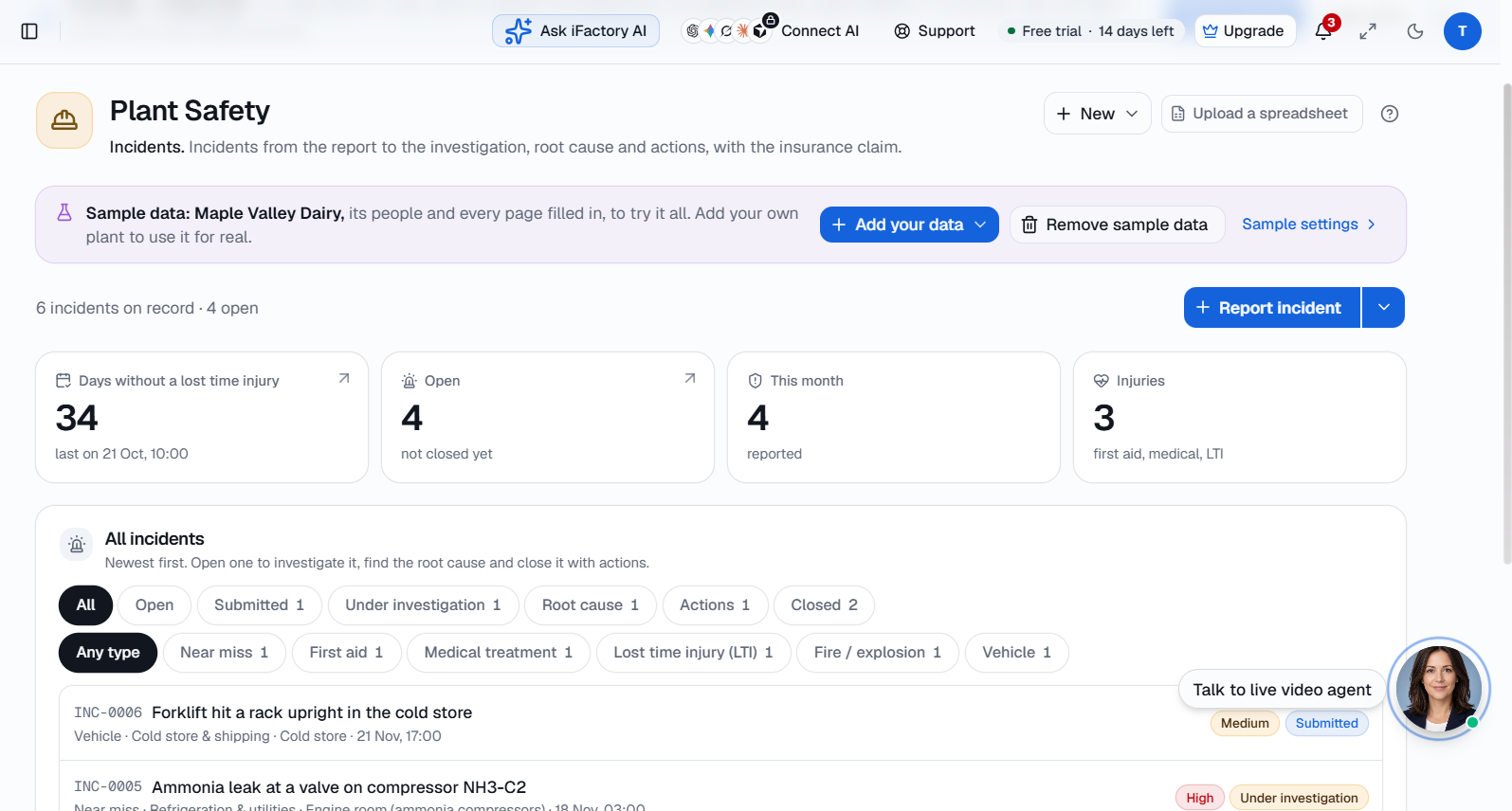
Incident investigated to a root cause — people involved, injury details, five whys, actions and a days-without-lost-time counter
Incidents

Incidents investigated to a root cause

Report by type with the people involved and injury details, then investigate to a root cause — five whys and contributing factors — with actions that carry an owner, a due date and evidence, through to closed. The overview counts the days without a lost-time injury.

  • Under investigation → root cause → actions → closed
  • Five whys and contributing factors on every incident
  • Days-without-lost-time-injury counter on the overview
Training, audits and the records they leave

Acknowledged by each person, scored on every round

Training sessions are acknowledged individually, with a matrix showing current, due or expired per person. Audits are answered yes, no or N/A with photos and a score — and every "no" becomes an observation that runs the same owned workflow.

Training

Sessions, individual acknowledgement, a status matrix.

LOTO awareness Current
Working at height Due
Confined space Expired
Audits

Yes / No / N/A with photos and a score.

Housekeeping round Score 86%
Each "no" → observation
Records

Minutes, attendance and an audit trail.

✓ Monthly report as PDF or spreadsheet
Included with every tool

Everything comes standard

✓

Your whole team

Invite colleagues, with owners and admins managing who has access.

✓

iFactory AI

Ask questions and get answers from your own safety records.

✓

Your data stays yours

Export everything to Excel or PDF, any time.

✓

Hosted in the US

US hosting, with each company's records kept separate.

Who it's for

Built for the whole plant, not just the safety office

Safety officers

Triage observations, run permits and incidents, and keep the records.

Department & plant heads

See what's open and late by department, and own the escalations.

Workers & contractors

Report by scanning an area's QR — no account, name optional.

Trainees

Acknowledge training via their own link — no account needed.

Questions

Plant safety questions, answered

Do workers and contractors need an account to report?+
No — scanning an area's QR code opens the form with no sign-in, and the name is optional. Only people who act in the app need an account; others can be listed in People and receive emails. Start a free trial or book a demo.
Can we start with one section?+
Yes — import one section's people from Excel and print its QR codes, then grow from there. You can also preview with the sample plant and remove it in one click. Try it free or book a demo.
Can we change approval steps per permit type?+
Yes — in Settings. Changes apply to new permits only, so permits already in progress keep the steps they were raised with. Start a free trial or book a demo.
Who gets escalation emails?+
The supervisor after 24 hours unacknowledged; the section head and then the department head after the target date, daily until it's fixed — so late items never go quiet. Try it free or book a demo.
Does it replace our ERP's safety module?+
No — it runs separately on its own, using existing phones and printed QR codes, with no hardware needed. The trial needs no card and includes Pro features, 1 user, up to 15 assets and 10 AI questions a day. Start free or book a demo.
How does it help with ISO 45001?+
It supports ISO 45001 and Factories Act record-keeping — observations, permits, incidents, training and audits all leave a logged, exportable trail — while auditor conclusions stay separate. Start a free trial or book a demo.
Plant Safety

Try Plant Safety free for 14 days

Observations, incidents, permits with LOTO, training and audits — on a phone, paperless, owned through a workflow and escalated when late. Start with the sample plant and add your own sections when you're ready.

14-day free trial · Pro features · no card required · from $19/user/mo

An observation, start to verifiedConveyor 3 · High
✓Reported
✓Assigned
✓Fixed
Verify
Target3 days (High)
After photoAdded
NextReporter verifies