iFactory · Shift Handover Shift handover log

A shift handover that's written down, signed and easy to find again

One log per area or line — Safety, Quality, Production, Maintenance and Open issues — filled in on a phone during the shift, with open items carried forward and a signed handover between supervisors.

  • The same five sections every shift, filled in on a phone
  • Open items carry forward on later logs until someone closes them
  • Outgoing supervisor signs, incoming supervisor accepts — name and time recorded
Start free trial→ 14-day trial · no card required
Line 2 · Shift logDays → Nights · today
Handed over
OutgoingSigned
→
IncomingAccepted
Open itemsoldest first
✓
Guard panel awaiting partMaintenance · act: engineering
9 shifts
✓
Reject rate above targetQuality · act: line lead
3 shifts
✓
Spill near filler — cleanedSafety · flagged
1 shift
Signed by A. Okafor · 06:58 Download PDF
5 sections, the same
every shift
Why this matters

A verbal handover leaves nothing behind

When the shift log lives in a notebook or a quick chat at the door, open items get lost, the handover isn't signed, and nobody can find last Tuesday's night shift when they need it. Shift Handover writes it down, signs it, and keeps it searchable.

5
sections every shift

Safety, Quality, Production, Maintenance and Open issues — the same structure every time.

9

shifts an open item can sit unresolved — now it's visible on every log until closed.

2
signatures per log

outgoing supervisor hands over, incoming supervisor accepts — name and time on each.

What you get

The same sections every shift, signed and searchable

A shift log for each area or line — covering safety, quality, production and maintenance notes, open items carried forward, and a signed handover between supervisors.

✓
The same five sections, on a phoneSafety, Quality, Production, Maintenance and Open issues — short notes, filled in on a phone during the shift, the same structure every time.
✓
Open items carried forwardUnresolved items appear on later logs for that area until someone closes them, with who should act and how many shifts they've been carried.
✓
Signed by both supervisorsThe outgoing supervisor signs and the log shows "Handed over"; the incoming one signs to accept, and it shows "Accepted" — name and time on each.
✓
Production numbers in the logRecord planned, made, scrap, downtime minutes and crew alongside the notes, so the shift's output is captured with everything else.
✓
Flag a note in redAny note can be flagged to stand out in red, on screen and in print, so the incoming supervisor can't miss what matters most.
✓
Search, reports & PDFSearch past logs by word, area or shift; print each shift report or download it as a PDF; CSV export for logs and items anytime.
How the handover moves

Written, handed over, accepted — then easy to find

Each handover runs the same beats — the outgoing supervisor writes the log and signs, the incoming supervisor reads and accepts — and anything still open carries forward to the next log for that area.

✓
Outgoing
Writes

Fills the five sections on a phone; last shift's open items are already there.

✓
Outgoing
Hands over

Signs the log — it shows "Handed over," with name and time recorded.

You're here
Incoming
Accepts

Reads the log and signs to accept — it shows "Accepted," name and time recorded.

Anytime
Search & print

Find any past log by word, area or shift, and download it as a PDF.

Open items don't reset at the handover — anything unresolved appears on later logs for that area until someone closes them, showing which log it was raised in and how many shifts it's been carried.

The tool in use

The whole shift log in one place, with sample records

Each log opens with the same five sections, the production numbers, the open items carried from earlier shifts, and the two signatures — written on a phone during the shift and signed at the handover.
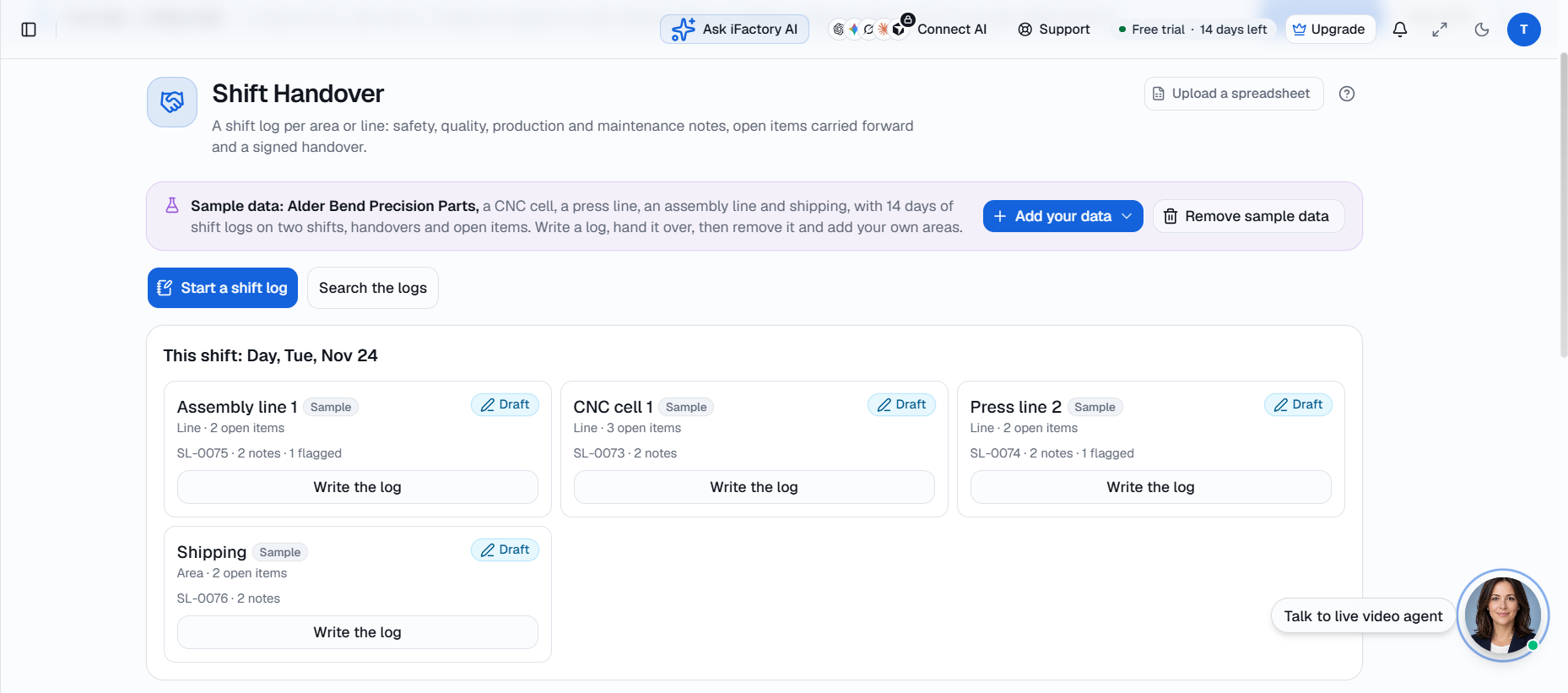
portal.ifactoryai.com/dashboard/shift-handover
Shift Handover in use, with sample records — the five log sections, production numbers, open items and both signatures

Shift Handover in use, with sample records.

How it works

Three steps from shift log to a signed, searchable record

Start from the areas and lines you already run, then let the five sections and the open-item carry-forward do the rest.

1

Write the shift log on a phone

Cover safety, quality, production, maintenance and open issues for each area or line. Open items from the last shift are already there.

2

Hand over and accept

The outgoing supervisor signs, and the incoming one reads and accepts. Anything still open carries forward.

3

Search and print

Search past logs by word, area or shift, and download each report as a PDF, with CSV export for logs and items.

The five sections

Every log covers the same five areas

Each shift log uses the same structure, so nothing gets forgotten and every handover reads the same way — Safety, Quality, Production and Maintenance notes, plus the Open issues that carry forward.

✓

Safety & Quality

Short notes, flag the key ones in red.

→
✓

Production & Maintenance

Planned, made, scrap, downtime, crew.

→
✓

Open issues

Carried forward until someone closes.

Open items that do not get lost

Each item records what is open, who should act, and which section it belongs to. It shows the log it was raised in and how many shifts it has been carried. The Open items page lists them oldest first, including closed items and who closed them.

Open items · oldest first
Open itemWho should act · sectionCarried
Guard panel awaiting partRaised: Line 2 · nights
Engineering · Maintenance
9 shifts
Reject rate above targetRaised: Line 2 · days
Line lead · Quality
3 shifts
Spill near filler — cleanedFlagged in red · Safety
Supervisor · Safety
1 shift
Label printer re-alignedRaised: Line 2 · days
Closed by J. Rivera
Closed
Oldest-first, closed items includedDownload as CSV
Sign-off

Signed by the outgoing and the incoming supervisor

The outgoing supervisor signs and the log shows "Handed over." The incoming supervisor signs to accept, and it shows "Accepted." Each signature records name and time. An owner or admin can reopen a signed log with a reason, which clears both signatures and keeps the history.

Handed over

Outgoing supervisor has signed the log.

A. Okafor 06:58
Line 2 · days Signed
Accepted

Incoming supervisor has signed to accept.

M. Lind 07:04
Line 2 · nights Accepted
Reopened

Admin can reopen with a reason.

✓ History kept · signatures cleared
Search, reports & PDF

Find any past log, and print it as a shift report

Search by words, area, shift, supervisor, status and dates. Each log prints as a PDF with its sections, production numbers, open items and both signatures. Reports cover 7, 30 or 90 days, and logs and items download as CSV.

  • ✓Search by word, area, shift, supervisor, status or date
  • ✓Shift report PDF with sections, numbers, open items and signatures
  • ✓7, 30 or 90-day reports; CSV export for logs and items
Shift reportLine 2 · days → nights
PDF
✓Safety, Quality, Production, Maintenance
✓Production: planned, made, scrap, downtime
✓Open items, with shifts carried
✓Flagged notes shown in red
✓Both signatures: handed over & accepted
7 / 30 / 90-day reportsDownload PDF or CSV
Included with every tool

Everything comes standard

✓

Your whole team

Invite colleagues so supervisors can write, hand over and accept logs across every shift.

✓

iFactory AI

Ask questions and get answers from your own shift records, in plain language.

✓

Your data stays yours

Export logs and items anytime; if the trial ends without a plan, nothing is deleted.

✓

Hosted in the US

US hosting, with each company's records kept separate from everyone else's.

Who it's for

Built for any operation that runs more than one shift

If the line keeps running after your crew clocks out, the handover is where things slip — and this is where it stops slipping.

Discrete manufacturing

Assembly and machining lines where job status and maintenance notes must survive the change.

Food & beverage processing

Continuous runs where quality, cleaning and open issues have to pass forward cleanly.

Power & utilities

Control rooms where safety notes and open work carry real consequences across shifts.

Multi-site operations

Several areas and lines, each with its own log, kept separate but searchable together.

What changes on the floor

From a notebook handover to a signed, searchable log

The point isn't more paperwork — it's a handover the next supervisor can trust and anyone can find again.

Open items don't get lost

Unresolved items stay on later logs until someone closes them — no item carried for nine shifts in silence.

Every handover is signed

Outgoing hands over, incoming accepts — name and time on each, so accountability is clear.

The same log every shift

Five fixed sections mean nothing is skipped and every shift reads the same way.

Easy to find again

Search any past log by word, area or shift, and print the shift report as a PDF.

Questions

Shift handover questions, answered

The things operations and EHS managers ask before they start.

Who can write and sign a shift log?+
Anyone in the company with app access can write, hand over and accept logs. The handing-over login can't also accept, so the second supervisor needs their own invited login. The trial has one user, so accepting requires inviting a second supervisor after subscribing. Start a free trial or book a demo.
Does it work on a phone?+
Yes — the log is built for a phone, with large buttons for use on the floor, so supervisors can fill the five sections during the shift rather than at a desk afterward. Try it free or book a demo.
Can we try it before adding our areas?+
Yes — try it with sample data for a made-up plant, including 14 days of logs, handovers and open items, and remove it in one click when you're ready to add your own. Start your free trial or book a demo.
Does this replace a downtime tracker?+
No. The shift log can record downtime minutes, but stops by machine and reason are handled by the separate Downtime Tracker. Many plants run both alongside each other. Start a free trial or book a demo.
Do I need a card for the trial?+
No — the 14-day trial needs no card and includes Pro features, 1 user, up to 15 assets and 10 iFactory AI questions a day. After the trial, a plan is required to keep editing; without one the workspace becomes read-only but records stay viewable and downloadable. Start free or book a demo.
Can I bring our existing spreadsheet?+
Yes — upload it and match the columns once, or add and edit entries individually. Only people in your company can see your records, and every change is logged. The team can also set it up with custom fields, rules or a tailored version. Start a free trial or book a demo.
Shift Handover

Try Shift Handover free for 14 days

A shift log for each area or line — the same five sections, open items carried forward, and a signed handover between supervisors. Start with sample data and add your own areas when you're ready.

14-day free trial · Pro features · no card required · from $19/user/mo

Written, signed, carried forward
1
Write the shift logFive sections, on a phone
✓Safety
✓Production
✓Open
✓
Handed over & acceptedBoth signatures, on the record