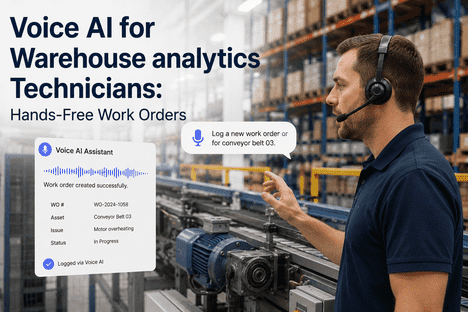
Warehouse maintenance technicians work in loud, physically demanding environments where stopping to type a work order, search a CMMS screen, or navigate a tablet means putting down tools, removing gloves, and breaking from the task at hand. Every interruption adds minutes. Across a shift, those minutes compound into hours of lost wrench time. Voice AI integrated with iFactory's CMMS eliminates the screen entirely — letting technicians log faults, create work orders, check parts availability, and update job statuses by speaking naturally, with tools in hand and eyes on the machine. This page explains how voice AI works in warehouse maintenance environments, what technicians can do with it, and how iFactory deploys it across real warehouse operations.
Log Faults, Create Work Orders, and Order Parts — Without Touching a Screen
iFactory's Voice AI lets warehouse technicians interact with the CMMS entirely by voice — keeping tools in hand, eyes on the machine, and maintenance data captured in real time.
Why Warehouse Maintenance Can't Afford Screen-Based Data Entry
A technician diagnosing a conveyor fault at 2 AM does not have a free hand for a tablet. A forklift engineer mid-repair cannot remove gloves to navigate a CMMS menu. A dock technician working in a 95-decibel environment cannot hear a phone alert. These are not edge cases — they are the normal operating conditions of warehouse maintenance. Screen-based data capture was designed for office workflows. Voice AI is designed for the warehouse floor.
What Warehouse Technicians Can Do With Voice AI — Six Core Capabilities
iFactory's Voice AI connects to the same CMMS data layer that drives work orders, parts inventory, and maintenance records. The difference is the interface: spoken commands replace screen navigation. The following six capabilities are available to technicians wearing a standard Bluetooth headset or earpiece on the warehouse floor.
A technician identifies a fault — unusual vibration on a conveyor belt motor, a leaking hydraulic line on a reach truck, a dock leveller that won't seat. Instead of navigating to a fault log screen, they speak: "Log fault on Conveyor 4 — motor vibration, severity medium, section B." iFactory's Voice AI transcribes, classifies, and creates the fault record in the CMMS instantly, linked to the correct asset node with timestamp and technician ID attached. The fault is live in the system before the technician has taken a single step away from the machine.
From a logged fault, a technician can immediately raise a work order by voice: "Create work order for Conveyor 4 fault — assign to night shift maintenance, priority high." iFactory creates the structured work order, assigns it within the platform, and routes any required approvals — all triggered by a single spoken instruction. Work orders that previously required 4–6 minutes of CMMS navigation take under 15 seconds by voice, and the data quality is higher because it is captured at the point of observation rather than reconstructed later.
Mid-repair, a technician needs to know if the replacement bearing is in stock: "Check stock for SKF 6205 bearing." iFactory's Voice AI queries the Parts and Inventory module and returns an audio response: "SKF 6205 — 3 in stock, bin 14C." If the part needs to be ordered: "Raise parts request for SKF 6205, quantity 2, linked to work order 4471." The request is placed in the procurement queue without the technician leaving the repair location or touching a device. Technicians using iFactory report this alone eliminates the most common cause of mid-repair delays.
As repair work progresses, technicians can update work order status entirely by voice: "Update work order 4471 — status in progress, parts retrieved, estimated completion 45 minutes." At job completion: "Close work order 4471 — fault resolved, conveyor running, vibration normal." The CMMS reflects real-time job status throughout the shift, giving supervisors live visibility without chasing technicians for verbal updates. Shift handover notes are automatically populated from voice-captured status changes, eliminating one of the most time-consuming end-of-shift tasks.
Before starting a repair, a technician can query the asset's maintenance history by voice: "What are the last three faults on Dock Leveller 6?" iFactory returns an audio summary of the most recent maintenance events, the parts consumed, and the resolution applied each time — the same relationship-aware retrieval that experienced technicians build over years, available to every technician from day one. For standard procedures, technicians can request step-by-step guidance: "Read maintenance procedure for hydraulic seal replacement, Dock Leveller 6." iFactory reads the relevant SOP aloud, hands-free.
Routine inspections — daily conveyor checks, forklift pre-shift inspections, dock safety walks — generate structured compliance data when captured by voice. Technicians speak their observations against a voice-prompted checklist: iFactory asks each question aloud, the technician responds, and the completed inspection record is timestamped and stored in the CMMS automatically. Inspection completion rates improve because the process is faster and requires no screen interaction. Book a Demo to see voice inspection capture in a live warehouse environment.
Six Maintenance Workflows. Zero Screens. All Captured in iFactory.
iFactory's Voice AI connects to your existing CMMS, parts inventory, and work order system — giving every warehouse technician hands-free access to the full maintenance platform from a standard headset.
The Warehouse Noise Problem — How iFactory Voice AI Works in High-Decibel Environments
Voice AI in a quiet office is a convenience. Voice AI in a warehouse running at 85–95 decibels with conveyor noise, forklift reversing alarms, and pneumatic equipment operating simultaneously is an engineering challenge. iFactory's Voice AI is built for the warehouse acoustic environment, not the office acoustic environment. The following capabilities address the specific noise conditions maintenance technicians face.
iFactory's voice processing pipeline applies acoustic noise cancellation before speech recognition, isolating the technician's voice from ambient warehouse sound. Recognition accuracy is maintained in environments up to 95 dB when used with a close-mic headset — the standard equipment for warehouse picking teams, already present in most operations.
Voice AI activates on a wake phrase, not continuous listening — reducing false triggers from ambient conversation and machinery noise. Technicians speak a short activation keyword, then give their command. The two-step model keeps the system responsive without misinterpreting background noise as instructions.
iFactory's Voice AI works with bone conduction headsets and in-ear industrial earphones — both of which are compatible with mandatory hearing protection in high-noise zones. Technicians operating in areas requiring ear defenders can use bone conduction microphones that transmit voice through skull vibration rather than air, maintaining safety compliance without losing voice capability.
In warehouses with patchy Wi-Fi coverage near dock doors, racking aisles, or cold storage zones, iFactory Voice AI supports a local edge processing mode — commands are recognised on the device and synced to the CMMS when connectivity is restored. Technicians are never blocked from logging a fault because they are in a coverage dead zone.
Voice AI Deployment Checklist — What to Verify Before Going Live
Deploying voice AI in a warehouse maintenance context requires a structured pre-launch verification process. The checklist below covers environment, integration, and technician readiness checks that iFactory recommends completing before activating voice workflows for production use. Teams that book a demo with iFactory receive this checklist as part of the onboarding workflow.
Voice AI vs Screen-Based CMMS — What Changes and What Stays the Same
Voice AI does not replace iFactory's CMMS — it adds a new input layer that is better suited to the physical reality of warehouse maintenance work. The table below compares the two interaction modes across the workflows where the difference matters most.
| Workflow | Screen-Based CMMS | Voice AI (iFactory) | Primary Benefit |
|---|---|---|---|
| Fault logging at point of failure | Navigate to fault log, type description, assign asset, submit — 4–6 min | Speak fault description — 10–15 seconds | Captured immediately, no tool put-down required |
| Work order creation | Open WO form, fill fields, assign, confirm — 5–8 min | Single voice command — WO created and assigned automatically | Eliminates form navigation under time pressure |
| Parts availability check | Navigate to inventory, search part number, read screen — 2–4 min | Ask by voice, receive audio response — under 30 seconds | No glove removal, no screen in dirty/wet conditions |
| Inspection completion | Complete digital checklist on tablet after inspection — data lag | Voice-prompted live during inspection — answers captured in real time | 100% data captured at point of observation |
| Shift handover notes | Typed manually at end of shift from memory — 15–20 min | Auto-populated from voice status updates throughout shift | Accurate, real-time handover with no end-of-shift effort |
Expert Perspective: Why Data Quality Improves With Voice Capture
The argument for voice AI in warehouse maintenance is usually framed around speed. The less-discussed but equally important benefit is data quality. Three structural improvements emerge when maintenance data is captured by voice at point of action rather than typed from memory later.
Temporal Accuracy
A fault logged at the moment of discovery has an accurate timestamp and a description based on direct observation. A fault logged from memory two hours later contains reconstruction errors — the precise sound, the exact vibration frequency, the sequence of events that preceded the failure. Voice capture eliminates the reconstruction gap. Every fault record in iFactory reflects what the technician observed, when they observed it.
Completeness Under Pressure
During a busy shift with multiple faults active, screen-based CMMS logging gets compressed or deferred. Technicians prioritise fixing over recording. Voice capture reverses this: logging is so fast it happens as a reflex alongside the repair activity rather than competing with it. iFactory customers consistently report higher work order completion rates and more complete fault descriptions after voice AI deployment than before — not because technicians changed their behaviour, but because the friction of recording was removed.
Knowledge Transfer Built In
Experienced technicians carry diagnostic vocabulary that junior staff lack. When a senior technician logs faults by voice — using the precise technical language that describes what they observed — that language is captured in the CMMS and becomes retrievable by junior technicians facing similar faults. Voice AI turns every repair into a documented knowledge transfer event. Teams that book a demo with iFactory see how this knowledge accumulation works across a full maintenance team over 90 days.
Conclusion
Warehouse maintenance technicians work in conditions that make screen-based data capture slow, error-prone, and often simply impossible. Voice AI integrated with iFactory's CMMS removes the screen from the equation — letting technicians log faults, create work orders, query parts, update job status, and retrieve maintenance history by speaking naturally, in the acoustic environment they actually work in. The result is faster data capture, higher data quality, better shift visibility, and maintenance records that reflect what actually happened rather than what was reconstructed from memory at the end of a shift.
iFactory connects Voice AI to your existing asset register, parts inventory, work order workflows, and Shift Logbook — with no new hardware required beyond a standard Bluetooth headset. Book a Demo to see Voice AI working in a live warehouse maintenance environment, or Talk to an Expert to discuss deployment for your specific warehouse and team configuration.
Frequently Asked Questions
Does Voice AI work accurately in loud warehouse environments with conveyor noise and forklift alarms?
Yes — iFactory's voice processing pipeline applies acoustic noise cancellation before speech recognition. With a close-mic headset or bone conduction device, the system accurately processes commands in environments up to 95 dB. Command-keyword activation (a short wake phrase before each instruction) reduces false triggers from background noise. For zones requiring mandatory hearing protection, iFactory is compatible with bone conduction microphones that transmit voice through skull vibration, maintaining safety compliance. Book a Demo to test recognition accuracy in your specific environment.
What hardware does a warehouse technician need to use iFactory Voice AI?
A standard Bluetooth headset is sufficient for most warehouse maintenance environments. iFactory also supports bone conduction headsets and industrial in-ear earphones for high-noise zones. No specialised hardware purchase is required if technicians already use Bluetooth headsets for picking or communications — the same device works with iFactory Voice AI. For warehouses with Wi-Fi coverage gaps, iFactory supports a local edge processing mode that queues commands for sync when connectivity is restored.
Can voice-created work orders go through the same approval workflow as screen-created ones?
Yes. Work orders created by voice go through the same routing and approval rules configured in iFactory's Work Order Management module. Priority classification, assignment groups, and approval thresholds are applied identically regardless of whether the work order was created by voice or screen. Supervisors see voice-created work orders in exactly the same view as manually created ones — with the technician ID, timestamp, and linked fault record attached.
How long does it take for a technician to learn voice AI commands?
iFactory's Voice AI orientation for warehouse maintenance technicians is designed to take 20 minutes. The command structure uses natural language rather than rigid syntax — technicians speak naturally and the system infers intent. A laminated quick-reference card with the 15 most-used commands is issued to each technician. Most teams report confident independent use within the first shift. Voice profile calibration, which runs once per technician in each maintenance zone, takes approximately 5 minutes and significantly improves recognition accuracy in noisy conditions.
How does Voice AI connect to iFactory's Shift Logbook?
Voice-captured status updates, fault logs, and work order completions flow automatically into iFactory's Shift Logbook module as structured entries throughout the shift. At handover, the outgoing supervisor has a complete, chronological record of every maintenance event captured during the shift — without any end-of-shift data entry. The incoming supervisor receives context-rich handover notes based on real-time voice data rather than rushed end-of-shift summaries. Talk to an Expert to see how Voice AI and Shift Logbook work together in your workflow.
Your Technicians Shouldn't Have to Stop Fixing Things to Log Them.
iFactory Voice AI connects to your CMMS, parts inventory, work orders, and Shift Logbook — giving every warehouse maintenance technician hands-free access to the full platform from a standard headset. No new hardware. Active from day one.