PLC and SCADA to AI: Connecting Your Existing Automation to Predictive Analytics

By Ethan Walker on June 18, 2026

plc-scada-to-ai-connecting-existing-automation-predictive

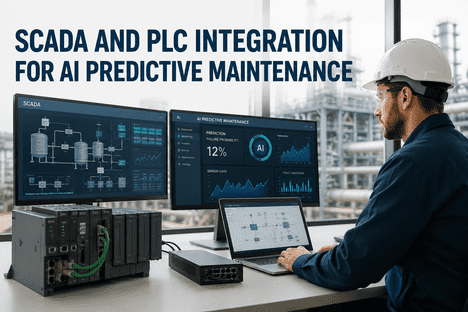
Your plant already runs on PLCs and SCADA. Siemens S7-1500 on the production line, Rockwell ControlLogix in the body shop, Mitsubishi MELSEC on legacy stations, all feeding data into an Ignition or Wonderware historian that has been collecting tag values for years. Vibration, temperature, pressure, motor current, flow rates — thousands of tags streaming at scan rates from 10 to 100 milliseconds, representing decades of operational history and millions of dollars in equipment telemetry already in motion. The missing piece is not more sensors. It is the AI intelligence layer that reads from your existing automation infrastructure and turns that data into failure predictions, maintenance recommendations, and automated work orders — without modifying a single line of PLC logic or reconfiguring a single SCADA alarm. iFactory's predictive maintenance platform bridges OPC UA, Modbus TCP, MQTT, and SCADA historian connectors into a unified AI analytics layer that forecasts equipment failures 2–4 weeks before conventional threshold alarms would trigger. Read-only integration. Zero PLC code changes. No rip-and-replace of existing systems. Book a Demo to see how iFactory connects your existing automation to predictive intelligence.


PLC & SCADA Integration · Brownfield AI · 2026
PLC and SCADA to AI: Connecting Your Existing Automation to Predictive Analytics

OPC UA · Modbus TCP · MQTT Sparkplug B — read-only integration with zero PLC logic changes, bridging your existing automation infrastructure to AI-driven failure prediction, Shift Logbook, and CMMS work order automation.

OPC UA
Secure read-only · IEC 62443 · X.509 certs
Modbus TCP/RTU
Legacy device bridge · 100ms polling · 247 slaves
MQTT Sparkplug B
Pub-sub · auto asset discovery · intermittent tolerant
SCADA Historian
Backfill 12–24 months · train on real history

Why Your Existing SCADA Telemetry Is Underutilized for Predictive Maintenance

SCADA systems were designed for one purpose: real-time monitoring and threshold-based alarming. When a pressure spike exceeds a configured limit, the SCADA fires an alarm and an operator responds. This workflow detects faults after they occur — pressure excursions, temperature violations, vibration trips — with zero predictive lead time for planned intervention. The same SCADA historian that captures these post-event spikes has been recording thousands of tag values at sub-second intervals for years, storing the pre-failure degradation patterns that could have predicted the event weeks in advance. The data exists. The telemetry infrastructure is already deployed and paid for. What is missing is the machine learning layer that can read that streaming telemetry, separate early-stage fault signatures from normal operating noise, and issue actionable predictions before thresholds are breached. iFactory connects to your existing SCADA, PLC, and historian infrastructure through read-only industrial protocol bridges, preserving every existing alarm, dashboard, and report while adding an AI prediction layer that detects faults 2–4 weeks before conventional alarms would trigger.

LIMITATIONS OF THRESHOLD-BASED SCADA ALARMING FOR PREDICTIVE MAINTENANCE
1
Post-event detection only — SCADA alarms fire after the pressure spike or temperature excursion occurs. By the time the alarm triggers, the fault has already propagated and production impact is underway.
2
Flat threshold limits ignore degradation trajectory — a bearing spall developing over 14 days produces a gradually rising vibration envelope that stays below the alarm threshold until 48 hours before seizure. The trajectory is invisible to fixed-limit alarming.
3
Single-variable alarms miss multi-sensor fault patterns — bearing degradation manifests across vibration, temperature, current, and acoustic emission simultaneously. SCADA alarms each variable independently, missing the cross-sensor correlation pattern that signals early-stage failure.
4
Historian data trapped in storage — years of high-frequency tag data sit in the historian, used only for post-incident analysis. The same data, fed into ML models, could train degradation trajectories that predict failure weeks in advance.

Three Industrial Protocols iFactory Uses to Bridge Automation to AI

iFactory does not require a single PLC program modification, SCADA reconfiguration, or historian replacement. The platform reads from your existing automation infrastructure through three standard industrial protocols — OPC UA, Modbus TCP/RTU, and MQTT Sparkplug B — plus direct historian connectors for Ignition, Wonderware, AVEVA, AspenTech IP.21, and OSIsoft PI. Each protocol serves a specific deployment context. iFactory's integration team selects the appropriate protocol mix during the week-1 site survey based on your PLC vendor inventory, network topology, and data latency requirements.

01
OPC UA — Secure, Platform-Independent PLC Connectivity
OPC UA (IEC 62541) is the de facto standard for secure industrial communication, supported by every major PLC vendor including Siemens, Rockwell, Beckhoff, Schneider, and Mitsubishi. iFactory's OPC UA client connects directly to the OPC UA server on your plant network, subscribing to read-only variables — vibration, temperature, pressure, motor current, flow rates — from the PLC tag namespace. The connection supports IEC 62443-compliant security with X.509 certificate authentication, data encryption, and role-based access controls. Data transfers at the native PLC scan rate (10–100 ms per tag group), preserving the temporal resolution required for ML-based trend analysis. Each OPC UA variable node maps to the corresponding asset hierarchy in iFactory's Shift Logbook, creating a structured data model for fleet-wide predictive analytics. Book a Demo to see OPC UA integration in a live industrial environment.
IEC 62443 security10–100ms scan rateZero PLC code change
02
MQTT Sparkplug B — Distributed Asset and Brownfield Connectivity
For plants with distributed assets, remote sites, or multi-vendor PLC environments, MQTT provides a lightweight publish-subscribe transport that decouples data sources from consuming applications. iFactory subscribes to MQTT broker topics published by IIoT gateways, edge PLCs, or SCADA systems that expose telemetry via Sparkplug B payloads — an ISO/IEC 20237 standard ratified in 2023. The platform handles network latency, bursty data, and intermittent connectivity gracefully, buffering incoming telemetry and replaying missing sequences when the connection restores. Sparkplug B topic schemas map directly to iFactory's equipment model, enabling automatic asset discovery and tag registration without manual configuration — especially valuable for brownfield deployments where legacy Modbus RTU devices and modern Ethernet-based PLCs coexist on the same plant floor.
ISO/IEC 20237 standardAuto asset discoveryIntermittent tolerant
03
Modbus TCP/RTU — Legacy Device Bridge to AI
Thousands of industrial sites still operate Modbus RTU devices — motor protection relays, VFDs, temperature transmitters, pressure transducers — connected via RS-485 serial networks or Modbus TCP over Ethernet. These devices contain decades of valuable telemetry that conventional SCADA systems sample too coarsely for predictive analytics. iFactory polls Modbus registers at configurable intervals down to 100 ms per register group via a dedicated Modbus master driver supporting up to 247 slave devices per serial segment. Register mappings are defined once in the iFactory configuration interface and automatically synchronised to the asset model. The Shift Logbook captures maintenance events associated with each Modbus device, enabling ML models to correlate telemetry anomalies with repair outcomes and build increasingly accurate failure prediction models over time.
247 slaves per segment100ms pollingDecades of legacy telemetry

Integration Architecture — What Stays, What Changes, What Gets Added

The distinction between a platform that works in brownfield plants and one that requires greenfield infrastructure is visible in the integration architecture. iFactory's design principle is additive — the AI layer sits alongside existing SCADA, PLC, and historian infrastructure without modifying any control system component. Existing dashboards, existing alarms, existing reports continue operating exactly as before. The AI stack reads from the same data streams through read-only protocol bridges and writes predictions to the Shift Logbook and CMMS through audited conduits. Nothing changes about your production control loops.

System
What Stays
What Changes
What iFactory Adds
PLC Controllers
All ladder logic, programs, scan cycles
Nothing — read-only OPC UA / Modbus
Tag subscription at native scan rate
SCADA System
All dashboards, alarms, HMI screens
Nothing — iFactory reads historian API
AI prediction overlay on existing views
Historian
All stored data, existing queries, reports
Nothing — iFactory reads via MSMQ bridge
12–24 month backfill for model training
CMMS / ERP
All work orders, asset hierarchy, parts inventory
Nothing — iFactory writes via REST API
Auto-generated work orders from AI predictions
Operator Workflow
Existing shift handover, inspection rounds
Digital Shift Logbook replaces paper logs
AI-generated shift summaries, prioritized alerts

Historian Backfill — Train AI Models on Your Plant's Real History

AI models trained only on live data as it streams in require months to learn seasonality, equipment drift, and rare failure modes before they deliver reliable predictions. Models trained on five years of historian data start delivering value in week one. iFactory's historian backfill engine pulls every tag, every event, every alarm from your existing historian — in parallel, without affecting live operations. The backfill replays through the same streaming ETL pipeline as live data, time-aligned and quality-flagged, so models are pre-trained on your plant's actual behavior before they touch a single live tag. For most plants with 12–24 months of historian storage, this means iFactory's ML models arrive at go-live already calibrated to your specific equipment degradation patterns, maintenance response history, and operating condition variability. The Shift Logbook captures maintenance events alongside the replayed telemetry, creating a structured training corpus that correlates sensor drift with actual repair outcomes.

12–24 mo
Historian data backfilled before go-live
Models pre-trained on real plant history, not generic data
100%
Existing SCADA dashboards preserved
AI layer runs alongside — no rip-and-replace required
2–4 wk
Integration timeline for read-only PLC bridge
No PLC code changes, no SCADA reconfiguration
Zero
PLC program modifications required
Read-only OPC UA / Modbus / MQTT connections
Bridge Your Existing Automation to AI Predictive Analytics
iFactory connects to your existing OPC UA servers, MQTT brokers, Modbus networks, and SCADA historians through read-only industrial protocol bridges — with zero PLC code changes, zero SCADA reconfiguration, and zero production disruption. Historian backfill trains AI models on your plant's real history before go-live. Power and network access are the only things you provide.

Deployment Architecture — How iFactory Connects Without Disruption

The deployment follows a fixed six-stage methodology designed specifically for brownfield plant integration. Each stage has a defined gate review before the next stage begins. The integration team handles every connection — OPC UA certificate authority setup, MQTT broker hardening, Modbus register mapping, historian connector configuration, and OT network segmentation per IEC 62443. Your plant's existing control systems never stop operating.

Phase 1
Site Survey and PLC Inventory
Week 1–2

iFactory's integration team inventories every PLC model, protocol version, SCADA platform, historian type, and network topology on your plant floor. Each asset class is mapped to the appropriate protocol bridge — OPC UA for modern Siemens and Rockwell controllers, Modbus TCP for legacy devices, MQTT for distributed or remote assets, native historian connector for SCADA backfill. The output is a structured tag-to-asset mapping that feeds directly into the iFactory equipment model. No PLC program access required. No production downtime for inventory collection.

Phase 2
Protocol Bridge Deployment and Historian Backfill
Week 3–5

iFactory's field technicians deploy the NVIDIA edge server appliance in the OT DMZ per IEC 62443 network segmentation, configure OPC UA client connections with X.509 certificate authentication, set up Modbus register polling schedules and MQTT broker subscriptions, and establish the read-only MSMQ bridge to the existing historian. The historian backfill engine begins replaying 12–24 months of tag history through the streaming ETL pipeline. All connections are read-only. No PLC program modification, no SCADA reconfiguration, no production impact.

Phase 3–6
Model Training, Validation, and Go-Live
Week 6–12

With streaming live data and backfilled historian data feeding the AI pipeline, iFactory's pre-loaded LSTM and CNN models begin training on your specific asset degradation patterns. Models run in shadow mode for 4–6 weeks, generating predictions logged for comparison against actual events. Reliability teams validate model outputs against known failure history before approving cutover. At go-live, AI predictions begin auto-generating work orders in the existing CMMS with fault classification, severity stage, RUL estimate, and recommended corrective action. The Shift Logbook captures every prediction, every work order, and every maintenance outcome in an immutable audit trail for continuous model improvement.

What the PLC-to-AI Integration Delivers for Plant Reliability

2–4 wk
AI failure prediction lead time
0
PLC code changes required
12–24 mo
Historian data backfilled pre go-live
6–12 wk
Full deployment timeline

Ready to see how iFactory connects your specific PLC and SCADA environment to AI predictive analytics? Book a Demo and our integration team will review your PLC inventory, historian configuration, and network topology to deliver a structured integration scope and deployment timeline for your plant.

Frequently Asked Questions

No. iFactory connects to your existing automation infrastructure through read-only protocol bridges — OPC UA, Modbus TCP/RTU, MQTT Sparkplug B, and SCADA historian APIs. No PLC ladder logic is modified. No SCADA alarm configuration is changed. No historian reconfiguration is required. The AI layer reads telemetry from your existing data streams and writes predictions to the Shift Logbook and CMMS without any write access to PLC registers, SCADA screens, or control loops. Your existing control system continues operating exactly as designed.
iFactory supports native OPC UA connectivity for Siemens S7-1200/1500, Rockwell ControlLogix/CompactLogix, Beckhoff TwinCAT, Schneider Modicon M340/M580, Mitsubishi MELSEC iQ-R/iQ-F, and Omron NJ/NX series. For legacy devices using Modbus RTU over RS-485 or Modbus TCP, iFactory polls registers directly with support for up to 247 slave devices per serial segment. For distributed and remote assets, MQTT Sparkplug B subscriptions enable automatic tag discovery and asset registration. Custom protocol support via the iFactory integration framework covers 500+ industrial protocols for universal connectivity.
Yes. iFactory's historian backfill engine connects directly to Ignition, Wonderware, AVEVA, AspenTech IP.21, OSIsoft PI, and other major historian platforms through read-only API or MSMQ bridges. The engine replays 12–24 months of tag history through the same streaming ETL pipeline as live data, time-aligned and quality-flagged, so AI models are pre-trained on your plant's actual equipment degradation patterns before they touch a single live tag. The backfill runs in parallel without affecting live historian operations or SCADA performance.
Full deployment from site survey to production AI runs 6–12 weeks. iFactory's field technicians handle OPC UA certificate authority setup, MQTT broker hardening, Modbus register mapping, historian connector configuration, OT network segmentation per IEC 62443, and all cabling between the NVIDIA edge server and your plant network. Your team provides power, network access, and SCADA/PLC system credentials. No PLC program access or SCADA reconfiguration work is required from your engineering team. Year-one remote monitoring and model retraining are included in the fixed-price turnkey package.
The standard integration is read-only from PLCs and SCADA systems. iFactory writes predictions, work orders, and shift summaries to the Shift Logbook and CMMS through audited REST API conduits — never directly to PLC registers or SCADA setpoints. Write-back to PLC tags for closed-loop control is available as an opt-in capability per tag, starting in advisory-only mode where the AI recommends a setpoint change and an operator confirms before execution. Most deployments operate read-only for the first 4–8 weeks of validation before considering advisory write-back for non-safety-critical parameters.
Deploy PLC-to-AI Integration for Your Plant

iFactory connects your existing OPC UA servers, Modbus networks, MQTT brokers, and SCADA historians to AI-powered predictive maintenance — with zero PLC code changes, zero SCADA reconfiguration, and historian backfill for pre-trained models. One fixed price. One go-live date. Your existing automation keeps running exactly as designed.
OPC UA Bridge Modbus Connectivity MQTT Sparkplug B Historian Backfill Shift Logbook

Share This Story, Choose Your Platform!