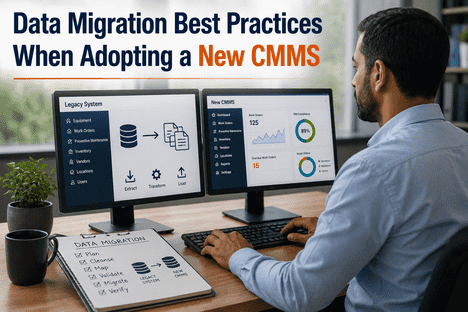
Adopting a new Computerized Maintenance Management System (CMMS) is one of the most consequential operational decisions a maintenance organization can make. At the center of every successful CMMS transition is data migration — the structured process of transferring asset records, work order histories, preventive maintenance schedules, and inventory data from a legacy system into the new platform. When executed with discipline, data migration sets the foundation for accurate asset management, reliable predictive maintenance, and measurable improvements in Overall Equipment Effectiveness (OEE). When done carelessly, it introduces corrupted records, broken workflows, and months of operational disruption. Organizations ready to evaluate how AI-powered CMMS tools can accelerate their transition can Book a Demo with iFactory for a structured readiness assessment.
Migrate to a Smarter CMMS With iFactory's AI Vision Platform
iFactory's AI-powered CMMS integrates IoT sensor data, computer vision, and automated work order generation — purpose-built for manufacturers transitioning from legacy maintenance systems to intelligent asset management.
The True Cost of a Poorly Planned CMMS Migration
Modern maintenance operations depend on a CMMS as the single source of truth for every asset, work order, and scheduled task across the facility. When data migration is treated as an afterthought, the consequences extend far beyond IT inconvenience — they directly compromise maintenance decision-making, regulatory compliance, and production continuity. A study found that 83% of data migration projects either fail outright or exceed their budgets and timelines, largely because organizations underestimate the complexity of transferring decades of historical maintenance records into a new data model. Legacy systems often contain thousands of duplicate records, inconsistent naming conventions, and unmapped asset hierarchies that cannot be transferred directly. Without deliberate cleansing and validation, the new CMMS inherits the same data quality problems that likely drove the migration in the first place. Understanding this risk is the prerequisite to avoiding it.
Data Loss Risk
Work histories, PM schedules, and asset records that are not mapped correctly can be permanently lost during transfer, eliminating years of maintenance intelligence used for failure pattern analysis.
Compliance Exposure
Regulatory frameworks including ISO 55001, NERC CIP, and FDA 21 CFR Part 11 require traceable maintenance records. Incomplete migration breaks audit trails and creates compliance gaps that can trigger penalties.
Operational Disruption
Maintenance teams working from incomplete or incorrectly migrated data during the transition period face reactive maintenance spirals — increased unplanned downtime at precisely the moment the new system should be delivering efficiency gains.
AI Accuracy Degradation
AI-driven predictive maintenance and OEE analytics require clean, complete historical data to establish accurate baselines. Migrating corrupted data directly undermines the intelligence layer that justifies the new platform investment.
Seven Best Practices for CMMS Data Migration
Successful CMMS migrations follow a structured discipline, not a single-step export-and-import sequence. The following seven practices represent the operational standard for organizations that complete migrations on time, within budget, and without data integrity failures.
Conduct a Pre-Migration Data Audit
Before transferring any record, audit the existing dataset for completeness and quality. Identify duplicate assets, outdated work orders, unmaintained equipment records, and inconsistent naming conventions. Data that would not be useful in the new system should not be migrated — moving legacy clutter forward defeats the purpose of the platform transition.
Define the Data Migration Scope
Not all historical data carries equal operational value. Active assets, open work orders, current PM schedules, and critical inventory records are migration priorities. Historical records older than a defined threshold — typically five to seven years for non-regulated environments — can be archived rather than actively migrated, reducing migration complexity and improving new-system performance.
Build a Rigorous Data Mapping Schema
Every field in the legacy system must be explicitly mapped to its equivalent field in the new CMMS. Asset ID formats, equipment hierarchies, maintenance categories, and work order status codes frequently differ between platforms. A formal mapping document — reviewed by both IT and maintenance operations stakeholders — prevents the misalignment that causes post-migration data inconsistencies.
Cleanse and Standardize Before Transfer
Data cleansing — the removal of duplicates, correction of inconsistencies, and standardization of formats — must occur before migration begins, not after. Assets with multiple naming variations, work orders assigned to decommissioned equipment, and inventory records with missing unit-of-measure designations all require resolution in the source system before any transfer is initiated.
Execute Pilot Migrations Before Full Transfer
Running a pilot migration with a representative subset of records — a single production line, one facility, or a defined asset class — surfaces mapping errors, format incompatibilities, and data quality gaps before they propagate across the entire dataset. Organizations that conduct multiple rounds of pilot testing consistently achieve smoother full-scale migrations and fewer post-go-live corrections.
Validate Post-Migration Data Integrity
After migration completes, every critical data category — assets, work orders, PM schedules, spare parts inventory — requires explicit validation against the source. Automated reconciliation counts, spot-check audits by maintenance team members, and functional testing of PM trigger logic should all be completed before the legacy system is decommissioned or placed in read-only archive mode.
Establish IoT and AI Data Integration Pipelines
Modern CMMS platforms like iFactory are designed to ingest real-time data from IoT sensors and AI vision cameras — not just historical records. The migration phase is the optimal moment to configure these live data pipelines, ensuring that asset health baselines, anomaly detection thresholds, and automated work order triggers are active from day one of the new platform's operation rather than added as a later phase.
CMMS Data Migration Phased Roadmap
Effective migrations are not single events — they are phased programs that deliver security and functionality incrementally. The following four-phase model is designed for manufacturing and industrial environments where operational continuity cannot be compromised during any transition period.
Data Assessment & Scope Definition
Audit the legacy system, define migration scope, identify data quality issues, and document current asset hierarchy and PM schedule structures. Key stakeholders from maintenance operations, IT, and compliance are engaged during this phase to align migration objectives with business requirements.
Data Cleansing, Mapping & Pilot Migration
Execute data cleansing in the source system, build the field-level mapping schema, and run pilot migrations against a defined data subset. Errors identified during pilot testing are resolved before full-scale transfer is initiated. IoT sensor integration architecture and AI vision camera data pipelines are configured in parallel.
Full Migration, Validation & Go-Live
Full dataset migration is executed, followed by systematic data integrity validation across all asset classes, work order categories, and PM schedules. Live IoT and AI data streams are activated. The new CMMS goes live with parallel operation against the legacy system for a defined cutover period before the legacy system is archived.
Continuous Optimization & AI Baseline Refinement
Post-migration, AI behavioral baselines are refined using live operational data. Predictive maintenance models calibrate against actual asset performance, improving detection accuracy over time. OEE analytics, energy management dashboards, and PM schedule optimization operate from the clean, complete data foundation established during migration.
How iFactory AI Vision Camera Enhances Post-Migration CMMS Performance
A well-executed data migration establishes the historical foundation of your new CMMS — but the real performance gains begin when live operational data flows in continuously. iFactory's AI Vision Camera platform connects directly to your CMMS to deliver 24/7 visual monitoring of assets, automated anomaly detection, and instant work order generation without manual inspection rounds. Once data migration is complete and asset records are accurate in the new system, the AI Vision layer uses that clean asset hierarchy to contextualize every visual alert — ensuring that a detected oil leak, a displaced safety guard, or a drifting analog gauge generates a correctly attributed, high-priority work order routed to the right technician in seconds. This integration closes the critical blind spot that traditional CMMS platforms leave open: the physical state of equipment between scheduled inspections. Teams ready to see this capability mapped to their specific asset environment can Book a Demo with iFactory today.
24/7 Visual Asset Monitoring
AI Vision cameras monitor every critical asset continuously — detecting surface degradation, visible leaks, component displacement, and PPE compliance gaps that vibration sensors and process data cannot capture. Visual anomalies surface weeks before functional failures become detectable through conventional condition monitoring.
Automated Work Order Generation
When the AI detects a confirmed anomaly, it automatically generates a prioritized work order in the CMMS — attaching the visual evidence, the asset record, and the recommended maintenance action. This eliminates the manual inspection-to-work-order gap that delays corrective maintenance in traditional operations.
OEE Performance Intelligence
Cameras mounted on production lines provide real-time part counts and cycle time monitoring — delivering the accurate availability, performance, and quality data required to calculate true OEE. When OEE drops below target, AI correlates the decline with asset health scores to direct maintenance action at the actual root cause.
Energy Management Integration
AI vision data combined with IoT energy sensors allows the CMMS to correlate equipment operating condition with energy consumption patterns. Assets running outside their optimal mechanical state typically consume 15–30% more energy — early visual anomaly detection enables maintenance interventions that directly reduce energy waste and support sustainability targets.
Migration Performance: Legacy CMMS vs. AI-Integrated CMMS
Understanding the performance gap between a conventionally migrated CMMS and one integrated with IoT and AI from day one helps maintenance leaders build the business case for the full platform investment.
| Performance Dimension | Legacy CMMS (Post-Migration) | iFactory AI-Integrated CMMS |
|---|---|---|
| Asset Data Accuracy | Static — degrades without manual updates | Continuously refreshed via IoT and AI vision data |
| Anomaly Detection | Reliant on scheduled inspections | 24/7 automated visual and sensor monitoring |
| Work Order Generation | Manual — technician-initiated | Automated — AI-triggered with visual evidence attached |
| Predictive Maintenance | Schedule-based PM only | Condition-based and AI-predicted interventions |
| OEE Visibility | Manual data collection, estimated figures | Real-time, camera-verified availability and performance data |
| Energy Management | Not integrated with maintenance workflows | Correlated energy anomalies trigger maintenance actions |
| Compliance Audit Trail | Periodic manual exports | Continuous, automated record with visual evidence logs |
"We had spent six months cleaning our legacy data before migration, and we thought that was the hard part. The real transformation came when iFactory's AI Vision layer went live on top of the clean CMMS data. Within the first two weeks, it flagged a hydraulic leak on a press that our inspection schedule wouldn't have reached for another three weeks. The system tied the visual alert directly to the asset record, generated the work order automatically, and attached the image as evidence. Our maintenance cost per unit dropped 22% in the first quarter after go-live."
Conclusion: Data Migration Is the Foundation — AI Is the Multiplier
CMMS data migration is not simply a technical transition between software platforms — it is a strategic initiative that determines the quality of every maintenance decision, compliance record, and predictive model the new system will generate for years to come. The seven best practices outlined in this article — from pre-migration audit through IoT and AI integration pipeline configuration — represent the operational standard for migrations that deliver their intended outcomes. Clean, validated, well-structured data is the prerequisite. But the organizations achieving the largest performance gains — measurable reductions in unplanned downtime, improved OEE, lower maintenance cost per unit, and stronger compliance posture — are those that pair disciplined data migration with an AI-integrated CMMS from the first day of operation. iFactory's AI Vision Camera platform and CMMS integration layer are purpose-built to deliver that outcome. Maintenance and reliability leaders ready to build their migration roadmap can Book a Demo with iFactory and receive a facility-specific migration and integration assessment before any platform commitment is made.
CMMS Data Migration — Frequently Asked Questions
Q: How long does a CMMS data migration typically take?
For most mid-sized manufacturing facilities, a complete migration following the four-phase model spans 12 to 18 weeks from initial data audit through full go-live validation. Complexity increases with data volume, legacy system age, and the number of integrated systems such as ERP, SCADA, and IoT platforms.
Q: Which data categories should be prioritized in a CMMS migration?
Active assets, open and recurring work orders, current preventive maintenance schedules, and critical spare parts inventory should be migrated first. Historical records older than the defined archival threshold can be preserved in read-only format rather than actively migrated, reducing complexity and improving system performance.
Q: Can iFactory's AI Vision Camera integrate with our existing CMMS during migration?
Yes — iFactory's AI Vision platform is designed to integrate with both the target CMMS and legacy systems during the transition period, ensuring that live visual monitoring and automated work order generation are active throughout the migration rather than waiting for full cutover.
Q: How does clean CMMS data improve predictive maintenance accuracy?
AI predictive maintenance models require complete, consistent historical data to establish accurate failure pattern baselines. Migrating clean, well-structured data allows the AI to train against real asset behavior rather than noisy or incomplete records, significantly improving anomaly detection precision and reducing false positive alert rates.
Q: What compliance frameworks are supported by iFactory's CMMS audit trail?
iFactory's integrated platform generates continuous, timestamped maintenance records aligned with ISO 55001 asset management requirements, FDA 21 CFR Part 11 for regulated industries, NERC CIP for energy sector operations, and ISA/IEC 62443 for industrial cybersecurity compliance.
Ready to Migrate to an AI-Powered CMMS and Unlock Predictive Maintenance From Day One?
iFactory's team maps your existing asset data, legacy system architecture, and compliance requirements to a phased CMMS migration and AI integration roadmap — before any platform commitment is made.