Every cement plant maintenance team carries a backlog, and a backlog on its own is not the problem — a backlog that never stops growing is. Work orders pile up faster than crews can close them, critical jobs get buried under a stack of low-priority requests, and by the time anyone audits the list, nobody can say with confidence which of the four hundred open items are actually protecting the plant from an unplanned stoppage. iFactory AI gives maintenance leaders a structured way to see the backlog for what it really is, sort it by what matters, and drive it down systematically instead of chasing whichever job happens to be loudest this week — Book a Demo to see your own backlog run through the classification model.
Why Backlogs Grow Even When Crews Are Working Hard
Backlog growth is rarely a sign that a maintenance team is lazy or under-resourced — it is far more often a sign that work is entering the system faster than it can be closed, and that the closing process has no consistent way to decide what gets done first. New work orders arrive from operator rounds, inspection findings, condition monitoring alerts, and routine PM schedules, all landing in the same queue with no shared definition of urgency. Without a common classification framework, the work order that gets closed first tends to be whichever one is easiest, cheapest, or most recently escalated by a vocal operations supervisor — not necessarily the one carrying the highest risk to production or safety.
Over time this produces a backlog with a long tail: a small number of genuinely urgent items buried among hundreds of lower-priority requests that keep getting pushed back. Planners lose confidence in the list, crews stop trusting that "priority" labels mean anything, and the backlog becomes background noise rather than a working management tool. Reversing that trend requires classifying the backlog honestly, then attacking it with a repeatable reduction process rather than a one-time cleanup effort.
Classifying the Backlog: Age and Risk Together
A healthy backlog management process looks at two dimensions simultaneously: how long a work order has been open, and how much risk it carries if it stays open longer. Age alone is misleading — a six-month-old request to repaint a handrail is not the same problem as a six-month-old request to address a gearbox with an elevated vibration signature. iFactory AI's platform tags every open work order with both an age band and a risk score derived from asset criticality, condition monitoring input, and safety implications, then presents the backlog as a matrix instead of a flat list.
Work orders that cross into the Stale and Chronic bands without a documented reason are automatically surfaced for planner review, since these are the items most likely to represent either forgotten risk or genuinely low-priority clutter that should be closed or deferred formally.
Act Immediately
Work orders tied to critical assets or safety findings that have been open longer than the target response window. These jump to the top of the next planning cycle regardless of how the rest of the backlog is prioritized.
Schedule Normally
Recently opened but high-consequence work orders. These are on track and simply need to move through normal planning and scheduling without being allowed to age into the aging or stale bands.
Batch or Defer
Lower-consequence items that have sat for a while. Strong candidates for batching into a single outage window or formally deferring with a documented review date rather than leaving them open indefinitely.
Monitor
The largest bucket in most plants. These need no urgent action but should be tracked so they do not silently drift into the aging or stale bands without anyone noticing.
A Systematic Reduction Loop, Not a One-Time Cleanup
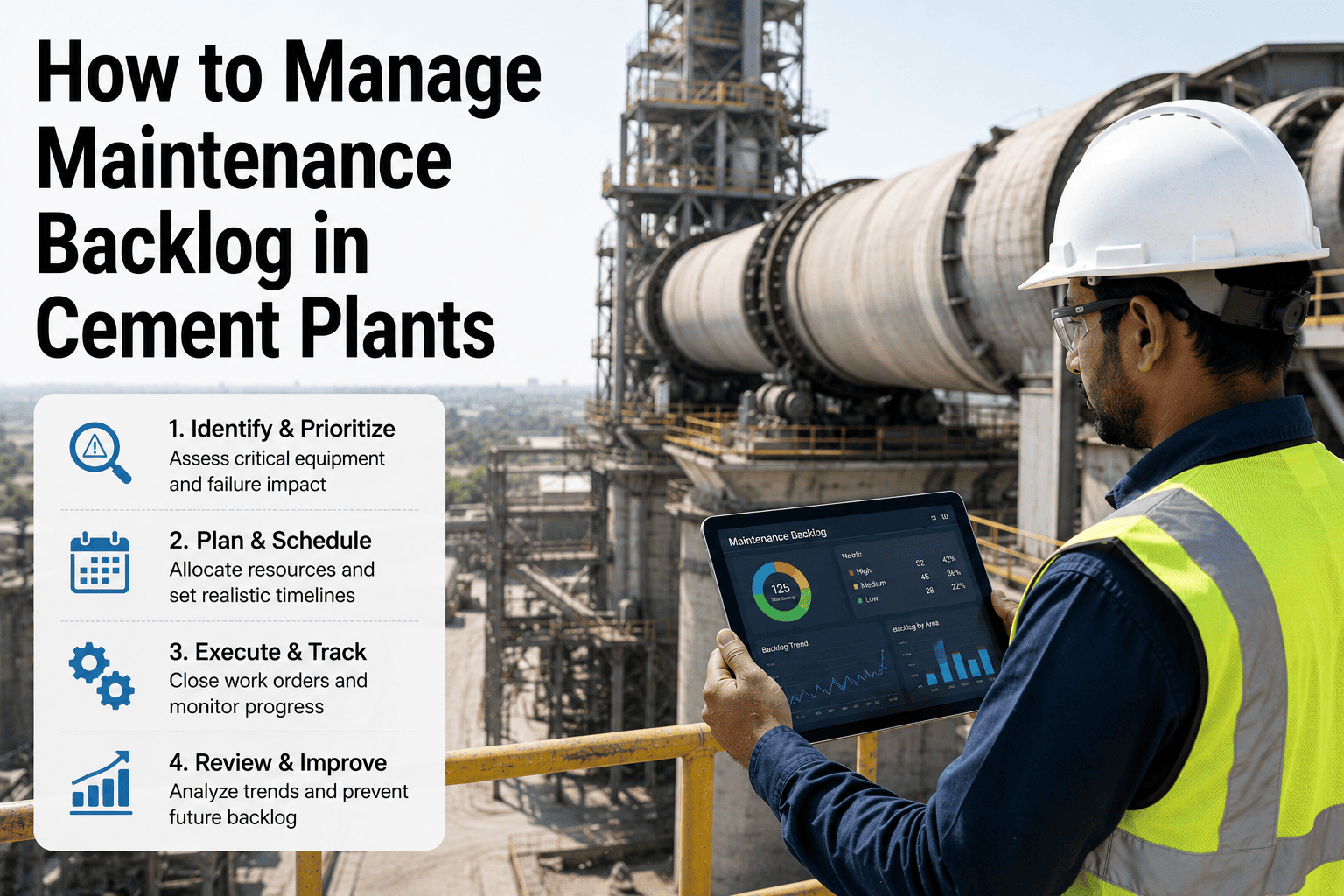
Backlog cleanups that happen once a year tend to produce a short-lived improvement followed by the same slow regrowth, because the underlying intake and prioritization process never changed. A sustainable reduction program instead runs as a continuous loop: classify what's open, target the highest-risk aging items first, batch the low-risk aging items into planned windows, and review intake so new work orders are being triaged consistently from the moment they're created.
Classify
Every open work order is scored by age band and risk level as soon as the backlog is loaded into the platform.
Target
High-risk, aging items are pushed into the next planning cycle ahead of everything else in the queue.
Batch
Low-risk aging items are grouped by asset area or outage window so they can be closed efficiently in one pass.
Review Intake
New work orders are triaged against the same age-and-risk framework from day one, so the backlog stops regrowing the moment it's cleared.
Backlog Health Metrics Worth Tracking Every Cycle
A backlog size number on its own tells you very little — four hundred open work orders could mean a plant in serious trouble or a plant with a large but well-managed low-risk queue. What separates a healthy backlog from an unhealthy one is a small set of metrics tracked consistently cycle over cycle, so trends become visible before the backlog grows into a crisis. These metrics also give planners a shared language when reporting backlog status to operations and plant leadership, replacing a vague "we're working through it" with numbers that show whether the situation is actually improving.
| Metric | What It Reveals | Healthy Direction |
|---|---|---|
| Backlog-to-completion ratio | Whether work is closing faster or slower than it's being created | Trending toward or below 1.0 |
| High-risk aging count | Number of critical-asset work orders sitting past their target window | Trending toward zero |
| Average work order age | Overall speed of the backlog moving through the system | Stable or declining |
| Chronic item percentage | Share of backlog sitting in the 180+ day band | Small and shrinking |
Getting Operations and Maintenance Aligned on the Same List
One of the quieter reasons backlogs grow unmanaged is that operations and maintenance often work from different mental models of what's outstanding. Operations sees the requests they've submitted and assumes anything urgent has been addressed; maintenance sees a queue shaped by parts availability, crew capacity, and competing priorities that operations rarely has visibility into. A shared, classified backlog view closes that gap by giving both groups the same age-and-risk picture, so a delayed high-risk item is visible to operations as a scheduling constraint rather than a mystery, and a deferred low-risk item is visible as a deliberate decision rather than something maintenance simply forgot.
This shared visibility also changes how backlog reviews are run. Instead of a planner defending a long list item by item, the age-and-risk classification does most of that work automatically, freeing the review meeting to focus on the handful of items that genuinely need a joint decision — whether that's approving an outage window, reallocating crew time, or agreeing to formally close an item that no longer reflects current plant conditions.
What a Reliability Manager Reported
We had almost six hundred open work orders and honestly no one on the team could tell you with confidence which forty of them actually mattered. Once the platform split the list by age and risk, it became obvious that most of the backlog was low-risk clutter that had just never been formally closed, and the real problem was maybe thirty items that had been quietly aging on critical equipment. We cleared those in the first two planning cycles and the backlog has stayed roughly flat since, instead of climbing every month the way it used to.