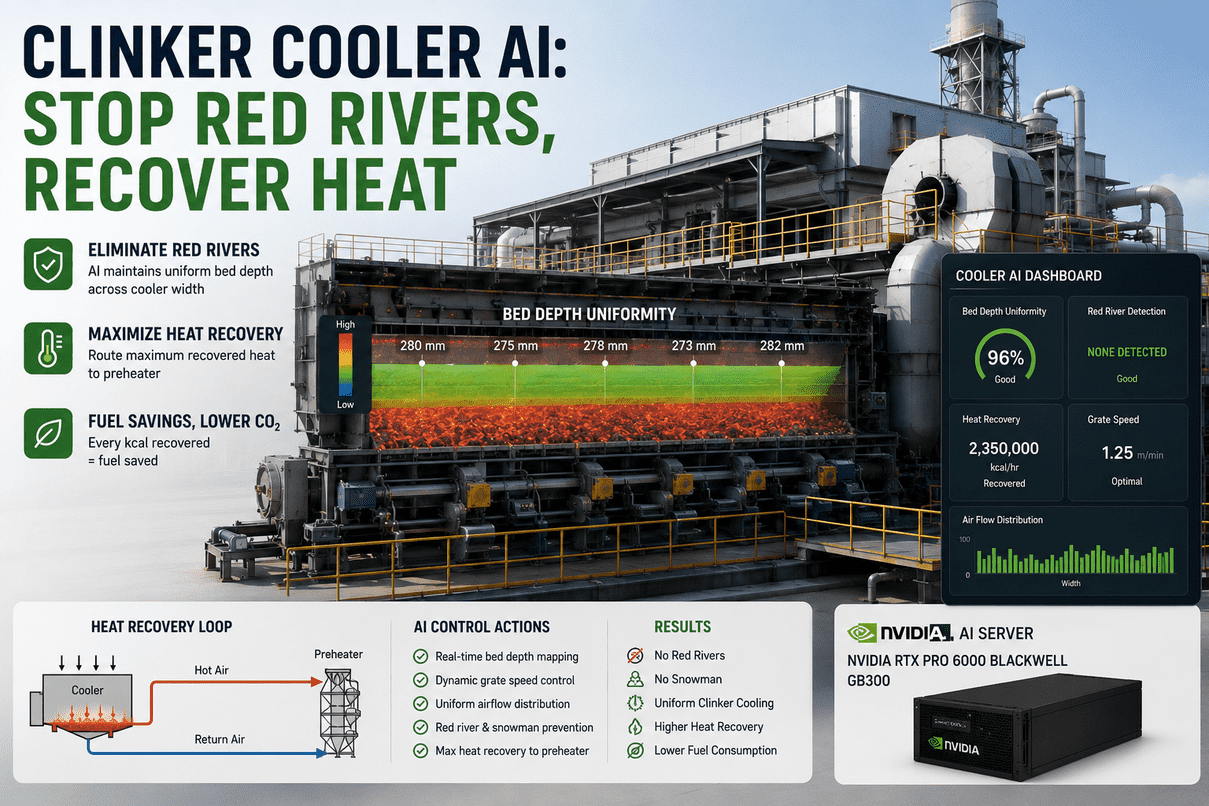
The clinker cooler is the single biggest fuel decision in your cement line that nobody is actively making in real time. About 35–40% of pyroprocessing heat passes through the grate cooler — half of it gets recuperated as secondary air feeding the kiln, the other half as tertiary air feeding the calciner. Every 50°C you lift secondary-air temperature is measurably less coal per tonne of clinker. Every red river that channels glowing clinker past the heat-recovery zone is fuel walking out the cooler discharge. Every snowman growing at the inlet quietly chokes the bed and forces operators to either drop kiln feed or accept under-burned clinker downstream. iFactory's Clinker Cooler AI watches bed depth across the cooler width, watches the thermal map of the bed, watches the under-grate pressure differentials zone-by-zone, and recommends coordinated grate-speed and fan-balance moves to hold uniform bed depth, suppress red rivers before they form, and route the maximum kcal back to the preheater. Recommendation only. The AI surfaces the move; the cooler engineer reviews; the DCS operator commits — manually, through your existing MOC. The model never writes to the cooler PLC. Ships pre-loaded on a turnkey on-prem stack: NVIDIA RTX PRO 6000 Blackwell digital-twin server paired with NVIDIA GB300 Grace Blackwell Ultra inference, plus AGX Orin edge gateways for PLC and thermal-imager ingest. Live in 6–12 weeks from PO.
Clinker Cooler AI
Bed Depth, Red Rivers, Snowmen — All On One Screen, All On Your Floor
Multivariable model trained on your cooler's normal envelope. Maintains uniform bed depth across the full grate width. Suppresses red rivers before they channel through the heat-recovery zone. Catches snowman build-up at the inlet before clinker flow chokes. Routes the maximum recoverable kcal back to the preheater as hotter secondary and tertiary air. Every degree of secondary-air temperature gained is coal saved, line after line. The AI recommends; engineer reviews; operator commits. No write path to the cooler PLC.
The Cooler Is The Single Biggest Real-Time Fuel Lever Nobody Is Pulling
A grate cooler is, to a thermal engineer, half product-handling and half heat exchanger. The product side wants uniform bed depth and steady flow. The heat-exchanger side wants the maximum delta-T between clinker and air, with the resulting hot air routed back to the kiln and calciner instead of out the stack. Manual operation can hold one of those at a time. When the cooler engineer slows the grate to thicken the bed against a red river forming on the fine side, secondary-air temperature drops. When fan balance is pushed to recover that temperature, channelling re-emerges. Multiple zones need to move together — that's the part conventional control cannot coordinate. Talk to our cement combustion lead about how your cooler is coordinated today.
Single-pressure-reading control hides wide variation across the cooler width. Operators correct one zone and worsen another. The bed is thick enough not to channel — and cool enough that 5–10% of recoverable heat is leaving as wasted exhaust. Fuel cost shows up in the kiln's specific heat consumption, but nobody traces it back to the cooler.
Model watches under-grate pressures per chamber, thermal-imager bed surface, drive amps, secondary and tertiary air temperatures, kiln feed rate, clinker discharge temperature. Recommends a coordinated move — slow Zone 1 grate by 0.3 m/min, lift Zone 2 fan damper 4%, hold Zone 3 — and projects the resulting bed profile and secondary-air gain.
An AI that writes grate-speed or fan-damper setpoints into the cooler PLC without a human gate is not a recommendation engine — it's an unvalidated controller next to the kiln. The Clinker Cooler AI has no write path. Recommendation only. Cooler engineer reviews. DCS operator commits manually through your existing MOC.
Snowman, Red River, Channelling — Three Ways A Cooler Quietly Burns Money
Failures in a clinker cooler don't usually arrive as alarms — they arrive as gradient drift. The bed gets a little less uniform, a hot streak gets a little brighter on the thermal map, secondary-air temperature falls 8°C. Each one alone looks like nothing. Together they're the fingerprint of three classic failure modes. The model is trained to recognise the early-stage version of each, before it becomes an operations problem.
Hot, sticky clinker with excess liquid phase piles up directly under the kiln nose. The pile grows. Grate plates reciprocate normally but cannot move the load. Eventually the kiln outlet itself can be partially blocked.
Drop in inlet bed-depth signal at the centre even as kiln feed is steady. Secondary air temperature lifts unusually high — the air is flowing past the pile, not through it. Inlet refractory thermocouples drift up. The combination is a snowman fingerprint, not any one signal.
Trigger the air cannons in sequence rather than as a fixed schedule. If pattern persists, recommend a short kiln-feed reduction and review of liquid-phase chemistry from the upstream raw mix. Cooler engineer reviews and routes; DCS operator commits the cannon sequence.
Fine clinker fluidises on one side of the bed and shoots toward discharge faster than the grate moves. A glowing red streak appears far down-cooler — clinker that should be black at that point. Grate plates in the affected lane go red-hot.
Air-distribution variation across the cooler width — fine vs. coarse pressure differentials — climbs toward the documented 1:6 ratio that precedes red-river formation. Thermal-imager hot streak forming. Discharge temperature on the affected side rising while the opposite side stays normal.
Slow the grate on the fine side, push the relevant under-grate fan damper down to reduce fluidisation, hold the coarse side. Recommendation includes the projected return of secondary-air temperature and the projected discharge-temperature profile after the move. Engineer reviews; operator commits.
The bed isn't visibly red anywhere, but it isn't uniform either. Cooling air takes the path of least resistance — through the thinner zones. Thicker zones cool slowly. Discharge temperature is acceptable on average but uneven, and clinker quality varies through the day.
Joint distribution of under-grate pressures across chambers drifts from learned-normal. Drive-amp pattern on the grates changes shape. Bed-surface thermal map shows zone-to-zone variance climbing. Secondary-air temperature drops 5–10°C without any obvious cause.
Coordinated multi-zone move — small grate-speed adjustments per zone plus fan-damper rebalancing — to restore bed uniformity. Recommendation surfaced with the projected bed-depth profile, projected secondary-air recovery, and SHAP attribution showing which zone drove the recommendation.
From The Cooler Bed Back To The Preheater — Where Every kcal Saved Shows Up
A cooler doesn't sit on its own. It sits inside a closed thermal loop with the kiln, the preheater tower, and the calciner. Heat that the cooler recovers as hot secondary and tertiary air goes straight back into combustion. Heat that the cooler fails to recover leaves as exhaust — that's the fuel walking out. The diagram below traces where every kcal goes, and where the AI's recommendations close the loop. If you want a non-technical version: hot clinker meets cold air; hot air goes back to where it can replace coal; the AI's job is to maximise the second part without breaking the first.
Hot clinker drops out of the kiln nose into the cooler inlet. AI watches kiln feed rate, burner load, and clinker-formation chemistry indicators upstream — the cooler's job is decided partly by what arrives at the inlet.
Half the cooling air is pulled back to the kiln as secondary air for combustion. Target around 1,050°C. Every degree gained here is fuel not burned in the main flame. This is the highest-value heat in the loop.
The other half of the recovered air ducts to the calciner — pre-heating limestone before it reaches the kiln. The hotter and more stable this stream is, the less calciner fuel is needed.
Last-zone air finishes cooling clinker for safe conveyor transport and good grindability. Excess hot exhaust here is loss — unless routed to a WHR boiler, where it can become 25–35 kWh per tonne of recovered electricity.
Hotter secondary air = less coal in the main burner. Hotter tertiary air = less coal in the calciner. The cooler's recommendations show up — measurable, attributable — in kiln specific heat consumption, the metric your VP-Operations watches.
The closed loop is what makes cooler AI different from cooler monitoring. A monitoring tool tells you the secondary-air temperature dropped. A recommendation engine tells you which zone caused it, which move recovers it, and what the kiln will see in specific heat consumption after the change. Register for Event.
Three Boxes On Your Floor — RTX PRO 6000 Twin, GB300 Inference, AGX Orin Bridge
Cooler optimisation runs in real time, on regulated infrastructure, on data that does not leave your perimeter. The full stack arrives racked and ready: a digital-twin server that holds the cooler model and dashboard, a high-end inference node for the heavy multivariable recommendations, and an edge gateway that ingests PLC tags and thermal-imager streams without competing for GPU memory. Below is what arrives on your dock.
Why three boxes: the twin server holds the cooler digital twin and renders the recommendation queue. The GB300 runs the heavy multivariable inference and the projected-state simulator that previews each recommendation before it's surfaced. The AGX Orin handles deterministic PLC ingest and thermal-imager RTSP streams in parallel — vision workload never starves the model.
Sensors The Model Reads — Zone By Zone, Across The Full Cooler Width
A coordinated recommendation only works if the model sees the cooler the way the engineer sees it: per zone and across the width. Most cement plants already have 70–90% of these tags published in the historian — we tap them read-only over OPC-UA. The rest are added during Phase 1 of deployment. The table below is the standard signal set.
| Zone | Signal | Source | What the AI uses it for |
|---|---|---|---|
| Inlet | Bed depth · pressure differential | Pressure transmitter · ultrasonic level | Snowman early detection, kiln-feed coordination |
| Inlet | Refractory shell skin temperature | Skin thermocouple grid | Hot-spot growth, snowman fingerprint |
| Zone 1 | Under-grate pressure per chamber | Chamber pressure transmitter | Air-distribution map, channelling detection |
| Zone 1 | Secondary air temperature | Kiln hood thermocouple | Heat-recovery KPI, recommendation target |
| Zone 1 | Grate drive amps · stroke | Hydraulic drive instrumentation | Bed loading, drive health, grate-speed inference |
| Zone 2 | Tertiary air temperature | TAD thermocouple | Calciner-feed quality, mid-cooler balance |
| Zone 2 | Bed surface thermal map | HGH Pyroscan or equivalent thermal imager | Red-river streak detection, bed uniformity score |
| Zone 2 | Fan amps · damper position | VFD feedback · damper transmitter | Fan-balance recommendation, energy attribution |
| Zone 3 | Clinker discharge temperature | Pyrometer at discharge | Cooling-completeness KPI |
| Zone 3 | Last-zone fan and damper status | VFD feedback · damper transmitter | Final-cooling balance, WHR routing |
| WHR (optional) | Boiler inlet temperature · steam flow | WHR boiler instrumentation | WHR diversion attribution, recovered-kWh tracking |
| Loop | Kiln specific heat consumption | Calculated from kiln data | The KPI every recommendation moves toward |
Same Recommendation, Two Levels Of Detail — Cooler Engineer & Plant Operations
A cooler engineer wants to know which zones are misbehaving, which sensor moved, and what the model thinks the corrective combination is. Plant operations and the VP-Operations want to know: what is the heat-recovery position right now, what's the projected fuel impact this shift, and which recommendations are queued for review. Same data, two depths.
What The Cooler AI Does — And What It Doesn't
Cement vendors tend to promise round numbers. The textured version is more useful. The Cooler AI doesn't replace your grate-plate maintenance program, doesn't eliminate the need for periodic refractory inspection, and doesn't push the cooler past the manufacturer's mechanical envelope. What it does is keep the bed uniform when manual control would let it drift, suppress red-river formation before damage occurs, and recover the small daily fraction of heat that conservative manual operation leaves on the table — across every shift, every load, every season.
From PO To Live Recommendation Queue In Three Phases
A clinker cooler is not a greenfield. It has a DCS, a thermal imager, a kiln operator who has heard vendor promises, and a maintenance team protective of mechanical limits. Deployment is staged so each phase produces a working artefact, not just a milestone. Live in 6 to 12 weeks from PO. Global dispatch on the RTX PRO 6000, GB300, and AGX Orin nodes. Field engineers on the floor for cabling, PLC handshake, and operator training.
RTX PRO 6000, GB300, and AGX Orin nodes ship pre-configured. Field engineers rack them, plug power and Ethernet, configure OPC-UA / Modbus TCP and RTSP ingest. Existing thermal imager (Pyroscan or equivalent) connected. 90 days of historical cooler operating data pulled.
Multivariable cooler model trained on your line, your raw mix, your fuel. Recommendations issued in shadow mode — visible to cooler engineer, not surfaced to operator. Bed-uniformity baseline established. Red-river and snowman signatures characterised against your historical events.
Recommendations promoted from shadow to engineer queue. Cooler engineer and DCS operator training (3 days, on-site). 24x7 remote monitoring active. Rollout to additional cooler lines on a schedule operations controls.
Model retrained monthly on fresh cooler data. Quarterly review with our cement combustion lead — accepted recommendation rate, realised kg/t coal savings, secondary-air temperature trend, grate plate health. Optional after year one. Stack keeps running either way.
Hardware, Cooler AI Software, Integration, Training — One PO
The Clinker Cooler AI is delivered as a turnkey on-prem stack: the three-node AI server set above, the cooler model and dashboard pre-loaded, our cement combustion engineers on the floor for tag mapping, model training, and operator training. 6 to 12 weeks from PO. Owned by you outright. No recurring license.
Pre-racked, burn-in tested, IEC 62443 zoned. Twin server holds the cooler twin; GB300 runs the multivariable inference; AGX Orin handles deterministic ingest. Air-gapped from public internet. One-time CapEx. Global shipping included.
Multivariable cooler model, projected-state simulator, SHAP explainer, recommendation queue, audit-log writer. Pre-loaded; calibrated to your cooler, raw mix, and fuel during weeks 1–8.
Read-only OPC-UA / Modbus TCP / EtherNet-IP connectors to FLSmidth, KHD, IKN, Polysius cooler PLCs and your kiln DCS. RTSP ingest from HGH Pyroscan or equivalent. Historian write to OSIsoft PI, Aveva, Ignition. Cabling and config handled on-site.
3-day on-site rollout. Cooler engineers learn the recommendation queue, projected-state preview, and SHAP review. DCS operators learn the manual commit procedure and the recommendation rejection path. Maintenance lead briefed on the audit trail.
24x7 remote monitoring of all stack nodes. Monthly model retrain on fresh cooler data. Quarterly review with our cement combustion lead — kg/t coal saved, secondary-air temperature trend, recommendation acceptance, model drift. Optional after year one.
Want to see the rack and a real cooler recommendation rendered before you commit? The full stack is on the iFactory booth at SAP. Bring your cooler tag list and a load profile; we'll show you what the model would surface.
What Cooler Engineers & Plant Operations Ask First
No, by architecture. The Cooler AI has read-only access to your cooler PLC and DCS via OPC-UA. There is no write path to grate drives, fan VFDs, or damper actuators. Recommendations are surfaced to a cooler engineer, who reviews and routes them. The DCS operator commits any setpoint change manually following your existing MOC. The AI is a recommendation engine, not a controller.
Yes. The Cooler AI is OEM-agnostic. We integrate with FLSmidth Cross-Bar / SF coolers, KHD Pyrofloor and Pyrostep, IKN Pendulum, Polysius Polytrack and others. The model is trained on your specific cooler's signature, regardless of OEM. We tap your existing thermal imager (HGH Pyroscan, FLSmidth ECS/CemScanner, etc.) over RTSP — no new vision hardware required.
Cooler dynamics aren't millisecond — they're seconds-to-minutes. The model issues recommendations on a rolling 30-second window. A red-river fingerprint typically forms in the model 5–10 minutes before the streak is visible to operators on the thermal imager — that's the early-warning value. Snowman fingerprints can appear 20–40 minutes ahead of full obstruction depending on liquid-phase conditions.
The model includes kiln feed rate, burner load, and clinker liquid-phase indicators as inputs. During a known feed-rate ramp the model widens its acceptance band rather than issuing aggressive moves. During an unrecognised upset (model confidence drops below 80%), recommendations are paused — operator runs the cooler manually and the model resumes when the envelope is back in a learned region.
Stays inside your perimeter. The full three-node stack runs on-site, air-gapped from the public internet by default. The model trains and infers on the appliance you own. No data leaves your zone. Your model is trained on your cooler, your raw mix, your fuel — we don't share weights between customers.
The stack keeps running. You own the three appliances, the trained cooler model, the audit logs, and the dashboards. Renew support and monthly retraining annually, run it in-house with our handover docs, or do a mix. No kill switch, no recurring license.
Walk The Cooler Real Cooler, Real Recommendation, Real Heat-Recovery Lift
RTX PRO 6000 Blackwell twin server. NVIDIA GB300 Grace Blackwell Ultra inference. AGX Orin edge gateway. Bed-uniformity map, red-river fingerprint, projected secondary-air temperature gain — rendered live on a real cooler model. Bring your cooler tag list and a load profile; our cement combustion lead will walk through what the model would surface for your line.





.png)