Choosing between the NVIDIA RTX 5090 and the RTX PRO 6000 Blackwell for local AI work is not a specs argument — it is a VRAM ceiling argument, a data residency argument, and a total-cost argument that most buyer guides skip. Both cards share the same GB202 Blackwell die. Both run PyTorch, both handle fine-tuning, and both will comfortably fit in a workstation tower. What separates them is what happens themmoment your model exceeds 32 GB, your training job runs past 48 hours, or your compliance team asks where patient data was processed. This page breaks the comparison down spec by spec, workload by workload, and dollar by dollar — with real benchmark data and a decision matrix so you leave with a clear answer, not more confusion.
RTX 5090 vs RTX PRO 6000 — Get a Live GPU Architecture Walkthrough
Join the iFactory Ai, Bring your model sizes and training cadence; walk out knowing exactly which GPU belongs in your on-prem AI workstation — and why.
Live Llama 3.3 70B inference demo on RTX PRO 6000
Side-by-side VRAM ceiling walkthrough
ECC, NVLink, and driver stability explained
Custom workstation spec delivered on-site
Spec Sheet
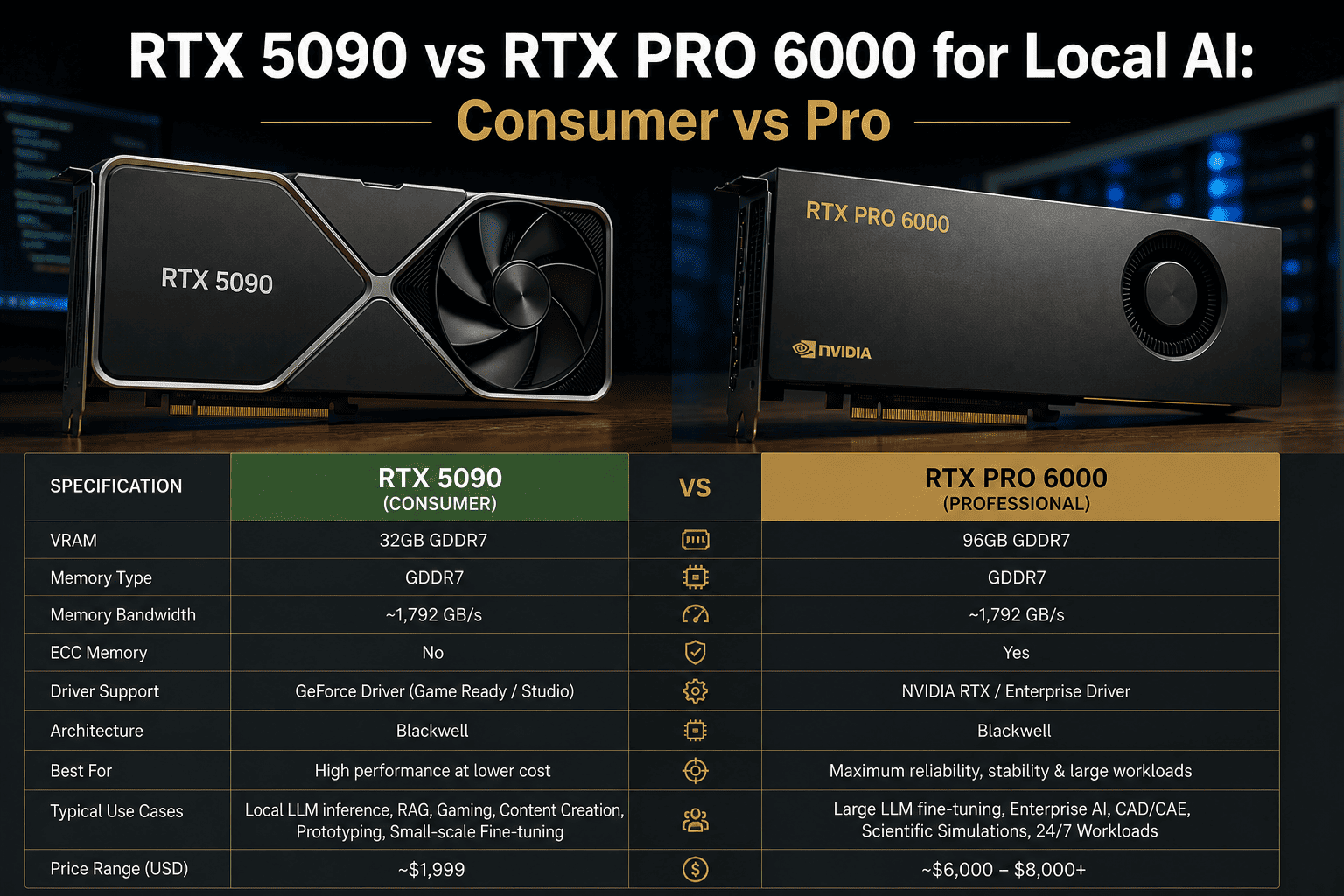
Head-to-Head Specifications — Blackwell Consumer vs Blackwell Pro
Both GPUs are built on NVIDIA's GB202 Blackwell die. The RTX PRO 6000 uses a slightly fuller version of the die — 24,064 CUDA cores vs 21,760 — and triples the VRAM while capping power at 300 W in its workstation edition. Everything else follows from those two decisions.
| Specification | RTX 5090 | RTX PRO 6000 |
| Architecture |
Blackwell GB202 |
Blackwell GB202 |
| CUDA Cores |
21,760 |
24,064 (+10.6%) |
| Tensor Cores |
680 (5th gen) |
752 (5th gen) |
| VRAM |
32 GB GDDR7 |
96 GB GDDR7 |
| Memory Bus |
512-bit |
512-bit |
| Memory Bandwidth |
1,792 GB/s |
~1,800 GB/s |
| TDP (Workstation) |
575 W |
300 W (Max-Q) / 600 W (Full) |
| ECC Memory |
No |
Yes |
| NVLink |
No (PCIe only) |
Yes (1,800 GB/s bi-directional) |
| Multi-GPU Stacking |
PCIe only (~64 GB/s) |
NVLink 5 supported |
| Driver Track |
GeForce Game Ready |
RTX Enterprise (quarterly QA) |
| Street Price (2026) |
~$2,000 MSRP / ~$3,800+ market |
~$8,000–$11,000 |
| Target Segment |
Consumer / Creator |
Professional Workstation |
The VRAM Ceiling
The 32 GB Ceiling — Where the RTX 5090 Hits Its Limit
VRAM is not a preference — it is a hard ceiling. When your model requires more memory than the GPU carries, training crashes. The table below shows exactly which model sizes fit where, at common precision levels. Teams working with Llama 3.3 70B, Qwen, or Mixtral routinely discover the 32 GB ceiling within two months of deployment.
Fits in 32 GB (RTX 5090)
7B model · QLoRA (4-bit)
7B model · LoRA (BF16)
13B model · 4-bit inference
Llama 3.1 8B · full fine-tune
RAG pipelines up to ~13B
Requires 32–96 GB (PRO 6000)
70B model · QLoRA (4-bit)
70B model · BF16 inference
Mixtral 8x7B · full load
30B+ full fine-tune
Multi-modal 7B + vision head
Requires 96 GB+ (Multi-PRO 6000)
Llama 3.3 70B · full FP16 fine-tune
Mixtral 8x22B · LoRA
Qwen 3 14B · full fine-tune at FP32
DeepSeek V3 671B (multi-node)
Foundation model pre-training
Full fine-tuning of a 7B model in FP16 already requires ~80 GB — above the RTX 5090's hard ceiling. Teams that start on 32 GB and scale to 13B+ models typically buy the PRO 6000 within six months anyway. Buying once saves the second purchase.
Real Benchmark Data
LLM Inference Throughput — Tokens per Second Across Model Sizes
Independent benchmark data from CloudRift AI using vLLM across three model sizes — 30B (fits in 24 GB), 70B AWQ (fits in 48 GB), and 96B (requires full 96 GB). These are throughput numbers under real concurrency load, not synthetic scores.
Configuration
30B Model (tokens/s)
70B AWQ Model (tokens/s)
96B Model (tokens/s)
1× RTX PRO 6000
8,425
4,210
Single-chip — no PCIe overhead
1× RTX 5090
4,570
Cannot fit (32 GB ceiling)
Cannot fit
2× RTX 5090 (PCIe)
~8,900
1,230
Cannot fit
4× RTX 5090 (PCIe)
~12,600
~1,720
Cannot fit (need 96 GB single)
Source: CloudRift AI independent benchmark, vLLM, Qwen3-Coder-30B, Llama 3.3 70B AWQ INT4, GLM-4.5-Air AWQ 4-bit. PCIe bandwidth bottleneck explains the poor multi-GPU scaling on 70B model.
The key insight is the PCIe bottleneck. Two RTX 5090s connected over PCIe Gen 5 share ~64 GB/s of inter-GPU bandwidth. The RTX PRO 6000 with NVLink 5 delivers 1,800 GB/s bi-directional — a 28× advantage for tensor-parallel inference on large models. For smaller models that fit on a single 5090, consumer GPU stacks can win on raw throughput per dollar.
The Real Tradeoffs
Five Dimensions Pricing Sheets Skip
Sticker price is not total cost. ECC protection, driver stability, NVLink bandwidth, and power requirements all affect the actual cost of a fine-tuning pipeline over 24 months. Here is the honest scorecard.
Dimension
RTX 5090
RTX PRO 6000
Who Wins
ECC Memory
No — silent bit errors can corrupt a 48-hour training checkpoint without warning
Yes — detects and corrects single-bit errors in real time across the full 96 GB
PRO 6000
NVLink
PCIe only — 64 GB/s inter-GPU bandwidth kills tensor-parallel throughput
NVLink 5 — 1,800 GB/s bi-directional, enabling true tensor parallelism across 2+ GPUs
PRO 6000
Driver Stability
GeForce Game Ready — frequent updates, not QA-validated for production AI frameworks
RTX Enterprise — quarterly release cycle, certified for CUDA, CAD, and AI workloads
PRO 6000
Raw Performance (single GPU, small model)
Faster — higher boost clock (2.41 GHz) gives 10–15% edge in single-GPU throughput on small models
Slightly slower peak clock — tuned for sustained load, not burst speed
RTX 5090
Upfront Cost
~$2,000 MSRP / ~$3,800 market — accessible for individual researchers
~$8,000–$11,000 — enterprise capex, typically requires purchase order
RTX 5090
Power Draw (workstation)
575 W — requires 1,200 W+ PSU; challenging in multi-GPU workstation builds
300 W (Max-Q edition) — four cards fit in a standard workstation; data-center edition at 600 W
PRO 6000
24/7 Reliability
Consumer-grade thermal design — sustained 100% load over days reported to cause instability
Built for 100% load for months — workstation thermal and power certification standards
PRO 6000
Expert View
What Engineers and Independent Reviewers Actually Found
Three independent sources benchmarked both cards under real workloads. Their conclusions align on the same inflection point: model size relative to VRAM determines the winner, not raw clock speed.
GamersNexus (September 2025)
The PRO 6000 carries 24,064 CUDA cores — nearly an 11% increase over the RTX 5090. In gaming benchmarks it ran 5–14% faster. But the reason to buy it is the 96 GB and ECC, not the frame rate advantage.
Tested on AMD Ryzen 9800X3D · Street price at review: ~$8,000
Tom's Hardware (May 2025)
In Geekbench 6, the RTX PRO 6000 landed 9–15% faster than the RTX 5090. At around $8,200 retail versus $3,800 market price for the 5090, the PRO 6000 makes economic sense only when 32 GB becomes the bottleneck.
Benchmark: 3DMark TimeSpy, TimeSpy Extreme, Geekbench 6
VRLA Tech AI Workstation Review (2026)
For teams running Llama 3.x 70B or Qwen at full precision, the 96 GB card is the practical choice. The 32 GB card is a ceiling that many teams hit within months of deployment. Buying once rather than twice is usually the cheaper path over 24 months.
Tested: PyTorch, vLLM, LoRA fine-tuning · Production AI workload focus
Decision Matrix
Which Card is Right for You — A Workload-First Decision Framework
The fastest path to the right GPU is matching your workload to the card — not comparing spec sheets. Work through the decision matrix below. If you reach a split or need a custom recommendation for your exact model mix, our ML engineers will spec it for you in 30 minutes.
Your Situation
Recommended Card
Reasoning
Working with 7B or smaller models, no near-term scale plans
RTX 5090
32 GB is sufficient; faster clock wins at small model sizes
Planning to run 13B–70B models within 12 months
RTX PRO 6000
Buy once; 96 GB covers the full range of modern open-weight models
Training jobs run 24/7 for 48+ hours continuously
RTX PRO 6000
ECC memory + workstation thermal design required for long-run reliability
Need two or more GPUs for tensor-parallel inference
RTX PRO 6000
NVLink 5 (1,800 GB/s) vs PCIe (64 GB/s) is the difference between viable and not
Research budget is tight; single-GPU, smaller models only
RTX 5090
$3,800 vs $8,000+ — 5090 delivers better value when 32 GB is genuinely enough
Regulated data — PHI, GDPR, IL5 — must stay on-premises
RTX PRO 6000
Enterprise driver certification and 24/7 stability are required for compliance environments
Quarterly retraining of a domain-tuned 7B model
RTX 5090
Predictable, small jobs — 32 GB is sufficient and the cost savings are real
FAQ
RTX 5090 vs RTX PRO 6000 — Frequently Asked Questions
Can the RTX 5090 run Llama 3.3 70B fine-tuning locally?
Yes, with QLoRA in 4-bit quantization — a 70B model in 4-bit requires approximately 38–42 GB of VRAM, which exceeds the RTX 5090's 32 GB ceiling. You would need to apply aggressive quantization techniques or use model sharding across two 5090s connected via PCIe. Full fine-tuning of a 70B model in BF16 requires roughly 160 GB, which is only achievable with two RTX PRO 6000 cards via NVLink. For sustained 70B QLoRA work, the RTX PRO 6000 is the practical single-GPU answer — learn more about on-prem LLM fine-tuning infrastructure options.
Is the RTX 5090 allowed in a production AI environment under NVIDIA's EULA?
NVIDIA's consumer GPU EULA historically restricts data center use of GeForce cards, though enforcement varies. The RTX PRO 6000 carries no such restrictions and includes enterprise-grade driver support from NVIDIA, quarterly QA validation for AI frameworks, and warranty terms aligned with production workloads. For regulated industries — healthcare PHI, defense IL5, financial services — the RTX PRO 6000's enterprise driver track is also a compliance requirement in many audit frameworks. Consult your legal team before deploying a consumer GPU in a regulated production environment. iFactory's ML engineers can advise on
compliant on-prem AI workstation configurations.
What is the actual performance difference in AI workloads between the two cards?
On small models that fit entirely in 32 GB VRAM, the RTX 5090 is actually 10–15% faster than the RTX PRO 6000 in raw throughput due to its higher boost clock (2.41 GHz vs the PRO 6000's controlled power limit). However, the PRO 6000 delivers 8,425 tokens per second on a 30B model in benchmarks — 1.8× faster than a single 5090 — because of its Blackwell architecture memory subsystem and higher CUDA core count. For models between 32 GB and 96 GB, the comparison becomes moot: the RTX 5090 cannot run them on a single card. See the
full CloudRift benchmark methodology for complete data.
How many RTX PRO 6000 cards do I need for a 70B model fine-tune?
For QLoRA 4-bit fine-tuning on Llama 3.3 70B, a single RTX PRO 6000 with 96 GB is sufficient and the recommended configuration. Full fine-tuning in BF16 precision requires approximately 160–180 GB of VRAM — achievable with two RTX PRO 6000 cards linked via NVLink 5, which pools 192 GB of addressable VRAM with 1,800 GB/s bi-directional bandwidth. Three or four cards in NVLink enables full fine-tuning of 70B models with optimizer states at BF16. For most enterprise teams, single-card QLoRA delivers 90–95% of the accuracy gains at a fraction of the multi-GPU cost. iFactory can
spec the right workstation configuration for your exact model and dataset.
Should I buy two RTX 5090s instead of one RTX PRO 6000?
Two RTX 5090s give you 64 GB of total VRAM across PCIe, which sounds like a match for the PRO 6000's 96 GB — but the comparison falls apart on bandwidth. PCIe Gen 5 inter-GPU bandwidth is ~64 GB/s; NVLink 5 delivers 1,800 GB/s. For tensor-parallel inference on a 70B model, two 5090s over PCIe achieved only 1,230 tokens per second in benchmark conditions vs the PRO 6000's 4,210 tokens per second single-card. Two 5090s also draw 1,150 W combined, requiring a specialized PSU and chassis. The PRO 6000's Max-Q edition runs at 300 W. Unless your workload is exclusively small-model inference at high replica count, two 5090s is rarely the right answer. Our team can model your specific job mix —
reach out for a comparison.
Make the Right GPU Call
Get a Costed RTX 5090 vs RTX PRO 6000 Recommendation in 30 Minutes
Tell us your model sizes, training cadence, and data sensitivity. iFactory's ML engineers will deliver a workstation spec, a cost comparison, and a clear recommendation — backed by real benchmark data and 1000+ enterprise AI deployments.
1000+
Enterprise AI deployments shipped
96 GB
PRO 6000 VRAM — 3× the 5090
1,800
GB/s NVLink vs 64 GB/s PCIe
24–48 hr
Workstation spec delivered