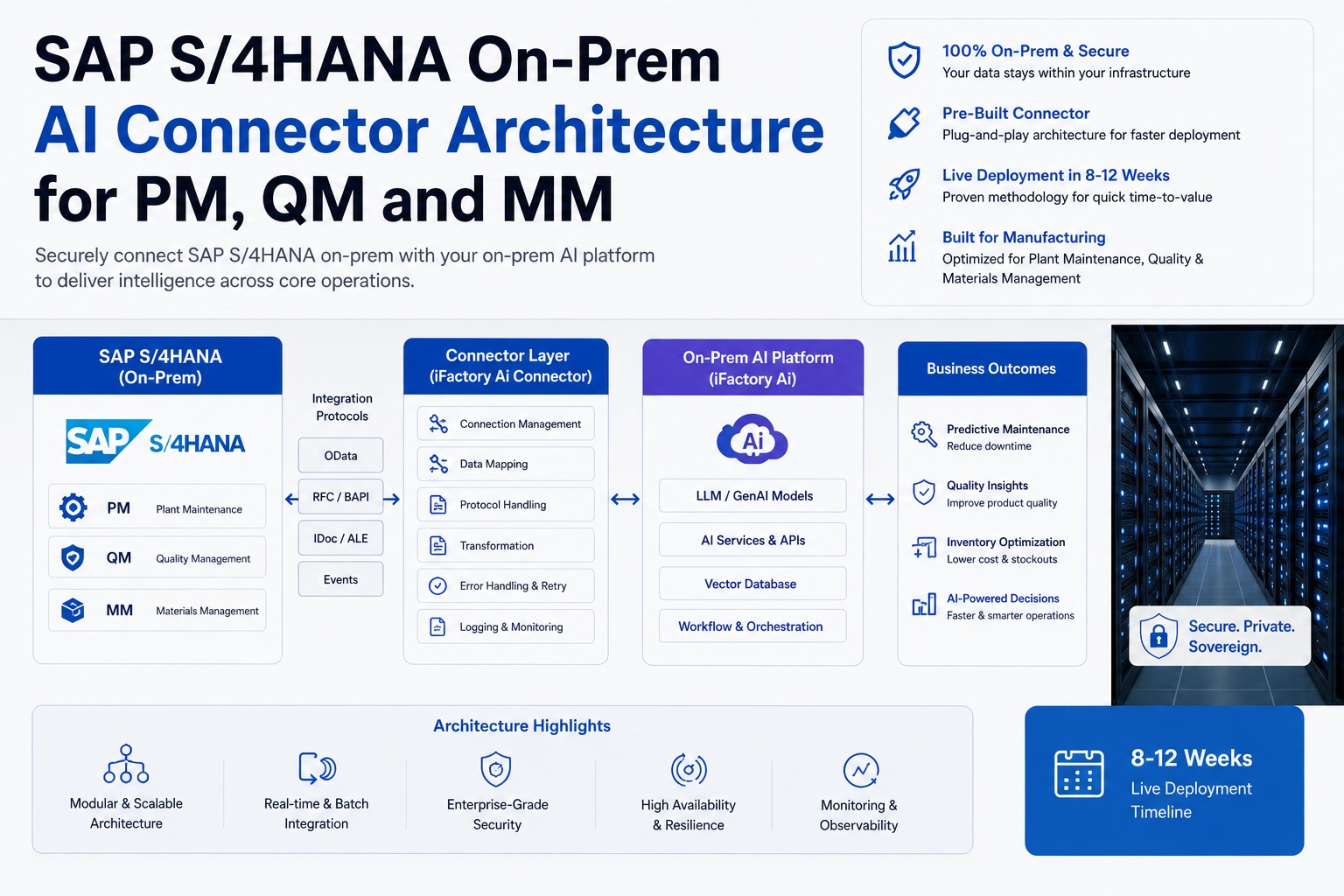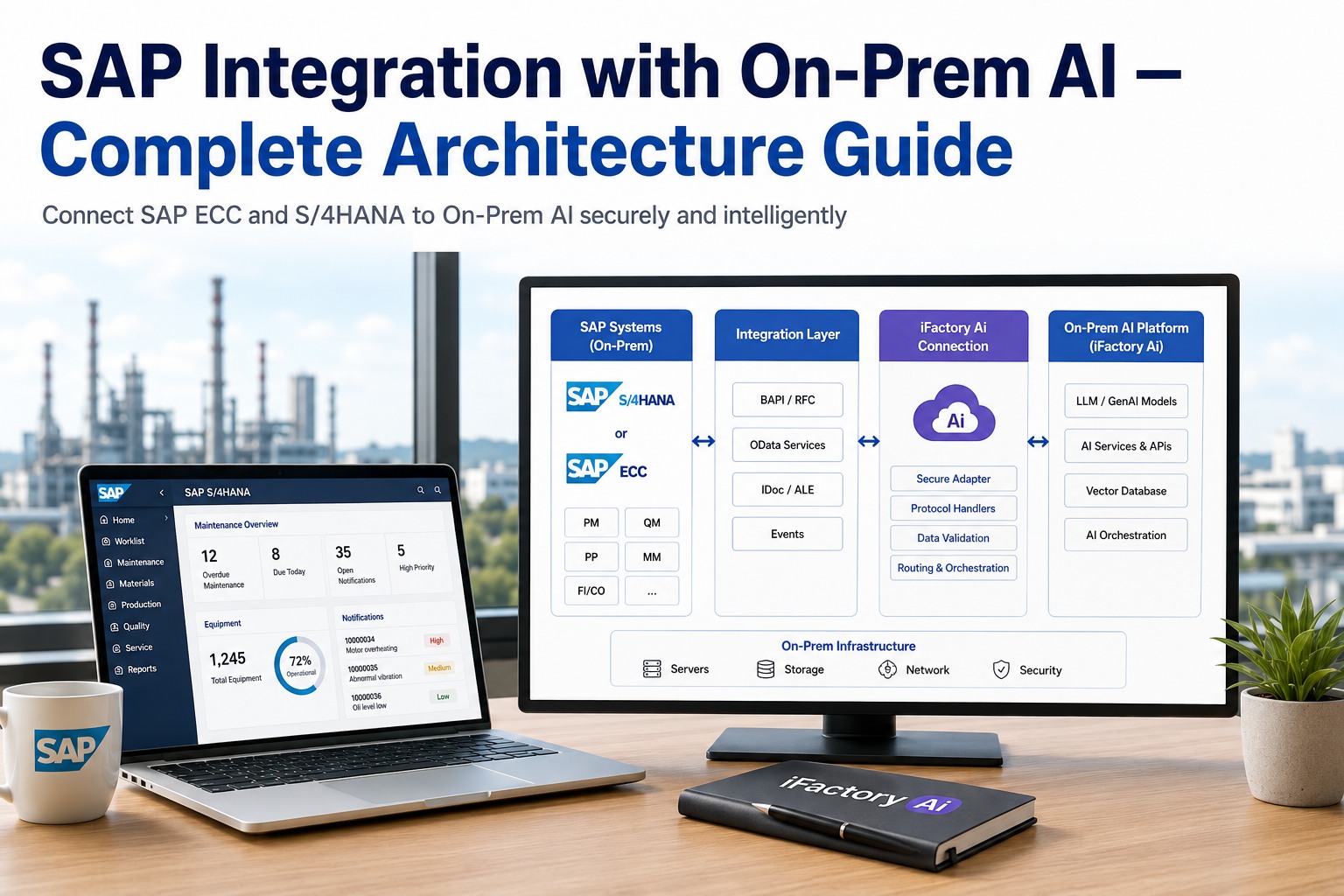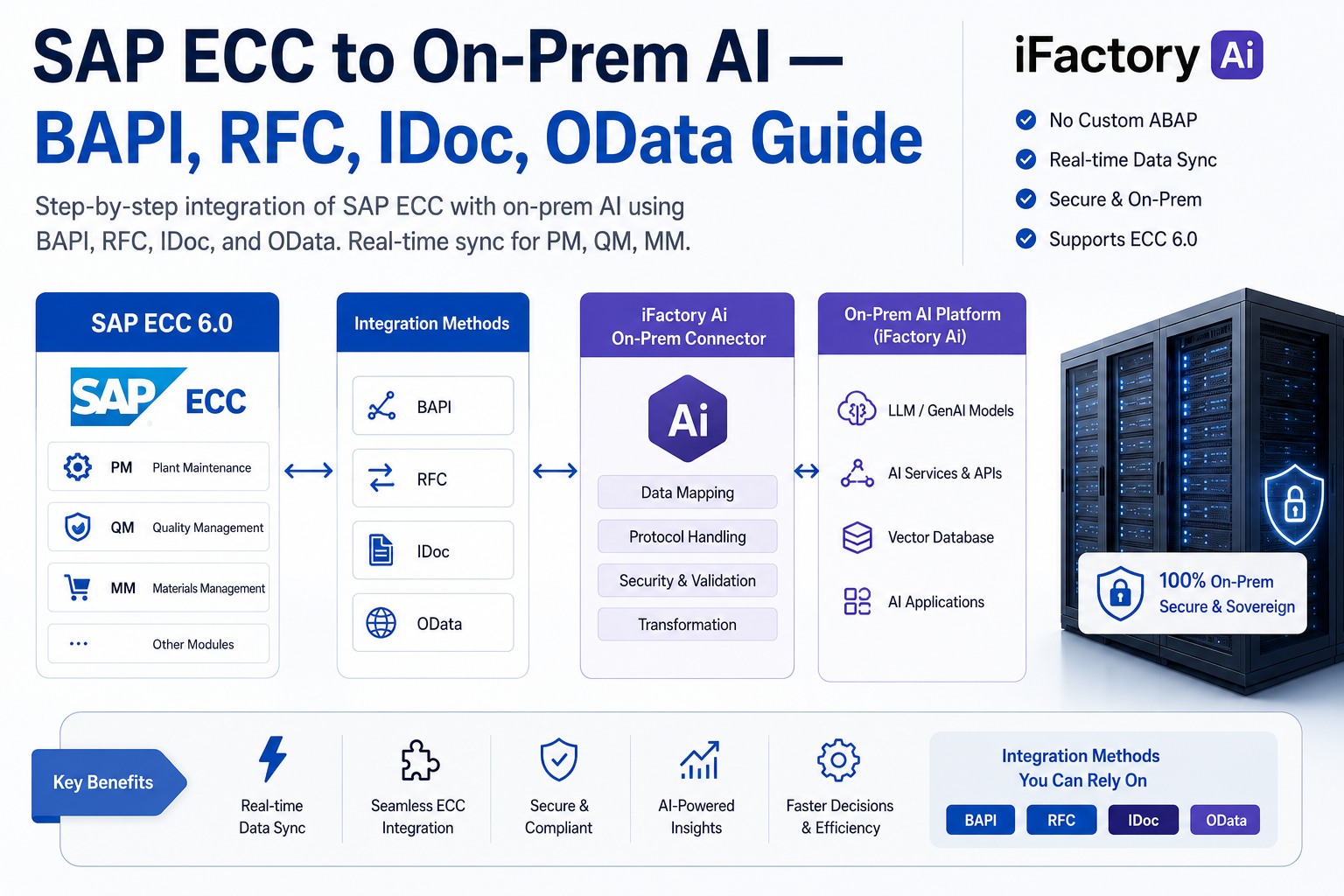
BAPI, RFC, IDoc, and OData are the four integration protocols that carry every transaction between SAP ECC and an on-prem AI brain. This deep-dive covers exactly when each one fits, how iFactory wires them under the hood, and the patterns that separate a clean integration from a brittle one. You'll see the modern bgRFC replacement for legacy tRFC/qRFC, the BAPI commit pattern that most teams get wrong on first try, IDoc message types for master and transactional data, and OData's place in mixed ECC plus S/4HANA landscapes. Every method shown is production-tested on SAP ECC 6.0 EHP4 through EHP8 — no custom ABAP, no middleware tax, no surprises at upgrade time.
SAP ECC to On-Prem AI Integration with BAPI, RFC, IDoc and OData
Four protocols. One on-prem AI brain. Zero custom ABAP. This is the working architect's guide to picking BAPI, RFC, IDoc, or OData for each data flow between SAP ECC and iFactory — sync vs async, real-time vs batch, master data vs transactions — with the bgRFC patterns that replace deprecated tRFC and qRFC.
What You Get — Turnkey ECC Integration
Pre-built connector library for all four protocols. Pre-configured for the eight common SAP modules. Pre-loaded NVIDIA AI server. One package, racked and shipped.
Connector Library
BAPI, sRFC, bgRFC, IDoc, and OData adapters — all pre-wired to the SAP ECC and S/4HANA on-prem stack.
Zero Custom ABAP
Standard SAP-released objects only. Your Basis team approves transports; no developer hours required.
Training
Basis admin, integration engineer, and AI operator playbooks — handed over with code-free runbooks.
Support
24×7 remote monitoring, SAP patch compatibility checks, and SLA-backed uptime on every protocol.
Why ECC Integration Needs All Four Protocols
SAP exposes different APIs through different protocols. Different data flows need different latencies. A real ECC-to-AI integration is not one method — it's a portfolio of four, chosen per use case. One-method shops force the wrong fit and pay for it in latency, lost transactions, or upgrade fragility.
The honest framing
BAPI and RFC are the workhorses for real-time writes — production confirmations, goods movements, work order creation. IDoc handles bulk and master data replication. OData is the modern, REST-based path for read-heavy copilot queries. Picking one for everything is the most common ECC integration mistake we fix on day one.
BAPI — Business Application Programming Interface
BAPIs are SAP's stable, business-object-oriented API layer built on top of RFC. They are the safest path for upgrade-stable, version-tolerant write operations into ECC. iFactory ships pre-configured BAPI calls for the most common shop-floor and warehouse transactions.
When to use BAPI
- Real-time writes — work orders, goods movements, confirmations
- Transactions that must survive an SAP upgrade unchanged
- Master data reads where you need full business-object context
- Scenarios where ABAP-level audit trails are required
Production-tested BAPIs in iFactory
- BAPI_GOODSMVT_CREATE — post inventory movement from sensor data
- BAPI_PRODORDCONF_CREATE_TT — production confirmation
- BAPI_EQUI_GETLIST — equipment master sync
- BAPI_PO_CREATE1 — auto-PO from predictive stock-out
- BAPI_MATERIAL_AVAILABILITY — real-time ATP check
- BAPI_ALM_NOTIF_CREATE — maintenance notification from PdM
The commit trap
Every BAPI write must be followed by BAPI_TRANSACTION_COMMIT or the data never persists. BAPI_TRANSACTION_ROLLBACK cannot undo a previous commit. iFactory's connector layer handles commit logic automatically — but if you write your own ABAP wrappers, this is the bug that takes down 80% of first-time BAPI integrations.
RFC — Remote Function Call (Use bgRFC, Not tRFC)
RFC is the transport protocol underneath BAPI. Five variants exist — but for any new integration today, the correct choice is almost always bgRFC. Legacy tRFC and qRFC are technically still functional but deprecated; bgRFC ships ~40% better throughput via parallel queue scheduling and is what iFactory uses by default.
iFactory's default RFC posture
sRFC for <1-second real-time lookups (material ATP, equipment master). bgRFC with parallel queues for everything else — production confirmations, batch movements, sensor-triggered transactions. Anti-pattern: sRFC inside a loop over thousands of records. Use bgRFC with parallel queues for that pattern — 40% faster and the dialog work processes stay free.
IDoc — Intermediate Document (Async & Batch)
IDocs are SAP's traditional format for structured, asynchronous, store-and-forward integration. They have been in production since 1979 on SAP R/2 — and they remain the right answer for bulk master data, end-of-shift batch postings, and any flow where eventual consistency is acceptable. iFactory uses IDocs through the ALE (Application Link Enabling) framework with the modern bgRFC transport underneath.
When to use IDoc
- Master data replication — material, equipment, customer, vendor
- Bulk transactional postings — shift-end production confirmations
- Decoupled, partner-system integrations
- Scenarios where you need ALE filtering and reduction
Common IDoc message types
- MATMAS — material master replication
- LOIPRO — production order (process & discrete)
- EQUIPMENT — equipment master to PM
- WBBDLD — sales conditions / pricing
- HRMD_A — HR master data
- ORDERS05 — sales orders
The IDoc reality on S/4HANA
SAP has reduced the number of IDoc message types available in S/4HANA versus ECC. SAP's Q2 2025 release of Clean Core Modernization Recommendations actively suggests OData API equivalents for many legacy IDocs. iFactory's posture is pragmatic — use IDoc where it still works cleanly on your version, OData where the equivalent exists, and never force a migration before it pays off.
OData — REST-based, JSON, Modern
OData (Open Data Protocol) is SAP's strategic API for the S/4HANA era. It's REST-based, returns JSON, and powers SAP Fiori behind the scenes. For ECC environments, OData support requires the Gateway component (SAP NetWeaver Gateway, released as standard from EHP6 onwards). iFactory uses OData for read-heavy copilot queries and modern dashboard refreshes where sub-second response time matters.
When to use OData
- Read-heavy operator copilot queries
- Real-time dashboards refreshing every few seconds
- External system integration where JSON is preferred
- Mixed ECC + S/4HANA landscapes where APIs need to feel native
When NOT to use OData
- Bulk batch processing — too chatty, prefer IDoc
- ECC versions below EHP6 without Gateway
- Transactions needing strict ALE-style error reprocessing
- High-frequency writes — BAPI via bgRFC is more efficient
Mixed-landscape pragma
If you run ECC today and are mid-migration to S/4HANA, the OData layer becomes more useful over time. iFactory's connector library detects the target system version and routes calls accordingly — same business logic, different transport per environment. No re-implementation when you cut over.
Which Method for Which Data Flow — A Working Architect's Cheat Sheet
Print this. Pin it on the integration team's wall. This is the matrix iFactory uses to map every ECC-to-AI data flow to its right protocol before a single transport gets approved.
| Data Flow | Volume | Latency | Recommended Method |
|---|---|---|---|
| Material ATP check | 1 record | <1 sec | sRFC + BAPI_MATERIAL_AVAILABILITY |
| Auto work order from PdM | 1 record | <5 sec | BAPI_ALM_NOTIF_CREATE via bgRFC |
| Production confirmation | 1–10 records | <3 sec | BAPI_PRODORDCONF_CREATE_TT |
| Shift-end goods movements | 1,000+ records | Batch | bgRFC parallel queues OR IDoc MBGMCR |
| Material master sync | 10,000+ records | Hourly | IDoc MATMAS with ALE filter |
| Operator copilot query | 1 record | <1 sec | OData (S/4HANA) · sRFC (ECC) |
| Dashboard refresh | 10–50 records | 5–30 sec | OData read with $batch |
| Equipment master replication | 1,000+ assets | Daily | IDoc EQUIPMENT |
| Sensor → auto-PO | 1 record | <10 sec | BAPI_PO_CREATE1 via bgRFC |
| QM result transfer | 50–500 records | Per inspection | BAPI_QPRS via bgRFC queue |
How iFactory Inherits SAP Authorization Objects
Every iFactory connection to ECC uses an SAP-issued service user with explicitly granted authorization objects. AI agents do not have a parallel access list — they inherit SAP roles directly. When a user's SAP role is changed or revoked, AI access reflects that change on the next session, enforced by SAP-issued tokens rather than a side-channel directory.
Service User Pattern
Dedicated CPIC user per integration scope. Locked to the iFactory server IP. No interactive login. SU01 audit trail enabled.
Authorization Objects
S_RFC for RFC calls, S_TCODE for transaction guarding, plus module-specific objects like I_BEGRP for PM, Q_TCODE for QM.
Audit Trail
Every AI-triggered SAP transaction logged in SM20 with timestamp, service user, AI action ID, and ABAP function called.
Role-Based AI
Operator sees only their plant. Supervisor sees their shift. Plant manager sees the full site. AI inherits whatever SAP gives the user.
Six Anti-Patterns We Refuse to Ship
Every one of these is a real-world ECC integration mistake we've inherited and rebuilt at customer sites. Avoiding them at design time saves weeks of go-live pain.
1. sRFC inside a tight loop
Calling BAPI_GOODSMVT_CREATE in a Python loop for 5,000 movements blocks 5,000 dialog work processes. Use bgRFC with a parallel queue and unit-of-work batching instead.
2. Missing BAPI_TRANSACTION_COMMIT
Calling a BAPI without a follow-up commit silently rolls back the work. AI predictions "succeed" but SAP shows nothing. Always commit on success; always rollback on RETURN-table errors.
3. tRFC for new integrations
tRFC and qRFC are deprecated. Every new integration should use bgRFC. Migrating off tRFC during go-live is painful and unnecessary if you start clean.
4. IDoc for real-time
IDocs are batch and asynchronous. Using them for sub-second operator queries adds 30+ seconds of latency for no benefit. OData or sRFC fit better.
5. Custom Z-BAPI wrappers
Wrapping released BAPIs in Z-functions breaks upgrade safety and adds maintenance debt. Use standard BAPIs directly; rely on iFactory's connector layer for orchestration.
6. One service user for everything
Single mega-user with SAP_ALL is the fastest route to a failed audit. Use scoped service users per integration domain — one for PM, one for QM, one for MM.
Operator Query → Four Protocols in One Answer
The example below shows the same operator chat call running through all four methods under the hood. The operator sees one bubble; iFactory orchestrates BAPI, RFC, IDoc cache, and OData in parallel to ground the answer.
· Inspection lot 100087421 closed with usage decision "Rejected" — pulled via BAPI_INSPLOT_USAGEDECISION
· Root cause: agitator #2 vibration trending high since 06:00 — sensor data crossed against SAP PM via bgRFC + BAPI_EQUI_GETLIST
· Equipment status now in "Maintenance Hold" — IDoc EQUIPMENT confirmed at 17:42
· Material master shows alternative formulation route — pulled via OData CDS view for fast lookup
8 to 12 Weeks From Kickoff to Live AI
The integration buildout follows the same three-phase deployment as every iFactory rollout. Phase 1 reads are live by week 4; pilot writes by week 8; full plant rollout by week 12.
- SAP service user provisioned, authorization objects approved
- sRFC + OData read paths wired for PM, QM, MM, PP
- IDoc inbound for master data replication (MATMAS, EQUIPMENT)
- Data fabric ingestion starts; AI models train on read-only feed
- BAPI write paths validated in SAP sandbox
- bgRFC parallel queues configured for production confirmations
- Pilot copilot live on one line — single-user, single-shift
- Auth chain verified end-to-end with SM20 audit traces
- BAPI write paths promoted to production via transport request
- Full plant rollout — all lines, all shifts, all eight modules
- 24×7 monitoring active on bgRFC queues and IDoc inbox
- SLA active, training delivered, handover complete
What Plants Measure After the Integration Goes Live
Numbers below come from plants running iFactory on top of SAP ECC 6.0 — every one of them using BAPI + bgRFC + IDoc + OData in the same connector layer.
See BAPI, RFC, IDoc and OData live at SAP Sapphire 2026
Watch the full integration stack run live against SAP ECC and S/4HANA — same connector layer, same on-prem AI brain, six industry tabs. Book a 20-minute walkthrough.
Frequently Asked Questions
Do I need to buy NVIDIA servers separately?
No. Fully-loaded NVIDIA DGX AI servers are supplied and installed as part of the iFactory package. They ship pre-racked, pre-cabled, with all NeMo, RAPIDS, NIM, and Agent Toolkit components pre-installed alongside the BAPI, RFC, IDoc, and OData connector library. You provide power and Ethernet. We provide the rest.
Does this work on SAP ECC 6.0 EHP4? We are on an older patch.
Yes. iFactory connectors are production-tested across SAP ECC 6.0 EHP4 through EHP8. The only constraint is OData — Gateway component is standard from EHP6 onwards; on EHP4 or EHP5 we use sRFC and BAPI for the same use cases, no OData required.
Should I migrate from tRFC to bgRFC before iFactory ships?
No. iFactory uses bgRFC from day one for its own connector layer regardless of what your existing custom integrations use. We do not require you to migrate legacy tRFC interfaces. We can flag your existing tRFC usage in the architecture review if you want a modernization plan.
How much custom ABAP does my team need to write?
None. All four methods use SAP-released objects — released BAPIs, standard IDoc message types, Gateway-published OData services, bgRFC infrastructure. Your Basis team approves the transport request that provisions the service user, the authorization role, and the bgRFC destination. No developer hours required.
What if a BAPI changes between SAP support packs?
SAP guarantees backward compatibility on released BAPIs across support pack levels and even most upgrades. The eight BAPIs iFactory uses by default have stable signatures across EHP4 through EHP8 and into S/4HANA. The one watch-out — S/4HANA extends material number length to 40 chars; iFactory's connector handles both lengths automatically.
Can iFactory run alongside SAP PI/PO if we already have it?
Yes. iFactory connects directly to ECC via RFC destination and Gateway services — it does not require PI/PO in the middle. If you have PI/PO doing other work, the two coexist. We typically do not recommend routing iFactory through PI/PO because it adds latency and an extra failure surface for no benefit.
What happens if SAP is down during AI predictions?
The AI continues running. iFactory's data fabric caches recent SAP transactions and master data locally. Predictions and recommendations stay live. Write-backs queue in bgRFC until SAP comes back, then drain automatically in original order. Nothing is lost; nothing is duplicated.
How are protocol failures monitored?
bgRFC queues monitored via SBGRFCCONF; IDoc inbox via WE02/WE05; OData via Gateway error log; BAPI via SM20 plus the RETURN table check in our connector layer. iFactory's own monitoring console aggregates all four into a single health view with alerts on backlog, error rate, and latency SLA breaches.
Stop Forcing One Protocol on Every Data Flow
iFactory ships all four methods pre-wired and pre-configured for SAP ECC and S/4HANA. You pick the use case; the connector picks the right protocol. Live in 8–12 weeks, with zero custom ABAP and zero middleware tax.