The machine that killed the maintenance worker did not fail. It started, exactly as designed, at the moment a coworker two floors away restored power to a circuit no one had physically locked. OSHA estimates that the lockout/tagout standard prevents roughly 120 fatalities and 50,000 injuries every year — and yet 1910.147 remains a top-five cited standard, with more than 2,100 citations in a single recent enforcement year. The gap between the written procedure sitting in a binder and the six locks actually hanging on the disconnect at 11:47 AM is exactly the gap AI vision was built to close. See continuous LOTO verification running on your own maintenance footage with a Book a Demo.
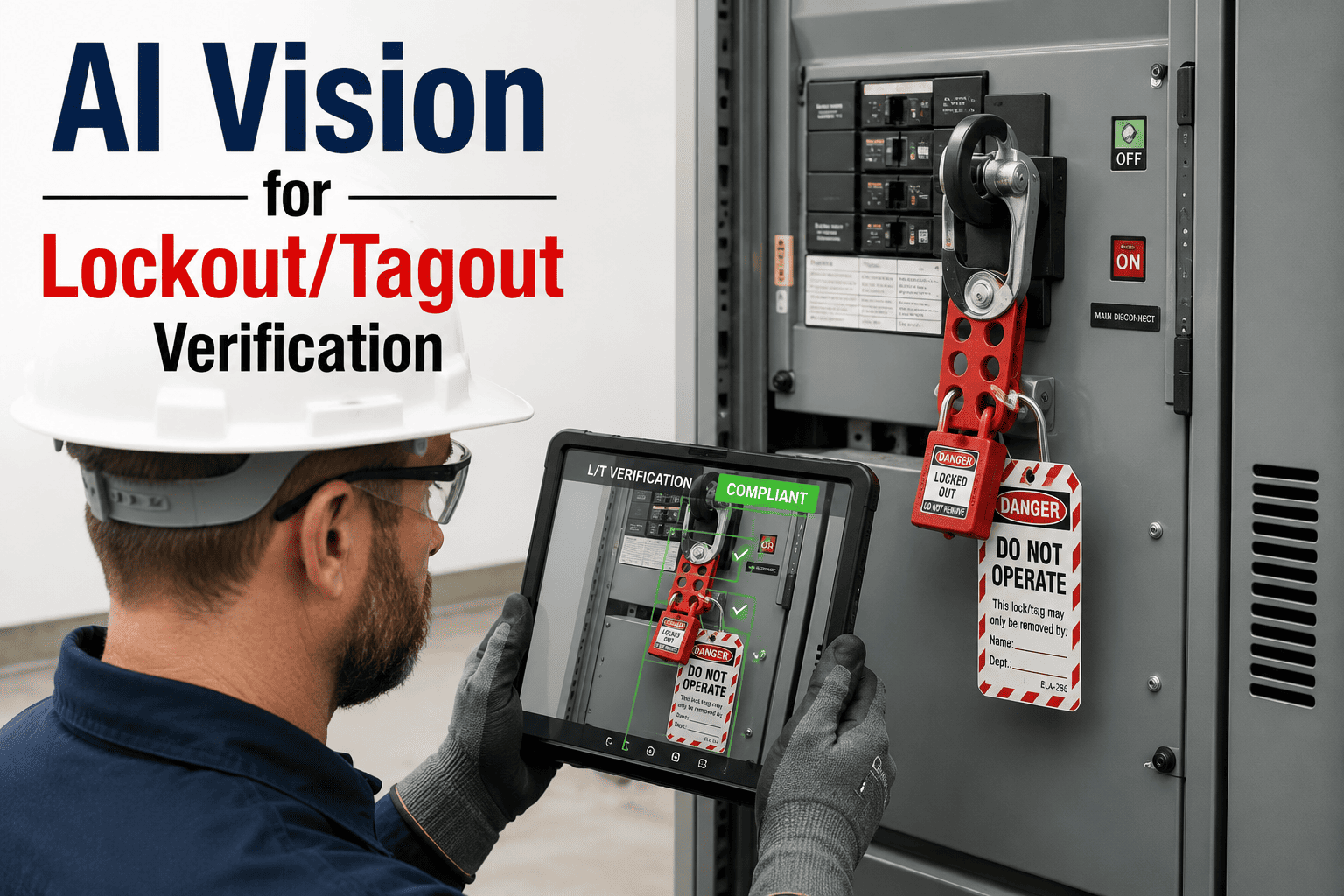
AI Vision for Lockout/Tagout Verification
Continuous camera confirmation that every energy isolation point is properly locked and tagged before maintenance begins — and that every lock is removed by the specific worker who applied it before energy is restored.
The Six Steps of Lockout/Tagout — And Where Each One Breaks Down
OSHA 1910.147(d) prescribes six steps that must happen in order before any authorized employee begins work on a machine with hazardous energy. Skipping steps or rearranging them is where nearly every LOTO fatality investigation eventually lands. AI vision verifies the visual signals for each step as it happens.
Preparation and Notification
Authorized employee reviews the machine-specific energy control procedure, identifies every energy source feeding the equipment, and notifies all affected workers that the machine is going down. Missing a secondary energy source is the single most common root cause of downstream injury.
Orderly Shutdown
Equipment brought to a complete stop using normal operating controls. Emergency stops are avoided for routine LOTO because they can introduce additional mechanical or hydraulic hazards during the shutdown itself.
Energy Isolation
Every energy-isolating device is physically operated — circuit breakers opened, valves closed, disconnects switched. A machine fed by three separate energy sources must have all three isolated, not just the primary one, before locks go on.
Lock and Tag Application
Each authorized employee applies their own personal lockout device and tag to each energy-isolating device. One lock per worker, no sharing, no exceptions. Group lockout uses a lockbox where each worker adds their individual lock to the group.
Stored Energy Release
Residual energy is bled, discharged, blocked, or restrained. Hydraulic pressure released, capacitors discharged, elevated components blocked, thermal systems cooled — cutting power alone does not eliminate energy already trapped in the machine.
Verification of Zero Energy State
The authorized employee attempts to start the machine using its normal controls to confirm it cannot energize, then returns controls to neutral. This is the single most commonly skipped step in LOTO — and one of the most frequently cited on inspection.
Every Isolation Point AI Vision Watches Falls Into One of These Categories
Machine-specific LOTO procedures must account for every energy type present. Missing an energy source — most often a secondary or stored one — is the failure mode behind a disproportionate share of LOTO fatalities.
Electrical
Line voltage from utility feed, control voltage, capacitor stored charge, and battery-backed circuits. Isolated at disconnects and circuit breakers.
Mechanical
Rotating shafts, flywheels, springs under tension, and moving parts that can drift under gravity. Isolated by pins, blocks, and physical restraints.
Hydraulic
Pressurized fluid holding cylinders, presses, and clamps. Isolated at supply valves and bled through relief points to atmospheric pressure.
Pneumatic
Compressed air lines feeding actuators, tools, and control systems. Isolated at supply valves with residual pressure released through vents.
Thermal
Steam lines, hot water systems, molten material, and hot process surfaces. Isolated at valves with cooling time required before intervention begins.
Chemical & Gravity
Process reagent lines, elevated tanks, suspended loads, and unstable equipment. Isolated by blanking, blocking, and stabilization measures.
Every Energy Source. Every Lock. Every Time.
See continuous AI verification of energy isolation on real maintenance footage from your own facility — before, during, and after the lockout window.
What the Binder Says vs. What Actually Happens at the Disconnect
On Paper
On the Floor
Five Visual Signals AI Vision Confirms at Every Isolation Point
The verification checks below are the ones that most commonly appear in fatality investigations as either present or missing. Each becomes a timestamped event in the maintenance record automatically.
Lock Present at Every Isolation Device
Detects a padlock or hasp on each disconnect, valve, or breaker identified for the specific machine being serviced.
Tag Present With Lock
Confirms a tagout device accompanies each lock at the isolation point, matching the 1910.147 dual-device requirement.
One Lock Per Authorized Worker
Counts locks on a hasp against the number of workers on the job, flagging shared-lock violations before work begins.
Verification Attempt Performed
Detects the physical act of returning to the control panel and attempting to start the machine before work begins.
Locks Removed by Original Applier
Confirms the same worker who applied a lock is present when it is removed at the end of the maintenance window.
LOTO Penalties Have Teeth — and Investigators Cite Per Instance
A single facility can accumulate multiple citations in one visit because OSHA cites per instance. One missing procedure, one untrained employee, and one uninspected machine are three separate violations. LOTO violations that cause amputations or fatalities open the door to maximum penalties and, in willful cases, criminal charges.
Where AI Vision Fits Into the Maintenance Cycle
The value of continuous verification is not just detecting missing locks — it is producing a maintenance record that ties each work order to a verified isolation event. Every phase below generates a documented compliance artifact automatically.
Work Order Opened
Maintenance work order triggers the vision system to prepare a LOTO verification window for the specified machine and its isolation points.
Isolation Verified
System confirms lock and tag presence at every mapped isolation device, counts locks against the number of authorized workers, and timestamps compliance.
Work In Progress
Continuous monitoring ensures no lock is removed or bypassed during the active maintenance window, and alerts on any anomaly in real time.
Release and Restore
Lock removal is verified against the specific applying worker, and the release event is logged as the closing artifact on the maintenance record.
Industries With the Highest LOTO Exposure
Manufacturing & Fabrication
Multi-machine environments where dozens of concurrent LOTO events happen daily across presses, mills, robots, and conveyors.
Food & Beverage Processing
CIP cycles, changeovers, and sanitation events layer LOTO on top of production pressure, where shortcuts cost the most.
Chemical & Petrochemical
Multi-energy isolation points on process vessels and reactors where missing a secondary source is catastrophic, not corrective.
Utilities & Power Generation
High-voltage equipment where Class E hard hats, dielectric gloves, and correct energy isolation all layer into a single lock-out event.
Metals, Mining & Cement
Heavy rotating equipment with stored mechanical energy and long spin-down times, where verification timing matters as much as sequence.
Automotive & Assembly
Robotic cells, weld lines, and press shops with high LOTO frequency and group lockout as the standard rather than the exception.
We had two near-miss investigations in a year that both came back to the same finding: the verification step was documented as complete on the permit, but there was no physical evidence anyone had tried to start the machine after the locks went on. That finding is now impossible on any lockout that runs under the AI camera. Every verification attempt is captured, every lock count is confirmed, and every release matches the applier. Our LOTO audit prep time went from two weeks to two hours.
Frequently Asked Questions
Q: Does AI vision replace physical LOTO devices or the written energy control program?
No. AI vision does not replace either the physical padlock and tag or the written 1910.147 energy control program — both remain fully required. What AI vision does is verify that the procedure is actually being executed as written, at every isolation point, on every maintenance event. The written program answers the question of what should happen. The camera answers the question of what did happen, with timestamped visual evidence that traditional inspection cycles cannot produce. Walk through the integration to your existing program with a Book a Demo.
Q: How does the camera actually detect the difference between a locked and unlocked isolation device?
The model is trained on the specific lockout hardware your facility uses — the padlock brands, hasp styles, tag colors, and mounting configurations at each isolation point. It confirms padlock presence, hasp closure, tag attachment, and, where the isolation device has a visible position indicator such as a disconnect handle or valve wheel, it confirms the device is in the isolated position. Configuration for your specific hardware is part of the initial calibration and typically covers each unique isolation-point type across the facility rather than each individual device.
Q: What happens if the LOTO device is in a location the camera cannot see, like inside a control cabinet?
Occluded isolation points are a known deployment consideration and are handled in one of three ways depending on your program. Additional cameras can be placed inside cabinet enclosures for high-consequence points. Cabinets can be photographed at the moment of lock application by the authorized employee as part of the workflow. Or the verification for that point can rely on the observable behavior around it — for example, verification that the worker returned to the control panel to attempt the start test. The deployment assessment identifies which method suits each isolation point in your facility.
Q: How does the system handle group lockout, where multiple workers apply locks to a shared lockbox?
Group lockout is fully supported and is one of the higher-value use cases because it is where lock-count violations most often occur. The system counts locks applied to the group lockbox against the number of authorized workers registered on the maintenance work order and flags any mismatch. At release time, it also verifies that each individual lock is removed by the specific worker who applied it rather than a supervisor performing a batch removal. Integration with your CMMS or work order system connects the worker roster to the lockbox counts. Reach out through Support Contact to review the group lockout configuration for your operation.
Q: How long does deployment take, and what site preparation is required?
Standard turnkey deployment runs six to twelve weeks for a facility with multiple LOTO points, and a focused pilot on one production line can go live in as little as six weeks. Site preparation includes an initial survey to map every isolation point covered by written procedures, camera placement planning, edge server installation, integration with your existing CMMS if applicable, calibration on your specific lockout hardware, and training for maintenance supervisors and safety staff on the alert workflow. Meaningful compliance data is available within the first two weeks of live operation.
Add a Second Layer to Every Lockout Event
See AI vision running against real maintenance footage — every lock counted, every verification attempt captured, every release matched to the applier.