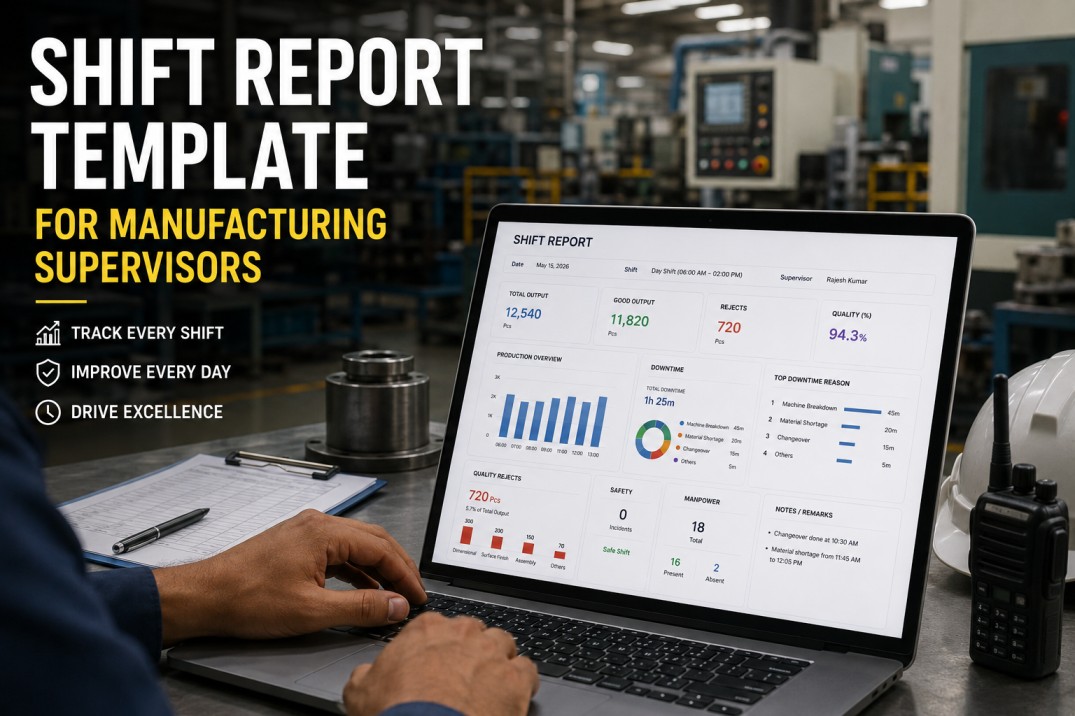
A shift report template is the operational handover document that transfers production state, equipment status, quality findings, and open actions from one shift team to the next. Its purpose is not primarily record-keeping — it is continuity. The incoming supervisor must be able to read the outgoing shift report and know within two minutes: what was produced, what went wrong, what is currently unresolved, and what requires immediate attention when the new shift begins. A shift report that requires the incoming supervisor to ask questions to understand the current production state is a shift report that has failed at its primary function. This page provides a complete shift report template with every section, field definition, and completion standard for manufacturing operations running multi-shift production.
Shift Reports Auto-Generated Every Shift — No End-of-Shift Work
iFactory builds the shift report from live machine data and distributes it to incoming supervisor and management the moment sign-off completes.
Shift Report Template — Completed Example
The example below shows a complete day shift report with production output, quality, downtime events, and handover actions. The three-panel layout covers production performance (left), quality and downtime (centre), and the downtime event log (right), with the handover actions block below showing priority-coded actions for the incoming shift.
Shift Report Header — Identification and Accountability
The shift report header establishes which shift, which line, which supervisor, and which time period the report covers. Consistent header formatting enables electronic sorting and retrieval — a shift report from six months ago must be findable by date, shift, and line without manual searching. The supervisor sign-off on the header establishes accountability: this person validates every piece of information in the report and is the primary reference if any figure is disputed.
Shift Date and Number
Date in consistent format and shift designation — Day/Afternoon/Night or Shift 1/2/3 depending on plant convention. Consistent format enables search and trend analysis.
Shift Start and End Time
Exact start and end times of the shift. Required for downtime duration calculations and for overtime boundary identification.
Production Line and Area
Line name or number and production area. The same line must always appear with the same identifier — inconsistent naming prevents report search and trend analysis.
Supervisor ID
Full name and employee ID of the shift supervisor. This is the person who owns the accuracy of every figure in the report.
Headcount
Planned vs. actual operators on the shift. Any staffing shortfall noted with reason — absent, transferred, or role unfilled. Staffing shortfalls often directly explain schedule attainment misses.
Production Orders Active
All work order or production order numbers active during this shift. Links shift output to ERP production orders for WIP traceability and cost accounting.
Output, Schedule Performance, and OEE
The output section of a shift report answers the most fundamental production question: did the shift produce what was planned? Target output, actual output, schedule attainment percentage, and the root cause of any shortfall must all be present. A shift report that records only "actual output: 847 units" without the target and the reason for any gap between target and actual provides no actionable information. The shift report output section is also the source data for the daily production summary and the OEE availability and performance inputs.
Target Output
Production schedule quantity for the shift — from the planning system, not estimated. If multiple products, target per product.
Actual Good Output
Units produced and confirmed good — excluding scrap and rework. This is the number that counts toward the production order.
Schedule Attainment
Actual good / target × 100. Calculated every shift. Any value below 95% requires a documented cause.
Shortfall Root Cause
If schedule attainment is below 100%, the specific cause — unplanned downtime, material shortage, quality hold, staffing — must be noted. "Production issue" is not a root cause.
OEE Reference
OEE for the shift — calculated from production data and linked to the OEE report, or summarised as Availability / Performance / Quality components in the shift report.
Cumulative vs. Plan
Running production order fulfillment: units produced to date on each active order vs. the order quantity and required delivery date. Flags orders at risk of missing their delivery date.
Downtime and Equipment Events
Every downtime event that occurred during the shift must appear in the shift report — not only those that exceeded an arbitrary duration threshold and not only those that required maintenance intervention. A three-minute jam that recurred seven times in a shift consumed more production time than a single 15-minute breakdown and is a far more important signal for improvement. The downtime section of the shift report is the primary diagnostic tool the incoming supervisor uses to assess equipment status and prepare the shift they are about to run.
Shift reports that record only the longest downtime event — or only events that required a maintenance call — hide the minor stoppages and short recurring jams that in aggregate often exceed the single long downtime in total lost production time. List every event above the defined minimum threshold with a start time, end time, and cause.
Any equipment condition that was not resolved by the end of the shift must be explicitly flagged in the handover section — not buried in the downtime list. The incoming supervisor must be able to immediately identify: this machine has an unresolved issue that may affect the start of the next shift.
Changeover duration is a separate category from unplanned breakdown time. A 45-minute changeover is planned; a 45-minute spindle fault is not. They require different management responses and different improvement paths. Recording them in separate fields is the minimum required for accurate OEE and for meaningful SMED improvement analysis.
Any maintenance intervention during the shift — planned or reactive — should reference the work order number in the shift report. This links the shift report to the maintenance record and prevents the same fault from being investigated twice when the next shift supervisor asks "what did maintenance do?"
Shift Handover — The Most Critical Section
The handover section is the most important part of the shift report and the most consistently incomplete. It must answer the incoming supervisor's three essential questions: what is currently in an abnormal state (equipment, quality, material), what actions from the previous shift are still open and require follow-through, and what does the incoming supervisor need to do in the first 30 minutes of the shift? A shift report that does not answer these three questions has not completed its primary function — ensuring production continuity without information loss at the shift boundary.
Current state of every line: running normally, on hold, or has an open condition. Any machine that had a downtime event in the last two hours of the shift has its status explicitly noted — resolved or still monitoring.
Any active quality holds, any lots under investigation, any customer calls or NCRs opened during the shift. The incoming quality team must know immediately what quality events are pending action.
Each open action from the previous shift report reviewed and status updated: closed, in progress with current status, or escalated. Incoming supervisor explicitly confirms awareness.
Actions generated by this shift that require follow-through by the next shift — maintenance work order follow-up, quality hold disposition, customer communication. Each has a named owner and priority.
The outgoing supervisor verbally confirms handover with the incoming supervisor — not just leaves the report on the desk. The shift report is documentation of the handover, not a substitute for it. iFactory confirms verbal handover completion with a digital sign-off step for both supervisors.
Replace Paper Handovers With Auto-Generated Digital Shift Reports
iFactory assembles the shift report from live data and auto-distributes the formatted handover document to the incoming team on sign-off.
Shift Report Completion Checklist — 25 Items
Use this checklist to verify shift report completeness before supervisor sign-off. Every item in the High priority rows must be present on every shift report before it is accepted by the production manager.
| # | Checklist Item | Type | Priority | Photo | Required | Critical |
|---|---|---|---|---|---|---|
| 1 | Shift date, shift number/name, start and end times recorded | Pass/Fail | High | — | ✓ | ✓ |
| 2 | Production line(s) and area covered by report clearly identified | Pass/Fail | High | — | ✓ | ✓ |
| 3 | Supervisor name, ID, and sign-off present on completed report | Pass/Fail | High | — | ✓ | ✓ |
| 4 | Headcount: planned vs. actual operators — any staffing shortfall noted | Numeric | Med | — | ✓ | — |
| # | Checklist Item | Type | Priority | Photo | Required | Critical |
|---|---|---|---|---|---|---|
| 5 | Target output and actual output recorded per production order | Numeric | High | — | ✓ | ✓ |
| 6 | Schedule attainment % calculated and recorded | Numeric | High | — | ✓ | ✓ |
| 7 | OEE for shift recorded or linked to OEE report | Pass/Fail | High | — | ✓ | ✓ |
| 8 | Reason for any shortfall documented — specific, not blank or "machine issue" | Text | High | — | ✓ | ✓ |
| 9 | Material usage or consumption noted if relevant to shift | Pass/Fail | Med | — | ✓ | — |
| # | Checklist Item | Type | Priority | Photo | Required | Critical |
|---|---|---|---|---|---|---|
| 10 | All unplanned downtime events listed with time, duration, equipment, and cause | Pass/Fail | High | — | ✓ | ✓ |
| 11 | Total unplanned downtime for shift summed and recorded in minutes | Numeric | High | — | ✓ | ✓ |
| 12 | Changeover duration recorded separately per product changeover | Numeric | High | — | ✓ | ✓ |
| 13 | Maintenance actions taken during shift noted — work order numbers referenced | Pass/Fail | Med | — | ✓ | — |
| 14 | Any unresolved equipment issues carried to next shift explicitly flagged | Pass/Fail | High | — | ✓ | ✓ |
| # | Checklist Item | Type | Priority | Photo | Required | Critical |
|---|---|---|---|---|---|---|
| 15 | Scrap units recorded by part and reason code | Numeric | High | — | ✓ | ✓ |
| 16 | Rework count recorded separately — outcome noted (accepted / scrapped) | Numeric | High | — | ✓ | ✓ |
| 17 | Any NCR raised during shift — NCR number referenced in shift report | Pass/Fail | High | — | ✓ | ✓ |
| 18 | Safety incidents or near misses documented — or explicitly noted as none | Pass/Fail | High | — | ✓ | ✓ |
| 19 | Any quality or safety escalation during shift noted with action taken | Pass/Fail | High | — | ✓ | ✓ |
| # | Checklist Item | Type | Priority | Photo | Required | Critical |
|---|---|---|---|---|---|---|
| 20 | Status of previous shift open actions updated — closed / in progress / escalated | Pass/Fail | High | — | ✓ | ✓ |
| 21 | New open actions listed with owner name and priority level | Text | High | — | ✓ | ✓ |
| 22 | Maintenance items for incoming shift noted — equipment status, pending work orders | Pass/Fail | High | — | ✓ | ✓ |
| 23 | Material or supply items for incoming shift noted — shortages, pending deliveries | Pass/Fail | Med | — | ✓ | — |
| 24 | Verbal handover between outgoing and incoming supervisor completed and confirmed | Pass/Fail | High | — | ✓ | ✓ |
| 25 | Report submitted to production manager and maintenance by end of shift | Pass/Fail | Med | — | ✓ | — |
Frequently Asked Questions
What is a shift report in manufacturing?
A shift report is the operational record of a production shift — documenting what was produced, what equipment events occurred, what quality findings were made, what safety events happened, and what actions are open for the next shift. Its primary function is shift handover: ensuring the incoming supervisor has complete operational context when they begin their shift. Secondary functions include performance tracking, incident documentation, and the data source for daily production summaries and OEE reports.
What is the difference between a shift report and a production report?
A shift report is primarily a handover document — its structure emphasises open actions, equipment status, and continuity information for the incoming supervisor. A production report is primarily a performance document — its structure emphasises output, schedule attainment, OEE, and downtime analysis. In practice many organisations combine both functions into a single document. iFactory generates both views from the same live data source, with the shift report emphasising handover status and the production report emphasising performance metrics.
How should a shift handover be structured?
An effective shift handover covers five areas in order: (1) equipment status — any machine in an abnormal state or with an unresolved condition; (2) quality status — any active holds, open NCRs, or quality trends requiring attention; (3) open actions — each open action from the previous shift reviewed and confirmed by the incoming supervisor; (4) new actions — actions generated this shift requiring incoming-shift follow-through; (5) schedule status — current position against the production order and any at-risk delivery dates. The verbal handover confirms all five areas; the shift report documents them. Book a Demo to see iFactory's digital handover workflow.
How often should shift reports be completed?
Shift reports must be completed at the end of every shift, without exception. In a 24/7 three-shift operation, this means three shift reports per day per production line. Shift reports completed after the fact — the next morning based on memory or a brief supervisor conversation — are significantly less accurate than reports completed while the data is current. iFactory generates the shift report automatically from live data during the shift, so there is no end-of-shift completion workload and no accuracy degradation from delayed entry.
How does iFactory automate shift report generation?
iFactory builds the shift report in real time during the shift from live production data — machine counter output against the schedule target, timestamped downtime events with reason codes, inspection results for quality data, and any safety event records entered during the shift. When the supervisor initiates sign-off, the shift report is already complete. The supervisor reviews the auto-assembled report, adds any handover notes or open actions, and signs off. iFactory immediately distributes the report to the incoming supervisor and configured management recipients. Book a Demo to see the shift report automation.
Every Shift Report Auto-Generated — No Manual Entry Required
iFactory builds the shift report from live data, generates it on sign-off, and distributes it before the shift change completes — always complete, always on time.