Manufacturing generates enormous volumes of data every second—from production rates and quality metrics to equipment performance and supply chain status. Traditional approaches required executives to wade through spreadsheets, wait for periodic reports, or request custom analyses from IT teams. Data visualization changes this paradigm entirely.
How Visual Analytics Simplifies Manufacturing Complexity
Modern manufacturing operations involve thousands of variables across multiple facilities, production lines, and supply chains. Visual analytics transforms this complexity into clarity by presenting information in formats the human brain processes naturally—patterns, colors, trends and spatial relationships that communicate meaning instantly.
Real-Time Operations View
Live dashboards showing production status, equipment health, and quality metrics across all facilities simultaneously.
Trend Analysis & Patterns
Visual timelines revealing performance trends, seasonal patterns, and early warning indicators before problems escalate.
Comparative Performance
Side-by-side facility comparisons, benchmark visualizations, and gap analysis highlighting improvement opportunities.
Exception-Based Alerts
Color-coded indicators and automated alerts drawing attention to metrics requiring executive action.
8 Key Benefits of Data Visualization for Manufacturing Executives
5x Faster Decisions
Minutes vs. Hours
Visual information processing is 60,000x faster than text. Executives grasp situations instantly rather than reading reports.
Real-Time Visibility
Live vs. Historical
See operations as they happen across all facilities, enabling proactive intervention before issues impact performance.
Pattern Recognition
Hidden Insights Revealed
Visual displays reveal correlations, trends, and anomalies invisible in spreadsheets and tabular reports.
Improved Communication
Shared Understanding
Dashboards create common language for discussions, ensuring all stakeholders see the same picture.
Reduced Information Overload
Signal from Noise
Well-designed visualizations filter complexity, presenting only what matters for executive decisions.
Better Resource Allocation
Data-Driven Priorities
Clear visibility into performance gaps guides investment decisions and improvement priorities.
Increased Accountability
Transparent Performance
Shared dashboards create visibility that drives ownership and accountability at all levels.
Mobile Access
Anywhere, Anytime
Monitor operations from anywhere via smartphone or tablet, staying connected while traveling.
Comparison: Traditional Reports vs. Visual Dashboards
| Factor | Traditional Reports | Visual Dashboards |
|---|---|---|
| Information Delivery | Weekly/monthly reports, often delayed | Real-time, continuously updated |
| Time to Insight | 30-60 minutes to review report | 10-30 seconds to scan dashboard |
| Decision Speed | Hours to days | Minutes (5x faster) |
| Pattern Detection | Requires manual analysis | Automatic visual patterns |
| Cross-Facility View | Separate reports, hard to compare | Unified view, instant comparison |
| Drill-Down Capability | Request additional reports | Click to explore details |
| Mobile Access | PDFs, difficult on small screens | Responsive, touch-optimized |
| Alert Capability | None—passive documents | Proactive notifications and alerts |
| Collaboration | Email attachments, version confusion | Shared live view, annotations |
| Cost per Insight | High (analyst time, delays) | Low (automated, self-service) |
5 Essential Executive Dashboard Types
Operations Overview Dashboard
Bird's-eye view of entire manufacturing operations across all facilities in a single screen.
Key Metrics Displayed:
- Overall Equipment Effectiveness (OEE)
- Production output vs. targets
- Quality rates and defect trends
- Equipment status (running/down/idle)
- Facility-by-facility comparison
Financial Performance Dashboard
Real-time financial metrics connecting operational performance to business outcomes.
Key Metrics Displayed:
- Cost per unit produced
- Margin analysis by product line
- Labor cost efficiency
- Energy consumption and costs
- Inventory valuation and turns
Quality & Compliance Dashboard
Track quality metrics, compliance status, and risk indicators across operations.
Key Metrics Displayed:
- First-pass yield rates
- Customer complaints and returns
- Audit findings and CAPA status
- Regulatory compliance indicators
- Supplier quality scores
Supply Chain Visibility Dashboard
End-to-end supply chain monitoring from suppliers through delivery to customers.
Key Metrics Displayed:
- Supplier performance and risk
- Inventory levels and aging
- Order fulfillment rates
- Logistics and delivery status
- Demand forecast accuracy
Predictive Maintenance Dashboard
Equipment health monitoring with predictive analytics for proactive maintenance decisions.
Key Metrics Displayed:
- Equipment health scores
- Predicted failure timelines
- Maintenance backlog status
- Spare parts inventory
- Maintenance cost trends
Executive KPI Framework: The 15 Metrics That Matter
Not all metrics belong on an executive dashboard. Focus on the vital few that drive strategic decisions. Here's the framework leading manufacturers use:
Production Performance
Quality Metrics
Financial Indicators
Equipment & Maintenance
Safety & Sustainability
4-Phase Implementation Guide
Discovery & KPI Definition
- Interview executives to understand decision-making needs
- Identify top 10-15 KPIs aligned with strategic priorities
- Map data sources for each required metric
- Assess data quality and availability gaps
- Define dashboard hierarchy (enterprise → facility → line)
Data Integration & Architecture
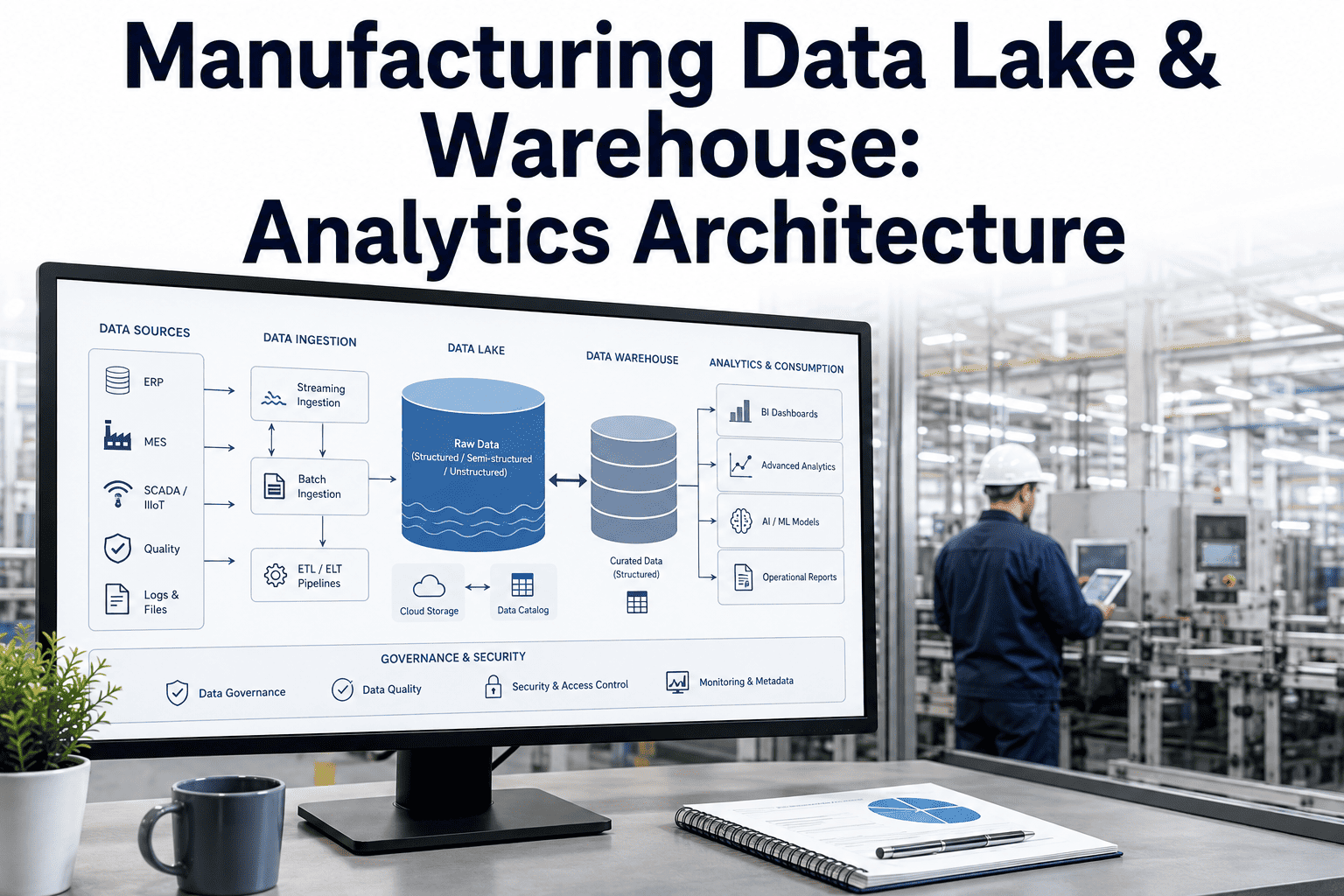
- Connect data sources (ERP, MES, SCADA, quality systems)
- Establish data warehouse or lake for unified storage
- Implement data quality rules and validation
- Create calculated metrics and KPI formulas
- Set up automated data refresh schedules
Dashboard Design & Development
- Design dashboard layouts following visualization best practices
- Build executive summary dashboard
- Create drill-down views for detailed analysis
- Configure mobile-responsive displays
- Implement alerting and notification rules
Deployment & Adoption
- Conduct executive training on dashboard interpretation
- Define decision triggers and action protocols
- Roll out to leadership team with support
- Gather feedback and iterate on designs
- Establish governance for ongoing improvements
ROI Calculator: Estimate Your Value
Executive Dashboard Value Formula
Value Components:
Example Calculations by Company Size:
Want a customized ROI analysis for your organization?
Get Custom ROI AnalysisCase Studies: Executive Dashboard Success Stories
Global Auto Parts Manufacturer: CEO Dashboard Transformation
Challenge
CEO received weekly PDF reports from 8 facilities taking 4+ hours to review. By the time decisions were made, data was already outdated. No ability to drill into issues or compare facilities easily.
Results After 6 Months
CPG Company: Plant Manager Performance Visibility
Challenge
COO couldn't compare performance across 12 plants consistently. Each facility reported different metrics in different formats. Performance gaps went unaddressed for months.
Results After 12 Months
Equipment Manufacturer: Board-Level Reporting Transformation
Challenge
Finance team spent 80+ hours preparing monthly board reports. Data inconsistencies between departments created credibility issues. Board members asked for drill-downs that took weeks to produce.
Results After 9 Months
Implementation Checklist: 20 Essential Steps
Planning (Steps 1-5)
Data Foundation (Steps 6-10)
Dashboard Build (Steps 11-15)
Deployment (Steps 16-20)
Dashboard Design Best Practices for Executives
5-Second Rule
Executives should grasp the overall status within 5 seconds of viewing. If it takes longer, simplify the design.
Limit to 7±2 Metrics
Human working memory holds 5-9 items. Keep each dashboard view focused on the vital few metrics.
Use Traffic Light Colors
Green/yellow/red coding provides instant status recognition. Reserve red for items requiring action.
Show Trends, Not Just Numbers
A sparkline or trend arrow tells more than a single value. Context is essential for interpretation.
Compare to Targets
Every metric should show actual vs. target/plan. Without context, numbers are meaningless.
Enable Drill-Down
Executives will ask "why?" Provide one-click access to underlying details and root causes.
Mobile-First Design
Executives check dashboards while traveling. Ensure critical views work on smartphone screens.
Consistent Layout
Use same position for same metrics across all dashboards. Familiarity speeds comprehension.
Transform Your Executive Decision-Making with Visual Analytics
Join leading manufacturers who have moved from weekly reports to real-time visibility. See how iFactoryApp delivers executive dashboards that drive faster, better decisions.
Book a Demo Contact SupportFrequently Asked Questions
What is industrial data visualization?
Industrial data visualization transforms complex manufacturing data into intuitive visual formats like dashboards, charts, graphs, and real-time displays. It enables executives to understand operations instantly—seeing patterns, trends, and exceptions that would take hours to find in traditional reports. The goal is turning data into actionable insights that drive faster, better decisions.
How much faster can executives make decisions with visual dashboards?
Research shows executives using visual analytics make decisions 5x faster than those relying on traditional reports. This acceleration comes from the human brain's ability to process visual information 60,000x faster than text. Additionally real-time dashboards eliminate the delays of waiting for report generation, further compressing decision cycles from days to minutes.
What ROI can manufacturers expect from executive dashboards?
ROI varies by company size but typically ranges from $420K-$4.5M annually. Value comes from faster decisions (35%), reduced downtime through early detection (25%), quality improvements (20%), analyst productivity gains (15%), and meeting efficiency (5%). Most organizations achieve positive ROI within 6-12 months of deployment. Mid-size manufacturers ($200M revenue) typically see $1.2M-$2.1M in annual value.
What KPIs should be on an executive manufacturing dashboard?
Focus on 10-15 metrics across five categories: Production (OEE, output vs. plan, throughput), Quality (first pass yield, defect rate, customer complaints), Financial (cost per unit, margin, inventory turns), Equipment (unplanned downtime, MTBF, maintenance costs), and Safety/Sustainability (incident rate, energy per unit, emissions). Avoid the temptation to include too many metrics—the vital few beat the trivial many.
How long does it take to implement executive dashboards?
A typical implementation takes 12-16 weeks across four phases: Discovery and KPI definition (weeks 1-3), Data integration (weeks 4-8), Dashboard design and development (weeks 9-12), and Deployment with training (weeks 13-16). Organizations with mature data infrastructure can accelerate this timeline, while those requiring significant data integration may need additional time.
What data sources need to be connected for manufacturing dashboards?
Core sources include ERP systems (SAP, Oracle) for financial and inventory data, MES for production metrics, SCADA/historian for equipment data, quality management systems, and maintenance management systems. Additional sources may include HR systems for safety metrics, supply chain platforms, and IoT sensors. iFactoryApp provides pre-built connectors for common manufacturing systems.
How do you ensure executives actually use the dashboards?
Adoption requires three elements: Executive involvement in KPI selection (ensuring relevance), training on interpretation and action triggers (building confidence), and integration into existing routines like staff meetings and reviews (creating habits). Start with the metrics executives already ask about, deliver mobile access for convenience, and demonstrate quick wins that prove value within the first month.
Can dashboards work for executives who aren't technical?
Absolutely—that's the entire point. Well-designed executive dashboards require zero technical knowledge. Traffic light colors indicate status instantly. Trends show direction without requiring analysis. Drill-downs are one-click. The best dashboards are so intuitive that executives start using them within minutes of their first exposure. If training takes more than 30 minutes, the design needs simplification.
Start Your Data Visualization Journey Today
Manufacturing executives who embrace visual analytics gain a decisive advantage: the ability to see, understand, and act on operational reality in real-time while competitors wait for weekly reports. The technology is proven, the ROI is clear, and implementation timelines are measured in weeks, not years.
iFactoryApp provides the complete platform for executive data visualization—connecting your manufacturing systems, transforming data into insights, and delivering intuitive dashboards accessible from any device. Our manufacturing-specific approach means faster implementation and dashboards designed for how manufacturing executives actually make decisions.
Take the first step: Schedule a demo to see how leading manufacturers have transformed their executive decision-making with visual analytics. We'll show you examples relevant to your industry and discuss a roadmap for your organization.
See Executive Dashboards in Action
Request a personalized demo showing how iFactoryApp delivers real-time visibility, intuitive analytics, and actionable insights for manufacturing executives.
Book a Demo Contact Support