Most plants that move EHS off spreadsheets don't fail on the software. They fail on the move: incident history that won't map, OSHA logs split across files and supervisors who keep their own sheets "just in case". Add AI vision for PPE and zones, and the rollout needs one plan for data, people and cameras. This roadmap covers the 12 weeks. Map it to your own site in an EHS rollout briefing.
EHS ROLLOUT · 12-WEEK TURNKEY PLAN
From Spreadsheets to a Live EHS and AI Vision Platform in 12 Weeks
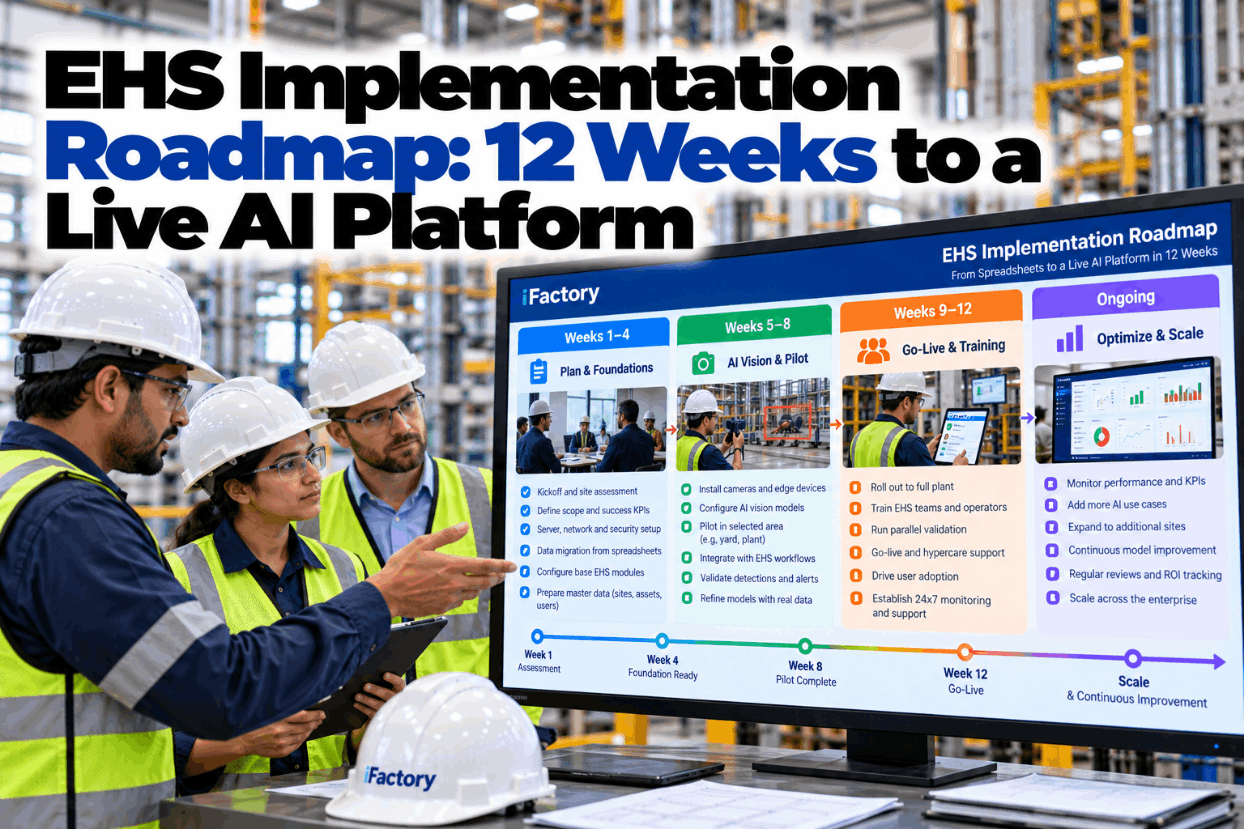
The iFactory 12-Week Turnkey Rollout puts the server, network and data in place in weeks 1 to 4, tunes AI vision models in a pilot area in weeks 5 to 8, and goes live with training and 24x7 monitoring in weeks 9 to 12.
Rollout tracker · Plant 1Week 6 of 12
Server, network and dataDone
AI vision pilot · Dock 3Shadow mode
Go-live, training, 24x7From week 9
Incident history ✓OSHA 300 logs ✓Training records ✓SDS library ✓Open permits · week 11
EHS SOFTWARE ROLLOUT
What Changes When the Spreadsheets Go
Spreadsheets are flexible, which is exactly the problem. Every site has its own version, and nothing stops a cell being overwritten. A platform gives you one record per event, one owner per action and a history of every change. List what you are moving away from, because each line becomes a test at go-live. Check your own list with our EHS specialists.
TodayIncident log in one workbook per site, emailed at month end
›
After go-liveOne incident record per event, visible to every site the same day
TodayOSHA 300 log typed up from incident notes once a year
›
After go-liveRecordable cases flow to the log as each case is classified
TodayTraining matrix in a sheet only the trainer can read
›
After go-liveExpiring training flagged to the person and their supervisor
TodaySDS binders and a shared folder with mixed versions
›
After go-liveOne SDS library, searchable from the floor on a handheld
TodayPPE checked on walk-rounds when someone has time
›
After go-liveAI vision checks PPE and zones in pilot areas, all day
EHS IMPLEMENTATION ROADMAP
Twelve Weeks, Six Workstreams, Three Gates
A phased implementation runs several workstreams in parallel and checks them at fixed gates. Data migration starts on day one because it always takes longer than expected. Configuration overlaps it, AI vision starts once the server and cameras are in, and training builds up to go-live. Each gate is a meeting with a yes or no answer, not a progress report. Walk through the plan with an engineer in a roadmap session.
DATA MIGRATION EHS
Six Record Sets and the Rule That Governs Each
Some records must be kept for years by law, some only need to be current, and some are better left in the old system until they close. Under 29 CFR 1904.33, the OSHA 300 log, annual summary and 301 forms must be kept for five years after the end of the year they cover. Exposure records under 1910.1020 are kept for at least 30 years. Plan each record set with our data migration team.
EHS IMPLEMENTATION ROADMAP BEST PRACTICES
Move the Data in Five Passes, Then Prove It
Loading everything at once and fixing it later is the classic migration mistake. Five passes keep it under control, and the last one earns trust: totals in the platform must match the sheets people have relied on for years. If they don't, find out why before go-live. See a reconciliation report in a migration walkthrough.
1InventoryList every file, owner and date range
2CleanFix names, dates, duplicates at the source
3MapOld columns to new fields, one sheet per set
4Trial loadLoad a copy, let owners check samples
5ReconcileTotals match, then freeze the old files
Reconciliation check · prior year OSHA 300 logIllustration
Recordable casesSpreadsheet 23Platform 23Match
Days away from work, totalSpreadsheet 187Platform 187Match
Cases with a 301 form linkedSpreadsheet 23Platform 212 to find
CONFIGURATION
Six Decisions to Make Once, Before Anyone Logs In
Configuration is where the platform starts to fit your plant. Each decision below shapes every form and report that follows, so make it once, with the right owner. Changing a risk matrix after six months of data is far harder than agreeing it in week two. Get a configuration workbook from our support team.
Site and area structureOps lead
Sites, buildings, areas and lines, named the way people say them on the floorRisk matrixEHS lead
Likelihood and severity scales that drive lanes, deadlines and escalationCase classificationEHS lead
How a case is judged recordable under 29 CFR 1904 and who confirms itWorkflows and approvalsEHS lead
Who reviews an incident, approves an action and verifies the fixRoles and accessIT and HR
Who sees medical details, who sees names, who sees only trendsForms and alertsSupervisors
Short report forms for the floor, alerts that reach the right person
Server, Data, AI Vision and Training in One Plan
iFactory runs the rollout as one turnkey project: server, network and data in weeks 1 to 4, AI vision models and a pilot area in weeks 5 to 8, then go-live, training and 24x7 monitoring in weeks 9 to 12.
Plant manager and iFactory · Week 7
Plant managerHow is the PPE pilot at Dock 3 doing?
iFactorySecond week in shadow mode. Hard hat and hi-vis detections agree with the supervisor's spot checks on most shifts. The misses are at the dock door in low afternoon sun.
Plant managerWill that hold up the week 8 sign-off?
iFactoryNot if the door camera is moved this week and the model is retuned on the new view. Sign-off stays on the plan for Friday of week 8.
AI VISION SETUP
Choosing the Pilot Area for PPE and Zone Detection
The pilot area decides how fast AI vision earns trust. Pick a place with a clear PPE or zone rule, a history of near misses, good camera views and a supervisor who wants it to work. The scores below are an illustration. Score your own candidate areas in a pilot planning call.
Shadow modeModels run silently. EHS compares detections with spot checks.
Supervisor alertsAlerts go to the area supervisor only, with images for review.
Live in the pilot areaAlerts and events logged for EHS trend review from go-live.
EHS CHANGE MANAGEMENT
Using ADKAR So People Actually Switch
A platform only works if people stop using the old sheets. ADKAR, the change model developed by Prosci founder Jeff Hiatt, breaks individual change into five steps that must happen in order: Awareness, Desire, Knowledge, Ability and Reinforcement. Each step gets its own work in the plan. Talk through your change plan with our rollout team.
A
Awareness · why changePlant manager explains at shift briefings what the sheets miss and what the AI pilot is for
Wk 1–2D
Desire · what's in it for meSupervisors see fewer forms and faster answers. Crews hear that cameras check PPE, not identities
Wk 3–6K
Knowledge · how to do itChampions trained first, then short role-based sessions on every shift
Wk 7–10A
Ability · doing it for realChampions on the floor during cutover week, a support line for the first month
Wk 9–12R
Reinforcement · making it stickOld sheets frozen to read-only, adoption measures reviewed monthly, quick wins shared
Wk 12 on
EHS USER ADOPTION
Six Adoption Measures to Watch After Go-Live
Logins tell you little. These measures show whether the platform has replaced the spreadsheets. Set a baseline from the old sheets before cutover and agree targets with site leads, since no outside benchmark fits every plant. Expect near-miss reports to rise at first, which usually means reporting got easier. Review your measures in an adoption review.
Active users each weekShare of named users who report, act or verify in a weekWatch: supervisors who never log in
Reports from the floorShare of reports made on handhelds or by voice, not typed up laterWatch: reports batched at shift end
Near-miss reports per monthCount of near misses reported, compared with the spreadsheet yearsWatch: a fall after the first months
Time to triageHours from report to owner and risk level agreedWatch: reports waiting over a weekend
Actions closed on timeShare of actions verified by their due dateWatch: due dates moved repeatedly
Shadow sheetsSpreadsheets still kept alongside the platformWatch: any that survive past week 12
EHS GO LIVE CHECKLIST
Twenty Checks Before the Cutover Weekend
Go-live should be the least exciting day of the project. Work through these checks in week 9 with the EHS lead, IT and site leads. Any unticked box in the data or people groups is a reason to move the date. Ask our support team for a version with your site names.
EHS IMPLEMENTATION ROADMAP COST AND ROI
Size the Spreadsheet Hours You Get Back
The clearest benefit to measure is the time people spend compiling, checking and re-typing EHS spreadsheets. Count it honestly from your own sites. The worksheet below uses assumed inputs to show the arithmetic only. Leave injury cost savings out until your own data supports them. Get a scoped quote for your rollout in a turnkey quote call.
Sites on spreadsheets3Assumed
Hours per site per month compiling logs, matrices and reports12Assumed
Hours per month across all sites3 × 12 = 36Calculated
Hours per year36 × 12 = 432Calculated, before any AI vision benefit
TURNKEY AI DEPLOYMENT
The Platform, the AI Server and the Rollout in One Bundle
iFactory delivers the EHS platform and AI vision as one turnkey package. A pre-configured NVIDIA AI server ships racked and ready with the EHS software and PPE and zone models pre-loaded, so video is processed on site. You rack it, plug in power and Ethernet, and the AI is live. Confirm what your plant needs with our integration team.
What's Included
- Pre-configured NVIDIA AI server, racked and ready
- iFactory EHS software and PPE and zone models pre-loaded
- Network, cabling and cameras for the pilot area
- Migration of incident, OSHA log, training, SDS and permit records
- Configuration of areas, risk matrix, workflows and roles
- Champion, supervisor and user training on every shift
- 24x7 remote monitoring of server, models and software
Live in 6–12 weeks
Wk 1–4
Server, Network and Data
Server racked and connected, records inventoried, cleaned, mapped and trial-loaded.
Wk 5–8
AI Vision and Pilot Area
PPE and zone models tuned, pilot run in shadow mode, sign-off at Gate 2.
Wk 9–12
Go-Live, Training and 24x7
Cutover, training on every shift, hypercare and 24x7 monitoring handover.
HOW iFACTORY FITS
One Team From First Spreadsheet to Live AI
The 12-Week Turnkey Rollout means your EHS team runs the change, not the infrastructure. See the full plan in a rollout walkthrough.
1
Weeks 1–4: server, network and data. Server racked, cameras connected and every record set migrated and reconciled.
2
Weeks 5–8: AI vision and pilot area. PPE and zone models tuned on your own cameras and proven in shadow mode.
3
Weeks 9–12: go-live and training. Cutover with champions on the floor and training on every shift.
4
24x7 monitoring. Server, models and software watched around the clock from go-live.
1000+
Industrial clients running iFactory
99.9%
Platform uptime after go-live
6-12 wks
From spreadsheets to a live AI platform
FREQUENTLY ASKED QUESTIONS
EHS Implementation Questions From Plant Managers
Can an EHS platform really go live in 12 weeks?
For a single plant with records in spreadsheets, yes, when data, configuration, AI vision and training run in parallel and each phase ends at a gate. A smaller scope can be live nearer six weeks.
How far back should we migrate incident history?
At least as far as the law and your own policy require you to keep it. OSHA 300 logs, annual summaries and 301 forms must be kept for five years after the end of the year they cover. Many plants bring over that window in full and keep older records as read-only archives.
Can our SDS library be electronic only?
The OSHA Hazard Communication Standard allows electronic access to safety data sheets, as long as employees can reach them readily during each work shift in their work areas, with no barriers to immediate access. Plan a backup for power or network outages.
Why start AI vision in a single pilot area?
Because trust is earned on one camera view at a time. A pilot with a clear PPE or zone rule, good views and an engaged supervisor lets the models be tuned in shadow mode and checked against spot checks before any alert goes live.
What is ADKAR and why use it here?
ADKAR is Prosci's model for individual change: Awareness, Desire, Knowledge, Ability and Reinforcement. In a rollout it makes sure people know why the sheets are going, want the new way, can use it and keep using it.
What does the plant team need to provide?
An EHS lead, a contact in IT, site leads who own the record sets, champions for each area and shift, and time for training. The server, software, migration, configuration and monitoring are in the bundle. Our
support team can map the split for your plant.
Retire the Spreadsheets in One Quarter
Move your EHS records, configure the platform, prove AI vision in a pilot area and go live with training and 24x7 monitoring. The full rollout is delivered turnkey in 6 to 12 weeks.
Example handover · Week 12
RecordsMigrated, reconciled, old files read-only
PlatformAll areas, roles and workflows live
AI visionPPE and zone alerts live at Dock 3
PeopleEvery shift trained, champions named
24x7 monitoring active