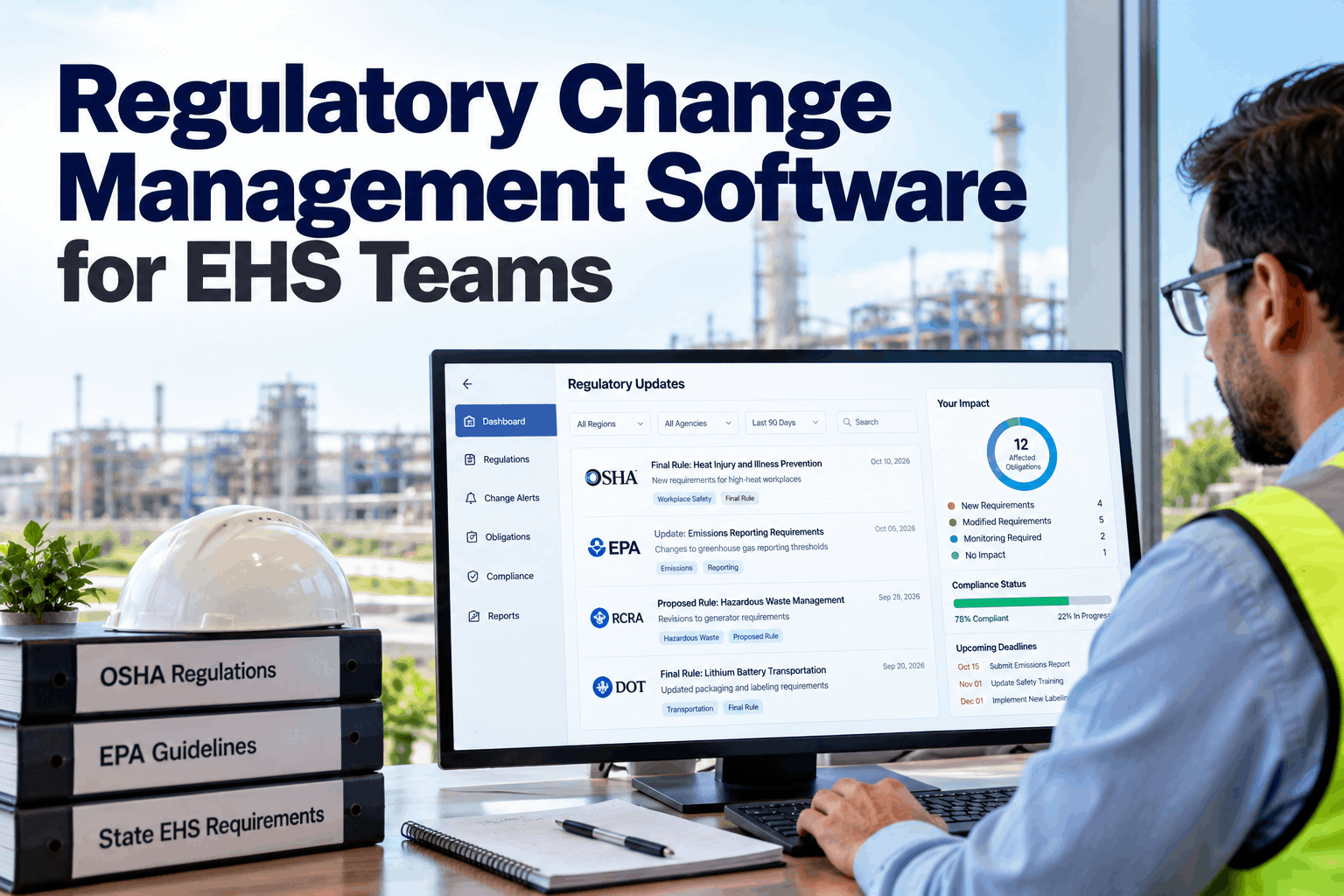
Most EHS teams find out about a rule change the hard way: from an auditor, an inspector or a line in a newsletter months after the effective date. A manufacturing site can be subject to federal OSHA and EPA rules, one of 29 OSHA-approved State Plans, state environmental agencies and its own permit conditions, all changing on their own schedules. Regulatory change management software watches those sources, screens what matters to each site and maps every new requirement to the obligations, owners and evidence it affects. See it in a regulatory review.
Regulatory Change Management Software for EHS Teams
Detect rule changes early, screen them for relevance, map them to the obligations you already hold and track every action to closure. No more surprises at audit time.
- Where rule changes come from and why they get missed
- A six-step change management lifecycle
- How obligation mapping turns a rule into owned actions
Why Rule Changes Still Blindside EHS Teams
Too many sources, too little time, no link to the work.
Federal OSHA rules sit in Title 29 of the Code of Federal Regulations and EPA rules in Title 40, with new rules and proposals published in the Federal Register. On top of that, OSHA lists 29 approved State Plans, 22 covering private and public sector workers and 7 covering only state and local government workers, and State Plans can adopt their own standards. State environmental agencies, air and water permits and local codes add more. An EHS manager cannot read all of it, and even when a change is spotted, it often sits in an inbox with no link to the procedures, training and records it affects. Our EHS specialists can review how you track changes today.
Scattered sources
Federal, state and local rules published in different places.
Relevance unclear
Hard to tell which changes apply to which site.
No owner
Changes noticed but never assigned to anyone.
No proof
Actions taken but not recorded for the next audit.
Sources a Manufacturing Site Should Watch
Know where change comes from before you try to track it.
The right watch list depends on where your sites are and what they do. The grid below shows the usual sources for a US manufacturing plant. The software holds this list per site, so a plant in a State Plan state watches different sources from one under federal OSHA. When you open or acquire a new site, its watch list is set up from its location and activities on day one, rather than built up slowly after the first inspection. Build your watch list with our regulatory team.
The Regulatory Change Lifecycle
Six steps from first notice to evidence on file.
Good change management follows the same path for every change, whether it is a new federal standard or a small amendment to a state reporting form. The software moves each change through these steps and shows where it is stuck. A dashboard shows how many changes sit at each step by site, so leaders can spot a backlog before an effective date arrives. Walk through it in a product demo.
Detect
New proposals, final rules and amendments picked up.
Screen
Relevance checked against site profiles.
Map
Linked to affected obligations and assets.
Assign
Actions given to owners with due dates.
Implement
Procedures, training and records changed.
Verify
Evidence attached and change closed.
A proposed rule gives you months of warning and a chance to comment. Logging proposals with a watch status means your team can estimate impact and budget early, instead of starting from zero when the final rule arrives.
Screening Changes for Relevance
Most changes do not apply to most sites. Find the ones that do.
Screening is where most of the time goes. Each site has a profile of what it does, what it stores and what permits it holds. The software compares each change against those profiles and suggests which sites are affected, with the reason. An EHS professional confirms the result. Set up site profiles with our support team.
Jurisdiction
Federal OSHA or State Plan, state agency and local authority.
Processes and industry
Industry codes, processes and equipment on site.
Chemicals and quantities
Substances held and amounts that trigger thresholds.
Permits and programs
Air, water and waste permits and the programs they require.
Screening is only as good as the profile behind it. When a site adds a process, a new chemical or a permit, change its profile the same week. Otherwise relevant rule changes will be screened out and missed.
See Every Relevant Change Before It Bites
Federal and state sources watched for you, screened against your sites and mapped to the obligations and owners they affect.
Obligation Mapping: From Rule to Action
A rule change matters only through the obligations it changes.
The heart of regulatory change management is an obligation register: every requirement your sites must meet, linked to its legal source, the assets and activities it covers, the procedure that meets it, the owner and the evidence that proves it. When a rule changes, the software finds every obligation that cites it, so you see the full impact at once. Build your register in a mapping session.
Each obligation holds
- The legal citation it comes from
- Sites, assets and activities it covers
- The procedure or task that meets it
- Owner, frequency and evidence needed
When a rule changes
- All linked obligations are flagged
- Affected procedures and training listed
- Actions drafted for each owner
- Old and new text shown side by side
Effective Dates and the Compliance Calendar
Every change carries a clock. Make it visible.
Rules often have several dates: publication, effective date and one or more compliance dates for different parts of the rule. Missing the difference is a common way to fall behind. The software places each date on a shared compliance calendar, works back to set action due dates and escalates when actions run late. Set up your calendar in a planning call.
Published
The rule is final. Screening and mapping start now.
Effective
The rule is in force, even if some parts phase in later.
Compliance
Specific requirements must be met by these dates.
Internal due
Set ahead of the deadline, so there is time to check the work.
Turning a Change into Procedures and Training
A rule is not met until the work on the floor changes.
Most rule changes end up as a change to something people use every day: a procedure, an inspection form, a training module, a record template or a label. The software lists every one of these linked to the affected obligations, so nothing is left on the old version. When the action is done, the new document version and training records are attached as evidence. Ask our implementation team how documents are linked.
Typical actions from one change
- Revise a written procedure or program
- Change an inspection or record form
- Retrain affected workers and supervisors
- Adjust a monitoring or reporting schedule
Evidence that closes it
- New document version with approval
- Training records for named people
- First completed record on the new form
- Sign-off by the obligation owner
People Stay in Charge of Interpretation
Software finds and organises. Professionals decide.
Applicability decisions can carry legal weight. The software suggests which sites and obligations a change affects and shows its reasoning, but an EHS professional or counsel confirms each decision, and that decision is recorded with the reason. This gives you speed without handing judgement to a machine. It also builds a history of decisions over time, so when a similar change arrives, reviewers can see how the team reasoned last time and stay consistent across sites and years. Discuss review rules with our compliance team.
When a change is screened out, keep a short note of why. If an auditor later asks how you handled that rule, a dated record saying "not applicable, no affected processes at this site" is far stronger than silence.
Regulatory Change Mistakes to Avoid
Tracking is easy. Closing the loop is the hard part.
Many teams subscribe to alerts but never connect them to the work. These are the most common gaps. A short compliance review can find them.
What works
- Watch lists set per site and jurisdiction
- Proposals tracked as well as final rules
- Every change mapped to obligations
- Evidence attached before closing
What fails
- One newsletter for all sites
- Alerts forwarded with no owner
- Applicability decided with no record
- Procedures left on the old version
How iFactory Runs Regulatory Change Intelligence
Regulatory Change Intelligence, on your own network.
iFactory monitors federal and state EHS sources, screens each change against your site profiles, maps it to your obligation register and assigns actions to owners. It runs on an on-prem AI server inside your plant, so your compliance data stays in your control. Fit questions go to our solutions team.
Source monitoring
Federal, state and permit sources per site.
Relevance screening
Changes matched to site profiles with reasons.
Obligation mapping
Every affected obligation flagged at once.
Owned actions
Owners and dates for every change.
Evidence on file
Proof attached before a change closes.
Effective date tracking
Countdowns and escalation before deadlines.
iFactory supports your compliance process. It does not replace legal advice, and applicability decisions are confirmed by your EHS professionals or counsel.
Turnkey AI: Delivered, Connected and Live in 6–12 Weeks
You do not build this. It arrives ready.
iFactory ships as a pre-configured NVIDIA AI server with the software pre-loaded, racked and ready. Rack it, plug in power and Ethernet, and the AI is live on your network. Our team handles cabling, network setup, PLC, SCADA, DCS and CMMS integration, site profile and source links, operator training and 24×7 remote monitoring. Data stays on your network. For a scope matched to your plant, request a turnkey quote.
Ship, network and data
Server installed. Site profiles, permits and existing obligation lists loaded.
Model training and pilot
Watch lists and screening tuned. Obligation register mapped for one site.
Go-live and training
Change intelligence live for all sites. EHS team trained. 24×7 monitoring begins.
Frequently Asked Questions
What is regulatory change management software?
It is software that monitors regulatory sources, screens changes for relevance to each site, maps them to the obligations they affect and tracks actions and evidence to closure.
Which regulations does it cover?
Federal OSHA and EPA rules, OSHA State Plans, state environmental agencies, site permits and consensus standards adopted by reference, configured per site.
How does it know which changes apply to us?
Each site has a profile of its jurisdiction, processes, chemicals and permits. Changes are compared against those profiles, and an EHS professional confirms the result.
What is an obligation register?
A list of every requirement your sites must meet, linked to its legal source, the activities it covers, the owner and the evidence that proves compliance.
Does it track proposed rules?
Yes. Proposals can be logged with a watch status so you can estimate impact and plan before the final rule is published.
Can it handle sites in different states?
Yes. Each site has its own jurisdiction and watch list, so a plant under a State Plan and a plant under federal OSHA see the changes that apply to them, while the EHS team sees all of them in one view.
Does it replace legal advice?
No. It finds and organises changes. Applicability and interpretation are confirmed by your EHS professionals or counsel, and their decisions are recorded.
Where is our compliance data kept?
On the on-prem server inside your plant, under your own access controls.
How do we start?
Start with one or two sites and their main permits. A 6-week pilot builds the watch lists, site profiles and obligation register. To plan it, contact our team.
Never Get Blindsided by a Rule Change Again
In thirty minutes we review how your team tracks regulatory change today and sketch a watch list and obligation register for one site. You keep the sketch either way.
- 1List of sites and their states
- 2Current environmental permits
- 3Any compliance calendar or register
- 4How rule changes reach you today
- 5One change you found out about too late