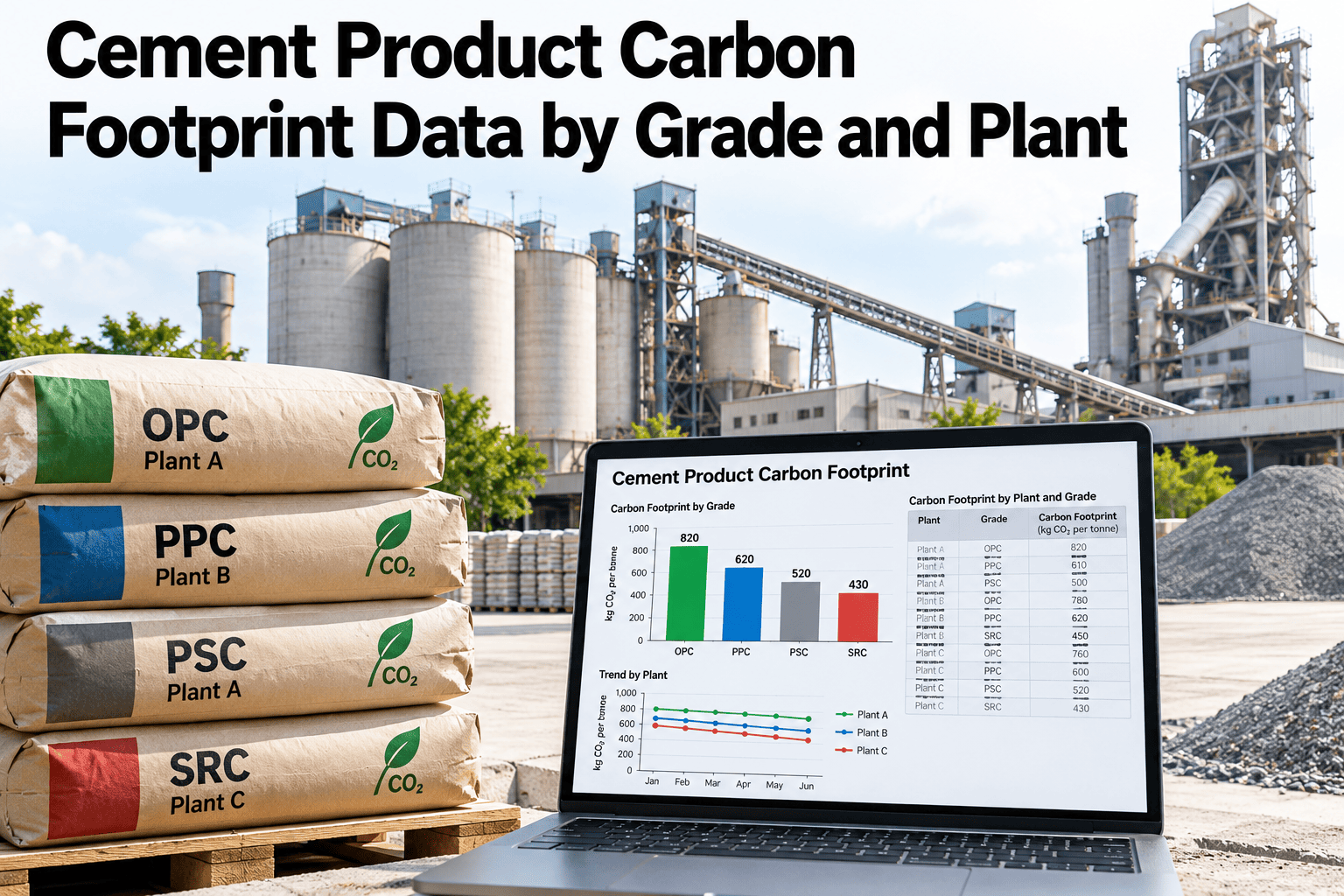
A cement carbon footprint is a ratio: kilograms of CO2 equivalent over tonnes of a named product from a named plant. Getting either side wrong moves the number, and customers, certifiers and green-building tools now read it closely. Most plants hold the inputs already, spread across the control system, the ERP, the energy meters and the laboratory. This guide shows how to organise them into footprint data by grade and by plant. Teams ready to see it built on live data can book a demo with the iFactory AI team.
Cement Product Carbon Footprint Data by Grade and Plant
A data workflow for cement teams: fix the product and site boundaries, collect material and energy records, allocate shared energy, normalise to a tonne of product, cite the factors used and keep a review trail. iFactory AI gathers the records.
Why Grade and Plant Are the Right Unit
A single plant-wide emissions figure hides most of what buyers want to know. One site may sell a cement with a high clinker content and another with far less, and their footprints will differ even when the kiln is identical. Two levels of detail matter.
Site-specific facts
Fuel mix, kiln efficiency, raw material chemistry, electricity supply and distance to suppliers all belong to one location and change its numbers.
Recipe-specific facts
Clinker factor, supplementary cementitious materials, grinding energy and gypsum differ by cement type and strength class.
A published example shows the form. An environmental product declaration for a CEM II/B-P 42.5 R cement from a single plant in North Macedonia declares one tonne of that product, covers raw material supply, transport and manufacturing (A1 to A3), and reports about 993 kg CO2 equivalent per tonne. Its primary data came from the plant's ERP, flow meters and continuous emissions monitoring, and it used a plant-specific electricity factor. That is the shape of data this guide helps you hold.
Where the Method Comes From
The footprint method is not invented plant by plant. Several documents set the rules, and your data model should respect them so that customers and verifiers recognise the result.
| Reference | Role | What It Means for Your Data |
|---|---|---|
| EN 15804+A2 | Core rules for construction product declarations | Defines modules and the global warming indicator |
| EN 16908 | Product category rules for cement and building lime | Cement-specific boundary, allocation and data rules |
| ISO 21930 | Referenced by the GCCA for accounting emissions from treated waste | How waste-derived fuels and materials are counted |
| GCCA rating | Seven bands from AA to F, cradle-to-gate | Footprint per tonne decides the band, using a country clinker ratio |
| Verified EPD | Third-party checked declaration | The strongest proof for a customer |
The GCCA describes its rating as using the global warming potential from an EPD. A country first fixes a clinker to cement ratio, then sets band values, and a producer compares its product's figure with them. The exact thresholds are published by the GCCA in chart form, so use the current official version when you label a grade.
Data Block 1: Product and Site Boundaries
Boundaries answer two questions before any number is added: what exactly is the product, and what exactly is inside the fence. Write them as fields, not as prose in a report.
| Boundary Question | Typical Answer | Risk if Left Vague |
|---|---|---|
| Is clinker made on site? | Own kiln, bought clinker, or both | Clinker emissions counted twice or missed |
| Which quarry belongs to the plant? | Own limestone and clay operations are in; third-party supply is a purchased input | Raw material emissions assigned to the wrong plant |
| Are dispatch and depots included? | Usually out of A1 to A3 and treated as later stages | Mixed scopes across reports |
| What is the reporting period? | A calendar year, or a shorter test period for a new grade | Seasonal variation hidden or exaggerated |
| Are grades grouped? | Each grade, or a family sharing a recipe | Averages that no single product matches |
Data Block 2: Material Inputs
Material records say what physically went into a tonne of each cement. Weigh feeder totals, clinker movements and stock counts all feed the same ledger, and they must reconcile.
| Input | Source of Quantity | Emission Link |
|---|---|---|
| Limestone and clay | Quarry output and raw mill feeders | Process CO2 on calcination, plus quarry fuel and power |
| Clinker | Kiln output, store balances, purchases and sales | The largest share of a cement footprint |
| Gypsum | Cement mill feeders | Small, from supply and transport |
| Slag, fly ash, natural pozzolana | Mill feeders and delivery records | Depends on how the by-product is treated in the rules |
| Limestone additions | Mill feeders | Low once ground, with no kiln emissions |
| Fuels | Kiln and dryer meters, with fuel analysis | Combustion CO2, split fossil and biogenic where rules require |
The bars above show clinker as a share of cement for three illustrative grades. Because clinker dominates the footprint, the clinker factor is the first number any reviewer will test. Hold it as a calculated field from feeder records, not a typed value.
Where the Emissions Sit in One Tonne
Before building the allocation, it helps to see roughly where a tonne of cement collects its carbon. This example uses made-up but plausible figures for an illustrative Grade A cement with a clinker factor of 0.80.
Turn Plant Records Into Footprints
Book a 30-minute walkthrough and iFactory AI will show how material, energy and output records combine into a footprint per grade and per plant.
Data Block 3: Energy Allocation
Fuel and electricity are rarely metered by grade. The kiln and raw mill serve every grade, while each cement mill serves one or a few. Allocation is the rule that shares the common energy fairly, and it must be written down.
| Energy Stream | Meter Level | Allocation Basis |
|---|---|---|
| Kiln fuel | Fuel flow per kiln line | To clinker by output, then to grades by clinker factor |
| Raw and kiln electricity | Feeder or sub-station meter per line | To clinker, then to grades by clinker factor |
| Cement mill electricity | Mill drive meter | Directly to the grade ground, or by tonnes per grade when the mill switches |
| Separators, fans and conveying | Motor control centre meters | With the unit they serve |
| Site services | Main incomer minus unit meters | By tonne of cement |
The point is not the values but the transparency. A reviewer can see which energy was measured and which was shared, and can test whether a different sharing rule would change the answer.
Data Block 4: Output Normalisation
Normalisation is the division step. Total emissions are divided by tonnes of the product, so the denominator needs as much care as the numerator. It also needs to match the declared unit.
Period boundaries matter here. Stock counted at the end of the period may differ from the book value, so schedule a physical count and record who did it. A mismatch of a few percent in clinker stock can move the plant factor by more than a decarbonisation project would.
Data Block 5: Factor References
Activity data becomes emissions only when multiplied by a factor. Every factor in the dataset needs a source, a version and a validity period, because factors change and old reports must remain reproducible.
| Factor | Preferred Basis | Fallback | Record to Keep |
|---|---|---|---|
| Process CO2 of raw meal | Measured composition of raw meal and clinker | Default per tonne clinker from the method used | Lab method, sample dates, result |
| Fuel CO2 | Fuel analysis and measured quantity | Published fuel factor | Supplier certificate, analysis date |
| Waste-derived fuel | Fossil and biogenic split by analysis | Supplier declaration | Rule followed, evidence of split |
| Electricity | Supplier-specific or site-specific mix | National or regional grid factor | Year, source, location or market basis |
| Purchased materials | Supplier EPD or declaration | Database value | Document reference and version |
| Transport | Actual distance and mode | Database value per tonne-kilometre | Route, mode, load |
The published cement EPD cited earlier notes that it used a specific electricity mix of 0.95 kg CO2 equivalent per kilowatt hour and filled gaps with generic data from the GCCA industry EPD tool. That is a good habit to copy: say which numbers are plant data and which are generic.
Data Block 6: Review Trail
A footprint is defended months after it is produced. The review trail is the evidence that lets a new colleague, a customer or a verifier reproduce it without asking the author.
Source lineage
Every figure points to a meter, a lab result, a stock count or a document, with a date.
Change history
Edits show who changed what, when and why, and earlier values remain visible.
Sign-off
Production, laboratory and sustainability each approve their part before a figure is released.
| Check | Question | Owner |
|---|---|---|
| Mass balance | Do inputs and outputs close within tolerance? | Production |
| Energy balance | Do unit meters add up to the incomer? | Energy manager |
| Year-on-year | Is any change explained by a real event? | Sustainability lead |
| Factor version | Is each factor current and cited? | Sustainability lead |
| Grade consistency | Do grade figures reconcile with the plant total? | Quality and sustainability |
| Outlier review | Has every flagged value been explained? | Reviewer |
Comparing Grades on One Page
Once the six blocks are in place, comparing grades is a simple report. The bars below use the illustrative numbers from this guide and show kilograms of CO2 equivalent per tonne for two grades.
Grade B carries more mill electricity but far less clinker, and clinker wins. The page shows why plants focus on clinker factor and kiln fuel first, and treat electricity as a second lever. Real plants will see different splits, so use your own data to decide where to act.
Common Footprint Data Mistakes
The same errors show up when plants first build footprint data. Each has a simple fix.
Putting the Data to Work After the Report
Footprint data earns its keep when people outside the sustainability team use it. The same records that give a number per tonne also show where a tonne can be cleaned up, and which customers are asking.
Start with a short weekly view of four numbers per grade: clinker factor, kiln fuel per tonne of clinker, electricity per tonne of cement and the resulting footprint. A drift in any of them is easier to explain this week than at year end, and it lets the plant link a process change to a carbon outcome.
A 90-Day Path to Footprint Data
iFactory AI is built as a turnkey server that racks in, plugs in and goes live in roughly 6 to 12 weeks, so a footprint pilot on one plant and two grades fits inside a quarter.
What iFactory AI Adds
iFactory AI is smart manufacturing and industrial software. For cement plants it joins production, material and energy records into footprint data you can trace.
Plain-Language Glossary
Shared words keep production, quality and sustainability teams aligned.
Frequently Asked Questions
Do we need a footprint for every grade?
Customers usually ask by product, so yes for the grades you sell in volume. Grades with the same recipe can share one figure. Book a demo to see grade-level footprints built from plant records.
Which scope should we use?
Cradle-to-gate (A1 to A3) is the common cement scope in EPDs and in the GCCA rating. Agree it with your customers and keep it fixed across reports.
How do we share kiln energy between grades?
Assign it to clinker first, then pass it to each grade through its clinker factor. Write the rule down. Book a demo to see allocation rules applied to your meter data.
Can this data support an EPD?
It supports the data side. An EPD still needs a program operator, a verifier and the current product category rules, so check those before you commit to a date.
Does iFactory AI replace our ERP or lab system?
No. It reads from them and joins the records. Book a demo to confirm which systems fit your plant.
Make Every Tonne Carry a Traceable Number
iFactory AI joins material, energy and output records into footprint data your sustainability team can defend. Book a walkthrough built around your plant.