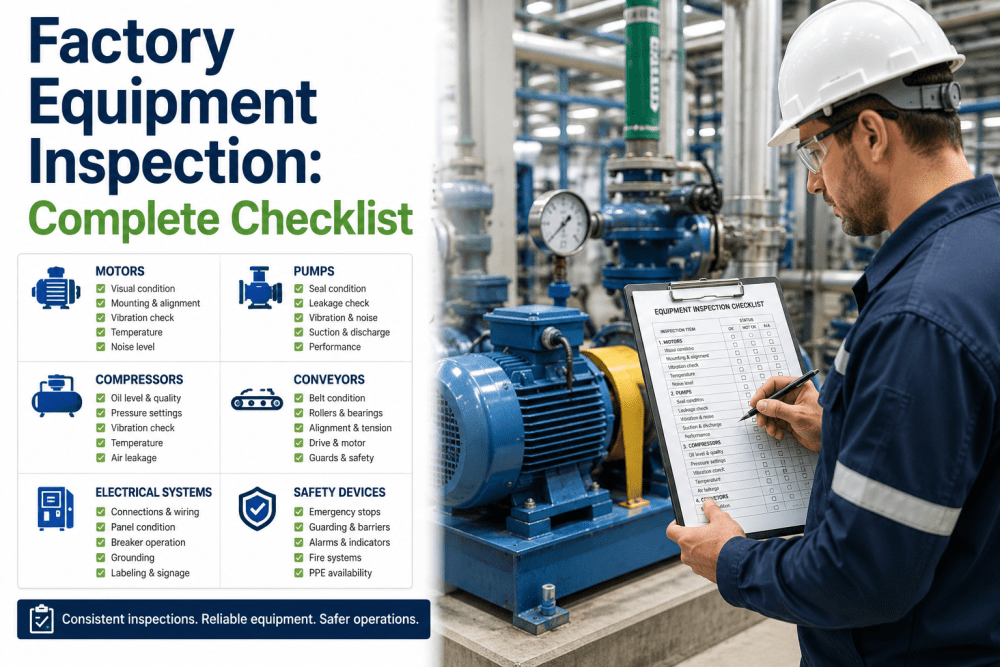
Commissioning new equipment without a structured process is one of the fastest ways to shorten asset life, inflate maintenance costs, and miss your OEE baseline from day one. This checklist walks U.S. manufacturing teams through every stage of equipment onboarding — from pre-installation readiness to PM schedule setup — using the framework that iFactory's Asset Lifecycle Management module enforces on every new asset entry. Teams that book a demo with iFactory see how digital commissioning records replace paper-based FAT/SAT packets and feed directly into predictive maintenance workflows.
Commission Every New Asset with a Digital Checklist — Not a Paper Packet
iFactory's Asset Lifecycle Management module captures FAT, SAT, baseline OEE, and PM schedules in one connected workflow — from day one of installation.
Why Commissioning Discipline Determines Asset Performance
Most unplanned downtime in the first year of an asset's life traces back to a commissioning gap — a skipped functional test, a missing baseline measurement, or a PM schedule that was never entered into the CMMS. A structured commissioning and acceptance process closes those gaps before production begins. The five stages below mirror industry-standard FAT (Factory Acceptance Testing) and SAT (Site Acceptance Testing) protocols and are aligned with how iFactory's Asset Lifecycle Management module structures new asset onboarding.
Stage 1 — Pre-Installation Readiness
Before the equipment arrives on-site, the receiving facility must be verified as ready. Gaps in utilities, space, or documentation discovered after delivery cause costly delays and can void OEM warranty conditions. Complete every item below before scheduling delivery.
Stage 2 — Installation Verification
Installation verification confirms that the equipment is physically set up to OEM specifications before any power or media is applied. Skipping this stage is the primary source of early bearing failures, alignment faults, and electrical faults in the first 90 days of operation. Teams that book a demo with iFactory can log all verification measurements directly into the asset's commissioning record — no paper, no transcription errors.
Capture Every Commissioning Measurement in iFactory — Linked to the Asset for Life
iFactory's Asset Lifecycle Management stores FAT/SAT data, baseline OEE, and PM schedules in one asset record — searchable, auditable, and connected to work orders from day one.
Stage 3 — Functional Testing (FAT / SAT)
Functional testing validates that the equipment performs every specified function at the required parameters — before production parts are run. Factory Acceptance Testing (FAT) is typically conducted at the OEM's facility; Site Acceptance Testing (SAT) is conducted after installation at your plant. Both stages are listed here so teams can use this checklist regardless of where they are in the acceptance cycle.
Stage 4 — OEE Baseline Recording
Baseline OEE recording is the step most commissioning teams skip — and it's the most valuable data the maintenance team will have for the entire asset lifecycle. Without a commissioning baseline, you have no reference point for what "normal" looks like. Every degradation trend starts from zero evidence instead of from a documented standard. Plants that book a demo with iFactory connect baseline OEE directly to their production monitoring dashboard from the first shift of operation.
Stage 5 — Preventive Maintenance Schedule Setup
A new asset with no PM schedule in the CMMS is already on the path to reactive maintenance. PM schedule setup at commissioning is the last gate before the equipment enters production custody — and it is the step most directly connected to long-term maintenance cost reduction. The checklist below should be completed before the first regular production shift begins.
FAT vs SAT vs Commissioning — What Each Stage Actually Covers
The three terms are frequently confused, and the confusion costs plants time and money when acceptance disputes arise. The table below clarifies scope, location, and sign-off ownership for each stage. U.S. manufacturers evaluating new capital equipment should use this as the basis for their acceptance criteria definition in the purchase order.
| Stage | Where Conducted | Who Signs Off | Primary Focus | iFactory Integration |
|---|---|---|---|---|
| Factory Acceptance Test (FAT) | OEM facility | Plant engineer + OEM rep | Equipment builds and functions per spec in controlled conditions | FAT document uploaded to asset record pre-delivery |
| Site Acceptance Test (SAT) | Plant — after installation | Maintenance lead + Operations lead | Equipment functions correctly in actual production environment | SAT measurements logged; OEE baseline activated |
| Commissioning | Plant — full startup sequence | Plant management | Equipment handed over to operations with PM schedule live | PM work orders generated; asset status set to Active |
| Equipment Qualification (IQ/OQ/PQ) | Plant — regulated industries | Quality / Validation team | Compliance with GMP, FDA, or regulatory requirements | Qualification documents linked to asset; audit trail maintained |
Expert Review: What Commissioning Failures Actually Cost
The most common commissioning failures in U.S. manufacturing plants are not dramatic — they are omissions. A lubrication point left dry at startup. A VFD parameter not matched to actual line voltage. A PM schedule entered into the CMMS two months after startup, after the first failure. These omissions compound over the asset's lifecycle and are rarely traced back to the commissioning record — because there isn't one. Three patterns emerge repeatedly in plants with high first-year failure rates on new equipment.
No Baseline, No Benchmark
Without a commissioning-day OEE and vibration baseline, there is no objective measure of whether the equipment is degrading or simply running at its actual design capability. Plants discover this gap during the first major failure investigation — when the question "what was normal?" cannot be answered.
PM Lag Creates First-Year Failures
When PM schedules are entered into the CMMS after the first breakdown rather than before first production, the asset has already accumulated its most critical wear cycles without structured maintenance. Bearing failures in months two through six are the most common result — and the most preventable.
Paper Records Don't Scale
FAT and SAT packets in binders are unavailable to the technician on the floor at 2 AM during a fault event. Digital commissioning records linked directly to the asset in the CMMS — with every measurement, parameter setting, and sign-off searchable — reduce mean time to repair on new equipment by making the commissioning data accessible when it is actually needed. Teams that book a demo with iFactory see how this works in practice.
Conclusion: Commissioning Is the First Maintenance Decision
Every asset arrives on the plant floor with a certain lifespan built in by the OEM. How much of that lifespan the plant actually captures is determined in the first 30 days — specifically by the quality of the commissioning and acceptance process. A disciplined five-stage commissioning program — pre-installation readiness, installation verification, functional testing, OEE baseline recording, and PM schedule setup — is not overhead. It is the most cost-effective maintenance investment a plant makes on any new asset. iFactory's Asset Lifecycle Management module gives U.S. manufacturing teams the digital infrastructure to execute each of these stages with a permanent, connected record rather than a paper packet that lives in a filing cabinet. Plants that complete this checklist digitally, inside iFactory, enter the first year of an asset's life with a baseline, a schedule, and a record — the three things that separate proactive from reactive maintenance.
Frequently Asked Questions
What is the difference between a Factory Acceptance Test and a Site Acceptance Test?
A Factory Acceptance Test (FAT) is conducted at the OEM's facility before the equipment ships. It confirms that the equipment was built to specification and functions correctly under controlled conditions. A Site Acceptance Test (SAT) is conducted at the plant after installation, confirming that the equipment functions correctly in the actual production environment with real utility connections, actual ambient conditions, and plant-specific operating sequences. Both stages should be documented and linked to the asset record in iFactory's Asset Lifecycle Management module.
When should the PM schedule be entered into the CMMS — before or after first production?
Before the first production shift begins. PM schedule setup is the final stage of commissioning, not the first step of ongoing maintenance. Entering PM tasks after the first breakdown means the most critical early wear cycles happened without structured maintenance coverage. iFactory's commissioning workflow requires PM schedule completion as a gate before the asset status is changed from "commissioning" to "active" in the asset record.
What baseline measurements should be recorded during new equipment commissioning?
At a minimum: vibration (overall velocity or acceleration at each bearing point), operating temperature at key components, full-load current draw per phase, actual cycle time versus design cycle time, and first-pass quality yield from the first production run. These four data sets form the OEE baseline (availability, performance, quality) and the condition monitoring baseline for predictive maintenance. In iFactory, all commissioning measurements are stored against the asset record and become the reference point for all subsequent trend analysis.
How does iFactory's Asset Lifecycle Management support equipment commissioning?
iFactory's Asset Lifecycle Management module provides a digital commissioning record template that captures pre-installation, installation verification, FAT/SAT data, OEE baseline measurements, and PM schedule setup in one connected workflow. All documents — OEM manuals, sign-off sheets, measurement records — are stored against the asset and accessible to maintenance technicians via mobile device. PM work orders are generated automatically from the commissioning schedule, and baseline OEE data feeds directly into the production monitoring and OEE analytics dashboards from day one of operation.
What are the most commonly skipped steps in new equipment commissioning?
The three most commonly skipped steps in U.S. manufacturing plants are: (1) OEE baseline recording — plants start production without measuring first-week cycle time and quality yield against OEM specification; (2) PM schedule entry before first production — the CMMS record is created but left without task assignments until after the first failure; and (3) spare parts linkage — critical spare parts are not associated with the asset record, so the first maintenance event triggers an emergency procurement instead of a scheduled pull from stock. All three are covered in the Stage 4 and Stage 5 checklists above.
Ready to Commission New Equipment the Right Way — Digitally, From Day One?
iFactory's Asset Lifecycle Management connects commissioning records, baseline OEE, and PM schedules in one digital workflow — so every new asset enters production with a full history and a live maintenance plan.