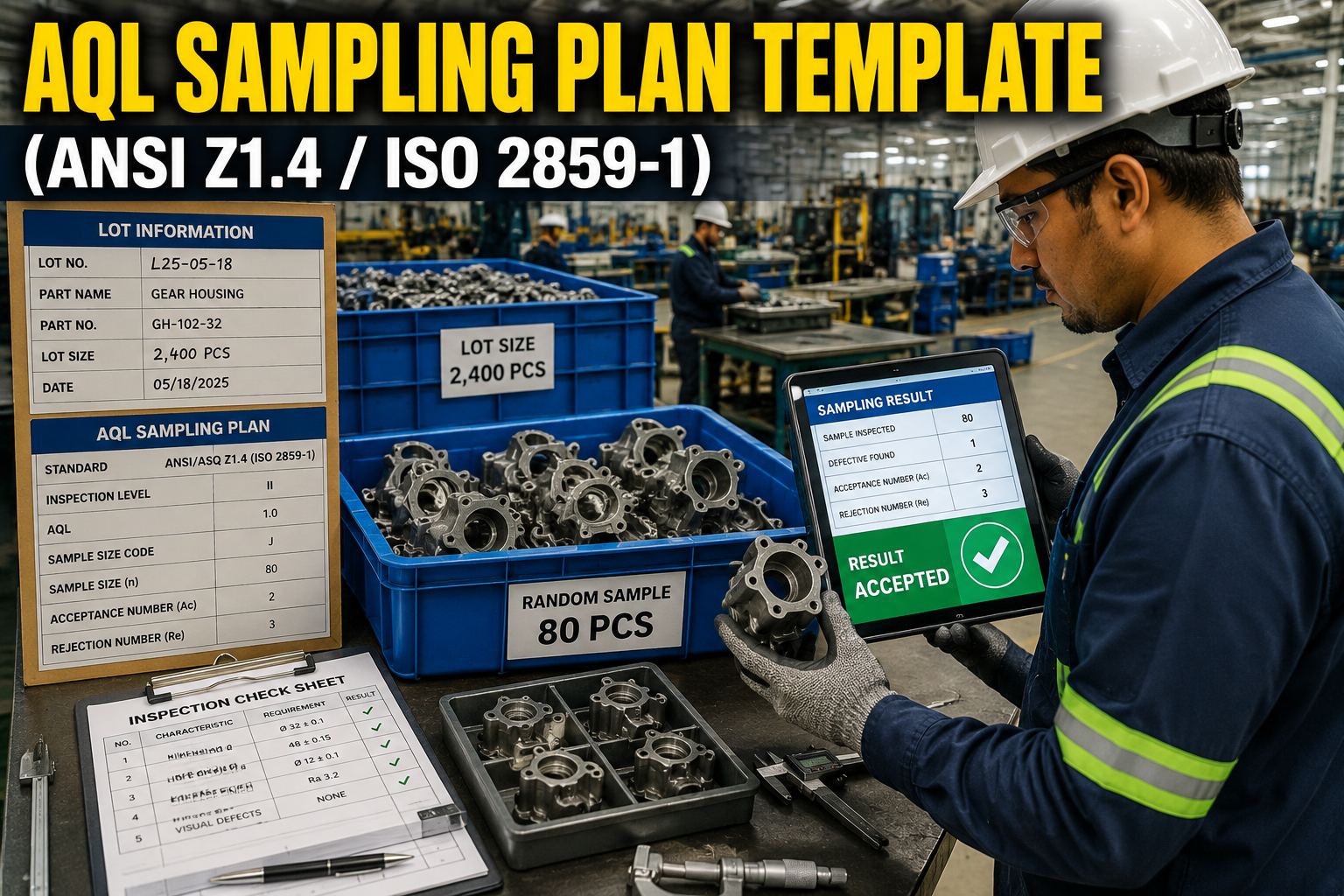
An AQL sampling plan (ANSI/ASQ Z1.4) determines how many units to inspect from a production lot and whether to accept or reject based on nonconforming units. The standard covers lot sizes from 2 to 500,000+ units with 7 AQL levels and Normal/Tightened/Reduced inspection levels with automatic switching rules. This template provides a scrollable master table, explainer cards, a workflow, a decision flow diagram, and reference cards.
Stop Looking Up AQL Tables — Let iFactory Auto-Select Your Sample
Enter lot size and AQL once, get the right sample size, acceptance number, and rejection number instantly.
iFactory’s quality module embeds the full ANSI Z1.4 master table with all 15 code letters and 7 AQL levels. When you create an inspection lot, simply enter the lot size and select the AQL. The system automatically looks up the correct sample size code letter, retrieves the acceptance (Ac) and rejection (Re) numbers from the master table, and generates a sampling plan with the exact number of units to inspect. No more flipping through printed tables or maintaining spreadsheets. The switching rules between Normal, Tightened, and Reduced inspection are tracked automatically based on your lot disposition history, and the system prompts you when a level change is required.
AQL Sampling Plan Scoreboard
The scoreboard provides a quick overview of the AQL sampling framework’s scope and impact. Seven AQL levels from 0.065 to 6.5 cover everything from critical safety features to cosmetic characteristics. Twenty-six lot size ranges across 15 code letters ensure every production batch from prototype runs to mass production is covered. Plans are auto-generated instantly from the master table, eliminating manual lookup errors. Quality teams report up to 40% reduction in inspection planning time when moving from printed tables to an integrated sampling plan system.
ANSI Z1.4 / ISO 2859-1 Normal Inspection Master Table
The master table below shows the complete mapping from lot size ranges to sample size code letters and the corresponding acceptance (Ac) and rejection (Re) numbers for each of the 7 AQL levels. Each row represents a code letter (A through R) with its associated lot size range and sample size n. The columns show the Ac/Re pairs for AQL values from 0.065 to 6.5. Where a code letter’s sample size is insufficient for a given AQL, a downward arrow (↓) indicates that the next higher code letter’s sample should be used. This table matches the format of Table II-A in the ANSI/ASQ Z1.4-2008 (R2013) standard for single sampling plans under normal inspection.
| Code Letter | Lot Size Range | Sample Size | AQL 0.065 | AQL 0.10 | AQL 0.15 | AQL 0.25 | AQL 0.40 | AQL 0.65 | AQL 1.0 | AQL 1.5 | AQL 2.5 | AQL 4.0 | AQL 6.5 |
|---|---|---|---|---|---|---|---|---|---|---|---|---|---|
| A | 2–8 | 2 | ↓ | ↓ | ↓ | ↓ | ↓ | ↓ | ↓ | ↓ | ↓ | ↓ | 0 1 |
| B | 9–15 | 3 | ↓ | ↓ | ↓ | ↓ | ↓ | ↓ | ↓ | ↓ | ↓ | ↓ | 0 1 |
| C | 16–25 | 5 | ↓ | ↓ | ↓ | ↓ | ↓ | ↓ | ↓ | ↓ | ↓ | ↓ | 0 1 |
| D | 26–50 | 8 | ↓ | ↓ | ↓ | ↓ | ↓ | ↓ | ↓ | ↓ | ↓ | 0 1 | 0 1 |
| E | 51–90 | 13 | ↓ | ↓ | ↓ | ↓ | ↓ | ↓ | ↓ | ↓ | 0 1 | 0 1 | 0 1 |
| F | 91–150 | 20 | ↓ | ↓ | ↓ | ↓ | ↓ | ↓ | ↓ | 0 1 | 0 1 | 0 1 | 1 2 |
| G | 151–280 | 32 | ↓ | ↓ | ↓ | ↓ | ↓ | ↓ | 0 1 | 0 1 | 1 2 | 1 2 | 2 3 |
| H | 281–500 | 50 | ↓ | ↓ | ↓ | ↓ | ↓ | 0 1 | 0 1 | 1 2 | 1 2 | 2 3 | 3 4 |
| J | 501–1,200 | 80 | ↓ | ↓ | ↓ | ↓ | 0 1 | 0 1 | 1 2 | 2 3 | 3 4 | 4 5 | 5 6 |
| K | 1,201–3,200 | 125 | ↓ | ↓ | ↓ | 0 1 | 1 2 | 1 2 | 2 3 | 3 4 | 5 6 | 6 7 | 7 8 |
| L | 3,201–10,000 | 200 | ↓ | ↓ | ↓ | 1 2 | 1 2 | 2 3 | 3 4 | 5 6 | 7 8 | 9 10 | 10 11 |
| M | 10,001–35,000 | 315 | ↓ | ↓ | 1 2 | 1 2 | 2 3 | 3 4 | 5 6 | 7 8 | 10 11 | 12 13 | 14 15 |
| N | 35,001–150,000 | 500 | ↓ | 1 2 | 1 2 | 2 3 | 3 4 | 5 6 | 7 8 | 10 11 | 14 15 | 18 19 | 21 22 |
| P | 150,001–500,000 | 800 | 1 2 | 1 2 | 2 3 | 3 4 | 5 6 | 7 8 | 10 11 | 14 15 | 21 22 | 21 22 | 21 22 |
| R | 500,001+ | 1,250 | 2 3 | 2 3 | 3 4 | 5 6 | 7 8 | 10 11 | 14 15 | 21 22 | 21 22 | 21 22 | 21 22 |
Six Essential AQL Sampling Concepts Explained
Understanding the six core concepts of AQL sampling is essential for correct application of the standard. Each card below covers one concept with a clear definition, practical example, and connection to the master table. Review these cards to build a solid understanding of how AQL works before applying the sampling plan to your inspection lots.
See the AQL Sampling Plan Template in Action
Watch how iFactory auto-applies ANSI Z1.4 sampling plans from your inspection lots in seconds.
iFactory connects your inspection lot data directly to the ANSI Z1.4 master table, eliminating manual lookup and calculation errors. When you create an inspection lot, the system reads the lot size, determines the correct code letter and sample size, and displays the Ac/Re numbers for your selected AQL. The system tracks lot disposition history and automatically applies the switching rules for Normal, Tightened, and Reduced inspection. Rejected lots trigger tightened inspection on the next lot, and consistent quality performance over 10 consecutive lots qualifies for reduced sampling. Quality engineers can see the complete sampling plan on one screen — code letter, sample size, Ac/Re numbers, and current inspection level — and execute the inspection with a single click. Book a demo to see the AQL sampling module in action.
How to Execute an AQL Sampling Plan in 5 Steps
Executing an AQL sampling plan following ANSI Z1.4 involves five straightforward steps. The workflow below guides you from determining the lot size through to the accept/reject decision, with each step referencing the master table. Following these steps consistently ensures your sampling plans are statistically valid and compliant with the standard.
Inspection Level Switching Rules: Normal, Tightened, and Reduced
The decision flow diagram below shows the switching rules that govern transitions between Normal, Tightened, and Reduced inspection levels. Starting at Normal, the system monitors your lot disposition history and automatically switches levels based on the criteria defined in the standard. Tightened inspection increases scrutiny when quality deteriorates, while Reduced inspection rewards consistent quality with lower sample sizes. Understanding these switching rules is essential for maintaining the integrity of your AQL sampling program.
Sample Size Code Letter Reference by Lot Size Range
Sample size code letters are grouped by lot size range. Each group shares a common range of code letters: small lots (2–25) use codes A–C with sample sizes from 2 to 5 units; medium lots (26–1,200) use codes D–J with sample sizes from 8 to 80 units; large lots (1,201–150,000) use codes K–N with sample sizes from 125 to 500 units; and very large lots (150,001+) use codes P–R with sample sizes up to 1,250 units. The code letter determines the row in the master table from which Ac/Re numbers are read.
Frequently Asked Questions
What is an AQL sampling plan and when should I use it?
An AQL (Acceptable Quality Level) sampling plan is a statistical quality control method defined by ANSI/ASQ Z1.4 (ISO 2859-1) that specifies the number of units to inspect from a lot and the criteria for accepting or rejecting the lot based on the number of nonconforming units found. It is used when 100% inspection is impractical or too costly, and the supplier has a demonstrated history of quality performance. AQL sampling is most appropriate for incoming raw material inspection, in-process quality checks, final product inspection before shipment, and supplier quality audits. It is not suitable for safety-critical characteristics where zero defects are required, or for very small lot sizes where 100% inspection is more efficient than statistical sampling.
How do I choose the right AQL value for my product?
Choosing the right AQL depends on the criticality of the characteristic being inspected and the risk associated with accepting a nonconforming unit. The ANSI Z1.4 standard provides general guidelines: critical characteristics (safety-related, regulatory-mandated) should use AQL 0.065–0.65; major characteristics (functional performance, fit, durability) typically use AQL 1.0–2.5; and minor characteristics (cosmetic, packaging, labeling) use AQL 4.0–6.5. Industry-specific standards may prescribe tighter AQLs: for example, medical devices often require AQL 0.065–0.25 for critical features, while commodity hardware may accept AQL 2.5–4.0. Contractual agreements between buyer and supplier may also specify AQL values. When in doubt, start with a moderate AQL such as 1.0 or 1.5 and tighten or relax based on historical defect data.
What is the difference between Normal, Tightened, and Reduced inspection?
ANSI Z1.4 defines three inspection levels that adjust the sampling stringency based on recent quality performance. Normal inspection is the starting level for all suppliers and represents the standard sampling plan specified in the master table. Tightened inspection uses the same sample size code letter but with stricter acceptance criteria (lower Ac, higher Re) and is triggered when 2 of 5 consecutive lots are rejected. Tightened inspection puts pressure on the supplier to improve quality by making it harder for lots to pass. Reduced inspection uses a smaller sample size (roughly 40% less) and is permitted when 10 consecutive lots have been accepted with zero defects, production is at a steady rate, and quality is considered excellent. Reduced inspection reduces inspection cost but carries more risk. Switching rules between levels are enforced automatically by the standard to ensure inspection effort matches demonstrated quality.
How does the sample size code letter work in ANSI Z1.4?
The sample size code letter maps the lot size to a letter from A through R using a predefined table in the standard. Each code letter corresponds to a specific sample size: A (n=2) through R (n=1,250). The code letter is determined by the lot size range: for example, a lot of 200 units falls in the 151–280 range and gets code G (n=32). The same code letter applies across Normal, Tightened, and Reduced inspection, but the sample size for Reduced is approximately 40% of the Normal sample size, using a separate reduced table. For Tightened inspection, the sample size remains the same as Normal but the acceptance criteria are stricter. The code letter system ensures that larger lots receive proportionally larger samples while keeping the inspection burden manageable.
What happens when a lot is rejected under an AQL sampling plan?
When a lot is rejected under ANSI Z1.4 (defect count equals or exceeds the rejection number Re), the entire lot is returned to the supplier for 100% screening, rework, or replacement. The supplier must inspect every unit, remove all nonconforming items, and present the corrected lot for re-inspection — typically under Tightened inspection. The rejection is recorded in the switching rules tracker: if 2 of 5 consecutive lots are rejected, inspection shifts from Normal to Tightened. Quality engineers should also perform root cause analysis to determine why the lot failed and implement corrective actions. Rejected lots and the associated disposition actions should be documented in a quality management system for traceability and trend analysis. Frequent rejections from the same supplier may trigger a supplier quality audit or a corrective action request.
Run AQL Sampling Plans Live on iFactory
Stop printing AQL tables. iFactory auto-selects sample size, tracks results, and generates pass/fail decisions from your lot data.
iFactory’s quality inspection module gives you the full power of ANSI Z1.4 sampling without the manual overhead. Create inspection lots, select AQL, and get an instant sampling plan with the correct code letter, sample size, and Ac/Re numbers. Record inspection results on mobile devices, and the system automatically generates pass/fail decisions based on the Ac/Re criteria. Lot disposition history drives switching rule automation: 2 rejections in 5 lots triggers tightened inspection, and 10 consecutive accepted lots with zero defects qualifies for reduced sampling. The system also tracks supplier performance across lots, flags recurring defect patterns, and supports corrective action workflows. Book a demo to see how iFactory’s quality module can transform your inspection process.