Most maintenance teams aren't failing because of bad technicians — they're failing because of bad systems. Work orders get lost in email threads. Jobs are duplicated or missed entirely. Emergency repairs eat the budget that should be going into planned maintenance. A work order management system fixes all of this — turning a reactive, disorganised operation into a proactive one with measurable efficiency gains from the first month. Here's exactly how it happens, step by step.
Why Maintenance Efficiency Breaks Down in the First Place
Before you can fix maintenance inefficiency, you have to understand what's actually causing it. It's rarely a people problem. In most manufacturing and facility operations, the root cause is structural — the way work is requested, assigned, tracked, and reviewed creates friction at every stage. The result is predictable: reactive repairs dominate the schedule, planned maintenance slips, asset life shortens, and costs climb. See how iFactory's system eliminates each of these friction points — schedule your free 30-minute walkthrough →
Verbal & Informal Requests
Jobs communicated by radio, phone, or in passing create no paper trail. There's no prioritization, no assignment confirmation, and no way to verify completion.
Zero Real-Time Visibility
Managers have no live view of which jobs are in progress, delayed, or waiting for parts — so they can't intervene before small delays become production stoppages.
Parts & Inventory Blindspots
Over 30% of unplanned downtime is caused by not having the right part available. Without work order-linked inventory, you can't predict demand before the job starts.
No Performance Data
Without documented work orders, there's no data to analyse. MTTR, MTBF, cost-per-asset, and technician utilization are all invisible — making improvement impossible.
7 Ways a Work Order Management System Directly Improves Efficiency
Each of the following improvements is measurable, trackable, and directly tied to the capabilities a modern CMMS delivers. These aren't theoretical — they're the specific workflow changes that generate the 15–30% productivity gains reported by teams that make the switch.
Automated Work Order Creation — From Sensor to Schedule
In traditional operations, someone has to notice a problem, report it, and then wait for a manager to create a work order manually. In iFactory, AI monitors equipment sensors in real time — detecting abnormal vibration, temperature spikes, or power draw increases — and automatically generates a work order with the asset ID, fault description, suggested technician, and required parts. The time between problem detection and repair start drops from hours or days to minutes.
Smart Prioritisation — Right Job, Right Technician, Right Time
Without a system, priority is informal and inconsistent — the loudest requester wins. A work order management system assigns urgency levels based on asset criticality, production impact, and safety implications. Work orders are then matched to technicians based on skill set, current workload, and proximity. The result is a balanced workload, fewer missed SLAs, and senior technicians focused on complex jobs rather than routine tasks.
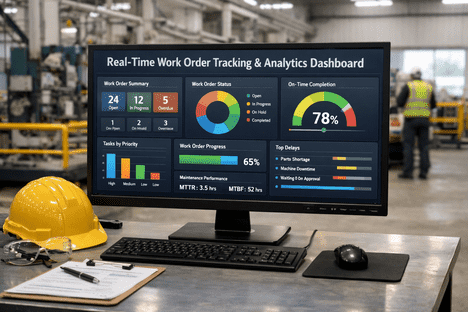
Real-Time Job Tracking — No More Status Calls
44% of facility managers say tracking work order progress is their most time-consuming daily task — and most of that time is spent on phone calls, walkabouts, and chasing updates. With iFactory, every work order has a live status: Requested → Assigned → In Progress → Pending Parts → Complete. Managers see the full picture on any device without asking anyone. Bottlenecks surface automatically before they cascade into delays.
Inventory Integration — Parts Ready Before the Job Starts
Over 30% of unplanned downtime is caused by not having the right spare part on hand when a repair is needed. iFactory links each work order to inventory — automatically checking stock availability when the work order is created and triggering a reorder if levels are low. Technicians arrive at the job with everything they need. Emergency rush orders and mid-job delays waiting for parts are dramatically reduced.
Preventive Maintenance Scheduling — Moving From Reactive to Proactive
Reactive maintenance costs 3–5× more per repair than planned preventive maintenance. A work order management system automates the generation of recurring preventive work orders based on calendar intervals, runtime hours, or cycle counts. Nothing slips through the schedule. Assets are serviced before failure, not after — shifting the maintenance mix from reactive-heavy to planned-dominant, which is where the largest efficiency gains accumulate over time.
Asset History & Failure Pattern Analysis
Every closed work order feeds a growing intelligence layer. Over time, iFactory identifies which assets fail most frequently, which failure modes recur, and which repairs are consuming disproportionate cost. This shifts maintenance planning from calendar-based to condition-based — servicing assets when the data says they need it, not on a fixed schedule that may be too early or too late. The result is lower total maintenance spend and longer asset lifespan.
Compliance Reporting — Automatic, Audit-Ready Documentation
Every completed work order creates a timestamped, digital audit trail — who did what, when, with what parts, and what the outcome was. iFactory auto-generates compliance reports from this data for OSHA, ISO, and internal audit requirements. What used to take days of manual document assembly now takes minutes. Safety inspections are logged automatically with technician signatures, photo evidence, and checklist completion records.
The Efficiency Shift: Where Teams See Impact First
Not all gains come at the same speed. Here's a realistic picture of where manufacturers typically see improvement — and when — after deploying a digital work order management system:
Immediate: Visibility & Accountability
All work requests are now captured digitally. No more verbal-only jobs falling through the gaps. Managers have a live view of open, in-progress, and completed work for the first time. Technician utilization becomes measurable.
Short-Term: Downtime & Response Time Reduction
Preventive work orders are now auto-scheduled and never missed. AI anomaly detection starts flagging early failure signals. MTTR begins to drop as technicians arrive prepared with the right parts and instructions. Emergency repairs start declining.
Medium-Term: Cost Optimisation
Asset history data is now rich enough to identify repeat failure patterns. Spare parts stock is right-sized based on actual consumption data. Overtime and emergency purchase costs fall. Planned maintenance percentage rises above 70% for most teams.
Long-Term: Continuous & Compounding Improvement
AI models learn each asset's unique behavior and failure envelope. Predictive work orders are generated weeks before potential failures. Cross-shift and cross-site benchmarking reveals best practices to replicate. ESG and compliance reporting is fully automated.
What the Numbers Look Like for a Typical Facility
Abstract percentages are useful — but concrete numbers are more persuasive. Here's what a mid-size manufacturing facility with 80 assets and a 5-person maintenance team typically realises in the first year after deploying iFactory: Schedule a demo and we'll calculate these numbers for your specific facility →
Stop Measuring Efficiency by Gut Feel — Start Measuring It in Numbers
In 30 minutes, iFactory's team will show you live dashboards with real MTTR, backlog, planned maintenance percentage, and cost-per-asset KPIs — then calculate your facility's projected first-year efficiency gains. No obligation. Just numbers.
Key KPIs Your System Should Be Tracking
A work order management system is only as useful as the metrics it produces. These are the six KPIs that define whether your maintenance operation is getting more efficient — and that iFactory tracks automatically from your closed work order data. See the full KPI dashboard live — book a 30-minute demo and we'll show you every metric in real time →
Mean Time to Repair
How long repairs take on average. Falling MTTR means faster response, better-prepared technicians, and cleaner work order execution.
Mean Time Between Failures
How long assets run between breakdowns. Rising MTBF means preventive and predictive maintenance is actually extending equipment life.
Planned Maintenance %
The ratio of planned to reactive work orders. World-class operations target 70%+ planned. Your system should be moving you there automatically.
Work Order Backlog
Outstanding tasks vs. team capacity. A growing backlog signals a resourcing or prioritisation problem — visible in real time, not discovered too late.
Cost Per Work Order
Total maintenance spend per asset, per period. Reveals which assets are approaching end-of-life or suffering from recurring fixable failures.
First Call Resolution Rate
How often jobs are completed correctly the first time. Low FCR points to poor work order instructions, wrong parts, or skill-mismatch assignments.