If your maintenance team has ever scrambled to find out who fixed what, when, and with what parts — you've already felt the cost of poor work order management. Work order management is the end-to-end process of creating, assigning, tracking, and closing maintenance tasks so every job is documented, prioritized, and completed by the right person at the right time. It's the backbone of every high-performing maintenance operation — and the gap between teams that get it right and teams that don't is measured in downtime, cost, and equipment life.
What Exactly Is a Work Order?
A work order is a formal, documented instruction to carry out a maintenance task — whether that's a scheduled inspection, an emergency repair, or a safety compliance check. It captures who does the job, what's needed to do it, when it must be done, and what the outcome was. Without a work order, maintenance happens informally — which means it also goes untracked, unanalysed, and unrepeatable.
"A work order is the single source of truth for a maintenance task — connecting the asset, the technician, the parts, the time, and the outcome into one documented record that drives continuous improvement."
The difference between manufacturers that run lean, reliable operations and those that constantly firefight breakdowns usually comes down to one thing: how well they manage work orders. See how iFactory structures work orders for your industry — schedule a free 30-minute walkthrough →
The Work Order Lifecycle — 6 Stages Every Team Must Master
Every work order — from a 10-minute lubrication task to a full equipment overhaul — passes through six stages. Most teams lose efficiency (and money) by mismanaging one or more of these steps.
The insight most teams miss: Step 6 is where the real ROI lives. Every closed work order is a data point. Over time, that data reveals which assets fail most, which repairs cost the most, and which preventive actions eliminate the most downtime. Without a digital system capturing this, that intelligence disappears the moment the job is done.
4 Types of Work Orders in Manufacturing
Treating all work orders the same is one of the most expensive maintenance management mistakes. Each type carries different urgency, cost, and opportunity for optimisation. iFactory handles all four types in one platform — book a demo to see how predictive work orders are auto-generated from your live sensor data →
What Happens Without a Proper System?
Teams relying on spreadsheets, whiteboards, or verbal handoffs share the same four pain points. Check how many apply to your operation right now:
Work Requested Verbally, Never Documented
Jobs slip through. No record of what was requested, assigned, or completed. Compliance audits and insurance disputes become expensive.
Technicians Duplicate or Miss Work
Two techs fix the same machine while a critical task goes unchecked for weeks. No single source of truth for who's doing what, right now.
Parts Ordered Without Visibility
Overstocking, emergency rush orders, and untracked inventory drain budgets. Without work order data, you can't predict what you'll need next month.
No Data to Improve With
Which machines fail most? Which repairs cost most? Which preventive actions save the most? Nobody knows — because nothing was ever recorded.
Paper vs. Digital: The Real Difference
6 Features Every Work Order System Must Have
Not all CMMS and work order platforms are built equal. Here's what separates basic ticketing tools from genuine maintenance intelligence systems. Want to see every feature live? Schedule a personalized demo — no slides, just your real questions answered →
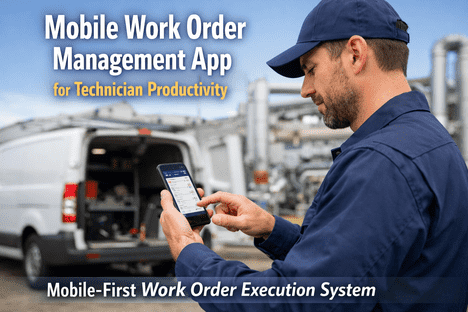
Mobile-First Access
Technicians update work orders from the shop floor in real time — not from a desktop hours later when details are forgotten.
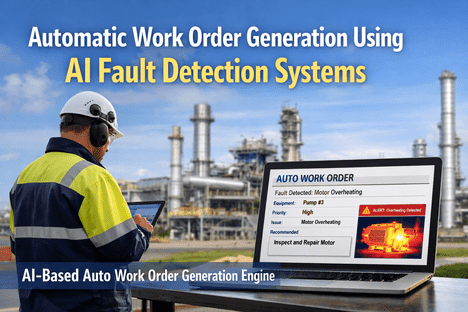
AI-Triggered Work Orders
System creates a work order automatically when sensor data signals degradation — no manual request needed, no delay.
Full Asset History
Every work order links to the asset. Complete maintenance history — costs, parts, labour, failure patterns — at a glance.
Inventory Integration
Parts consumed auto-update stock levels. Low-stock alerts trigger reorders before a job is delayed waiting for parts.
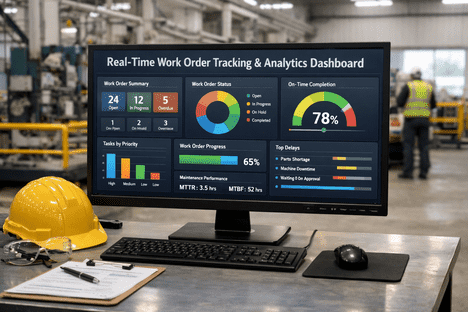
Live KPI Dashboards
MTTR, MTBF, backlog size, overdue count, and technician utilization — visible in real time without building reports manually.
Compliance-Ready Reporting
Audit trails, inspection logs, and safety checklists auto-generated from completed work orders. Zero scrambling at audit time.
The Real Impact: What Changes When You Get This Right
These aren't projections — they're outcomes maintenance teams are achieving today with iFactory's AI-powered work order system. Book your free demo and we'll calculate your facility's projected savings before the call even ends →
See What Modern Work Order Management Looks Like
In 30 minutes, iFactory will show you live dashboards, AI-triggered work orders, real-time KPIs, and automated compliance reports — built for manufacturing teams exactly like yours. Zero obligation.