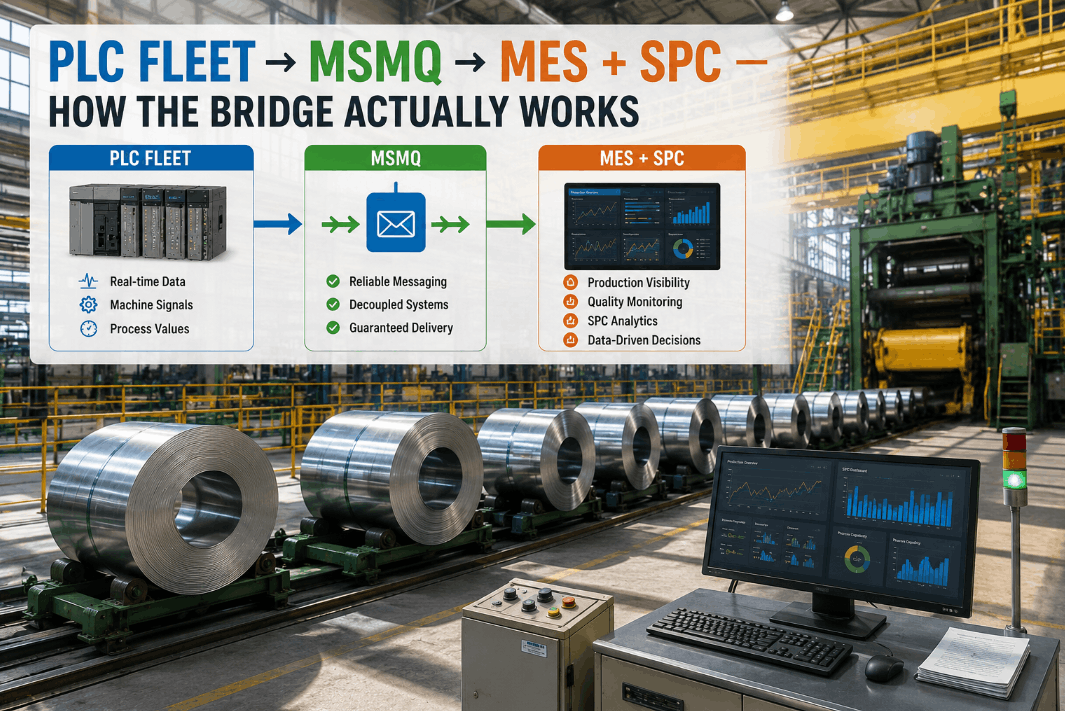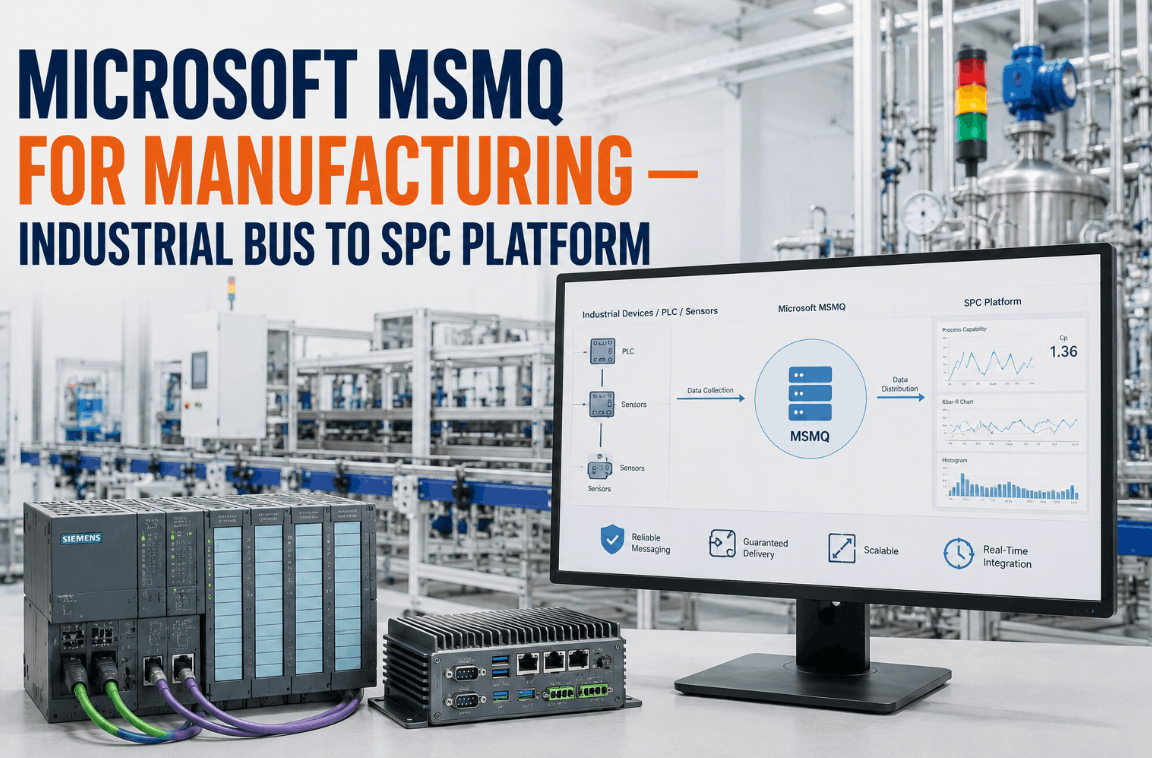
Microsoft Message Queuing remains the most reliable industrial message bus on Windows-based manufacturing infrastructure — and for good reason. In high-volume discrete and process manufacturing environments where guaranteed message delivery, transactional consistency, and on-premise control are non-negotiable, MSMQ outperforms every cloud-native alternative on the dimensions that matter most to IT/OT integration leads: deterministic delivery, zero message loss under network interruption, and seamless integration with Windows Server environments where most manufacturing applications already live. iFactory's MSMQ connector consumes industrial queue streams directly into an AI-powered SPC platform — 12 named queues, 2-second poll cycle, API bridge on, webhooks on, Windows Server 2025 supported — without requiring a middleware layer, a message broker migration, or a cloud dependency. Book a Demo to see MSMQ data flowing into live SPC charts.
Why MSMQ Remains the Industrial Bus of Choice for Windows Manufacturing Environments
The manufacturing technology community has spent a decade debating MSMQ's relevance in an era of cloud messaging — Azure Service Bus, RabbitMQ, Apache Kafka. What that debate consistently underweights is the operational reality of the factory floor: most manufacturing applications running on Windows Server infrastructure were built with MSMQ as their messaging foundation, they have been validated and certified against MSMQ behavior, and the IT/OT integration teams maintaining them have neither the budget nor the risk appetite to migrate to a cloud broker. More importantly, MSMQ's core properties — transactional message delivery, store-and-forward under network failure, journal queues for audit, exactly-once delivery with COM+ transactions — are precisely the properties that manufacturing IT/OT integrations require.
The real question for IT/OT integration leads in 2025 is not whether to replace MSMQ, but how to get more intelligence out of the data MSMQ is already carrying. iFactory answers that question directly: connect the existing MSMQ queues to a modern AI-powered SPC analytics engine, preserve the on-premise message bus architecture that provides guaranteed delivery, and add the real-time quality intelligence layer that MSMQ alone cannot provide. Book a Demo to see the integration against your queue topology.
iFactory's MSMQ Connector Architecture: How 12 Named Queues Feed an SPC Platform
The iFactory MSMQ connector runs as a Windows Service on the manufacturing network, consuming messages from up to 12 named queues simultaneously. Each queue is independently configured with its own message parser, data mapping schema, and SPC routing rules — allowing a single connector installation to serve multiple production lines, work centers, or measurement systems feeding different queue paths. The 2-second poll cycle ensures that measurement data reaches the SPC control chart in near real-time, with message sequencing preserved and no data loss under transient network conditions.
iFactory's connector scans the MSMQ service for configured queue names on startup and registers each queue with its associated data schema and SPC routing rule. New queues added to the configuration are picked up on the next service restart without reinstallation.
A dedicated worker thread polls each registered queue at 2-second intervals using System.Messaging in transactional mode. Messages are read within a COM+ transaction scope — guaranteeing that a message removed from the queue is either successfully processed and acknowledged or returned to the queue for retry.
Each queue's message format — XML, JSON, binary, or proprietary encoding — is handled by a configurable parser. Field-level mapping converts source message fields to iFactory's SPC data model: characteristic name, measured value, nominal, tolerance, order reference, and timestamp.
Parsed measurement data is posted to the iFactory SPC engine via REST API bridge. The API bridge supports both synchronous post (blocking until SPC chart is updated) and asynchronous post (fire-and-forward for high-volume queues). Webhook notifications are dispatched on control chart signal events to configured endpoints.
Messages that fail parsing or SPC routing are written to a configurable dead-letter queue with the original payload and the error detail. The dead-letter queue is monitored by the iFactory connector health dashboard, with alerting to the IT/OT integration team when error rates exceed the configured threshold.
When MSMQ journaling is enabled on source queues, iFactory can replay historical messages from the journal queue to backfill SPC charts after a connector outage or to validate the SPC configuration against historical production data before go-live.
MSMQ vs. Modern Cloud Message Brokers for Manufacturing IT/OT Integration
IT/OT integration leads evaluating messaging architecture for manufacturing SPC integration face a genuine architectural choice. The table below compares MSMQ against the most common cloud and on-premise alternatives on the dimensions that matter most for factory floor integration — not general-purpose enterprise messaging. iFactory supports all listed transports, but the MSMQ connector is optimized for environments where on-premise reliability and Windows Server compatibility are the primary requirements.
| Capability | MSMQ (Windows) | Azure Service Bus | RabbitMQ | Apache Kafka |
|---|---|---|---|---|
| Store-and-forward under network failure | Native — no config required | Cloud-dependent; offline gap | Requires durable queues + HA config | Partition replication required |
| Exactly-once delivery | COM+ transactional — built in | Sessions + peek-lock required | Publisher confirms + consumer ack | Idempotent producer required |
| On-premise deployment | Native Windows Server feature | Cloud-only; no on-premise option | On-premise supported | On-premise supported |
| Windows Server 2025 support | Supported — Windows feature | SDK-based; platform-independent | Supported | Supported |
| Existing manufacturing app compatibility | Wide — most MES/SCADA apps support MSMQ | Limited — requires SDK migration | AMQP adapter required | Protocol mismatch — major migration |
| iFactory connector status | Native connector — 12 queues, 2s poll | Supported via API bridge | Supported via AMQP adapter | Supported via Kafka consumer |
What AI-Powered SPC Adds to MSMQ Manufacturing Data
MSMQ delivers manufacturing data reliably and in sequence. What it does not do is analyze that data for statistical process control signals, compute capability indices, or trigger quality interventions. iFactory adds that intelligence layer on top of the MSMQ transport, transforming the queue data stream from a reliable delivery mechanism into a real-time quality management tool.
CMM, gauge, inline sensor, or test bench result posted to named MSMQ queue by the measurement application. Message includes characteristic value, timestamp, work order reference, and resource ID.
Worker service reads message within transactional scope. Parser extracts measurement fields. Data posted to SPC engine API bridge within the 2-second poll window.
Measurement added to the active subgroup for the characteristic. When subgroup is complete, X-bar and R (or S) calculated. All 8 Western Electric rules evaluated. Control chart updated on Quality Director dashboard.
Cpk and Ppk recalculated on configurable rolling sample window (last 25–100 measurements). Trend projection computed. Alert generated if projected Cpk is trending below minimum threshold.
On control chart signal, webhook fired to configured endpoint (MES, CMMS, email, SMS). Investigation workflow opened in iFactory with chart context, rule detail, and assignable cause form. Response tracked to closure in audit record.
Windows Server Compatibility and IT/OT Security Considerations
IT/OT integration leads managing Windows-based manufacturing environments need to understand where iFactory's MSMQ connector sits in the network topology and what security footprint it requires. The connector is designed to operate within existing OT network security boundaries without requiring firewall rule changes that would expose production equipment to the enterprise network.
- Windows Server 2025 — fully supported including MSMQ v6 feature
- Windows Server 2022 and 2019 — supported LTS versions
- MSMQ installed as Windows Server feature — no separate installation
- .NET 8 runtime required for iFactory worker service
- PowerShell-based deployment scripts for automated installation
- Connector runs within OT network segment — no inbound firewall rules required
- Outbound HTTPS to iFactory API bridge on port 443 only
- MSMQ read operations use Windows service account with queue read permissions only
- No write access to MSMQ queues required — read and purge after successful processing
- TLS 1.3 on all outbound API bridge connections; certificate pinning supported
- Up to 12 named queues in single connector configuration
- Per-queue message parser: XML, JSON, binary, custom formats
- Field-level mapping configuration via iFactory admin console
- API bridge ON by default — REST endpoint for SPC engine
- Webhooks ON — configurable endpoints for MES, CMMS, alerting systems
- Queue depth monitoring — alert when queue depth exceeds configured threshold
- Processing latency tracking — alert when poll-to-SPC latency exceeds 10 seconds
- Dead-letter queue depth — alert to IT/OT team on error accumulation
- Windows Event Log integration — connector health events written to Application log
- iFactory connector health dashboard — real-time status for all 12 queue channels
Expert Perspective: Why IT/OT Integration Leads Keep Building on MSMQ
Every few years, someone proposes replacing MSMQ with the latest cloud messaging platform, and every few years the proposal dies in the risk assessment. The reason is simple: in a manufacturing environment, the cost of a missed measurement event is not an abstract metric — it is a defective part that ships, a customer claim, or a regulatory nonconformance. MSMQ's store-and-forward behavior under network failure, its transactional delivery guarantees, and its deep integration with the Windows Server applications that have run factory floors for 20 years are exactly the properties that make it difficult to replace. What I tell IT/OT integration leads is: stop trying to replace the bus and start getting more out of the data it carries. The MSMQ infrastructure you have is already doing the hard part — guaranteed, ordered, on-premise delivery of manufacturing data. What you need is a modern analytics layer on the receiving end that turns that data into quality intelligence. When I see a plant with MSMQ queues full of CMM and gauge data feeding nothing but a historian, I know exactly what the quality improvement opportunity looks like. The bus is working. The intelligence layer is missing.
Conclusion: Your MSMQ Infrastructure Is Already Doing the Hard Part — Add the Intelligence Layer
Microsoft MSMQ is not a legacy liability — it is a proven, reliable industrial message bus that is still the right transport for on-premise Windows manufacturing environments where guaranteed delivery, transactional consistency, and OT network security are non-negotiable. The gap is not in the transport layer. It is in the analytics layer that should be consuming the data MSMQ delivers and converting it into real-time SPC intelligence.
iFactory's MSMQ connector closes that gap: 12 named queues, 2-second poll cycle, API bridge on, webhooks on, Windows Server 2025 supported, on-premise deployment — no cloud dependency, no middleware migration, no changes to the MSMQ infrastructure that your manufacturing applications depend on. Book a Demo and see your MSMQ data flowing into live SPC control charts within minutes of the connector going live.
Frequently Asked Questions
MSMQ remains a supported Windows Server feature in Windows Server 2025. Microsoft has not announced deprecation of the MSMQ Windows feature, and iFactory's connector is tested and certified on Windows Server 2025 alongside 2022 and 2019 LTS versions.
iFactory is designed to read from dedicated SPC queues, not to compete with existing consumers on shared queues. The recommended architecture uses MSMQ's routing or the source application's queue fan-out to post measurement data to a dedicated iFactory queue alongside the existing consumer queue — no changes to existing applications required.
The parser supports XML, JSON, and delimited text out of the box. For binary or proprietary message formats used by older MES or SCADA systems, iFactory provides a custom parser configuration framework that allows field-level byte-offset mapping without requiring code changes to the connector service.
Messages remain in the MSMQ queue during SPC engine unavailability — the connector pauses processing and retries the API bridge connection on a configurable backoff schedule. When the engine recovers, the queue backlog is processed in sequence and SPC charts are backfilled from the queued data.
For an environment with existing MSMQ queues carrying structured measurement data, a standard connector deployment runs 3 to 6 weeks — covering queue inventory, message schema mapping, SPC chart configuration, and control limit baseline establishment. First live SPC charts typically appear within the first two weeks.