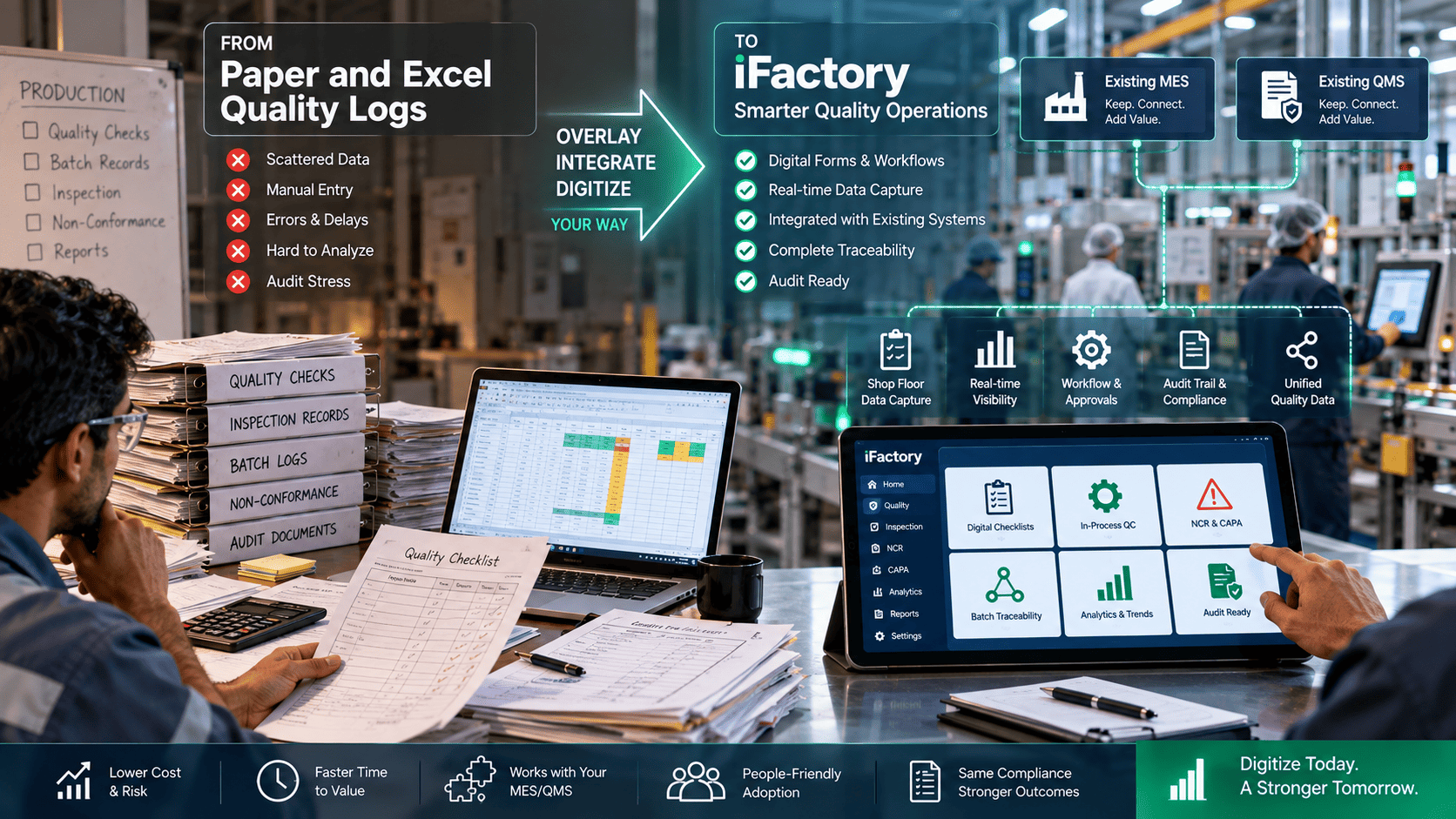
It’s 7:25 AM on the production floor. An engineer stands in front of a line with a clipboard, flipping between hand-written logs and Excel printouts, trying to reconcile those notes with the MES. The plant manager’s question is familiar: can we get digital quality logs overlaying our stack so operators stop re-keying data and issues start triggering actions in minutes, not days? If your team is evaluating a move off paper and Excel, the real choice usually isn’t replace or keep. It’s overlay or rip out.
iFactory / Digital quality logs, MES & QMS overlay
Overlay or Rip Out — The Honest Comparison
An intelligence and action layer that digitizes checks at the source, harmonizes them with MES and QMS data, and triggers documented corrective workflows — while your validated systems of record stay exactly where they are.
Today: paper
Binders · clipboards
↓
Today: Excel
Islands of truth
↓
Overlay layer
Digital forms · triggers
↓
System of record
MES / QMS · unchanged
One line first
incremental rollout
Browser-first
minimal IT footprint
Low-privilege
standard enterprise auth
The Problem on the Floor
Many plants still collect daily checks on paper or in Excel even when an MES or QMS exists. Those logs become isolated islands of truth. The result is a signal-to-action gap: quality signals are captured, but they never flow automatically into root-cause workflows, batch genealogy, or corrective actions. What follows is predictable — delayed containment, manual reconciliation work nobody budgeted for, fractured audit trails, and trends that affect OEE and compliance going unnoticed until someone assembles the spreadsheet by hand.
Where the Data Chain Breaks
Four domain realities determine whether digitizing quality logs actually pays off. Each one degrades quietly when checks stay on paper.
SPC / SQC
Statistical process control only works when sample points and control chart inputs are captured consistently and are accessible in real time.
Batch genealogy
Traceability across inputs, machines, and operators requires joining operational telemetry with the quality checks themselves.
Predictive quality
Early-warning models need harmonized, timestamped data. Ad hoc logs with inconsistent cadence break those models outright.
OEE
Availability, performance, and quality metrics only improve when quality exceptions and machine states are tied to the same time frame.
What Good Digital Quality Logs Look Like
The target state is not “everything digitized.” It is checks captured at the source, harmonized across lines and shifts, and wired to escalation — while the MES or QMS remains the system of record.
Capture at Source
Operators and test devices record checks digitally where the work happens — tablet, terminal, or straight from the PLC.
Discipline: no re-keying
Harmonized View
Quality data from lines, shifts, and labs is reconciled and visible in near real time rather than at the next reporting cycle.
Discipline: one timeline
Automatic Escalation
Exception rules fire on their own — alerts, rework orders, supervisor escalations — closing the loop without a meeting.
Discipline: rules, not memory
Incremental Rollout
A single line, shift, or checklist can be digitized and validated before anything scales, so risk stays contained.
Discipline: pilot first
Overlay vs Ripping Out — The Trade-Offs
A full MES or QMS replacement offers a single vendor stack and long-term consolidation. It also brings high project cost, long timelines, real business risk during cutover, and heavy change management — which is rarely realistic for a plant that must keep producing and stay compliant throughout. The overlay approach trades that for faster time-to-value, modular deployment, lower implementation risk, and preserved validated systems of record. Its honest cost is process mapping and careful integration design so data flows stay consistent and traceable, and some workflows will need alignment across systems. Favor overlay when you need speed, lower risk, or must maintain validated systems for compliance. Consider replacement only if your MES or QMS genuinely cannot meet governing regulations or cannot be integrated at all — and expect a much longer, riskier program.
How iFactory AI Fits
iFactory AI is an intelligence and action overlay, not a replacement. It references and augments MES/QMS data instead of overwriting it, which is what maintains system-of-record integrity and regulatory traceability. Four capabilities carry most of the transition:
Connectors + Imports
Overlay Layer
Supports Excel import and export and integrates with common MES/QMS APIs or secure file interfaces, so existing records remain authoritative.
Digital Forms
Operator Input
Replaces paper checklists with configurable forms on tablets, terminals, or phones — with MES/QMS context visible without leaving the workflow.
Action Triggers
Action Layer
Exceptions create documented corrective workflows, task assignments, or MES updates, which is what actually closes the signal-to-action gap.
Genealogy Linkage
Trace Model
Links operator checks, test-device outputs, and machine events to batches so every exception is tied to its process history.
Start with one binder. Pick the single checklist that causes the most re-keying or the most reconciliation pain, and time how long it takes today from a failed check to a documented corrective action. That number is your baseline, and it is the number a pilot should move first. Book a working session and bring that checklist — we’ll scope it into a pilot plan.
An Illustrative Pilot — Metal-Detect and pH Logs
A food-batch plant piloted iFactory on a single line by digitizing metal-detect checks and pH logs that had been kept in binders. Within two weeks the team linked those checks to batch IDs and machine run states. When the metal detector drifted, an automated exception stopped the line and created a documented rework task tied to the batch genealogy — visible to the MES without replacing it. No return-on-investment numbers are claimed here. This is an example of how overlaid data can speed containment and documentation, and actual results depend on your processes and data.
Six Steps From Paper to Overlay
The overlay model reduces disruption, but it still rewards a deliberate sequence. Process mapping in step one is what prevents surprises in step five.
Step 1
Map the Touchpoints
Document where paper and Excel touchpoints exist, the cadence of each check, and who needs to be alerted when one fails.
Step 2
Fix the System Boundary
Identify which MES/QMS fields must remain authoritative and which can be supplemented by overlay inputs. Plan the API or secure file integration.
Step 3
Clear IT and Security
Expect reviews on data flows, audit logging, and access controls. The overlay is designed for low-privilege deployment with standard authentication.
Step 4
Pilot With Superusers
Start on one line with a small group of superusers, clear operator procedures, and short retraining sessions rather than a plant-wide launch.
Step 5
Define Governance
Decide how exceptions and actions recorded in the overlay are reconciled into the MES/QMS audit trail so the compliance posture stays clean.
Step 6
Expand by Checklist
Digitize one checklist or line at a time and scale only once each process has been validated in production conditions.
What the Overlay Unlocks Next
Closing the data-chain gap is not only about getting off paper. It is what makes the other quality overlays possible on the same record.
SPC / SQC
Control charts on real-time data
Capture the right statistical points and display control charts built on harmonized, timestamped data from every source, not just the digital ones.
Genealogy
Every exception tied to a batch
Operator checks, test-device outputs, and machine events link to batches, so containment starts with process history rather than a search.
Predictive Quality
A dataset models can actually use
Eliminating gaps and harmonizing inputs creates the reliable, timestamped dataset predictive models need — when you choose to add them.
OEE
Quality exceptions in the same time frame
Tying quality exceptions to machine states in one timeline is what lets availability, performance, and quality be read together.
What This Cannot Do
An overlay does not remove the integration work — it relocates it. Process mapping matters, and some processes can be fully digitized while others will be phased over months. Expect IT review cycles on data flows and access controls even though the deployment is low-privilege; routine security reviews are normal, though major policy exemptions are uncommon. Training and change management still apply: the model reduces disruption but benefits enormously from clear operator procedures and short retraining. And governance is a standing commitment, not a setup task — someone has to own how overlay records reconcile into the MES/QMS audit trail.
FAQ
Do we have to get rid of our MES or QMS to use iFactory AI?
No. iFactory is built as an overlay and augments your current MES/QMS. It references system-of-record data rather than replacing or overwriting it.
Book a working session to see the boundary drawn against your own stack.
We have critical procedures and compliance logs in paper binders — can those move gradually?
Yes. Incremental adoption is core to the overlay model. Digitize one checklist or one line at a time and expand once each process has been validated in real production conditions.
How does iFactory connect to both Excel logs and structured MES/QMS data?
iFactory supports importing and exporting Excel and integrates with MES/QMS systems via APIs or secure file interfaces to create a unified quality data layer across both.
Will iFactory conflict with IT security or require major policy exemptions?
iFactory is designed for low-privilege overlay deployments using standard security protocols and enterprise authentication. Expect routine security reviews; major policy changes are uncommon.
Can actions triggered in iFactory flow back into our main systems of record?
Yes. Actions, exceptions, and handoffs can be configured to update the MES/QMS or create traceable audit artifacts, so your compliance posture remains intact.
Overlay or rip out — decide with your own stack.
Bring One Checklist — We’ll Scope the Pilot
The overlay versus rip-and-replace question depends on your plant’s specific stack, people, and compliance scope. A short working session is the most practical way to see real workflows and leave with a pilot plan.
Excel + API
both supported