In many pharma plants, the MES is live but the operator still carries a pen. Weights are read from a scale and written down, times are noted on a sheet, then typed into the system later. Second-person checks happen on paper. Calculations are done by hand. Every one of those steps is a chance for error and a gap in data integrity. A modern MES operator control panel ends double entry by capturing data where it originates, guiding each step and checking entries as they happen. This guide covers what ALCOA means at the operator’s level, what a good panel shows, design principles for operators, how review by exception follows and a practical rollout plan. To see a paperless operator panel, book a short walkthrough.
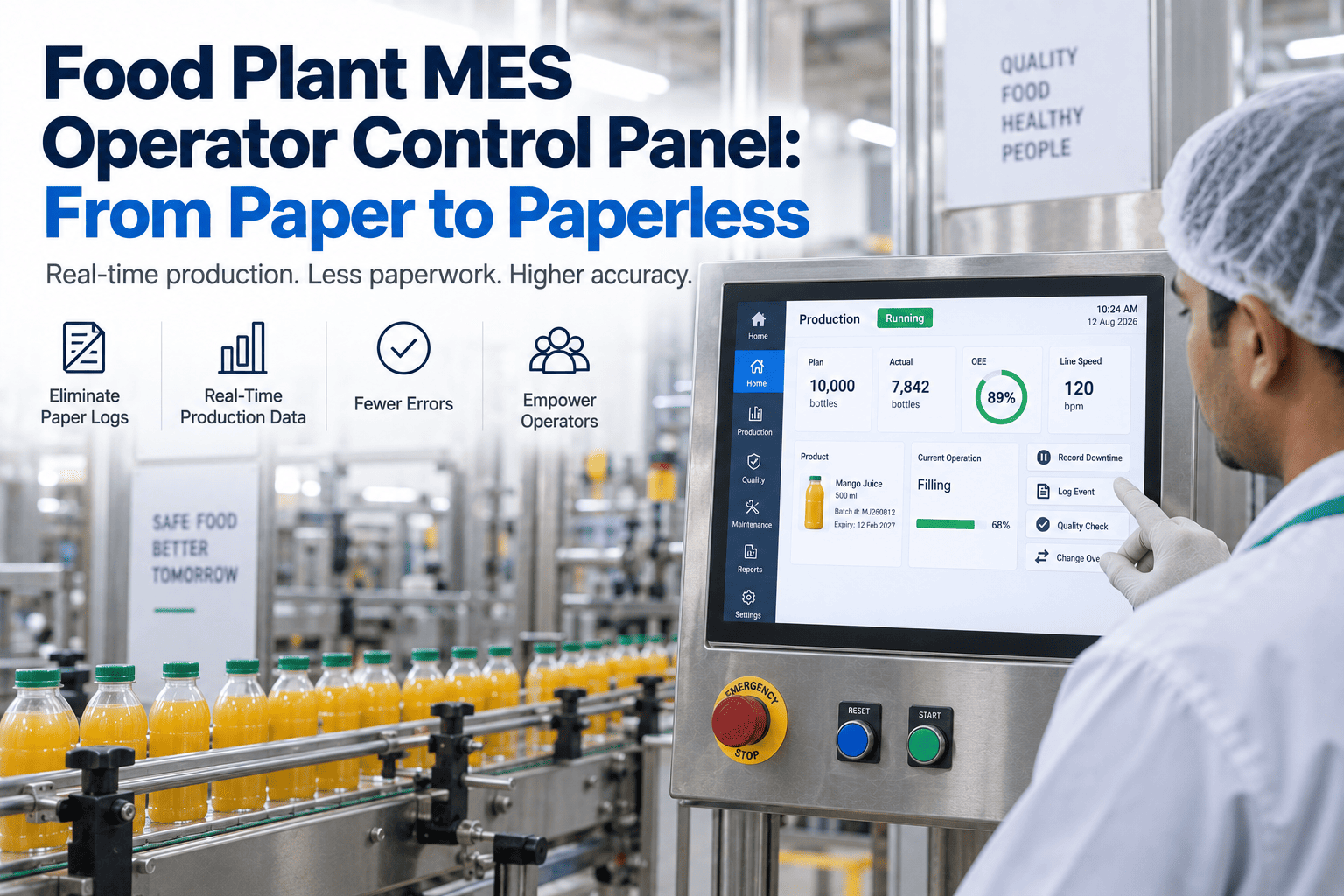
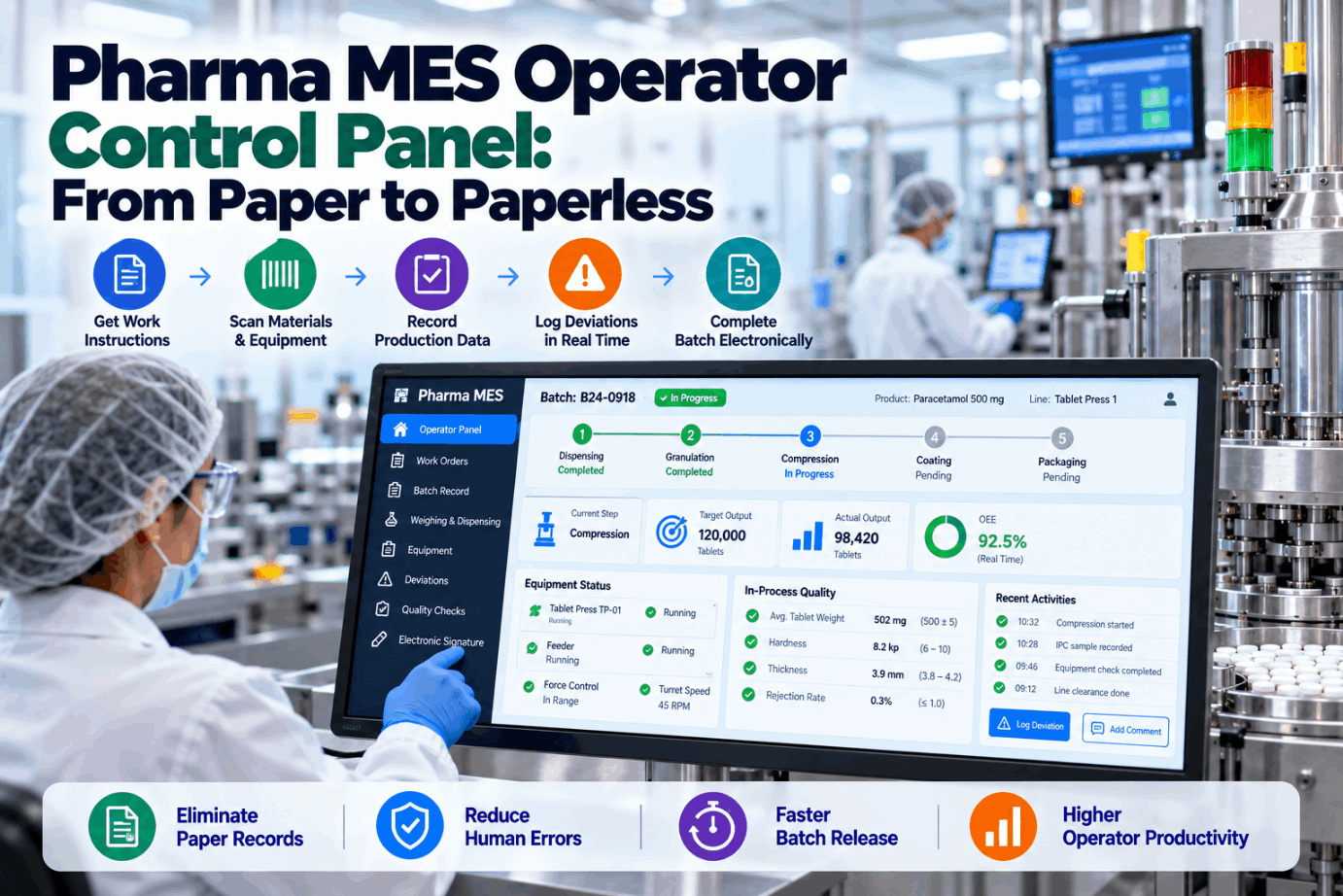
Pharma MES Operator Control Panel: From Paper to Paperless Without Double Entry
Guided steps, direct equipment data, live checks and electronic signatures at the point of work, so batch records are right the first time and ready for review by exception.
Why Double Entry Survives in Digital Plants
Many MES rollouts digitize the batch record without redesigning the work. The system asks for data, but the operator still has to read it somewhere, remember it or write it down first. Gloves, gowning and busy suites make typing awkward, so paper notes persist. The result is double entry: data recorded twice, with two chances for error and a record that is not truly contemporaneous.
The FDA’s 2018 guidance on data integrity is direct about this. It expects data to be attributable, legible, contemporaneously recorded, original or a true copy, and accurate, and it states that recording data on pieces of paper to be transcribed later is not acceptable. A panel that forces or tolerates that habit leaves a gap no amount of review can close.
The fix is not more checking. It is a panel designed so that the right data arrives once, at the right moment, from the right source. We can review your current operator workflow on a call.
What ALCOA Means at the Operator’s Level
Data integrity principles are often discussed at system level. At the operator panel, each one turns into a concrete design requirement.
When the panel is designed around these requirements, compliance becomes the easy path rather than an extra burden. That design principle runs through every screen in our operator panel.
What a Good Operator Panel Shows
Operators need the right information at each step and nothing that distracts from it.
The instruction for this step only, with the next action highlighted and completed steps greyed out.
Setpoints, ranges and actual values side by side, with out-of-range values flagged immediately.
Material, lot, target quantity and scale reading, with barcode confirmation of the right lot.
Cleaning status, calibration status and qualification, blocking use of equipment that is not ready.
Process alarms and hold conditions, with the required response shown at the point of need.
Electronic signatures and second-person verification built into the step, not added at the end.
Equipment status checks are an underrated benefit. A panel that will not let a batch start on equipment past its cleaning hold time prevents deviations rather than recording them. See status checks in a demo.
Design Principles for Operators in Gowning
Operator panels in pharma suites are used by gloved hands, often standing, sometimes in noisy areas. Design for those conditions.
Involving operators in design is the single strongest predictor of adoption. Our rollout includes structured operator sessions, which our team can describe.
Paper Records Versus a Guided Panel
The difference is not just paper versus screen. It is recording versus preventing.
- Values read and written by hand
- Times noted when remembered
- Checks signed after the fact
- Errors found during batch review
- Deviations written up later
- Full review of every page
- Values captured from equipment
- Times stamped by the system
- Checks built into each step
- Errors blocked at entry
- Guided deviation at the moment it happens
- Review focused on exceptions
Paper also hides the timing of work. On a panel, every step has a start and end time, which gives production a precise view of where batches spend their hours and where waiting occurs. That information is almost impossible to reconstruct from paper records, and it often reveals improvement opportunities nobody was looking for.
The operator’s experience changes too. Instead of juggling a paper record, a pen and a system, the operator follows one screen that tells them what to do next and confirms when it is done. Most operators prefer it once they have used it for a few batches.
Double entry during transition is the most common reason paper persists, so the rollout plan should remove it deliberately. That is built into every rollout plan.
How Review by Exception Follows
When the panel prevents most errors and flags the rest, QA no longer needs to read every entry. It can review only what went wrong or looked unusual.
Data enters from equipment and guided steps.
Limits and rules applied at entry.
Exceptions recorded: out-of-range values, overrides, deviations.
An exception summary built for each batch.
QA reviews exceptions and signs off the batch.
EY describes how review by exception can cut a 150-page batch record review to a three-page exception report, reducing review cycle time from days to hours. That only works if the records are trustworthy in the first place, which is what the guided panel provides.
Review by exception must be validated like any GMP process, with clear rules on what counts as an exception. We help define those rules during design workshops.
A Practical Rollout Plan
Paperless operation is best introduced product by product and suite by suite.
Walk through a real batch and list every data point, source and check.
Integrate scales, meters, PLCs and scanners so data arrives without typing.
Build and test screens with the people who will use them.
Test the panel and interfaces under your computerised system validation approach.
Run the first batches with close support, then retire the paper.
Move to the next product or suite and refine the design.
The equipment connection step is where most double entry disappears. It is worth investing there first, because every connected device removes a manual entry from every batch.
A focused first suite often goes live faster than a site-wide project and builds the case for the rest. Ask our support team for a sample plan.
How to Measure a Paperless Operator Panel
A panel succeeds when records are right first time and release gets faster. These measures show whether that is happening.
Track the baseline on paper or current MES before go-live, then compare after each product moves to the panel. The equipment-capture measure is especially useful: it shows exactly how much manual entry remains and where to connect next.
These measures also make the case for the next suite far easier to approve. We provide a standard set with every pilot report.
How iFactory Delivers the Operator Control Panel
One step per screen in the order of the work.
Scales, meters, PLCs and scanners feed data directly.
Limits, units and calculations enforced at entry.
Cleaning, calibration and qualification checked before use.
Signatures and verification built into each step.
Batch summaries ready for review by exception.
It works with your existing MES or as an operator layer beside it. Bring one batch record and we will show it as a guided flow in a session.
Take One Batch Record Fully Paperless
Choose one product and suite. We connect its equipment, design screens with your operators and run guided batches with exception reports through the pilot.
Binder addition time outside the recipe window by 40 s. Panel paused the step and opened a guided deviation.
A Deviation Handled at the Moment It Happens
This exchange shows how an operator and supervisor might use the panel with iFactory’s assistant during granulation.
iFactory ships as a pre-configured NVIDIA AI server, racked and ready with the operator guidance and batch data capture models loaded. Rack it, plug in power and Ethernet, and the AI is live on your network. Our scope covers sensors and data connections across production suites and equipment, PLC/SCADA, MES, LIMS and ERP integration, cabling and network setup, operator and quality team training, and 24×7 remote monitoring.
Server installed, sensors and system links live, historical batch, lab and maintenance records loaded.
Models trained on your own batches and equipment, then run in parallel on one area with your quality and engineering teams reviewing every output.
Rollout to the agreed areas under your change control and validation procedures, team training and 24×7 remote monitoring in place.
Software, server and integration come as one package. For pricing on your suites, contact our sales team.
Frequently Asked Questions
It is the screen operators use to follow batch instructions, record data, confirm materials and equipment, sign steps and handle deviations, ideally capturing data directly from equipment rather than by typing.
By taking data from scales, meters and PLCs automatically, stamping times by system, doing calculations for the operator and building checks into each step, so nothing needs to be written down first.
Every entry must be attributable to a named user, legible, recorded at the time of the action, original or a true copy, and accurate, as set out in the FDA’s 2018 data integrity guidance.
A batch review approach where QA reviews only exceptions, such as out-of-range values, overrides and deviations, instead of every entry. It depends on reliable, validated data capture.
Yes. It can be the MES’s own operator interface or a guided layer that works beside it and writes to it.
A first suite typically goes live within a 6–12 week rollout, including equipment connections, screen design, validation and parallel batches. Plan it with our team.
Capture Every Entry Once, Right, at the Point of Work
iFactory guides operators step by step, takes data straight from equipment and checks it as it happens, so batch records are complete, trustworthy and ready for fast release.
Most entries come straight from equipment, so operators confirm rather than copy.