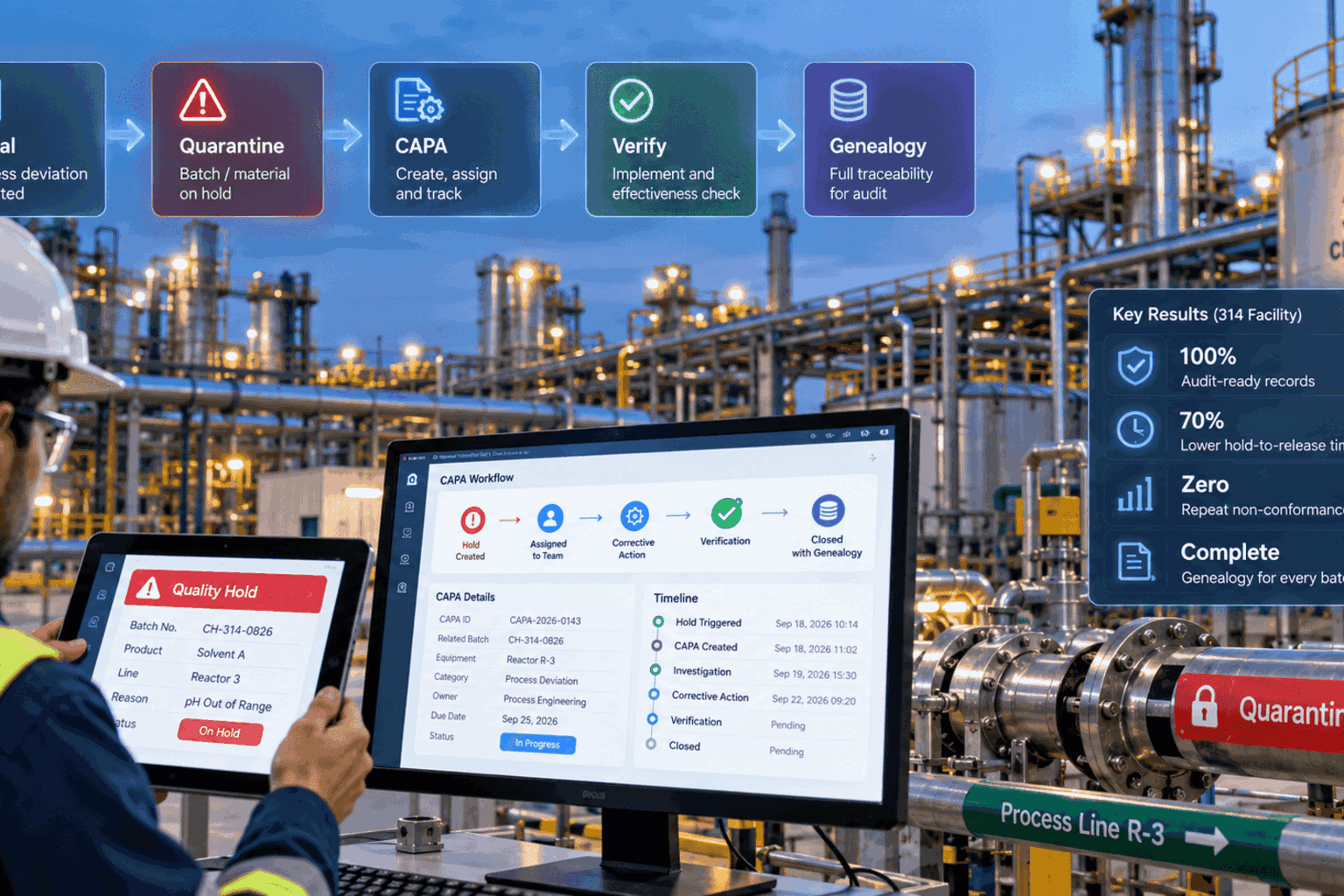
A lot can be out of control long before the defect count tells you. The real delay shows up in the hold lag — the minutes and hours between a failed sample, a quarantine decision, and the moment someone proves where the material went. That delay is exactly why a modern AQL sampling plan template has to do more than say accept or reject. A failed lot does not just create a quality record; it can stall production, block shipment, and expose a hidden inventory problem if genealogy is not checked before release. iFactory AI supports the workflow layer around AQL sampling — sample-size logic, switching rules, digital hold, CAPA, and lot genealogy — beside your existing MES and QMS. Schedule a 30-minute closed-loop AQL demo.
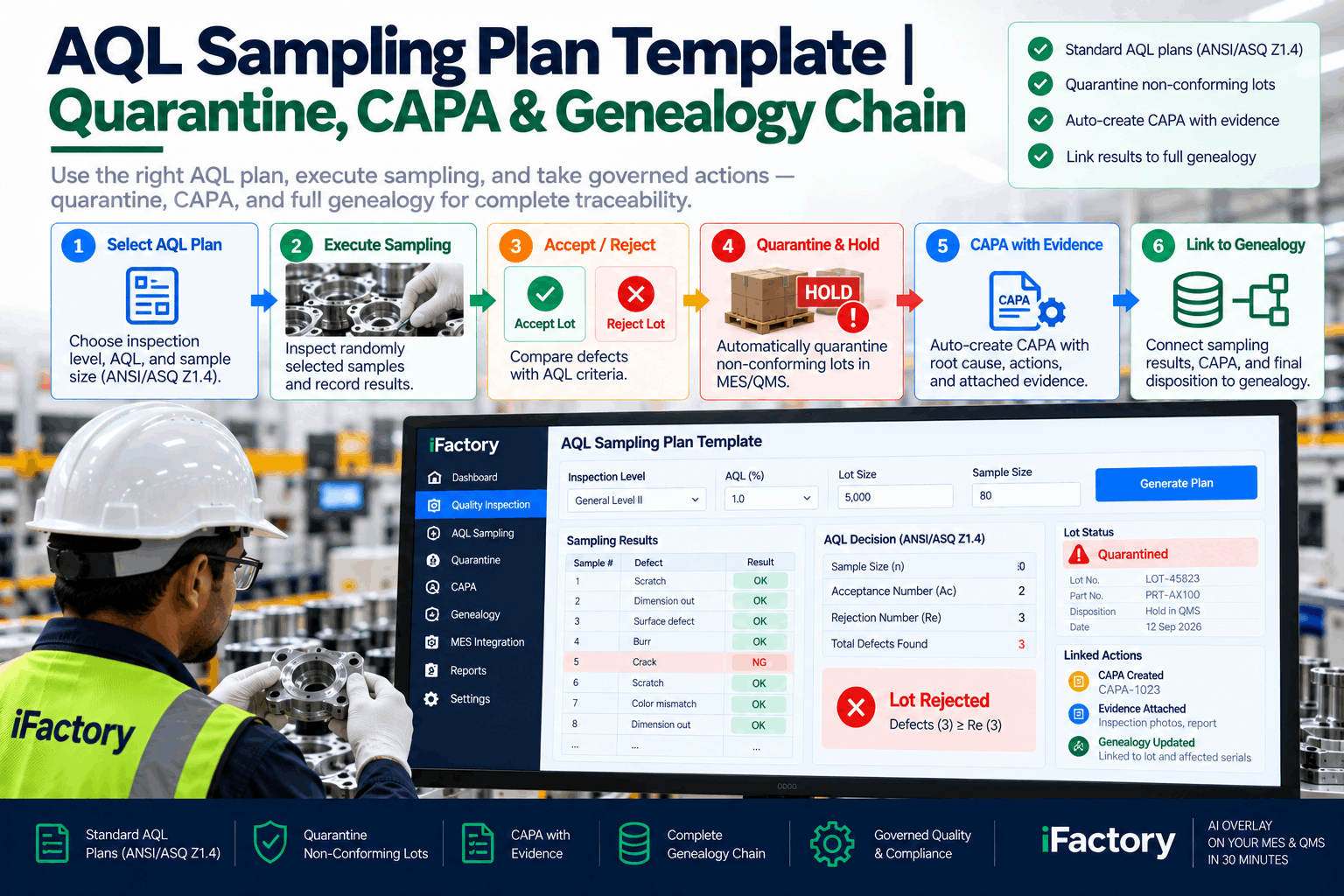
A refreshed AQL template that turns a failed sample into a controlled workflow event — hold, CAPA tasking, genealogy verification, and release approval, all in one traceable chain.
At a Glance
Why This AQL Template Needs a Refresh
A classic AQL sampling plan template answers a narrow question: how many units do we inspect, and do we accept or reject the lot? That is still useful for incoming inspection, but it is not enough for a plant that needs fast containment, clear ownership, and verified release. The biggest gap is what happens after the reject.
Modern quality teams need a workflow that can place the lot on hold immediately, preserve genealogy and inspection evidence, trigger CAPA with ownership and due dates, verify the disposition before release, and keep MES and QMS records aligned without duplicating them. That is where iFactory AI fits — it does not replace your inspection standard; it supports the workflow around it so the AQL result becomes a controlled action, not a spreadsheet note.
Sample-Size Reference — ANSI Z1.4 / ISO 2859-1 Framing
A refreshed AQL sampling plan template should make the standards logic easy to follow without turning the page into a wall of numbers. At minimum, it should show lot size range, inspection level, code letter, sample size, acceptance number, rejection number, and switching implications tied to the disposition outcome.
| Lot Size Range | Inspection Level | Code Letter | Sample Size | Accept | Reject |
|---|---|---|---|---|---|
| 2 – 8 | General II | A | 2 | 0 | 1 |
| 9 – 15 | General II | B | 3 | 0 | 1 |
| 151 – 280 | General II | G | 32 | 1 | 2 |
| 281 – 500 | General II | H | 50 | 1 | 2 |
| 501 – 1200 | General II | J | 80 | 2 | 3 |
| 1201 – 3200 | General II | K | 125 | 3 | 4 |
| 3201 – 10000 | General II | L | 200 | 5 | 6 |
| 10001 – 35000 | General II | M | 315 | 7 | 8 |
The highlighted row (501–1200 lot at AQL 1.0, sample 80) is the exact configuration used in the template example further down. That matters because the quality team is not just asking how many to inspect — they are asking what happens to the lot if the sample passes, fails, or triggers a change in inspection severity.
Switching Rules — The State Diagram Most Templates Skip
A good refresh should include a deeper section on switching rules because that is where many static templates break down. Switching rules govern when a plan moves between normal, tightened, and reduced inspection — and in practice, they are the bridge between the sampling table and the supplier management strategy.
A useful decision logic looks like this: if a lot fails and the defect is material or recurring, route the lot to quarantine and move the account to tightened inspection; if a lot passes and the supplier has a clean run, allow reduced inspection subject to quality rules; if the defect pattern suggests process drift, keep the lot under normal or tightened until CAPA verification closes. That keeps the sampling plan connected to reality instead of leaving it frozen as a static table.
Sample size, switching rules, digital hold, CAPA tasking, and genealogy — one continuous workflow in 30 minutes.
Reject Lot to Release: The Full Digital Path
When a lot fails AQL, the next step should not be a manual scramble. It should be a defined digital path — five checkpoints that turn an inspection decision into a controlled disposition without losing evidence between the shop floor and the release authority.
Reject
Hold
CAPA
Genealogy
Release
Trail
1) Record the reject
Capture the lot ID, supplier lot, part number, revision, defect code, sample count, inspection date, and inspector notes. The goal is not just to mark the lot as failed. The goal is to preserve the evidence that explains why.
2) Place the lot on digital hold
A rejected lot should move immediately into quarantine. The system should block use, movement, or release until the disposition is approved. A digital hold ties the status to the lot record so receiving, quality, and production are all seeing the same decision.
3) Launch CAPA
The failed lot should create a corrective action path with owner, due date, containment steps, root cause analysis, corrective action, and verification task. This is where manual follow-up often slips — automated tasking helps the team keep the issue visible until closure.
4) Verify genealogy before release
Before anything returns to production, the team should confirm where the material went, whether any WIP or finished goods contain the affected lot, and whether rework or segregation is required. Genealogy verification is the release gate that prevents hidden exposure.
5) Release only after evidence is complete
A release should require proof that the hold was cleared, CAPA was addressed, and genealogy was checked. That verification step is what turns inspection into controlled disposition — and what makes the audit response defensible on a Monday morning.
Template Field List — Worked Example
If you want the template to be operational, not just descriptive, include a concrete field list. The example below is the 501–1200 lot at AQL 1.0 (sample 80, accept 2, reject 3) with a cosmetic defect cluster that triggered hold and CAPA.
That field list gives teams a way to move from a paper sampling table to a traceable lot record — one where every disposition survives audit review because the evidence is attached to the record, not to somebody's memory.
Defect Handling Swimlane — Who Does What After Reject
Hold lag usually is not a system problem. It is a handoff problem. The swimlane below shows the four roles that touch a failed lot and the specific action each one owns before release can be considered.
Release Verification Checklist
A strong refresh should include explicit release verification steps, not just a pass or fail field. A pass on inspection does not always mean the lot is ready for use; if the lot had a previous hold, a supplier issue, or a tracing concern, the release needs proof, not assumptions.
- Recheck the lot number and revision
- Confirm the hold status is closed
- Review defect evidence and disposition
- Reference the CAPA number
- Verify genealogy for affected downstream units
- Approve via designated release authority
- Timestamp the release record
How Closed-Loop SPC Fits Into the Path
AQL and SPC solve different problems, but they work best together. AQL is about lot-level sampling decisions. SPC is about process behavior over time. When both are connected, the team can move from reactive inspection to faster process awareness. A practical closed-loop path: sample the lot using AQL, record defects and disposition, route failed lots into hold and CAPA, analyze recurring defect patterns, feed the findings back into process parameters, and verify correction with follow-up sampling or process checks.
Market Context — Edge AI Moves Closer to the Inspection Point
Vendor-reported case studies suggest manufacturers are pushing inspection decisions closer to the line and closer to the edge. In vendor-reported outcomes, industrial edge AI visual inspection continues to be associated with faster inspection and sampling decisions, while control plans, FAI, and PPAP remain unchanged.
That is the right way to think about the trend: not as a replacement for quality standards, but as a faster way to collect and route the data that quality teams already need. The operational effect is straightforward — faster defect detection, more consistent inspection execution, quicker containment decisions, stronger traceability. For teams evaluating this shift, the question is not whether the standards change (they do not) but whether the workflow around the standards becomes more responsive.
Frequently Asked Questions
No. AQL is a lot-level sampling decision method. SPC monitors process behavior over time. They solve different problems and are strongest when connected — AQL provides the accept/reject discipline, SPC provides the drift signal that adjusts sampling severity.
Switching rules keep the sampling plan proportional to actual supplier and process risk. Without them, the same inspection severity is applied to a stable supplier and a struggling one — which wastes inspection capacity and misses early warnings.
A digital hold ties the lot status to the record so receiving, quality, and production are all seeing the same decision at the same time. It removes the delay window where a rejected lot could still move because nobody knew it was rejected yet.
No. iFactory AI is positioned as an operational workflow layer beside MES and QMS — it makes the inspection decision actionable without replacing your systems of record. That matters especially when the existing systems are stable but the handoffs between them are slow.
Before release, the team confirms where the material went, whether any WIP or finished goods contain the affected lot, and whether rework or segregation is required. That check is what prevents a local hold from becoming a broad downstream exposure.
AQL still provides the decision structure for incoming inspection. But modern quality teams need more than accept or reject — they need quarantine, CAPA, genealogy verification, and a clear release path.