Most plants that buy a new machine are solving the wrong problem. The capacity was always there — it just never showed up in the numbers because availability losses, speed losses, and quality losses were quietly consuming it shift after shift. Closing those gaps does not require capital. It requires visibility. iFactory AI gives plant teams the real-time OEE data they need to attack the right losses in the right order, turning existing equipment into the capacity expansion the budget cannot afford. See how much hidden capacity your current machines are sitting on.
Your Hidden Capacity Is Already Paid For
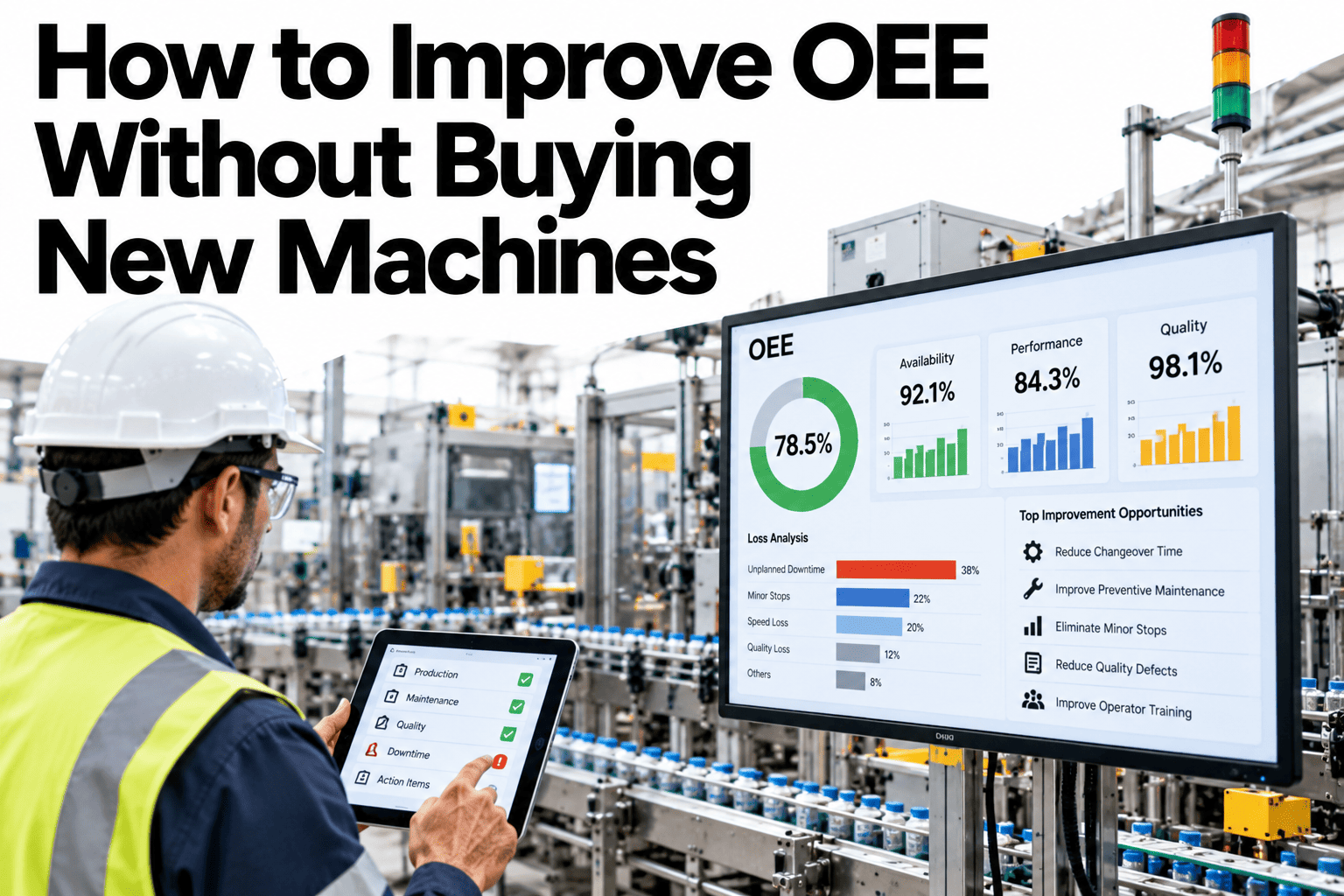
The average plant runs at 65% OEE. World-class is 85%. That 20-point gap represents capacity your machines already have — not capacity you need to buy.
Why More Machines Rarely Solve the Real Problem
Buying equipment before measuring losses is the most expensive mistake in manufacturing. You are adding capacity on top of a leaking bucket.
A plant running at 65% OEE has 35% of its scheduled time already lost to breakdowns, speed degradation, minor stoppages, changeovers, startup losses, and defects. Adding a new machine at the same OEE simply adds more of the same losses at a higher capital cost. OEE improvement unlocks capacity already embedded in the machines you own — at a fraction of the cost of new equipment.
The Six Losses That Eat Your OEE
Every OEE shortfall traces back to one of six loss categories across the three OEE components. Knowing which dominates your line determines where to act first.
Five Levers That Move OEE Without Capital
Each lever attacks a different loss category. Apply them in the order your data shows matters most — not in the order that feels most familiar.
Measure It Accurately First
You cannot improve what you cannot see. Most plants track OEE through manual operator entries or end-of-shift reports — both systematically undercount minor stoppages and speed losses. Real-time automated measurement is the prerequisite, not an optional upgrade. iFactory AI connects to existing equipment signals and delivers an accurate loss breakdown within days of installation.
Run a Pareto Audit on Downtime
Roughly 20% of failure modes drive 80% of downtime hours. A Pareto audit of critical equipment failure codes — not a general discussion, but a ranked table by lost production minutes — tells you exactly where to focus maintenance investment first. iFactory AI builds this ranked view automatically from work order and sensor data.
Cut Changeover Time with SMED
Single-Minute Exchange of Die methodology separates internal setup steps (machine stopped) from external steps (done while running) and systematically eliminates the internal ones. Teams that apply SMED routinely cut changeover time by 40–60%, freeing production capacity without touching any machine's rated throughput. The payback is immediate and measurable.
Restore Rated Speed
Many lines run at 70–80% of rated speed because nobody formally re-baselimed the standard after equipment wear increased or operating conditions changed. Benchmarking actual speed against manufacturer-rated speed, then systematically restoring it through maintenance and parameter optimization, often recovers double-digit OEE points with no capital spend whatsoever.
Standardize Operator Work Methods
Inconsistent methods produce inconsistent OEE. When documented standard work covers lubrication, inspection, startup sequence, and minor fault response, operator-to-operator variation in performance narrows sharply. The gain is not individual — it is systemic. Each refinement to the standard becomes the new baseline for everyone, so OEE ratchets upward instead of bouncing around between shifts.
Find Out Where Your Line Is Losing OEE
iFactory AI connects to your existing equipment and shows you a ranked breakdown of losses within days. No new machines needed — just the data to act on what you already have.
How iFactory AI Delivers OEE Gains
iFactory AI is a plug-in smart manufacturing platform that connects to existing equipment signals without requiring PLC replacements or major infrastructure changes.
Real-Time Loss Visibility
Availability, performance, and quality losses broken down by machine, line, shift, and SKU as they happen — not reconstructed from memory at end-of-shift.
Automatic Pareto Ranking
Loss causes ranked by production minutes lost, updated continuously, so the improvement priority list writes itself rather than depending on manual analysis.
Predictive Maintenance Integration
Condition signals from critical equipment feed directly into maintenance scheduling, catching degradation before it becomes unplanned downtime that drops availability.
Shift Comparison and Drift Alerts
Performance differences between shifts, operators, and days surface automatically, directing root cause investigation to where the gap is largest rather than where it is most visible.
Changeover Timing Analytics
Actual changeover duration versus standard tracked for every changeover, with variance flagged and internal versus external steps broken out to guide SMED projects.
Turnkey Hardware Deployment
iFactory AI arrives pre-configured on dedicated hardware with plant-specific signal mapping, going live in six to ten weeks with no ongoing IT maintenance burden.
What a 10-Point OEE Gain Actually Looks Like
Ten OEE points is not an aggressive target — it is a realistic first-year outcome for most plants that start measuring accurately. Here is what it means in production terms.
| Line Configuration | Current OEE | After 10-Point Gain | Additional Output | Capital Needed |
|---|---|---|---|---|
| Single line, 8-hour shift | 65% | 75% | +15.4% throughput | None |
| Two lines, two shifts | 65% | 75% | Equivalent to one new line | None |
| Five lines, 250 days/year | 65% | 75% | Nearly 25 extra production days | None |
| Single line versus new machine | 65% | 75% | Same output, fraction of the cost | 10–50x less |
The Right Sequence for OEE Improvement
Most improvement programs stall because they pick the wrong starting point — fixing the most obvious problem rather than the largest loss.
Common Questions
How quickly can we see OEE improvement after deploying iFactory AI?
Accurate measurement surfaces previously invisible losses within the first few weeks, and actual OEE gains typically show up in the data within four to eight weeks as the first targeted actions take effect. Walk through the deployment timeline in a live session.
Does our equipment need to have existing sensors or connectivity?
No. iFactory AI connects through existing PLC signals, retrofitted sensors where needed, and on-site edge hardware, with the deployment team handling signal mapping before go-live. Ask the team about connectivity for your specific machine types.
Can OEE improvements be sustained long-term without continuous monitoring?
Not reliably — equipment wear, operator drift, and mix changes gradually reintroduce losses. Continuous monitoring is what turns a one-time project into a sustained baseline. See how continuous monitoring works in practice.
Which OEE component should we focus on first?
It depends on your actual loss distribution. Availability is the most common first focus, but some lines lose more to speed or quality — iFactory AI shows your real split before any plan is made. See your own loss distribution before deciding where to start.
How does iFactory AI handle multi-line plants where OEE varies across lines?
It tracks OEE at machine, line, shift, and SKU level simultaneously, surfacing which lines drag the average down and letting teams replicate best practices from top performers. Book a demo to see cross-line benchmarking in action.
Unlock the Capacity You Already Own
iFactory AI shows you exactly where your machines are losing OEE and ranks the improvement actions by production impact. Book a 30-minute walkthrough to see your real numbers.