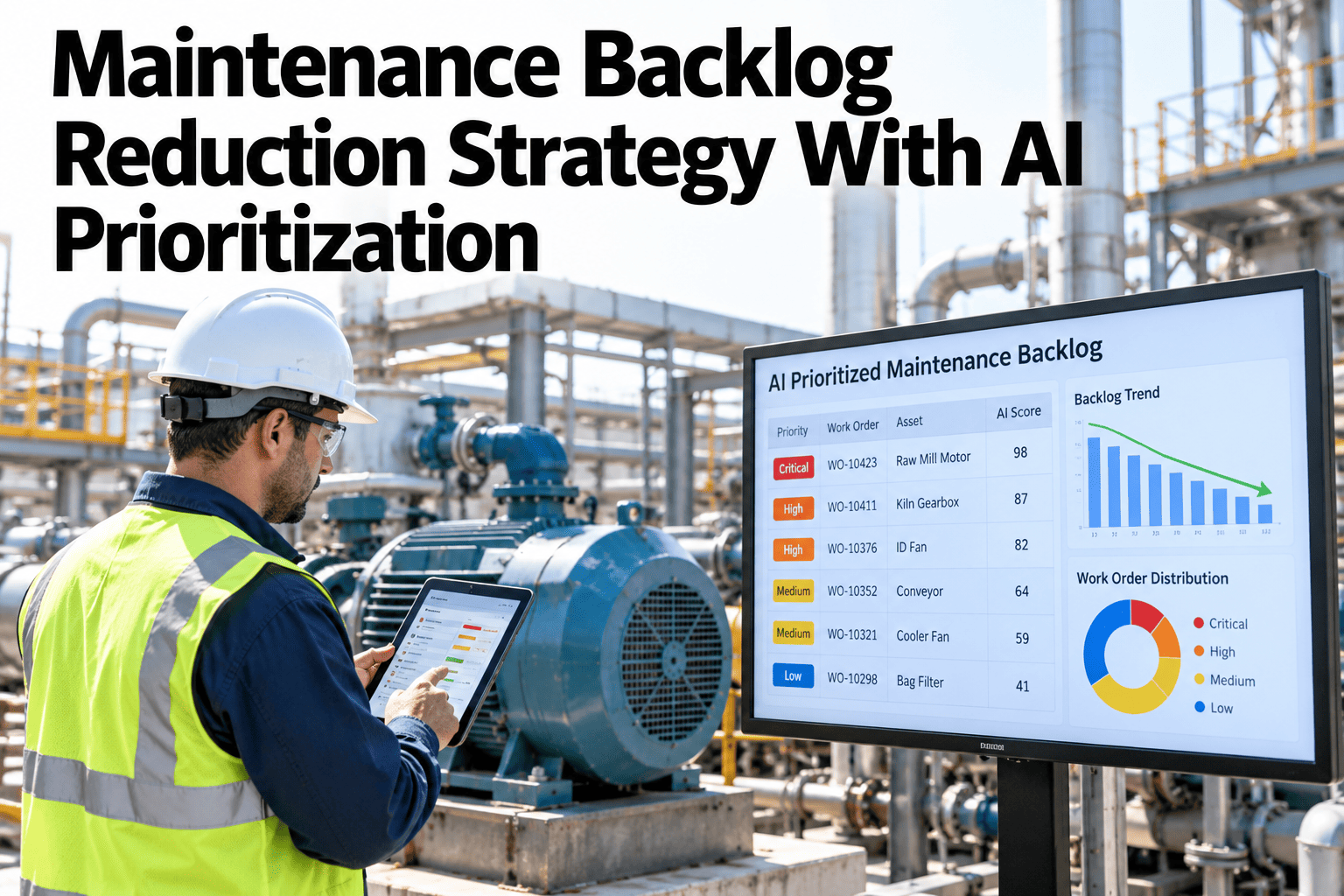
A maintenance backlog that keeps growing despite a team working hard every week usually has a prioritization problem, not a capacity problem. Work orders tend to get worked in the order they arrived or by whoever happens to be free, rather than by which ones carry the most actual risk if delayed. A backlog treated this way grows because the highest-risk items sit queued behind lower-risk ones that happened to be logged first, and nobody is actively managing the queue against risk rather than age. AI-based prioritization re-ranks the backlog continuously against asset criticality, failure risk and production impact, so the team works the highest-value items first instead of the oldest ones. Maintenance leaders rethinking their backlog can see their own backlog re-prioritized by risk live before the next planning meeting.
Maintenance Backlog Reduction Strategy With AI Prioritization
The backlog re-ranked continuously by risk and impact, not worked in the order it arrived.
Why "Oldest First" Grows the Backlog
Working a queue by age rather than risk produces three predictable problems.
A high-risk item logged last week sits behind a low-risk item logged last month.
As conditions change, the queue order rarely gets revisited against current risk.
Technician time goes to whatever is next in line, not whatever matters most right now.
Continuous risk-based re-ranking fixes all three without requiring more technician hours.
What Drives the Risk-Based Ranking
Three factors combine to determine where a work order actually belongs in the queue.
| Factor | What It Captures |
|---|---|
| Asset criticality | How much production or safety impact this asset carries if it fails |
| Failure risk | How likely this specific issue is to progress to a failure soon |
| Production impact | What delaying this work order actually costs in output or downtime |
See Your Own Backlog Ranked by Risk Instead of Age
Book a 30-minute session and bring your current backlog. iFactory AI will show how it would re-rank by asset criticality and risk.
A Repeatable Reduction Sequence
Reducing a large backlog follows a consistent approach rather than an all-at-once push.
What iFactory AI Supports
The backlog is ranked continuously from live asset and production data, not a periodic manual review.
Continuous Risk Ranking
Every work order is scored and re-ranked as conditions and new items arrive.
Criticality-Weighted Scoring
Asset criticality is built into the ranking, not treated as a separate filter.
Production Impact Link
Delay cost is estimated per work order to inform the ranking directly.
Backlog Health Tracking
Size and average risk score are tracked together to show real progress, not just count.
iFactory AI connects to existing CMMS and production data. Scope covers ranking model setup, data integration, team training and ongoing support.
Expert Review
The plants that make real progress on a large backlog are rarely the ones that add headcount. They are the ones that stop working the queue in arrival order and start working it in risk order, which concentrates the same capacity on the items that actually matter.
Tracking average risk score alongside backlog count is what keeps the team honest about real progress. A shrinking count that is really just clearing low-risk items while high-risk ones sit untouched is not the improvement it looks like on a simple count chart.
Frequently Asked Questions
Does this replace our existing CMMS prioritization fields?
No, the ranking reads from existing CMMS priority and asset data, adding a continuous risk score on top rather than requiring a new system or re-entry of existing work order information. See how it reads your current CMMS fields in a working session.
How is asset criticality determined if we haven't formally ranked our assets?
A basic criticality ranking can be built from production dependency and safety impact even without a formal prior exercise, and refined further as more data becomes available. Ask support about building an initial criticality ranking.
Can supervisors still manually reorder the queue when needed?
Yes, the risk-based ranking is a recommendation that supervisors can adjust for context the model may not fully capture, such as parts availability or a planned shutdown window. Request a demo of manual override controls.
How quickly can a large backlog actually be reduced with this approach?
The pace depends on current team capacity, but most plants see the average risk score of the backlog drop meaningfully within the first few months, even before the total count shrinks significantly. Contact support for a realistic reduction timeline based on your backlog size.
How long before the ranking model reflects our own priorities accurately?
Most teams have a validated ranking model within five to eight weeks, tuned against known high-priority items from their own maintenance history before being trusted for day-to-day queue management. Book a session to estimate your own timeline.
Work the Backlog That Matters, Not Just the Oldest
iFactory AI ranks your maintenance backlog continuously by risk and production impact. Book a walkthrough on your own queue.