A plant manager's daily management meeting should take fifteen minutes — not forty-five. The difference is whether the dashboard answers the three questions that matter before anyone walks into the room: where is the plant against its production plan, what maintenance event is most likely to affect today's schedule, and which quality issue from yesterday is still open. When the dashboard cannot answer those three questions at a glance, the meeting fills the time that the data should have saved. iFactory AI builds the daily management dashboard that compresses this review into a decision-ready view across production, maintenance, and quality — without requiring manual report compilation from three different systems. See the daily management dashboard layout for your plant type.
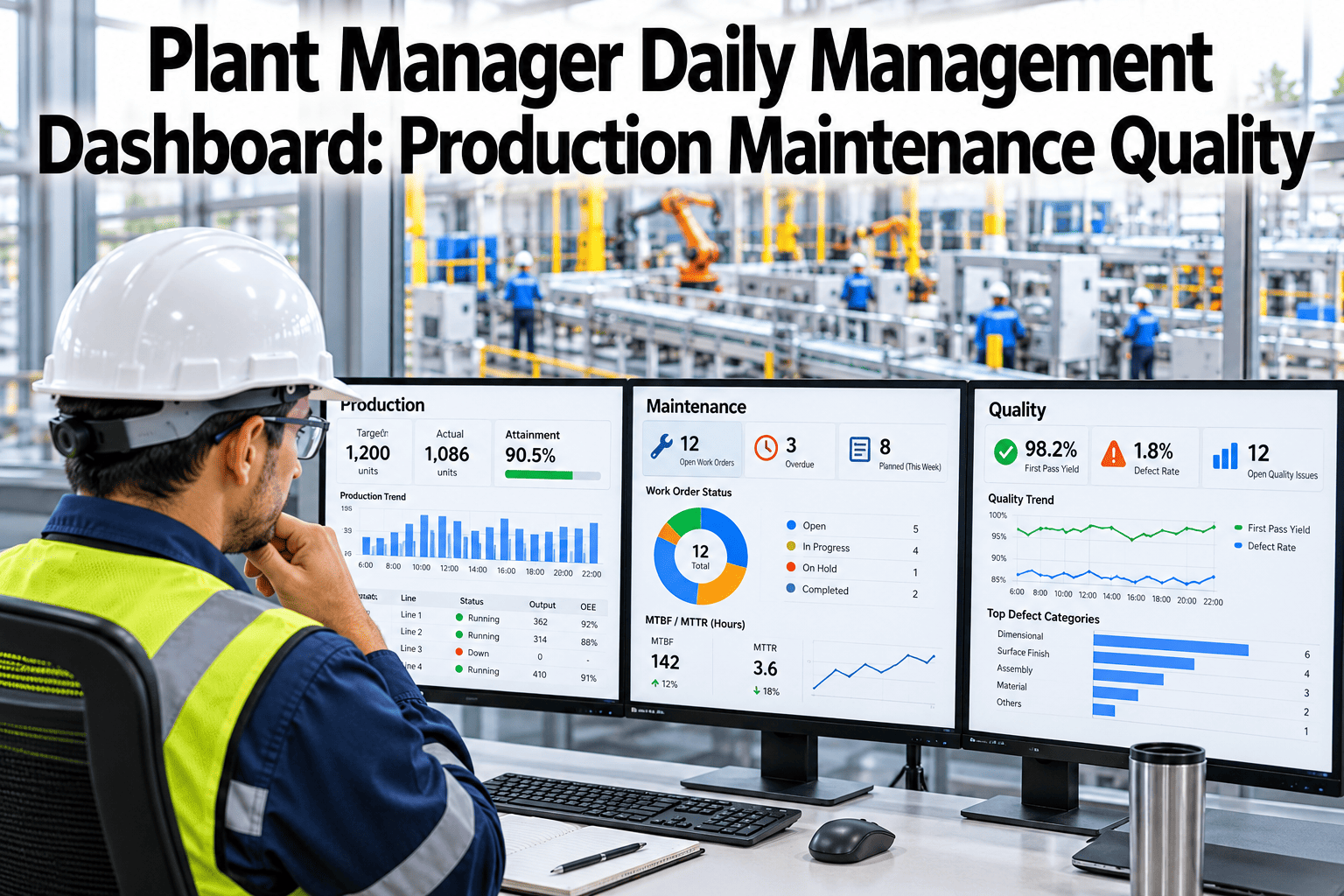
Plant Manager Daily Management Dashboard
Production vs. plan, maintenance risk, and quality status — three panels that give the plant manager everything needed for a 15-minute daily decision meeting.
The Daily Management Dashboard inspection
A dashboard earns its place in the daily management meeting only if every element on it either prompts a decision or provides context for one. This inspection covers the minimum set for each of the three panels.
What Does Not Belong on the Daily Management Dashboard
A daily management dashboard that displays everything available is a dashboard nobody uses. Exclusion discipline is as important as inclusion discipline.
How iFactory AI Populates the Daily Management Dashboard
iFactory AI pulls all three dashboard panels from connected data sources automatically — no manual report compilation, no end-of-shift spreadsheet merging, no lag between the event and the view.
Build the Daily Management Dashboard Your Plant Needs
iFactory AI delivers the three-panel daily management view — production, maintenance, and quality — from your own connected data sources. Book a session to see the dashboard configured for your plant type.
Frequently Asked Questions
How should the daily management dashboard differ from the plant manager's weekly review dashboard?
The daily view shows current shift and yesterday — actionable within today. The weekly view shows 7-day trends, week-over-week comparisons, and leading indicators for the coming week. Both use the same underlying data but with different time horizons and different decision contexts. iFactory AI provides both views from the same platform without requiring separate configuration. See both the daily and weekly views during a live demo.
Can the dashboard be viewed on a mobile phone during a floor walk?
Yes. iFactory AI's dashboard is fully responsive and optimized for mobile viewing, so plant managers can access the three-panel view on a phone or tablet during a floor walk without returning to a workstation. The mobile layout prioritizes the three headline KPIs — OEE vs. target, top asset health alert, and FPY — with detail accessible on tap. Ask about the mobile dashboard experience for plant managers.
What is the right update frequency for daily management dashboard KPIs?
Production and maintenance alert KPIs should update in real time or at minimum every 15 minutes — a dashboard that shows yesterday's data at 8:00 AM is already out of date for the daily meeting. Quality KPIs that depend on lab results can update at the cadence of the quality system, but delay should be shown explicitly so the meeting knows when the quality data was last refreshed.
Should shift supervisors use the same dashboard as the plant manager?
Shift supervisors need a more granular view — machine-level OEE, individual asset alerts, and active work orders — rather than the summarized plant-level view the plant manager uses. iFactory AI provides role-specific dashboard layers: the plant manager's summary view and a shift supervisor's operational view, both updated from the same data source in real time. Walk through the role-based dashboard structure in a session.
How do we keep the daily management dashboard from growing into a cluttered reporting tool over time?
Set a formal governance rule: the top-level daily dashboard has no more than eight KPIs across all three panels, and any addition requires removing something else. Every KPI on the dashboard must be linked to a decision made in the daily meeting — if a metric is reviewed but never prompts an action, it is context noise rather than decision content and belongs in a drill-down layer, not the top view.
Run a Sharper Daily Management Meeting with Better Data
iFactory AI delivers production, maintenance, and quality in a single daily management view — automatically updated, no manual compilation. Book a walkthrough to see the dashboard configured for your plant.