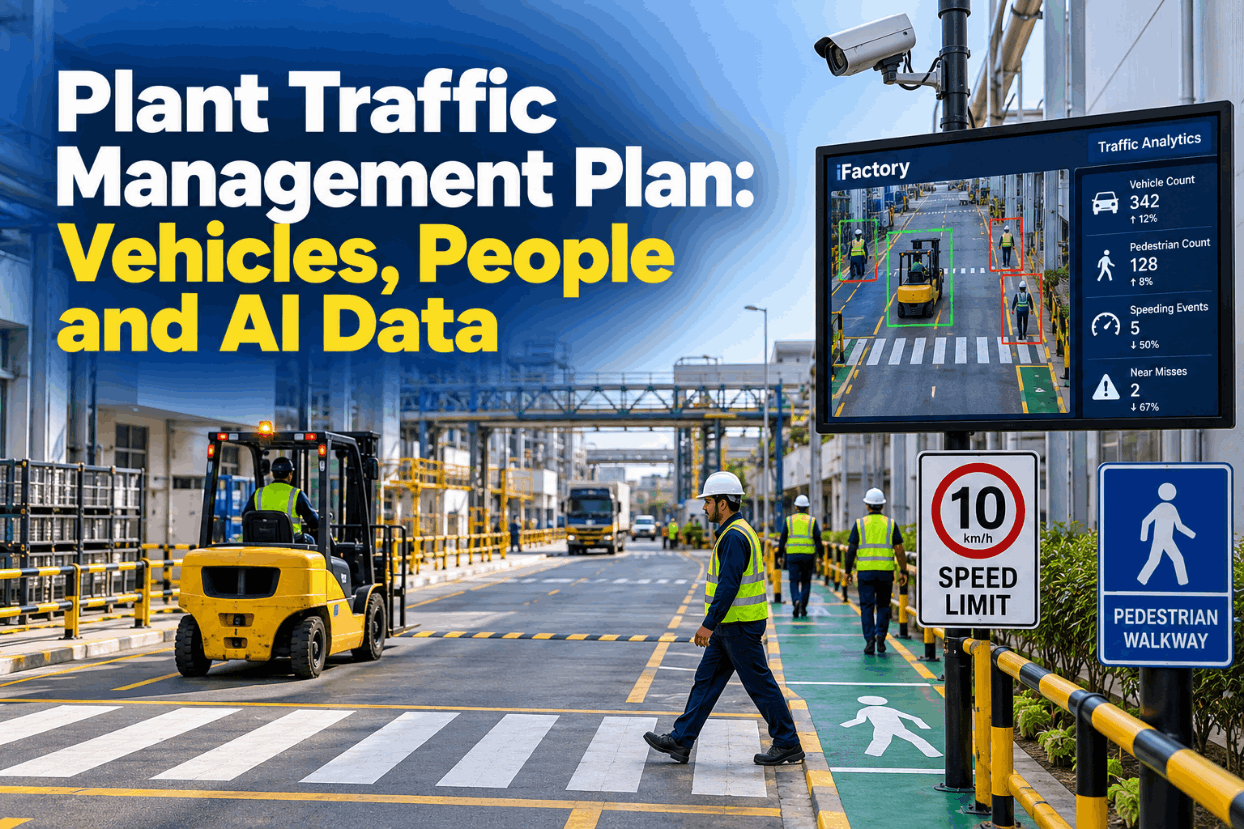
Plant Traffic Management Plan: Vehicles, People and AI Data

By Jackson T on October 27, 2026

plant-traffic-management-plan-vehicles-people-ai-data

Most plants have speed signs, painted walkways and a forklift rule sheet. Far fewer have one traffic management plan that says where vehicles run, where people walk, where the two meet and how anyone knows the plan still works. Layouts change, temporary routes become permanent, and near misses go unreported because nobody thinks a close pass counts. AI vision can now count every vehicle-pedestrian interaction by zone, so the plan gets reviewed against what really happens on the floor. See those counts on a live floor plan in a short traffic demo.

TRAFFIC ANALYTICS · SITE TRAFFIC PLANS

Build the Traffic Plan Around Where Near Misses Really Happen

iFactory Traffic Analytics uses AI vision to count vehicle-pedestrian interactions, speeding events and crossings outside marked points. The counts roll up into a zone heat summary, so EHS can change layouts, crossings and training based on evidence instead of hunches.

Near-miss heat · Week 436 zones
Person and moving vehicle inside the site-set distance · all shifts
Dock 3 crossing38
Cross-aisle 724
Charging bay exit15
Yard gate lane11
Main aisle B7
Paint store door4
Plan review flag · Dock 3 crossing, second shift
PLANT TRAFFIC MANAGEMENT PLAN

Five Layers of Control, Strongest First

The UK HSE guide to workplace transport safety (HSG136) groups the risk under three headings: safe site, safe vehicle and safe driver. Inside the site heading, the order of controls matters. Removing a vehicle movement beats painting a line, and a barrier beats a rule that relies on memory. Build the plan from the top layer down and lean on rules and training only for the risk that is left. Talk through your own layers with our EHS team.

01
Remove movementsFewer trips, storage moved closer to use, deliveries outside the busiest hours
02
Separate routesDedicated walkways, barriers and separate doors for people and vehicles
03
Control meeting pointsMarked crossings, gates, one-way loops and mirrors at blind corners
04
Set speed and prioritySite speed limits, right of way, horn at cross aisles, clear signs
05
Train and checkOperator training, pedestrian induction and regular route audits
WHAT THE RULES SAY

The Requirements Behind a Site Traffic Plan

In the US there is no single OSHA standard called traffic management. The duties sit in the forklift standard, the materials handling rules and the walking-working surfaces rules, with a consensus standard for the trucks themselves. Your mobile equipment rules should trace back to each of them. The UK keeps the guidance in one document, which makes it a useful structure anywhere. Map your current rules against these in a plan review.

Source
What it covers
What it means for your plan
OSHA 1910.178(n) Traveling
Observe traffic rules and authorized plant speed limits, keep about three truck lengths from the truck ahead, slow down and sound the horn at cross aisles, travel with the load trailing when it blocks the view, keep a speed that allows a safe stop
Write the rules operators are held to
OSHA 1910.178(l) Training
Training covers workplace topics such as pedestrian traffic where the truck runs, plus an evaluation at least every three years and refresher training after a near miss
Plan changes feed training content
OSHA 1910.176(a)
Safe clearances for aisles, docks, doorways and turns where mechanical handling equipment runs, aisles kept clear, permanent aisles marked
Route widths and markings
OSHA 1910.22(c)
Safe means of access and egress on walking-working surfaces. The 2016 revision removed the old general aisle-marking wording, so marking for truck areas now rests on 1910.176(a)
Walkways kept usable
ANSI/ITSDF B56.1
Safety standard for low and high lift trucks, with user and operator duties and stopping-distance guidance
Basis for site speed limits
HSE HSG136 (UK)
Safe site, safe vehicle, safe driver: separation, crossings, one-way systems, speed limits and visibility
A tested structure for the plan
VEHICLE PEDESTRIAN SEPARATION

Three Kinds of Route, Each With Its Own Rules

HSE puts it simply: roadways and footpaths should be separate whenever possible. Good traffic route design sorts every route into one of three kinds and gives each kind its own rules. Walkways should follow desire lines, the paths people really take, because a walkway that adds a detour will be ignored by the second week. Get help sorting your routes from our support team.

Vehicle only
No walking, entry at controlled pointsRacking aisles, yard roads and dock aprons, with barriers at the ends and a gate or crossing for any access
Pedestrian only
Walkways that trucks cannot enterBarriers at building corners and doorways, separate personnel doors, walkways laid along desire lines
Shared and controlled
Where separation is not possibleWalking-pace speed, clear priority rules, horn at cross aisles, mirrors and high-visibility clothing
Watch the doorways

Doors are where routes cross without warning. Give people and vehicles separate doors where you can, and fit vision panels so each side can see what is coming.

CROSSING POINTS

Where People and Trucks Must Meet, Design the Meeting

A crossing is where separation stops, so it deserves the most design effort. HSE guidance asks for crossings that are marked and signposted, barriers or deterrent paving that guide people to them, and lights, bridges or subways where traffic is heavy. Wide roads may need an island refuge so people cross one lane at a time. Review your busiest crossing with our traffic engineers.

PositionClear sightlines both ways, away from blind corners, doors and racking ends
Guide railsBarriers that lead walkers to the crossing instead of a gap beside it
Marking and signsFloor markings on both sides and signs that face approaching drivers
Active controlLights, gates or interlocked barriers where traffic and footfall are heavy
RefugesAn island on wide roads so people cross one lane at a time
LightingEnough light for a driver to see a person in dark clothing at night
SPEED LIMITS PLANT

Speed Limits Are Set by the Site, Not by OSHA

OSHA gives no number. 1910.178(n)(1) says authorized plant speed limits must be observed, and (n)(8) says a truck must always run at a speed that lets it stop safely. That puts the limit in your hands, based on stopping distance, load, floor surface, visibility and how many people are around. HSE adds that speed humps should not be used where forklifts operate. The rules below are illustrations of the kind of limit a site might set. Ask our safety team how others set theirs.

Shared aisles
Walking pace, horn at every cross aisle, people have priority
Vehicle-only aisles
A site limit set from stopping-distance trials with typical loads
Docks and trailers
Walking pace, full stop before the dock edge and trailer entry
Yard roads
Posted limit, repeated along the road, not only at the entrance
Narrow aisles
As the truck maker and aisle guidance system allow
Make the limit enforceable

A sign alone is a hope. Pair it with speed limiting on the trucks where available, signs repeated along long routes and a count of speeding events by zone.

Plan Reviews Built on Counts, Not Guesswork

iFactory Traffic Analytics counts vehicle-pedestrian interactions, speeding events and crossings by zone and shift. EHS sees which layout change or training topic the data supports, then checks whether it worked.

Plan review · EHS manager and iFactory
EHS managerWhy is Dock 3 top of the list again?
iFactory38 interactions this week, 29 on second shift. Most are people walking straight from the break room to Bay 2, about 15 m from the marked crossing.
EHS managerSo the crossing is in the wrong place.
iFactoryThe desire line suggests so. Moving the crossing or adding a guide rail are the two options. I can compare two weeks before and after the change.
NEAR MISS HEAT MAP

Four Weeks of Interactions by Zone

An interaction is a person and a moving vehicle inside the distance your site sets. Most are harmless on their own. The value is the pattern: a zone or shift where counts keep climbing usually points to a layout problem, not a careless worker. Interactions are counted whether or not anyone files a report. The figures below are illustrative. See how the map is built in a live walkthrough.

Weeks 40 to 43 · All shiftsInteractions by zone
Dock 3 crossing131
Cross-aisle 784
Charging bay exit52
Yard gate lane40
Main aisle B23
HotspotDock 3, second shift
PatternShortcut from the break room
Plan actionMove crossing to desire line
PLANT TRAFFIC MANAGEMENT PLAN SOFTWARE

From Camera Frame to Plan Review

Traffic Analytics does not replace walkways, barriers or training. It measures whether they work. Video is processed on site, people are detected as people rather than identified, and only counts and short clips for review leave the edge server. Each camera view is split into the same zones your plan uses. Ask our support team how zones are drawn.

1DetectVehicles and people in each camera zone
2MeasureSeparation, direction and an estimate of speed
3ClassifyInteraction, speeding event or crossing outside a marked point
4CountTotals by zone, shift and hour of day
5ReviewMonthly plan review picks the next change to test
PLANT TRAFFIC MANAGEMENT PLAN EXAMPLES

Three Changes the Data Could Point To

These are illustrations of how counts turn into plan changes. They are not case studies, and every change should still go through your own risk assessment. Walk through your own zones in a scenario session.

Crossing in the wrong place
Move it to the desire lineCounts cluster 15 m from the marked crossing. The crossing moves, a guide rail closes the shortcut, and counts are compared after two weeks.
Two-way aisle with reversing
Convert to a one-way loopHSE notes that one-way systems cut reversing and conflicting moves. Interactions at the aisle ends are tracked before and after.
Speeding on one shift
Coach, then check the trucksSpeeding events rise on nights. Supervisors observe, refresher training follows where 1910.178(l)(4) calls for it, and truck speed settings are checked.
PLANT TRAFFIC MANAGEMENT PLAN BEST PRACTICES

A Plan on File vs a Plan That Gets Tested

Most traffic plans are accurate on the day they are drawn. The difference between a plan that ages and one that improves is a regular, evidence-based review with a named owner. Set up your review cycle with our EHS specialists.

PLAN ON FILE
  • Drawn once when the layout was set
  • Reviewed after an incident
  • Near misses depend on someone reporting
  • Rules enforced by occasional spot checks
PLAN THAT GETS TESTED
  • Reviewed monthly with zone counts
  • Every layout change gets a before-and-after check
  • Interactions counted whether or not anyone reports
  • Training aimed at the zones and shifts with rising counts
PLANT TRAFFIC MANAGEMENT PLAN TEMPLATE

One Sheet per Traffic Zone

Fill in one sheet for each zone on your site plan. Together the sheets form the written plan, and each one tells the camera system which rules to count against. Get a blank version from our team.

ZoneDock 3 and Bay 2 approach
Vehicles allowedCounterbalance trucks, pallet movers
Pedestrian routeEast walkway, guide rail to crossing
Crossing pointsOne marked crossing, light-controlled
Speed ruleWalking pace inside the dock area
Right of wayPeople at the crossing, trucks elsewhere
Camera coverageTwo views, crossing and dock edge
Owner and reviewLogistics lead, monthly with EHS
TURNKEY AI DEPLOYMENT

Cameras, Traffic Models and Edge Server, Delivered as One

iFactory delivers Traffic Analytics as a turnkey bundle. A pre-configured NVIDIA AI server ships racked and ready with vehicle, person and crossing models pre-loaded, so video is processed inside your plant. You rack it, plug in power and Ethernet, and the AI is live. To scope it for your site, talk to our deployment team.

What's Included
  • Pre-configured NVIDIA AI edge server, racked and ready
  • Cameras for docks, cross-aisles and yard lanes, or links to suitable existing ones
  • Models for vehicles, people and crossing behavior
  • Zones and crossings drawn from your site plan
  • Heat summaries by zone, shift and week
  • Cabling, network setup and EHS team training
  • 24×7 remote monitoring of models and hardware
Live in 6–12 weeks
Wk 1–4
Map and Install

Zones and crossings agreed from your plan, cameras and server installed, network connected.

Wk 5–8
Tune and Baseline

Models tuned to your trucks and layout, then four weeks of counts collected before any change.

Wk 9–12
Review and Act

Heat summaries go live, the first plan review runs and the first layout change is tested.

HOW iFACTORY FITS

Traffic Analytics Built for Plan Reviews

iFactory turns camera views into the numbers a traffic plan review needs, zone by zone and shift by shift. See it on a sample site in a short session.

1
Counts interactions. Every person and moving vehicle inside the site-set distance, by zone.
2
Flags speeding events. Estimated speed compared with the limit your plan sets for each zone.
3
Checks crossings. Shows how many people cross at marked points and how many cut across elsewhere.
4
Informs layout and training. Before-and-after counts show whether a change worked.
1000+
Industrial clients running iFactory
99.9%
Platform uptime across sites
6-12 wks
From racked server to first plan review
FREQUENTLY ASKED QUESTIONS

Plant Traffic Management Plan Questions for Plant Managers

What should a plant traffic management plan include?
A site map of vehicle-only, pedestrian-only and shared routes, the crossing points and how each is controlled, speed limits by area, right-of-way rules, one-way systems, the vehicles allowed in each zone, how operators and visitors are trained, and who reviews the plan and how often. Walk through a sample plan when you book a 30-minute demo.
Does OSHA set a forklift speed limit?
No. 1910.178(n) requires operators to observe authorized plant speed limits and to run at a speed that lets the truck stop safely under all conditions. The number is the site's decision, usually based on stopping distance, loads, floors, visibility and pedestrian traffic, with ANSI/ITSDF B56.1 as a reference.
How does AI vision count a near miss?
It counts interactions: a person and a moving vehicle inside the distance your site sets for that zone. It also counts estimated speeding events and crossings outside marked points. Counts are confirmed across several frames to avoid false hits, then grouped by zone, shift and hour. You can see it on a live floor with our team.
Does Traffic Analytics identify drivers or pedestrians?
Not by default. It detects vehicles and people and reports counts by zone and shift. The aim is to fix layouts and routines, not to discipline individuals. Where local law or worker agreements apply, agree the setup with worker representatives before go-live.
Can we use the cameras we already have?
Often, yes, if the views cover the zones in your plan and the image quality is good enough. Some sites add cameras at crossings and dock edges where existing views have blind spots. Send your camera list to our support team for a check.
How do we start?
Pick the three zones where people and trucks meet most, usually docks, cross-aisles and charging areas. Draw them on the plan, run the cameras for four weeks to get a baseline, then make one change and compare. To plan that first review, walk through it with our team.

Put Numbers Behind Your Next Plan Review

Count interactions, speeding events and crossings in the zones that matter, then test every layout change against real data. The full system is delivered turnkey and goes live in 6 to 12 weeks.
Example monthly review · Site traffic plan
Zones counted6 traffic zones
InteractionsBy zone, shift and hour
Speeding eventsAgainst site-set limits
CrossingsMarked points vs shortcuts
Next change tested within four weeks

Share This Story, Choose Your Platform!