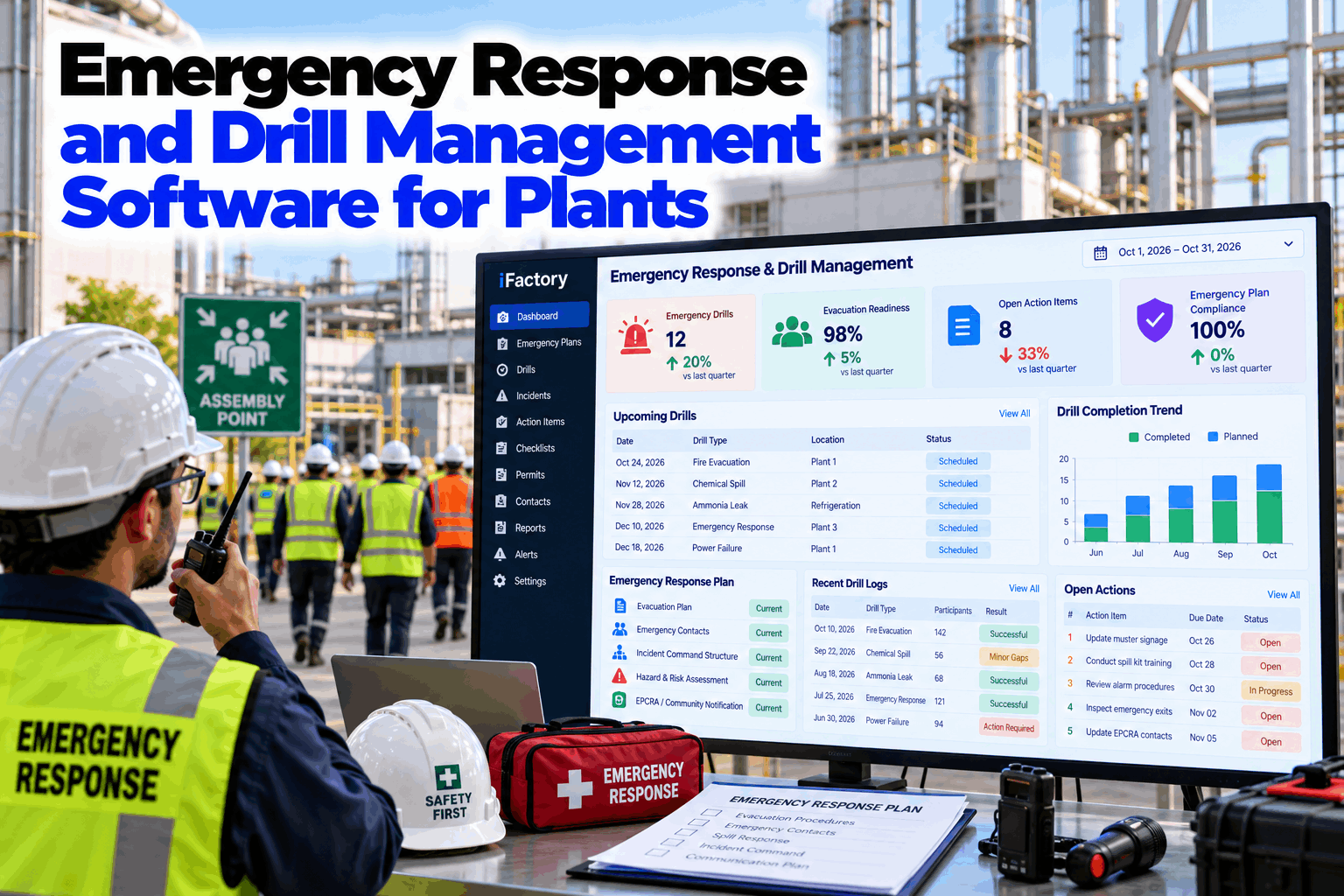
Most plants have an emergency response plan. Far fewer can say, on a given afternoon, which drills were run this quarter, how long the last evacuation took, which findings are still open and who the facility emergency coordinator is for the local planning committee. The plan sits in a binder, the drill log sits in a folder, and the gaps show up on the day they matter. Emergency response and drill management software puts the plan, the schedule, the drill record and the follow-up actions in one place, so readiness is something you can see. Plant managers can review it in an emergency readiness demo.
Emergency Response and Drill Management Software for Plants
Plan, run and document emergency drills and keep response readiness current. iFactory manages evacuation plans, drill schedules and logs, incident command roles and EPCRA emergency coordination, and turns every drill finding into an owned action.
- Drill schedule, headcount and timing in one record
- Evacuation, shelter-in-place and spill response scenarios
- Findings turned into owned actions until closed
Why Emergency Readiness Is Hard to Prove
A plan on paper tells you what should happen, not what did.
Emergency response plans are written once and revised when an auditor asks. Drills are run, but the evidence is a signature sheet and a few lines in a folder. When the plant needs to show that it is ready, whether to an insurer, a regulator or its own leadership, the record has to be rebuilt from memory. Our emergency preparedness specialists can review how your plant tracks readiness today.
Plan in a binder
Contacts and maps out of date within months.
Paper drill logs
Times and counts written by hand, rarely compared.
Slow roll call
Nobody knows who is missing until minutes later.
Findings forgotten
Lessons from the debrief never reach an owner.
What a Drill Programme Should Cover
One scenario list, each with a purpose and a record.
A good drill programme is a calendar of scenarios, each testing something specific and leaving behind a record that can be compared next time. The table below is a starting template. Your site hazards, fire code, insurer and local rules decide the scenarios and how often each one runs. Build your own list in a working session.
A drill that always runs on day shift at the same time proves little. Spread scenarios across shifts, include contractors and visitors, and vary the start so the plan is tested when staffing is thin.
The Drill Cycle, From Plan to Closed Findings
A drill is only finished when its findings are closed.
Every drill follows the same five steps. The schedule is set in advance, the drill is run and timed, the record is written as it happens, and each finding becomes an action with an owner and a date. The next drill of the same type then starts from the last one's results. Map your drill cycle with our implementation team.
Plan
Scenario, area, shift and observers set on the calendar.
Notify
Wardens and observers receive their role and the time window.
Run
Clock starts at the alarm. Events are logged as they happen.
Record
Timings, headcount and observations saved to the drill log.
Close findings
Each gap becomes an owned action, checked at the next drill.
Know How Ready Your Plant Is Before the Real Event
Drill schedules, timings, headcounts and open findings for every scenario, kept current and ready to show.
Evacuation Plans and Headcount That Keep Up
The plan is only useful if it matches the site as it is today.
Layouts change, areas are repurposed and people move roles. Evacuation plan software keeps floor plans, exit routes, assembly points and warden assignments in one place and flags when something changes. During a drill, headcount is taken at the assembly points and compared with who was on site, so a missing person is found in seconds and not at the end of a paper tally. Review your plans with our EHS team.
Floor plans and routes
Exits and routes by area, version controlled.
Assembly points
Capacity and location for each point.
Roll call
People present against people on site.
Roles and cover
Named wardens with a back-up for every shift.
Measure the Drill, Not Just the Fact That It Happened
Three times tell you more than a signature sheet.
The useful numbers in an evacuation drill are how long the alarm took to clear each area, how long the full headcount took, and where people were held up. Recorded drill after drill, these times show whether changes to routes, staffing or training are working. The example below shows one drill, with figures that are illustrative only.
Incident Command Roles, Ready Before the Call
When something goes wrong, nobody should be deciding who is in charge.
Incident command software holds the roles, the contact tree and the checklists in one place. Each role has a primary and a back-up for every shift, and the checklist for the scenario opens on the phone of the person who takes the role. During a drill, the same screens are used, so the team practises with the tools they will have on the day. Review your command structure with our operations team.
Incident commander
Overall decisions and outside contact.
Operations lead
Shutdown, isolation and response teams.
Safety officer
Hazard control and responder safety.
Coordinator
Fire service, authorities and the local committee.
EPCRA Emergency Planning Without the Scramble
Keep the facility emergency coordinator, contacts and inventory current.
Where EPCRA applies to a site, the plant has duties around emergency planning, release notification and hazardous chemical reporting. The practical risk is rarely the rule itself. It is a coordinator who has moved on, a contact that has changed or an inventory that no longer matches the floor. Keeping these in the same system as the drill programme makes them part of the routine review. Confirm which requirements apply to your site with your own compliance advisers. Check your records with our compliance team.
What the plant keeps ready
- Named facility emergency coordinator and back-up
- Contacts for the local planning committee and responders
- Hazardous chemical inventory with locations
- Release notification steps and who makes the call
What the system tracks
- Review dates for the plan and contact lists
- Reminders ahead of annual reporting deadlines
- Drills that exercised the notification steps
- Changes to chemicals or areas that need a plan update
Spill Response Drills That Test the Whole Chain
A spill drill is not finished when the kit is opened.
Spill response software links the spill scenario to the materials in the area, the right kit, the team call-out and the notification steps. In a drill, observers log how quickly the team arrived, whether the right absorbents and protective equipment were used, and whether the correct people were told. The record shows which parts of the chain are strong and which need work. Plan a spill drill with our EHS specialists.
Call-out
Spill team contacted and time to arrive.
Kit and PPE
Right materials chosen for the substance.
Drains and area
Drains covered and the area controlled.
Reporting
Internal and external calls made in order.
Asking the System About Readiness
Plain questions, answered from the drill record.
Managers and EHS leads can ask questions of the drill log without building a report. The AI compares drills, finds the areas that are slowest and lists the findings that keep coming back. See it on your own records in a live walk-through.
Emergency Drill Mistakes to Avoid
Drills fail quietly when they become a formality.
These are the patterns that make a drill programme look healthy while the plant is not. A short readiness review can catch them early.
What works
- Scenarios rotated across shifts and areas
- Timings and headcount recorded every time
- Findings with an owner and a due date
- Contractors and visitors included
What fails
- Announced drills on the same day each year
- A signature sheet as the only record
- Findings discussed but never assigned
- Contact lists reviewed only at audit time
How iFactory Runs Emergency Response and Drill Management
Emergency readiness on your own network.
iFactory holds your emergency plans, drill calendar, timings, headcounts and findings, links them to chemicals, areas and people, and turns every gap into an owned action. It runs on an on-prem AI server inside your plant, so plans and contact lists stay available when the plant's link to the outside world is down. Fit questions go to our solutions team.
Drill calendar
Scenarios scheduled by area and shift.
Timed drill log
Alarm to all-clear, every drill.
Headcount and roles
Roll call and command roles by shift.
Findings to actions
Every gap owned until closed.
Readiness dashboard
Plant and area view for managers.
On-prem
Plans and records stay in the plant.
The figures and exchanges on this page are illustrative. Your own readiness depends on your site, hazards, staffing and local requirements, and we measure it on your data during the pilot.
Turnkey AI: Delivered, Connected and Live in 6–12 Weeks
You do not build this. It arrives ready.
iFactory ships as a pre-configured NVIDIA AI server with the software pre-loaded, racked and ready. Rack it, plug in power and Ethernet, and the AI is live on your network. Our team handles cabling, network setup, PLC, SCADA, DCS and CMMS integration, links to alarm, access and personnel records, operator training and 24×7 remote monitoring. Data stays on your network. For a scope matched to your plant, request a turnkey quote.
Ship, network and data
Server installed. Plans, contacts, chemicals and personnel records connected.
Scenario setup and pilot
Drill scenarios, roles and checklists configured. First live drills run in a few areas.
Go-live and training
Drill management live across the plant. Teams trained. 24×7 monitoring begins.
Frequently Asked Questions
What is emergency response software for a plant?
It holds the emergency response plan, the drill calendar, the drill log, the incident command roles and the follow-up actions in one system, so a plant can run drills and show its readiness without rebuilding records from paper.
How does drill management software help with audits?
Every drill is recorded with its scenario, timings, headcount, observers and findings. When an auditor, insurer or regulator asks for evidence, the record is already there and the closed findings show what was done about it.
Can it manage evacuation plans?
Yes. Floor plans, exit routes, assembly points and warden assignments are held in one place with version history, and roll call during a drill compares people present with people on site.
How is incident command handled?
Roles, back-ups and contact trees are set for each shift, and the checklist for the scenario opens for whoever takes the role. The same screens are used in drills and in real events.
What does it do for EPCRA emergency planning?
It keeps the facility emergency coordinator, contacts and chemical inventory current and reminds the team of review and reporting dates. Which requirements apply depends on your site, so confirm them with your compliance advisers.
Does it support spill response?
Spill scenarios link to the materials in each area, the right kit, the call-out and the notification steps, and drills record how each part of the chain performed.
How often should drills be run?
That is set by your fire code, insurer, local rules and your own site plan. The software tracks the frequency you set for each scenario and shows what is overdue.
Where is the data stored?
On the on-prem server inside your plant, shown on dashboards and phones.
How do we start?
Start with one plant or a few areas. A 6-week pilot connects your plans and records, sets up the scenarios and runs live drills with timings and findings. To plan it, contact our team.
Find Out How Ready Your Plant Really Is
In thirty minutes we look at your emergency plan and drill records, and show what live drill management would reveal. You keep the notes either way.
- 1Your emergency response plan
- 2The last year of drill records
- 3Evacuation maps and assembly points
- 4Your chemical inventory list
- 5Open findings from past drills