AI predictive maintenance models degrade silently as equipment wear patterns shift and operating conditions evolve — turning once‑reliable predictions into false alarms and missed faults. Start Trial Free to see how iFactory continuously monitors model health, detects drift, and triggers retraining before accuracy decays.
Keep Every PdM Model Accurate with Continuous Drift Monitoring
iFactory tracks prediction accuracy, feature distributions, and concept drift across all deployed models — automatically alerting and retraining when equipment behavior changes, so your AI never falls behind the plant.
Why Unmonitored Models Are the Biggest Risk in PdM Programs
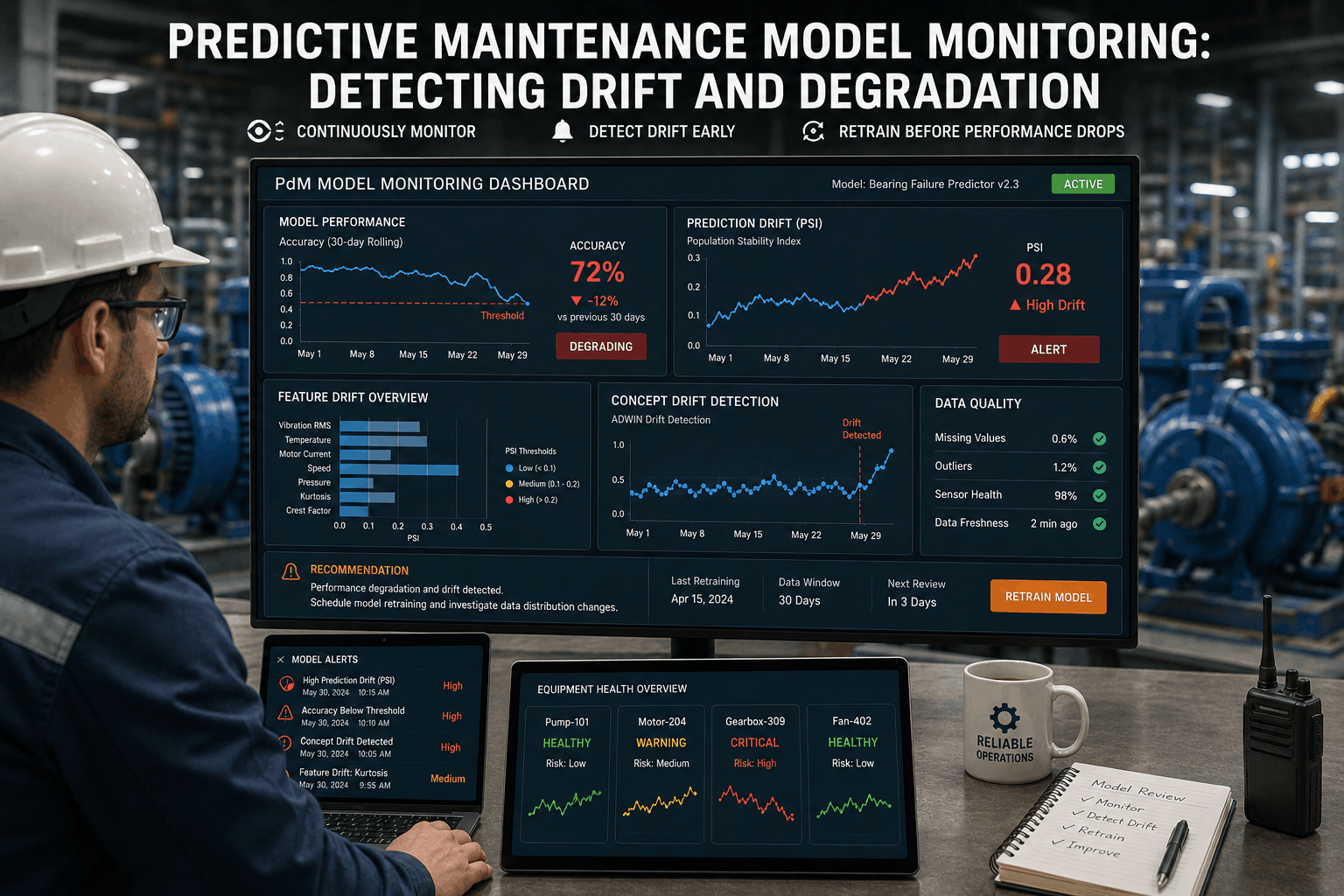
A vibration model trained on a pump with new bearings will miss faults when those bearings wear and the baseline signature shifts. A temperature threshold set in winter will trigger false alarms in summer if the model never adapts. Without monitoring, model decay goes undetected until operations teams lose trust in the entire PdM system. iFactory monitors feature drift, prediction accuracy, and concept drift in production — comparing live data against training baselines and triggering retraining workflows before false alarm rates rise. Teams that Book a Demo can see how drift dashboards make model health as visible as machine health.
-
Prediction Accuracy Monitoring
iFactory continuously compares model predictions against actual failure outcomes, logging accuracy metrics and alerting when precision or recall drops below configurable thresholds.
-
Feature Drift Detection
Statistical tests (PSI, KS, Wasserstein distance) track how each input feature's distribution shifts from the training baseline — identifying which sensors or operating parameters are changing.
-
Concept Drift Analysis
When the relationship between sensor readings and failure probability changes, iFactory detects it through prediction error trends and flags the model for investigation and retraining.
-
Automated Retraining Triggers
Configurable drift thresholds automatically launch retraining pipelines — pulling fresh historical data, retraining the model, and staging the new version for validation without manual steps.
-
Model Versioning and Rollback
Every retrained model is versioned and archived. If a new model performs worse, iFactory instantly rolls back to the previous trusted version while the team diagnoses the issue.
-
Explainable Drift Diagnostics
iFactory pinpoints which features contributed most to drift, showing engineers exactly which sensor or process change broke the model — accelerating root‑cause investigation.
Critical Model Monitoring Capabilities for Reliable PdM
-
Feature Drift Detection with Statistical Rigor
Drift PreventionPdM models assume that tomorrow’s sensor data looks like yesterday’s. When a gearbox rebuild changes vibration patterns or a new feedstock alters process temperatures, feature distributions shift. iFactory applies Population Stability Index, Kolmogorov‑Smirnov tests, and Wasserstein distance across every input feature, comparing rolling windows to the training baseline. Features with drift scores above threshold are highlighted on a per‑model dashboard, and the specific sensors contributing most to drift are identified for engineering review.
Metrics
PSI, KS, Wasserstein, JS divergence
Granularity
Per‑feature, per‑asset, hourly to daily windows
iFactory Record
Drift score trend and top‑contributing features
-
Concept Drift Monitoring via Prediction Error
Accuracy GuardConcept drift occurs when the same sensor readings now imply a different failure probability — often due to maintenance actions, operating procedure changes, or equipment modifications. iFactory tracks the moving average of prediction errors (when actual failures are observed) and flags sustained error increases that indicate the model’s internal logic no longer matches reality. Unlike feature drift, concept drift can occur even when sensor distributions appear stable, making error‑based monitoring essential.
Error Metrics
MAE, RMSE, precision/recall drift
Detection
CUSUM, sequential probability ratio test
iFactory Record
Concept drift event log with retraining trigger
-
Automated Retraining Pipeline with Guardrails
Self‑HealingManual retraining is slow and inconsistent. iFactory automates the full cycle: drift triggers fetch the latest labelled data window, execute the feature engineering DAG, train candidate models, and compare performance against the champion model. Only if the challenger outperforms on a holdout set does it get promoted. If performance degrades, the retraining is blocked, and an alert is sent to the data science team. This prevents a bad retraining run from replacing a working model.
Trigger
Drift threshold, schedule, or manual
Promotion
Champion‑challenger with holdout validation
iFactory Record
Retraining job status and performance comparison
-
Explainable Drift Root‑Cause Analysis
Faster DiagnosisWhen drift is detected, reliability engineers need to know why — not just that it happened. iFactory applies SHAP value comparisons between the baseline and drifted periods, identifying which features’ impact on predictions changed most. This pinpoints whether the drift originates from a specific sensor, an operating mode shift, or a data quality issue, turning what would be a data science investigation into an engineering‑actionable alert.
Method
SHAP, LIME, feature importance shift
Output
Ranked list of drifted features with impact delta
iFactory Record
Drift explanation report per event
-
Model Version Registry and Safe Rollback
Instant RecoveryEvery model iFactory produces is registered with metadata: training data range, feature list, hyperparameters, and performance metrics. If a newly promoted model generates false alarms, operators can roll back to the previous version with a single click. The rollback is immediate — prediction serving switches to the prior model artifact — and the problematic version is quarantined for offline debugging without affecting operations.
Registry
MLflow, custom model store
Rollback
Single‑click, zero‑downtime switch
iFactory Record
Version history with deployment timestamps
-
Performance Baseline and SLA Reporting
AccountabilityPdM stakeholders need to know the program is delivering value. iFactory establishes a performance baseline for each model — precision, recall, lead time — and continuously compares current metrics against it. Automated weekly reports show SLA compliance, drift events, and retraining actions, giving reliability managers evidence that the AI system remains under control and effective.
Baseline
Metrics at model approval
SLA
Precision >80%, recall >90%, drift < threshold
iFactory Record
Compliance report per model per period
Model Monitoring Performance Indicators
Drift Detection Latency
iFactory detects statistically significant feature drift within an average of 6 hours from onset — fast enough to trigger retraining before model accuracy drops below SLA thresholds.
False Alert Trend After Monitoring
Continuous drift monitoring and automated retraining reduced false alerts by 74% over nine months, restoring operator trust in PdM notifications.
Model Accuracy SLA Compliance
96% of monitored models remain within their accuracy SLA, with automatic retraining catching drift before precision or recall violate agreed thresholds.
Retraining Success Rate
94% of automatically triggered retraining runs produce a challenger model that outperforms the champion, ensuring self‑healing works reliably without introducing regressions.
Model Monitoring Reference Specifications
Scroll for more
| Monitoring Capability | Degradation Signal | iFactory Implementation | Data Source | Alert Type |
|---|---|---|---|---|
| Feature Drift | Input distribution shift | PSI, KS, Wasserstein per feature | Inference log, training baseline | Drift score exceeds threshold |
| Concept Drift | Prediction error increase | CUSUM on error rate | Actual failure labels | Sustained error above baseline |
| Accuracy SLA | Precision/recall drop | Rolling window metric comparison | Confusion matrix from outcomes | SLA breach warning |
| Retraining Trigger | Drift or schedule | Automated pipeline with validation gate | Feature store, label store | Retraining job status |
| Model Version Rollback | New model underperforms | One‑click restore, zero‑downtime | Model registry | Rollback execution alert |
How iFactory Keeps PdM Models Accurate Over Their Lifetime
Model monitoring turns PdM from a one‑time deployment into a sustainable reliability capability. iFactory embeds monitoring at every stage of the model lifecycle: drift scores update with each inference batch, error tracking compares predictions to actual maintenance events, and automated retraining gates ensure only validated improvements reach production. When a conveyor drive model starts showing feature drift on motor current, iFactory’s diagnostics reveal that a recent belt tension adjustment shifted the operating point — the model needs retraining on post‑adjustment data, and the reliability engineer gets that insight before the model generates a single false alarm. Facilities can Start Trial and set up monitoring for their first deployed model within one session.
Continuous Drift Monitoring
Every feature, every model, every day — drift scores update automatically and alert before accuracy decays.
Automated Retraining
Configurable triggers launch retraining pipelines that validate new models before promoting them to production.
Explainable Diagnostics
SHAP‑based drift explanations pinpoint the sensors or process changes that broke the model, enabling fast engineering response.
Safe Rollback
Every model version is stored and ready for instant fallback — protecting operations from problematic retraining runs.
Deploying Model Monitoring for Predictive Maintenance: Step‑by‑Step
01
Register All Deployed PdM Models
Catalog every AI model in production, recording training data range, baseline accuracy, and asset coverage to establish monitoring scope.
02
Define Accuracy SLA and Monitoring Metrics
Set precision, recall, and lead‑time targets per model based on operational criticality, and configure the monitoring windows and thresholds.
03
Connect Inference Logs and Actual Failure Labels
Integrate iFactory with the inference pipeline and CMMS to capture predictions alongside real failure outcomes for ongoing accuracy measurement.
04
Enable Feature and Concept Drift Detection
Activate statistical drift tests on model inputs, configure CUSUM error tracking, and set alert thresholds for each model individually.
05
Build Automated Retraining Pipelines
Design feature engineering DAGs and champion‑challenger validation gates that trigger on drift or schedule, with auto‑promotion rules.
06
Review Drift Dashboards and Retraining Actions Weekly
Use iFactory’s model health dashboard to monitor drift events, retraining success rates, and SLA compliance, adjusting thresholds as plant patterns evolve. Book a Demo to see the full model monitoring deployment workflow.
Frequently Asked Questions
How often should drift detection run on PdM models?
iFactory recommends daily drift checks for models with high‑frequency inference and weekly for slower batch predictions. The platform supports configurable schedules, and drift can also be triggered event‑based when new failure labels arrive.
What’s the difference between feature drift and concept drift?
Feature drift means the input data distribution changed — e.g., vibration levels shifted after a rebuild. Concept drift means the relationship between those inputs and failure probability changed — e.g., the same vibration now indicates a different remaining life. iFactory monitors both.
Can retraining happen automatically without human approval?
Yes, if configured. You can set iFactory to auto‑promote challenger models that pass validation gates, or you can require manual approval for high‑criticality assets. Both modes are supported on a per‑model basis.
What if a retrained model performs worse than the current one?
iFactory’s champion‑challenger gate blocks promotion. The new model stays in staging, an alert is sent, and the production model continues serving. The failed run is logged with comparison metrics for offline debugging.
Does model monitoring work for both classification and regression PdM models?
Yes. iFactory monitors classification metrics (precision, recall, F1) and regression metrics (MAE, RMSE, R²) equally. Drift detection operates on input features, which is independent of the model task type.
Never Let a Degraded Model Erode Your PdM Program’s Value
iFactory continuously monitors every deployed model, detects drift before accuracy drops, and automates retraining — so your predictions stay as reliable as the day they were first deployed.