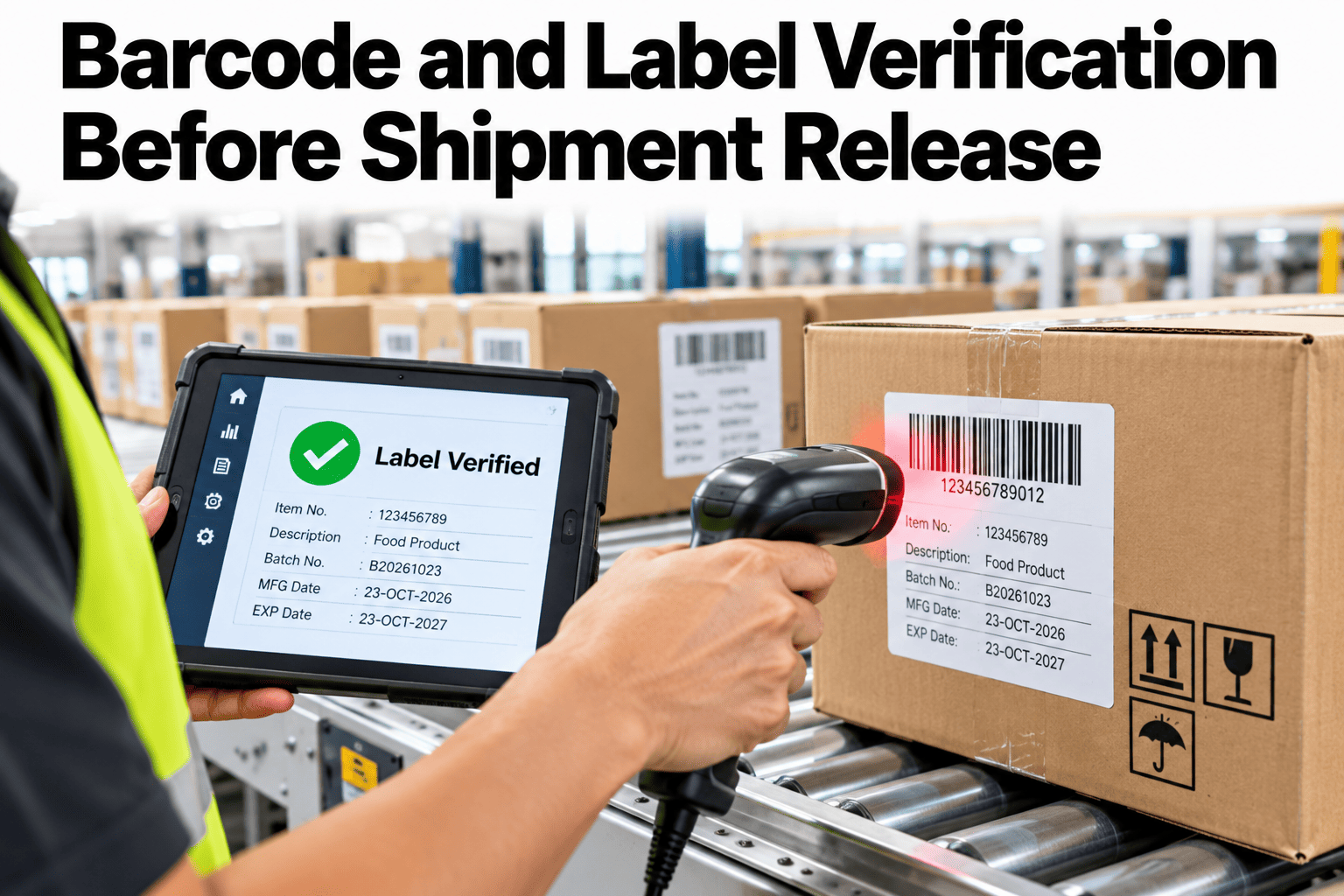
A shipment can be perfect and still be rejected because of a label. A barcode that does not scan, a label that shows the wrong product or a customer format that was not followed can stop a truck at the receiving dock, cost a chargeback and damage a relationship. Verifying barcodes and labels before release moves that check from the customer to the packing line. It uses rules, templates, matching and scan evidence to decide whether a shipment may leave. Teams who want to set it up can ask iFactory AI how label and barcode checks are recorded before release.
Verify Every Barcode and Label Before the Shipment Is Released
iFactory AI checks barcode rules, label templates and product-to-customer matching, and stores the scan evidence, so wrong labels are stopped at the line and not at the customer.
The Five Checks Behind a Safe Release
Each check catches a different kind of label error. Together they cover most shipment label failures.
Barcode rules
The barcode type, data structure and check digit follow the standard and the customer.
Label template
Layout, required fields, date and lot formats and regulatory marks are correct.
Product and customer match
The label content belongs to the product and to the customer's requirements.
Scan evidence
The barcode is scanned and the result is stored with time, scanner and batch.
Release exceptions
Any override has a reason and a second approver.
Barcode Rules Worth Enforcing
Rules turn a vague wish for good labels into a pass or fail result.
| Rule | What It Checks | Why It Matters |
|---|---|---|
| Symbology and structure | Barcode type and data format match the specification | The receiving scanner and system must read it |
| Check digit and data content | Digits and identifiers are valid and belong to the product | Prevents invalid or wrong product codes |
| Human-readable match | The printed text matches the encoded data | Catches template and data mismatches |
| Print quality | Contrast and readability meet the required grade | Poor print causes scan failures downstream |
Where Label Errors Come From
Errors follow familiar paths. The chart shows an illustrative ranking.
Which Error Is Caught by Which Check
The matrix, shown as an illustration, links error types to the checks that catch them best.
| Error | Rule Check | Template Check | Matching Check | Scan Evidence |
|---|---|---|---|---|
| Invalid or wrong barcode data | High | Moderate | Moderate | Moderate |
| Wrong template for the customer | Low | High | High | Moderate |
| Wrong product on the label | Moderate | Moderate | High | Moderate |
| Unreadable barcode | Moderate | Low | Low | High |
| Label on the wrong shipment | Low | Low | Moderate | High |
Stop Wrong Labels Before the Truck Leaves
Book a 30-minute session and iFactory AI will review your labelling process and past shipping errors to show where verification can prevent chargebacks.
The Verification Flow at the Packing Line
The check runs alongside packing. This flow shows how it fits into the normal sequence.
Trusting the Eye or Verifying With Scans
Experienced packers are accurate, but speed and similar-looking labels create gaps.
Handling Release Exceptions
Sometimes a label fails and the shipment must still move. A clear ladder prevents risky shortcuts.
Reprint and rescan
Fix the label and scan again.
Check the order and template
Confirm the right customer and product rules are loaded.
Escalate to quality
A named person reviews the failure.
Approve an override with a reason
A second approver confirms and the reason is recorded.
Hold the shipment
If it cannot be fixed safely, do not release.
Building Label Verification in Five Steps
A first rollout works best on one customer or one line.
Gather barcode rules and label specifications per customer.
Lock label templates and control who can change them.
Add a scan check before release.
Store scan evidence with batch and time.
Look at failures and exceptions every week.
Label Verification Checklist
Use this list on every shipment. Each box should be answerable from the record.
A Composite Scenario: The Label That Looked Right
This is a composite example, not a named company. It shows how scan evidence changes the outcome.
Mistakes in Label Verification
These habits let wrong labels through.
Checking by eye only
Similar labels are easy to confuse.
Letting anyone edit templates
Unnoticed changes spread errors.
Overrides with no reason
The check becomes a formality.
No scan evidence kept
Disputes cannot be settled.
What iFactory AI Adds to Label Verification
iFactory AI is smart manufacturing and industrial software that supports packaging and dispatch workflows. Capabilities described here should be confirmed against your specific setup. Explore label verification in a live product tour on realistic data.
A 30-Day Plan to Start
A month is enough to prove verification on one customer or line.
Review of Barcode and Label Verification
A practical review of what keeps shipping labels right, written as editorial guidance rather than a named expert quote.
Check rules, not just reads
A barcode that scans can still carry the wrong data.
Control the template
Uncontrolled templates are the biggest source of wrong labels.
Keep the evidence
A stored scan settles most disputes quickly.
Frequently Asked Questions
What should be verified on a shipping label?
Barcode type and data, check digit, human-readable text, template and customer format, print quality and the match to the product and batch. See each check on a live label in a short demo. Customer requirements always take priority.
Is scanning enough to prove a label is right?
Not by itself. A barcode can scan correctly and still hold the wrong product or customer data. Combine scanning with rule and matching checks for real assurance.
How do we handle labels that fail verification?
Reprint and rescan first, confirm the order and template, then escalate to quality. Ask support how failed labels and overrides are recorded in the workflow. Never release without a recorded reason.
Do customers have different label requirements?
Often yes, including formats, fields and minimum print grades. Store requirements per customer and apply them automatically. This avoids reliance on memory.
How soon can we start?
Many sites run verification for one customer within a month. Book time to scope a label verification pilot with your packing team. Fewer chargebacks are the clearest result.
Make Every Label Right Before the Truck Moves
iFactory AI checks rules, templates and matching and stores the scan evidence for every release. Book a walkthrough to see it on your own labels and shipments.