Most food and beverage plants still build their HACCP plan the same way they did fifteen years ago — a spreadsheet for the process flow, a separate document for the hazard analysis, and a binder of paper logs for CCP monitoring that nobody opens until an auditor asks for it. The three pieces rarely talk to each other, so when a process changes, someone has to remember to update all three separately, and one almost always falls behind. Software that keeps them inside a single connected plan removes that gap, and teams can Book a Demo to see a live plan built from a real process line.
One Connected Plan Instead of Three Disconnected Documents
iFactory links your flow diagram, hazard analysis, and CCP monitoring inside a single HACCP plan that updates everywhere the moment a process changes.
The Real Cost of a Fragmented HACCP Plan
A HACCP plan is only as reliable as its weakest link, and in most plants that weak link is the gap between the documents. The process flow diagram lives in one drawing tool, the hazard analysis worksheet lives in a spreadsheet with its own version history, and the CCP monitoring records live on paper at the line or in a separate digital form that nobody cross-references against the hazard analysis that justified it in the first place. When a new ingredient is introduced, a supplier changes, or a piece of equipment is replaced, the flow diagram should change first, the hazard analysis should be re-evaluated against that change, and the CCP monitoring plan should be updated to match. In practice, one of those three steps gets missed, and the plan on file no longer reflects the process actually running on the floor.
Auditors know exactly where to look for this gap, because it is the single most common finding in HACCP audits: a flow diagram that does not match the current line layout, a hazard analysis that references an ingredient no longer in use, or a CCP monitoring log that was clearly filled in after the fact rather than in real time. Software that keeps all three pieces inside one plan, with a single source of truth for the process itself, removes the opportunity for that drift to happen, because a change to the flow automatically flags the hazard analysis and monitoring steps that depend on it for review.
The cost of this drift is not just an audit citation. When the documented plan no longer matches the running process, the plant loses the ability to prove, with confidence, that every hazard reasonably likely to occur is actually being controlled. That gap is exactly what a recall investigation or a customer complaint escalation will probe first, and a plant that cannot immediately produce a flow diagram matching its current layout starts that investigation already on the back foot, regardless of how well the process itself is actually performing on the floor.
Quality managers who have lived through both versions of this workflow consistently describe the same shift once the plan moves into connected software: the annual reassessment stops being a dreaded multi-week project and becomes a structured review of what changed, because the system already knows what stayed the same. That single change in how the reassessment feels tends to be the detail that convinces a skeptical quality team the switch was worth making.
Building the Process Flow Diagram Inside the Plan
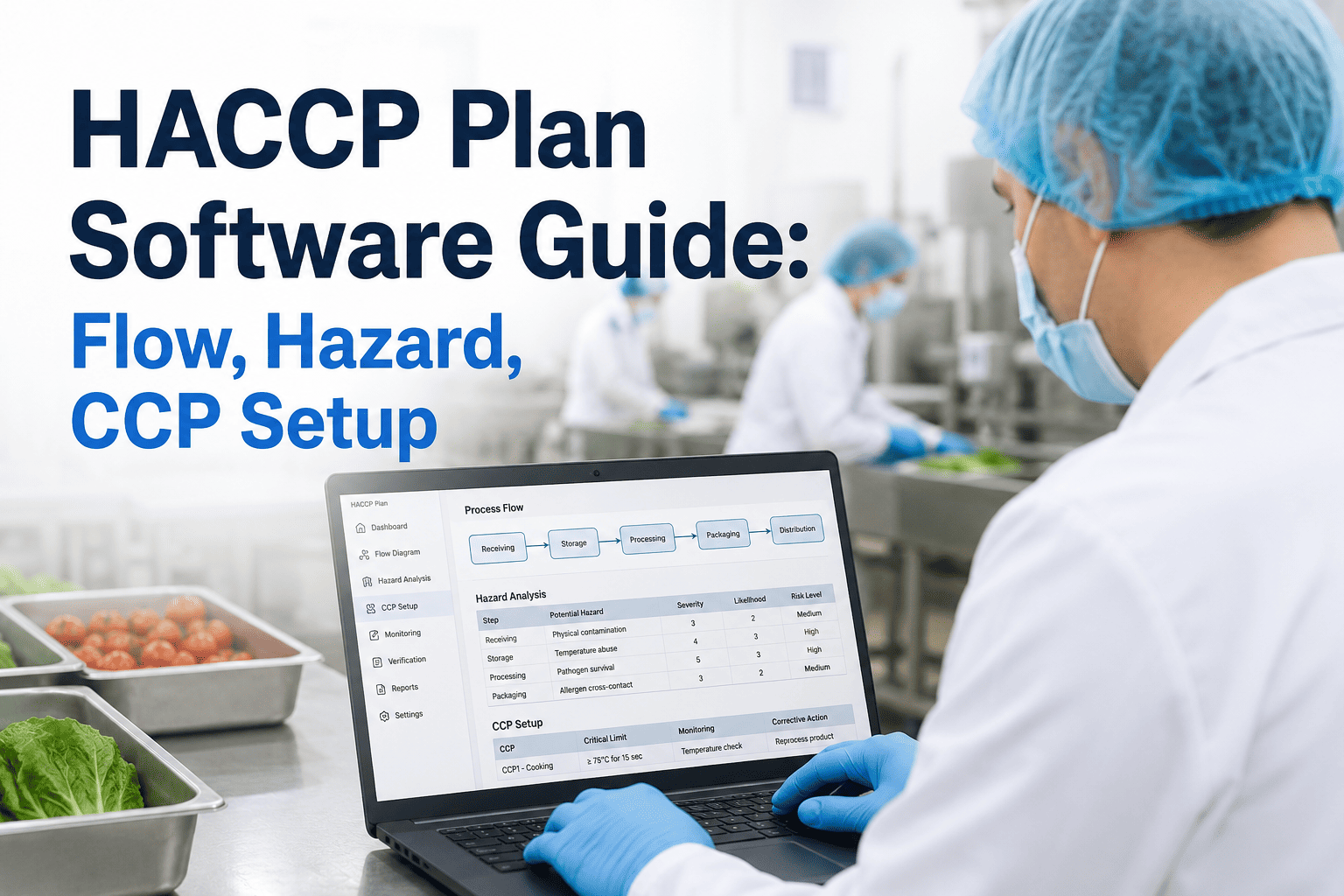
The flow diagram is the foundation every other part of the HACCP plan is built on, so it has to be accurate and easy to update as the process changes. Rather than a static drawing that lives outside the system, the flow diagram inside a connected HACCP builder is made of discrete process steps that carry their own data — temperature ranges, time limits, equipment references — which the hazard analysis and monitoring plan can pull from directly instead of duplicating.
Building the flow diagram this way also solves a problem most plants do not realize they have until it is pointed out: the flow diagram used for HACCP purposes and the process map used by operations for line balancing and scheduling are usually two completely separate documents, maintained by two different teams, and they drift apart from each other constantly. When the HACCP flow diagram is built from the same structured process data operations already tracks, the two views stay aligned by construction rather than by manual coordination between departments that rarely talk to each other about documentation.
Map Receiving Through Shipping
Every step from raw material receiving through finished goods shipping is entered as a discrete node, each carrying its own equipment, temperature, and time parameters rather than a single static drawing.
Attach Equipment and Parameters
Each process step is linked to the specific equipment used and the operating parameters that apply, so the hazard analysis has real data to reference instead of a generic assumption.
Version and Lock the Baseline
Once verified against the actual floor layout, the flow diagram is versioned and locked as the current baseline, with every future edit tracked against it for audit purposes.
Flag Downstream Dependencies
Any later edit to a process step automatically flags the hazard analysis entries and CCP monitoring steps that were built from it, so nothing downstream goes stale unnoticed.
Running the Hazard Analysis Against a Live Flow
A hazard analysis conducted against a static diagram tends to accumulate small inaccuracies over time, since nobody revisits every entry every time a minor process tweak is made — a slightly different holding time, a supplier substitution, a new piece of ancillary equipment. Each of those small changes is individually easy to justify as "not significant enough" to trigger a full review, and yet the accumulated effect over several years is a hazard analysis that has quietly drifted from the process it claims to describe.
Hazard analysis is where a plant identifies which biological, chemical, or physical hazards are reasonably likely to occur at each process step, and decides which of those hazards need a control measure significant enough to become a critical control point. When the hazard analysis is built against a live, structured flow diagram rather than a static drawing, each hazard entry is directly tied to the process step it applies to, and the system can show a reviewer exactly which steps have not yet been evaluated, rather than relying on someone manually cross-checking a spreadsheet against a diagram line by line.
This structure also makes the annual reassessment — a requirement under most HACCP frameworks — dramatically faster. Instead of starting from a blank worksheet and rebuilding the reasoning from scratch, the reviewer works from the prior year's hazard analysis with each entry already linked to its process step, updating only what has actually changed since the last review and leaving a clean record of what stayed the same and why.
The hazard analysis is also where cross-functional review tends to break down in a paper-based system, because quality, food safety, and operations all need to weigh in on the same worksheet without overwriting each other's comments or losing track of which version reflects the latest thinking. A structured hazard analysis built against a live flow diagram supports that review as a workflow rather than an email chain with attachments, with each reviewer's input tied to the specific process step and hazard they are commenting on, and a clear record of who approved the final determination and when.
Biological Hazards
Pathogen growth and survival risks tied to time, temperature, and cross-contamination points identified against each specific process step in the live flow.
Chemical Hazards
Allergen cross-contact, cleaning chemical residue, and sanitation compound risks flagged at the steps where they are most likely to occur.
Physical Hazards
Foreign material risks from equipment, packaging, or raw materials, tracked against the detection and control points already built into the flow.
Determining Critical Control Points With a Decision Tree
Inconsistent application of the decision tree is one of the more subtle risks in a paper-based plan, because two reviewers looking at the same hazard can genuinely reach different conclusions depending on how strictly they interpret each question, and there is often no record of the reasoning behind an older determination to check it against. A structured version of the same decision tree does not remove human judgment from the process, but it does make the reasoning visible and comparable across every CCP determination in the plan.
Not every identified hazard needs a critical control point — the CCP decision tree exists specifically to separate hazards that need a dedicated control measure from those already adequately addressed by a prerequisite program. Running that decision tree inside the same system as the flow diagram and hazard analysis means the logic is applied consistently across every process step, rather than depending on whoever happens to be filling out the worksheet that week interpreting the questions slightly differently.
Each answer is recorded against the process step it belongs to, and a step marked as a CCP automatically generates the corresponding monitoring, corrective action, and verification requirements as placeholders in the plan, so nothing has to be manually re-entered a second time in a separate monitoring worksheet.
Keeping a recorded rationale for every decision tree answer, not just the final determination, turns out to matter more than most plants expect the first time a regulator or a customer food safety auditor asks why a particular step was not designated a CCP. Being able to show the specific question, the specific answer, and the specific reasoning recorded at the time of the original analysis is a far stronger position than reconstructing that logic from memory months or years after the original determination was made.
Monitoring Templates That Match the Approved Plan
The gap between a documented critical limit and the actual limit an operator checks against during a shift is a surprisingly common finding, usually the result of a monitoring form that was created once, printed, and then never quite kept in sync with a later revision of the hazard analysis. Generating the monitoring template directly from the approved CCP determination closes that gap permanently, since there is only one place the critical limit is defined, and every downstream form pulls from it rather than storing its own separate copy that can silently fall out of date.
Once a critical control point is established, the monitoring plan needs to specify what is monitored, how, how often, and by whom, along with the critical limits that define a deviation and the corrective action required when one occurs. Because the monitoring templates are generated directly from the CCP determination rather than built separately, the limits and frequency entered into the monitoring form always match what was actually approved in the hazard analysis, closing off the common audit finding where a monitoring record does not match the documented critical limit.
Monitoring can be captured on a tablet or fixed terminal at the line, timestamped automatically, and checked in real time against the critical limit defined in the plan, so a deviation triggers an alert the moment it happens rather than being discovered during a end-of-shift review of paper logs.
The corrective action workflow follows the same logic. Rather than a blank text field where an operator writes a free-form description of what they did after a deviation, the corrective action step presents the specific options defined in the approved plan for that CCP, prompts for the product disposition decision, and requires a verification signature before the record is considered closed. This keeps corrective action documentation consistent across shifts and operators, which is exactly the consistency an auditor is checking for when they pull a sample of deviation records during an inspection.
Spreadsheet-and-Binder vs. Connected Plan Software
The comparison below reflects what actually changes on the ground, not just what changes on paper. Plants that have made the switch report the biggest shift is not in any single feature but in how much less time the quality team spends reconciling three documents against each other before every audit, freeing that time for the kind of proactive food safety work — supplier verification, sanitation program review, training — that tends to get pushed aside when the team is busy chasing down whether the CCP monitoring log actually matches the hazard analysis on file.
| Factor | Spreadsheet + Binder | Connected HACCP Software |
|---|---|---|
| Flow-to-hazard link | Manual cross-reference | Automatic, structured link |
| Annual reassessment | Rebuilt from scratch | Updated from prior baseline |
| Monitoring record source | Separate paper form | Generated from approved CCP |
| Deviation detection | End-of-shift review | Real-time alert |
| Audit trail | Scattered across documents | Single versioned plan |
Building Your First Connected Plan
It helps to think of the first pilot line not as a technology rollout but as an opportunity to have the quality team, operations, and food safety leadership sit down together and actually walk through the current plan line by line, which is a review most plants have not done thoroughly in years. That joint review, done as part of the digitization process, frequently surfaces small inconsistencies between what different departments believed the approved plan actually said — a genuinely useful outcome on its own, independent of the software that prompted the conversation.
Most plants start by digitizing their existing, already-approved HACCP plan rather than rebuilding it from a blank page, which means the flow diagram, hazard analysis, and CCP determinations are entered as-is and validated against the current documentation before anything changes on the floor. From there, the monitoring templates are generated and piloted on one or two critical control points before expanding to the full plan, giving the quality team time to confirm that the digital records match what the paper process was producing.
A typical rollout for a single production line takes two to four weeks from initial data entry to a fully piloted monitoring workflow, with the bulk of that time spent validating the hazard analysis against the live flow rather than on system configuration itself. Plants running multiple lines or multiple facilities can extend the same baseline plan structure to each additional line, reusing hazard analysis logic where the process steps are genuinely equivalent.
Training the floor team on the new monitoring workflow is usually the fastest part of the rollout, since the digital form asks for the same readings the operator was already taking on paper, just captured directly at the point of monitoring instead of transcribed later. Most plants find that operators adapt within the first two or three shifts, particularly once they see that a deviation alert reaches a supervisor immediately rather than being discovered hours later, which tends to reduce, not increase, the pressure operators feel around correctly documenting a limit exceedance.
HACCP Plan Software — Common Questions
Can we import our existing HACCP plan instead of starting over?
Yes, most plants begin by entering their existing, already-approved flow diagram, hazard analysis, and monitoring plan into the system exactly as documented, rather than rebuilding the hazard reasoning from scratch. This preserves the plant's existing regulatory approval history while giving the team a structured, connected version of the same plan going forward, and any gaps between the paper version and the digital entry are surfaced during that import step rather than discovered later during an audit. Most quality teams find this review itself valuable, since it is often the first time in years that every entry in the plan has been checked against the current process in one sitting.
Does the software handle multiple products on the same line?
Yes, each product or product family can have its own flow diagram and hazard analysis while sharing common equipment and process steps where the underlying process is genuinely identical, which avoids duplicating hazard reasoning that does not actually change between products. Where a hazard analysis does differ between products sharing a line, the system keeps those entries separate so a reviewer can see exactly which product-specific risks apply where, and changeover procedures between products can be documented against the same shared equipment record rather than recreated separately for each product variant.
How does the annual reassessment work differently in the software?
Instead of starting from a blank worksheet every year, the reviewer works from the prior year's hazard analysis with each entry already linked to its process step, confirming what has not changed and updating only the entries affected by a genuine process, ingredient, or equipment change during the year. This produces a clean, dated record of what was reviewed and what changed, which is exactly the kind of documentation auditors are looking for during a reassessment review.
What happens when a CCP monitoring reading is out of limit?
The system checks the reading against the critical limit defined in the approved plan the moment it is entered, and flags a deviation immediately rather than waiting for an end-of-shift review to catch it, giving the operator time to take the corrective action defined in the plan before product moves further downstream. The deviation, the corrective action taken, and the verification step are all logged together against the same CCP record for audit purposes.
Can our support team get help setting up the first pilot line?
Yes, the iFactory Support team works directly with your quality team to validate the digitized flow diagram and hazard analysis against your existing approved plan before any monitoring goes live on the floor. Teams ready to see the full plan builder in action on a sample process can Book a Demo and walk through a real HACCP plan end to end.
Stop Maintaining Three Documents That Never Quite Match.
See how iFactory keeps your flow diagram, hazard analysis, and CCP monitoring inside one plan that stays accurate as your process changes.