Most AR pilots in manufacturing don't fail because the headset was uncomfortable or the overlay lagged on the floor, they fail because nobody could keep the content current. A single assembly sequence gets built beautifully for the pilot line, everyone in the demo is impressed, and then the product revs six weeks later and the AR instructions quietly go stale while the paper backup comes back out of the drawer. Content creation and maintenance, not the hardware, is where most AR programs actually stall, and it's rarely discussed with the same attention as which headset to buy. Solving that bottleneck is what separates a one-line pilot from AR running across a full plant, something a content authoring demo can walk through against your own CAD library.
Your AR Pilot Looked Great, the Question Is Whether Anyone Can Keep It Current
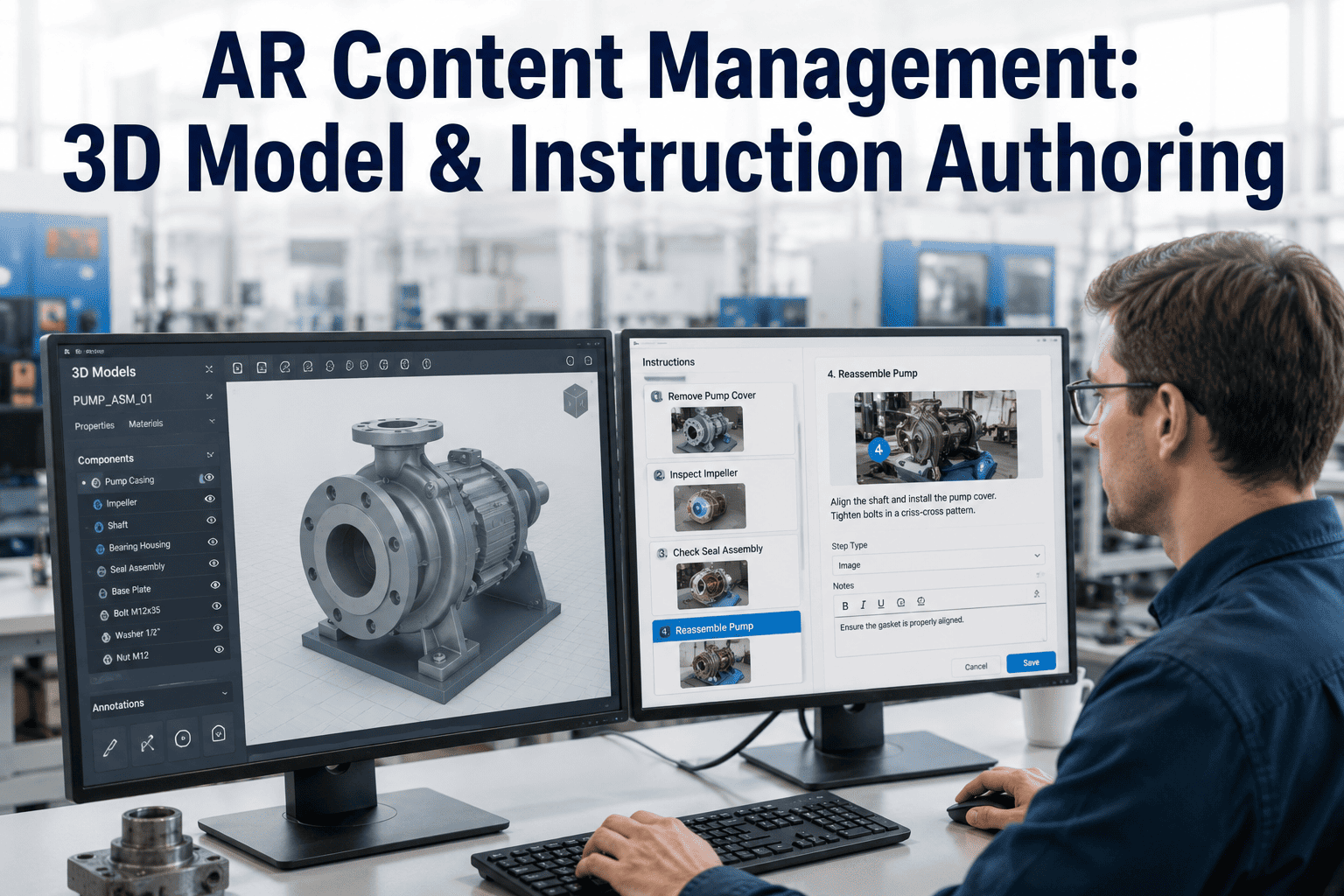
iFactory turns existing CAD and PLM data into step-by-step AR instructions without a coding team, keeps every version synced to the latest product change, and pushes updates to headsets, tablets, and projectors from one place.
Why Content Creation, Not the Headset, Decides If AR Actually Scales
A technical writer who once spent two days producing a single AR assembly sequence in a general-purpose authoring tool is not going to produce three hundred of them for a full product line, and that math is the reason most AR programs stay stuck at pilot scale. The instructions themselves are only half the problem, the other half is keeping them accurate. Every engineering change order, every supplier substitution, every revised torque spec has to propagate into the AR content or the overlay starts guiding workers toward a step that no longer matches the real part in front of them, which is worse than having no AR guidance at all.
This is why most vendor comparisons that focus only on headset comfort, field of view, or battery life miss the actual decision point. A plant can buy the best hardware on the market and still watch its AR program stall if the content behind it takes a specialist week to build and nobody owns keeping it current once the specialist moves to the next project. The programs that scale past a single line are almost always the ones where authoring got handed to the people who already know the process, using tools built for that handoff rather than for a professional 3D artist.
What a Content Pipeline Needs to Survive Past the Pilot Line
An AR program that scales past one demo line rests on five building blocks working together. Miss any one of them and the content either takes too long to build or goes stale the moment the product changes, and most stalled AR programs can usually trace their bottleneck back to exactly one of these five gaps rather than a hardware limitation.
From a CAD File to a Live AR Instruction in Four Steps
The platform sits on top of the CAD and PLM data your engineering team already maintains, so authoring starts from an accurate model instead of a rebuild.
Because publishing is decoupled from the device, a content update made once reaches every headset, tablet, and projector reading from that instruction set the same day, instead of requiring a separate rebuild for each hardware format in use across the plant. That decoupling also protects a plant's content investment against a future hardware switch, since instructions built today don't need to be recreated if the fleet moves from tablets to headsets a year from now.
Stop Losing Your AR Program to a Content Bottleneck
iFactory turns your existing CAD data into AR instructions your own experts can author and keep current, without a development team. Book a demo and see it built against one of your real assemblies.
Manual Build, Video Capture, or CAD-Driven Authoring, What Actually Scales
Plants building AR content today generally take one of three paths, and the difference shows up fastest once a program tries to move past its first handful of instructions. The right choice usually depends less on budget and more on whether the underlying CAD data already exists for the equipment being documented.
| Approach | Best Fit | Key Trade-Off |
|---|---|---|
| Manual 3D Authoring | A single flagship instruction built for a showcase demo | High visual polish, but each instruction takes days and doesn't scale across a product line |
| Expert Video Capture | Tasks with no existing CAD model, captured from an experienced operator | Fast to record, but lacks the precision overlay a CAD-linked instruction provides |
| CAD-Driven Authoring | Any plant with existing CAD or PLM data wanting to scale AR across a full line | Requires a connected data source, but authoring time and update effort both drop sharply |
The pattern mirrors what happened with digital work instructions before AR entered the picture, where manually formatted PDFs eventually gave way to templated documents pulled straight from the same source data engineering already maintained. AR content management is following the identical path, just with a 3D layer added on top, and plants that already made that earlier transition tend to move through the AR authoring shift faster since the underlying discipline of linking documentation to source data is already familiar to their teams.
Four Places CAD-Driven AR Content Pays Off Fastest
Once the authoring pipeline is running, it applies anywhere a worker needs to match a physical part to a precise sequence of steps. Most plants start with one high-consequence use case and expand instruction coverage into the other three once the pipeline proves it can keep pace with real product changes.
An AR Instruction Is Only Trustworthy the Day It Matches the Real Part
The moment an AR overlay tells a worker to do something the physical part no longer supports, because a supplier changed, a revision shipped, or a fastener spec updated, the entire program loses credibility with the floor. Workers who catch the AR guidance being wrong once tend to stop trusting it altogether, reverting to the paper backup or their own memory even after the content gets corrected, which is a harder trust gap to close than the one a paper manual ever had.
Linking instructions directly to the underlying CAD model instead of treating them as a standalone media file is what prevents that gap from opening in the first place. When engineering pushes a change order, the instructions tied to that model surface for review automatically rather than sitting untouched until someone on the floor notices something is wrong. That single structural choice, content tied to source data rather than built as a one-off asset, is the difference between an AR program that stays accurate for years and one that needs a full rebuild every time the product line evolves. It also changes who can be trusted to own the content long term, since a process engineer reviewing a flagged change doesn't need to touch a line of code to confirm or update the affected instruction.
What Manufacturers Report After Moving to CAD-Driven AR Authoring
These figures reflect outcomes reported by manufacturers after shifting from manual AR content builds to a CAD-linked, no-code authoring workflow, measured across the first year of a scaled rollout.
How Manufacturers Introduce CAD-Driven Authoring Without Restarting Their Program
A content pipeline rebuild works best layered onto whatever AR pilot content already exists, converting proven use cases into a scalable format rather than starting the program over. This keeps the rollout grounded in something the floor has already validated instead of asking workers to learn a second unproven system alongside the first.
Questions Teams Ask Before Rolling Out CAD-Driven AR Authoring
Build AR Content That Keeps Up With Your Product, Not Just Your Pilot
iFactory connects your CAD and PLM data to a no-code authoring workflow, so instructions stay accurate as your product evolves. Book a demo and see your own assemblies turned into AR guidance.