Power plants generate enormous volumes of operational data from condition monitoring systems, DCS platforms, CMMS databases, and financial tracking tools, yet most of this data remains trapped in the system where it was created because the integration between SAP PM and the plant-floor systems was never completed or was implemented as a one-way data dump rather than a bidirectional workflow. The SAP Plant Maintenance module is designed to be the central repository for maintenance planning, work order management, spare parts procurement, and cost tracking, but it cannot fulfill that role if the work orders are being created manually from data that operators read from a separate monitoring screen and then retype into SAP. This manual bridge between the operational world and the enterprise system is where data errors accumulate, where response times stretch from minutes to hours, and where the financial visibility that justified the SAP investment never materializes. Facilities that have accepted this manual gap as permanent are spending more on SAP administration than they are saving from the integration, which is the point where a purpose-built integration layer changes the economics. Teams ready to eliminate the manual bridge between plant operations and SAP can Book a Demo to see how iFactory connects operational data directly to SAP PM work orders and cost objects.
Your SAP PM Module Is Only as Good as the Data Flowing Into It.
iFactory connects your plant-floor monitoring, condition data, and operator rounds directly into SAP work orders, notifications, and cost objects without manual re-entry.
What Happens When Plant Systems and SAP Cannot Talk to Each Other
The silo problem in power plant data management is not that data is missing. It is that data exists in multiple systems simultaneously but cannot move between them without human intervention. Each silo produces accurate data within its own scope, but the data becomes stale, inconsistent, or incomplete the moment it needs to cross a system boundary. The visualization below shows the five most common data silos in a power plant that has SAP PM installed but not integrated, along with the manual bridge that operations and maintenance teams must cross to move data between each pair of systems. Every manual bridge is a source of delay, error, and cost that the SAP integration was supposed to eliminate.
Process alarms, equipment status, operating parameters, and trip event logs reside in the control system with no automated path to SAP maintenance notifications.
Vibration trends, temperature profiles, and oil analysis results from predictive maintenance systems exist in separate databases with no link to SAP equipment master records.
Field inspection data collected on paper or handheld devices that may or may not be uploaded to a separate database, rarely reaching SAP in time to influence maintenance planning.
Work orders, notifications, spare parts reservations, and cost postings that depend on timely data from all three source systems above but receive it hours or days late, incomplete, or with transcription errors that corrupt the maintenance history.
The cost of these manual bridges is not just the labor time spent re-entering data. It is the decisions that are made on stale data, the work orders that are created with incorrect equipment identifiers because the mapping between the DCS tag and the SAP functional location was done from memory, and the spare parts that are not reserved because the condition monitoring alert never reached the planner. A power plant with 5000 tagged pieces of equipment and 200 condition monitoring points can easily generate 50 to 100 manual data transfers per day between operational systems and SAP, each carrying a 3% to 5% error rate that accumulates into a maintenance history database that cannot be trusted for trend analysis or reliability engineering.
What the SAP PM Module Actually Manages in a Power Plant Context
SAP PM is a comprehensive maintenance management module, but understanding what it manages versus what it does not manage is essential for defining the integration scope. SAP PM manages the business process of maintenance: planning, scheduling, execution, confirmation, and cost settlement. It does not generate the operational data that triggers maintenance decisions. That data comes from systems outside SAP. The six functional blocks below represent the core scope of SAP PM in a power plant, with the external data source that each block depends on to function effectively. Any block where the external data source is not integrated represents a gap where the PM module is operating on incomplete or manually transferred information.
Equipment Master and Functional Location Hierarchy
External Dependency: Plant tag register and P&ID hierarchySAP PM organizes all maintenance activity around the equipment master record and the functional location hierarchy. In a power plant, this hierarchy must mirror the physical system hierarchy from unit level through system level to component level, and each equipment record must be cross-referenced to the DCS tag number, the condition monitoring point ID, and the physical location in the plant. When this mapping is not maintained, work orders are created against the wrong equipment, spare parts are reserved for the wrong component, and the maintenance history becomes fragmented across multiple equipment records that actually refer to the same physical asset. The integration must ensure that any equipment added in the plant design system is automatically reflected in the SAP hierarchy with the correct cross-references.
Maintenance Notifications
External Dependency: Alarms, condition alerts, and operator observationsThe maintenance notification is the entry point for all maintenance activity in SAP PM. It records what is wrong, where it is wrong, and how severe it is. In an integrated environment, notifications are created automatically from DCS alarms that exceed defined thresholds, from condition monitoring systems that detect a developing fault, or from operator round systems that flag an out-of-range reading. Without integration, notifications are created manually by operators or maintenance supervisors who must interpret the alarm or alert from the source system and then re-enter the information into SAP, losing the diagnostic context and the timestamp precision that the source system captured. The notification arrives in SAP as a textual description rather than a structured data record linked to the original measurement.
Work Order Management
External Dependency: Job plan libraries, safety procedures, and permit systemsWork orders in SAP PM define what maintenance work will be performed, when it will be performed, what resources are required, and what spare parts must be available before work can begin. The work order pulls task lists, operation steps, and inspection checklists from the SAP task list library, but in a power plant these task lists often reference safety procedures, lockout-tagout requirements, and hot work permits that are managed in a separate permit system. Without integration, the work order in SAP does not reflect the current permit status, and the permit system does not know whether the SAP work order has been released for execution. This creates situations where work begins before all permits are confirmed, or permits are issued for work that has not been properly planned in SAP.
Spare Parts and Inventory Management
External Dependency: Vendor catalogs, storeroom physical counts, and criticality ratingsSAP PM integrates with the SAP Materials Management module to reserve spare parts against work orders, track inventory levels, and trigger procurement when stock falls below reorder points. In a power plant, the accuracy of this process depends on whether the bill of material attached to each equipment record actually matches the parts installed in the field. When maintenance teams substitute parts during an outage and do not update the SAP bill of material, the next work order for the same equipment will reserve the wrong parts or parts that are no longer installed. The integration must include a feedback loop from the work order completion process back to the bill of material, so that any parts substitution or addition during execution is captured and reflected in the equipment record for future planning.
Maintenance Planning and Scheduling
External Dependency: Outage schedules, generation forecasts, and equipment availability statusThe planning and scheduling function in SAP PM uses maintenance plans, strategy definitions, and scheduling parameters to generate preventive work orders and integrate them into the overall maintenance schedule. In a power plant, this schedule must be coordinated with the generation dispatch schedule, planned outage windows, and equipment availability constraints that are managed outside SAP in the plant scheduling system or the energy management system. Without integration, the SAP maintenance schedule and the plant operating schedule are two separate documents that must be reconciled manually, which causes deferred maintenance when a planned outage is rescheduled but the corresponding SAP work orders are not moved to the new window.
Cost Settlement and Reporting
External Dependency: Labor time tracking, contractor invoices, and production loss dataSAP PM settles maintenance costs to cost centers, cost objects, and profitability segments, enabling the financial reporting that is the primary justification for SAP investment. The accuracy of cost settlement depends on whether all labor hours, material costs, and external service costs are posted to the correct work order and cost object. When maintenance technicians record their time on paper time sheets that are entered into SAP by a clerk days later, the hours are often posted to the wrong work order or to a generic cost center instead of the specific equipment work order. The integration must include direct time posting from the work execution system or mobile device to the SAP work order, so that labor costs are captured in real time and attributed to the correct cost object without manual intermediation.
Five Integration Steps From Plant Floor to SAP PM Work Order
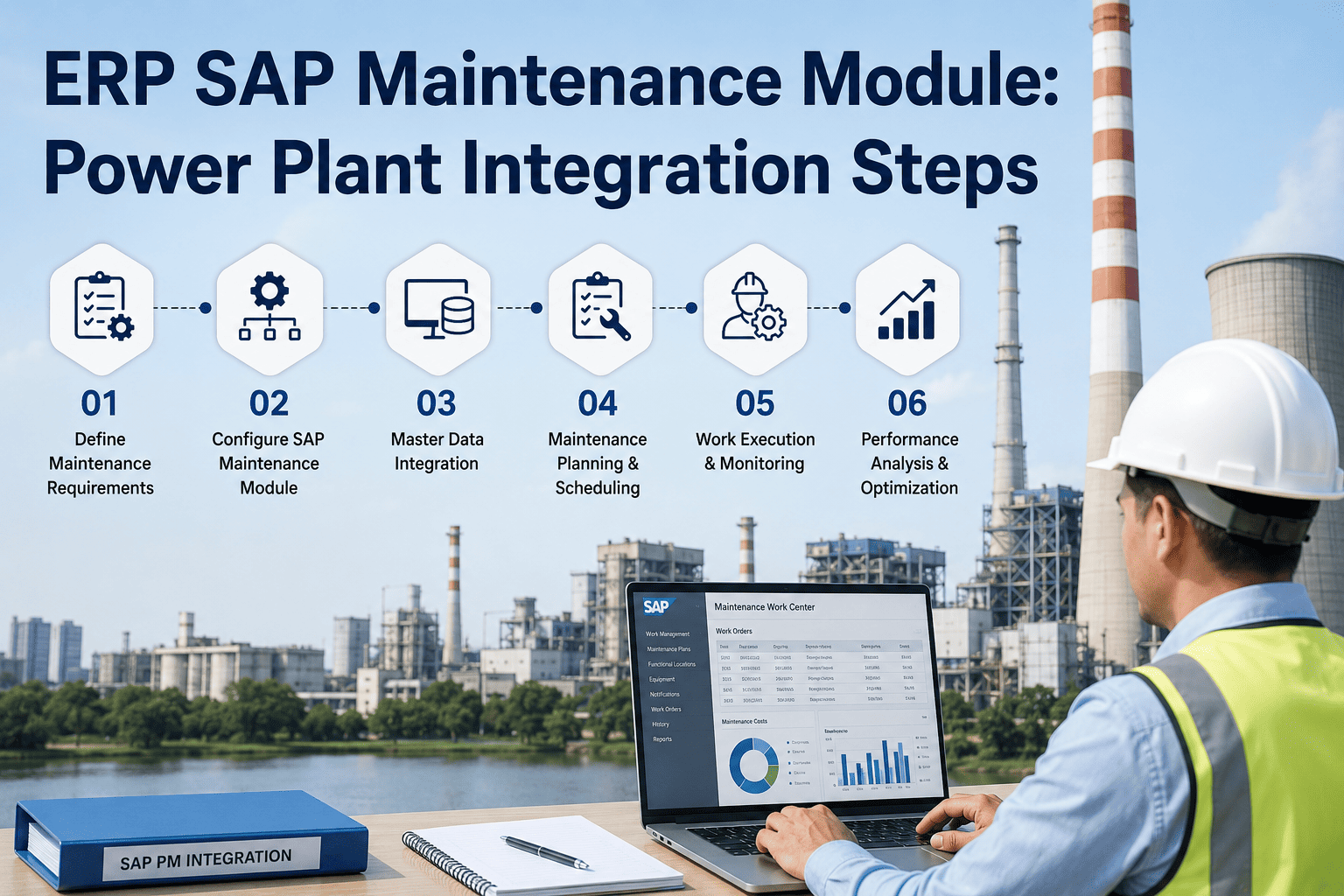
Integrating operational data with SAP PM is not a single connection but a five-step data pipeline that transforms a raw measurement or alarm from a plant-floor system into a structured, validated, and cost-attributed work order in SAP. Each step adds value by enriching the data with context, validating it against master data, and routing it to the correct maintenance process. A weakness in any step degrades the quality of the work order that reaches the maintenance planner, which directly affects the quality of the maintenance execution. The pipeline below represents the complete integration sequence from the moment an abnormal condition is detected to the moment a planned work order appears in the SAP planner queue.
Detection
Source: DCS, Vibration System, RoundsA condition monitoring system detects an abnormal reading, a DCS alarm is generated, or an operator records an out-of-spec observation during a field round. The raw data includes the equipment tag, the parameter that triggered the alert, the measured value, the timestamp, and any associated diagnostic information such as a vibration spectrum or a temperature trend.
Tag Resolution
Mapping: Plant Tag to SAP EquipmentThe integration layer maps the plant-floor tag number from the source system to the correct SAP equipment master record or functional location. This mapping must account for one-to-many relationships where a single DCS tag corresponds to multiple SAP equipment records, and for tags that have been renamed or renumbered in one system but not the other. Failed tag resolution is the most common integration error and must generate an exception queue rather than a failed notification.
Enrichment
Context: Priority, Safety, and HistoryThe resolved equipment record is used to pull context from SAP: the equipment criticality rating, the associated maintenance strategy, the applicable task list, the safety precautions required for work on this equipment, and the maintenance history including previous similar notifications. This enrichment transforms the raw alert into a contextualized maintenance recommendation that the planner can act on directly.
Validation
Rules: Duplicate Check and Threshold LogicThe enriched notification is validated against business rules before being sent to SAP. Duplicate detection prevents the same condition from generating multiple notifications if the source system sends repeated alerts. Threshold logic ensures that notifications are only created for conditions that exceed the defined severity criteria, preventing notification overload from minor fluctuations. The validation layer also checks that all required fields for SAP notification creation are populated and formatted correctly.
SAP Creation
Target: PM Notification and Work OrderThe validated, enriched, and mapped data is posted to SAP PM as a maintenance notification using the SAP RFC or BAPI interface. Depending on the configuration, the integration may create only the notification for planner review, or it may create both the notification and a pre-populated work order with the recommended task list, estimated labor, and reserved spare parts. The SAP response, including the notification number and any errors, is returned to the integration layer for logging and exception handling.
Every Manual Data Entry Between Your Plant and SAP Is a Failure Point.
iFactory automates the full pipeline from condition detection to SAP work order creation, including tag mapping, enrichment, validation, and error handling, so your planners receive structured work orders instead of phone calls from operators.
What Data Moves Between Plant Systems and SAP PM in Each Direction
Integration is not a one-way street. While the most visible data flow is from plant-floor systems into SAP as notifications and work orders, there are equally important data flows from SAP back to the plant floor, including equipment status changes, work order releases that trigger permit generation, and spare parts availability that affects whether a work order can be scheduled. The matrix below defines the data elements that must flow in each direction between the four most common plant-floor systems and SAP PM, along with the interface method typically used for each transfer. Any cell marked as Manual represents a specific integration gap that should be targeted for automation.
| Source System | Data Direction | Data Elements Transferred | Interface Method |
|---|---|---|---|
| DCS / SCADA | To SAP | Process alarms, equipment status changes, trip event logs, analog alarm thresholds exceeded | OPC-UA to Integration Layer to SAP RFC |
| DCS / SCADA | From SAP | Equipment maintenance status, work order active flag, equipment lockout status | SAP IDoc to Integration Layer to OPC-UA |
| Condition Monitoring | To SAP | Vibration alerts, temperature trends, oil analysis results, predictive fault diagnosis | API or Database Replication to Integration Layer to SAP BAPI |
| Condition Monitoring | From SAP | Equipment criticality rating, maintenance strategy assignment, past work order history for trending | SAP RFC to Integration Layer to API |
| Operator Rounds | To SAP | Out-of-range readings, visual inspection findings, corrective action requests, equipment condition notes | Mobile App to Integration Layer to SAP RFC |
| Operator Rounds | From SAP | Round checklist assignments, measurement points to inspect, open notifications for assigned equipment | SAP RFC to Integration Layer to Mobile App API |
| Permit System | To SAP | Permit approval status, permit expiration time, safety document completion confirmation | API to Integration Layer to SAP BAPI |
| Permit System | From SAP | Work order release notification, required permit types for the work scope, associated equipment list | SAP IDoc to Integration Layer to API |
The matrix reveals that the majority of data flows in both directions for each system, which means a one-way integration that only pushes alarms into SAP addresses only half of the integration requirement. The return path from SAP to the plant floor is what enables closed-loop maintenance: the operator performing a round needs to see the open notifications for the equipment they are inspecting, the condition monitoring system needs to know the maintenance status of the equipment it is monitoring to avoid generating alerts for equipment that is already under repair, and the permit system needs the work order scope to determine which permit types are required. iFactory implements both directions of each data flow through a bidirectional integration layer that maintains data consistency across all connected systems. Book a Demo to see how iFactory manages bidirectional data flows between plant systems and SAP PM.
From Detection to Financial Close: The Complete Automated Work Order Lifecycle
In a fully integrated environment, a work order originates from an automated data source, passes through planning and scheduling within SAP, is executed with real-time status updates from the field, and closes with costs settled to the correct financial object, all without manual data re-entry at any stage. The lifecycle below traces a single work order from the initial condition detection through to financial settlement, showing which system owns each stage and what data crosses each system boundary. Any stage where the data transfer is manual represents a break in the automation chain that introduces delay and error.
Condition Detected
System: Condition Monitoring / DCSVibration monitoring system detects bearing degradation on boiler feed pump BFP-3A. The system generates a severity Level 2 alert with the vibration spectrum, trend data, and recommended action. This data is the source of truth for the maintenance decision and must be preserved through the entire lifecycle as an attachment to the SAP work order for the planner and the technician to reference.
SAP Notification Created
System: Integration Layer to SAP PMThe integration layer maps the vibration system tag BFP-3A-VIB to the SAP equipment master record for Boiler Feed Pump 3A, enriches the notification with the equipment criticality rating, maintenance strategy, and relevant task list from SAP, validates against duplicate detection rules, and creates a PM notification with the vibration alert data attached. The notification appears in the planner queue within seconds of the original detection.
Work Order Planned and Scheduled
System: SAP PMThe maintenance planner reviews the notification, confirms the diagnosis from the attached vibration data, converts the notification to a work order, assigns the applicable task list for bearing replacement on this pump type, estimates labor hours, checks spare parts availability in SAP MM, reserves the bearing kit from stores, and schedules the work order into the next available maintenance window coordinated with the plant operating schedule.
Permits Issued and Work Order Released
System: SAP PM to Permit SystemWhen the planner releases the work order, the integration layer sends the work order scope, associated equipment list, and required permit types to the permit system. The permit system generates the appropriate lockout-tagout permits, confined space entry permits if applicable, and hot work permits based on the work scope. Permit approval status flows back to SAP, and the work order status updates to released only when all required permits are approved, creating a closed-loop safety gate.
Work Executed and Confirmed
System: Mobile Execution to SAP PMThe maintenance technician receives the work order on a mobile device with the task list, safety procedures, and attached vibration data. During execution, the technician records actual labor hours against each operation, confirms the parts used from the reservation, and documents the findings including photos of the replaced bearing. Upon completion, the time and material confirmations are posted directly from the mobile device to the SAP work order, eliminating the paper time sheet and the clerical re-entry step.
Technical Close and Cost Settlement
System: SAP PM to SAP FI/COThe work order is technically closed with the completion confirmation, and the costs, including labor hours valued at the applicable labor rate, material costs from the goods issue, and any external service costs, are settled from the work order to the assigned cost center and cost object. The maintenance history is updated, the equipment downtime is recorded, and the condition monitoring system is notified that the equipment has returned to service so that monitoring resumes and the post-repair baseline can be established.
Three-Layer Integration Architecture That Scales With Your Plant
Point-to-point integrations between each plant system and SAP are the most common approach in power plants, and they are also the most fragile. Every new plant system added to the architecture requires a new point-to-point connection to SAP, and every change in SAP configuration or plant system upgrade can break multiple connections simultaneously. The three-layer architecture below replaces point-to-point connections with a central integration layer that acts as a broker between all plant systems and SAP. Each plant system connects to the integration layer once, and the integration layer connects to SAP once, regardless of how many plant systems exist. This architecture reduces the number of connections from N-squared in a point-to-point model to 2N in a hub-and-spoke model, and it provides a single point where data transformation, mapping, validation, and error handling are performed consistently.
Tag Mapping Engine
Maintains the bidirectional mapping between plant-floor tags and SAP equipment master records. Handles one-to-many and many-to-one relationships, tag renames, and decommissioned tag retirement.
Transformation Rules
Converts data formats between source system representations and SAP field formats. Handles unit conversions, enum mappings, timestamp normalization, and free-text to structured field parsing.
Business Rule Engine
Applies plant-specific rules for notification creation, priority assignment, duplicate detection, and routing. Rules are configurable without code changes to accommodate changes in maintenance strategy.
Exception Management
Captures all integration failures in a structured exception queue with root cause categorization. Failed mappings, missing master data, SAP interface errors, and validation failures are each routed to the appropriate resolution team.
The critical advantage of this architecture is that the integration middleware layer, Layer 2, is owned and maintained by the plant operations and maintenance team rather than by the SAP implementation team or the DCS vendor. This means that changes to tag mappings, business rules, and validation logic can be made by the people who understand the maintenance process without requiring SAP configuration changes or DCS programming changes. iFactory serves as this integration middleware layer, providing the tag mapping engine, transformation rules, business rule engine, and exception management capabilities as a configurable platform rather than a custom development project. Contact iFactory Support to learn how the integration layer is configured for your specific plant systems and SAP instance.
Measurable Differences Before and After SAP PM Integration
The business case for SAP PM integration is not abstract. It translates into specific, measurable improvements in maintenance efficiency, data quality, and financial visibility. The comparison below documents the typical improvements that power plants achieve after implementing a structured integration layer between their operational systems and SAP PM, based on the performance metrics that are most relevant to maintenance management. Each metric is shown with the typical before-integration value, the after-integration value, and the operational impact of the change. These are not theoretical targets but documented results from facilities that have completed the integration and measured the before-and-after performance.
Automated notification creation from condition alerts reduces the time from detection to SAP record from 45 minutes of manual entry to under 2 minutes of automated processing.
Automated tag mapping and field validation reduce the error rate from 12% in manual entry to less than 0.5%, producing a maintenance history database that is reliable for trend analysis.
Work orders created with correct equipment mapping pull the correct bill of material, improving parts reservation accuracy from 72% to 96% and reducing emergency parts procurement.
Direct time and material posting to work orders from mobile execution captures 95% of maintenance costs at the equipment level, up from 60% when costs are posted to generic cost centers.
SAP PM Integration for Power Plants — Common Questions
What is the difference between SAP PM and a standalone CMMS, and why would a power plant choose SAP?
SAP PM is a maintenance module within the SAP ERP ecosystem, which means it shares a common database with financial accounting, materials management, procurement, and human resources modules. A standalone CMMS manages maintenance workflows effectively but does not natively integrate with the financial systems that the corporate office uses for budgeting, reporting, and compliance. A power plant chooses SAP when the parent organization has standardized on SAP for enterprise-wide financial management and requires that maintenance costs flow directly into the corporate financial reporting structure without manual consolidation. The challenge is that SAP PM is configured for general industrial maintenance and requires significant customization, integration, and mapping to function effectively in the specialized environment of a power plant where equipment hierarchies, safety requirements, and regulatory obligations are more complex than in a typical manufacturing setting. Book a Demo to see how iFactory bridges the gap between SAP PM's general-purpose architecture and the specific requirements of power plant maintenance.
How long does it take to integrate a condition monitoring system with SAP PM?
The integration timeline depends on three factors: the number of equipment tags that must be mapped between the condition monitoring system and SAP, the complexity of the notification creation rules, and the maturity of the SAP equipment master data. For a plant with 2000 monitored points and a well-maintained SAP equipment hierarchy, the integration can be operational in 8 to 12 weeks including tag mapping, rule configuration, testing, and go-live. For a plant with 10000 monitored points and an SAP equipment master that has not been maintained to reflect the current plant configuration, the tag mapping alone can take 4 to 6 weeks because each mapping must be verified against the physical equipment and corrected where the SAP record does not match the installed equipment. The most common delay is not technical but organizational: obtaining access to the SAP development environment, getting change control approval for interface configuration, and coordinating testing windows with the SAP basis team. Contact iFactory Support for a timeline assessment specific to your plant's tag count and SAP readiness.
What happens when the tag mapping between the plant system and SAP is incorrect?
When the integration layer cannot map a source system tag to a valid SAP equipment record, the notification creation fails and the data is routed to an exception queue rather than being discarded or posted to a default equipment. The exception queue captures the original tag, the timestamp, the data payload, and the reason for the mapping failure, such as tag not found, multiple matches found, or target equipment deactivated. The exception queue is monitored by a maintenance analyst who resolves each failed mapping by correcting the mapping table, adding a new equipment record in SAP, or deactivating a mapping for a decommissioned tag. In a well-managed integration, the exception queue should contain fewer than 2% of total transactions after the initial stabilization period, and each exception should be resolved within 24 hours to prevent a backlog of unmapped alerts. If the exception rate consistently exceeds 5%, it indicates a systemic problem with the equipment master data that requires a dedicated data cleanup project rather than incremental exception resolution.
Does SAP PM integration work with SAP S/4HANA or only with legacy SAP ECC?
SAP PM integration works with both SAP ECC and SAP S/4HANA, but the interface technology and some data structures differ between the two versions. In SAP ECC, the primary integration methods are RFC calls to BAPI function modules such as BAPI_ALM_NOTIF_CREATE for notification creation and BAPI_ALM_ORDER_CREATE for work order creation. In S/4HANA, these BAPIs are still supported for backward compatibility, but SAP also provides OData services and the SAP Integration Suite as preferred integration methods. The integration layer must be configured to use the appropriate interface for the target SAP version, and the data field mappings must account for differences in field names, data types, and mandatory fields between ECC and S/4HANA. Plants that are planning an ECC to S/4HANA migration should design the integration layer to be version-agnostic, using configuration rather than code to switch between ECC and S/4HANA interfaces, so that the integration does not require a complete rebuild when the SAP migration occurs.
How does integration affect the existing SAP PM configuration and can it be done without modifying SAP?
A well-designed integration layer creates notifications and work orders in SAP PM using the same standard BAPI and RFC interfaces that a human user would use through the SAP GUI. This means the integration does not require custom ABAP development, user exits, or modifications to the standard SAP PM transaction logic. The integration layer sends the same data fields that a planner would enter manually, and SAP PM applies the same validation rules, determination logic, and workflow triggers that it applies to manually created records. The SAP configuration work required is limited to setting up the interface user accounts with the appropriate authorizations, configuring the notification and work order types that the integration will use, and potentially defining custom notification types if the plant wants to distinguish integrated notifications from manually created ones in reporting. This approach ensures that the integration does not create a dependency on custom code that would complicate future SAP upgrades or support requests. Book a Demo to see how iFactory integrates with SAP PM using standard interfaces without custom ABAP modifications.
Stop Paying for SAP PM While Manually Bridging the Data Gaps It Was Supposed to Eliminate.
Talk to iFactory about building the integration layer between your plant-floor systems and SAP PM that automates notification creation, work order pre-population, spare parts reservation, and cost posting without custom ABAP code.