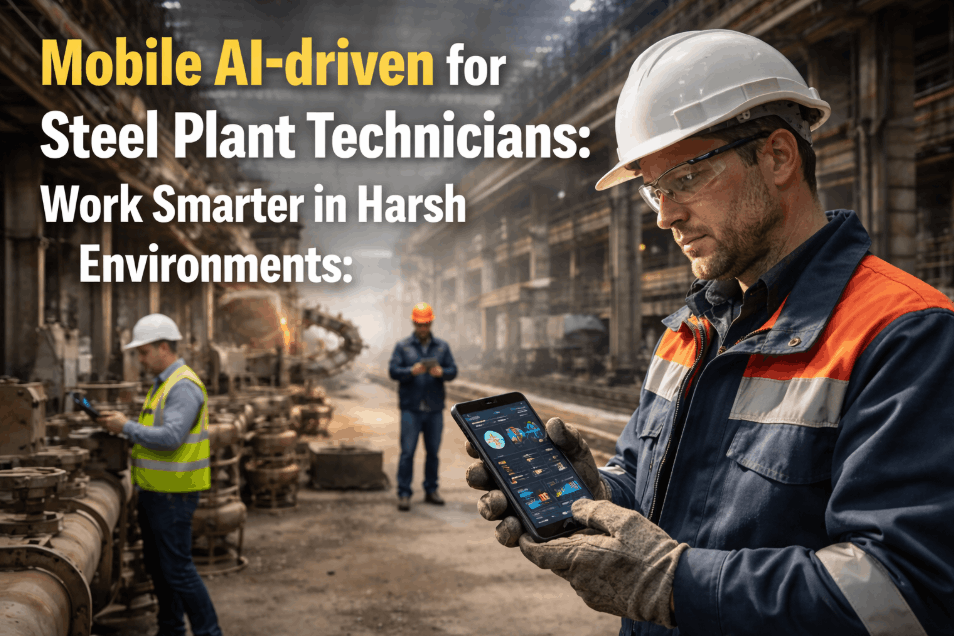
Steel plant maintenance technicians still carry paper work orders, hand-count spare parts against a printed bill of materials, and rely on a phone camera meant for personal use, even though the assets they service, continuous casters, rolling stands, ladle cranes, run on tolerances measured in minutes rather than shifts. A missed torque spec or a parts mismatch found mid-repair can idle a line for hours, and nobody sees it until the next shift's downtime report lands on a manager's desk. Rugged mobile CMMS apps built for steelmaking environments close that gap by putting work order execution, photo documentation, and parts verification directly into a technician's hand, right at the point of repair, not back at a terminal an hour later. The strongest of these tools work as reliably inside a 45 degree Celsius rolling mill bay as they do in an office, syncing the moment signal returns instead of losing a shift's worth of records. See how field crews use it day to day to understand what actually changes once the clipboard disappears.
Give Steel Plant Technicians a Work Order System That Survives the Shop Floor
iFactory AI puts work order execution, photo documentation, and parts verification on a rugged mobile app built for heat, dust, gloves, and dead zones, not a repurposed consumer phone screen.
Work order pushed straight to the technician's device with full asset history already attached.
Checklist steps, torque values, and safety checks completed on the device standing at the asset.
Photos and a parts scan attached before the work order is ever allowed to close.
The Real Price of a Clipboard on a Rolling Mill Floor
Paper work orders were never designed for an environment where heat, noise, and PPE make writing difficult and reading small print worse, yet most steel plants still run their entire maintenance record on exactly that format. The cost of that gap rarely shows up as a single line item, which is exactly why it survives budget reviews year after year, quietly compounding across every shift and every crew until someone finally measures it.
Handwriting recorded in gloves, heat, and low light rarely survives being transcribed accurately back at the office, and readings often get guessed at rather than confirmed.
Photos taken on a personal phone rarely make it into the actual work order record, so the plant's defect history stays incomplete right when it matters most.
Without a scan-based check, technicians pull the part they remember needing rather than the one the work order specifies, and look-alike parts make that worse.
A work order isn't really closed until someone keys the paper version into the CMMS, often a full shift after the actual repair finished.
What Changes When the Work Order Moves to the Device
Comparing the two side by side makes it clear that the gap isn't only about speed, it's about whether the data captured on the floor ever makes it back intact and usable by a planner.
| Task | Paper Work Order | Mobile CMMS App |
|---|---|---|
| Receiving the assignment | Printed and handed off, often hours after it was raised | Pushed instantly to the device with asset history attached |
| Recording torque and readings | Written by hand, transcribed later, prone to error | Entered directly against the checklist step, timestamped |
| Verifying the correct part | Matched by memory or a printed part number | Confirmed with a barcode or QR scan before installation |
| Documenting the defect | Described in a few written words, if at all | Photographed and attached directly to the asset record |
| Closing the work order | Re-keyed into the CMMS after the shift ends | Closed on the device the moment the last check passes |
Four Things a Steel-Ready Mobile App Has to Get Right
Step-by-step checklists, safety lockout confirmations, and torque or reading entries all happen on the device standing in front of the equipment, not from memory back at a desk an hour later.
Before, during, and after photos attach directly to the work order and to the asset's permanent maintenance history instead of sitting unused in a personal camera roll.
A barcode or QR scan confirms the part pulled matches the part the work order actually calls for, catching a mismatch before it gets installed rather than after.
Deep inside a mill building with no signal, the app keeps working exactly as normal and queues every entry to sync automatically the moment connectivity returns.
Why Steelmaking Environments Break Ordinary Mobile Tools
Software built for a warehouse or a general manufacturing plant tends to fail quietly in a steel mill, not because the workflow logic is wrong, but because the physical conditions around a caster or a rolling stand are simply more extreme than most software teams design for.
Screens and batteries near a caster or hot strip mill face ambient temperatures that push consumer electronics into thermal shutdown well before a shift ends, forcing technicians to step away from the asset just to let a phone cool down.
Airborne particulate works its way into ports, buttons, and seams over time, which is exactly why sealed, port-minimal device design matters more here than in cleaner industries like general warehousing or logistics.
Verbal handoffs get lost near rolling stands and blowers, so a written, photo-backed record on the device becomes the only reliable version of what actually happened during a shift.
Thick steel structures and large motor rooms create dead zones that a cloud-only app simply cannot work through without an offline-first design underneath it, no matter how good the network coverage looks on paper.
One Technician's Shift, With and Without the App
The clearest way to see the difference isn't a feature list, it's watching how the same repair unfolds across a single shift under both approaches.
The technician gets a printed work order at the start of shift, walks to the asset without its repair history, discovers the wrong bearing on the shelf, and installs it anyway because the printed part number looked close enough. The repair takes longer than expected because a torque spec had to be radioed in from the office, and the paperwork sits in a clipboard until the shift ends, when someone else re-types it into the CMMS the next morning.
The technician receives the work order on the device before reaching the asset, with the last three repairs and photos already visible. A quick scan flags the bearing on the shelf as the wrong load rating before it's installed, the correct part is pulled instead, and the torque spec sits right inside the checklist step. Photos go in as the repair happens, and the work order closes from the device before the technician even leaves the area.
Built for Gloves, Heat, and Dead Zones, Not an Office Desk
A mobile maintenance app is only as useful as the device it runs on, and a steelmaking environment rules out most consumer-grade hardware within the first few weeks of daily use.
Screens tuned to register input through standard work gloves so a technician never has to strip PPE just to log a single reading. This alone removes one of the most common reasons crews quietly abandon a new app within the first few weeks.
Dust and water ingress protection that holds up against mill scale, coolant spray, and regular washdown routines without failing early. A device rated for these conditions from day one avoids the slow creep of screen and port failures that plague consumer hardware.
Devices built to survive a drop from working height and the constant low-frequency vibration near rolling and casting equipment. That durability matters more than most specification sheets suggest, since a cracked screen mid-shift means a technician reverts straight back to paper.
Barcode and QR scanning that stays accurate near induction furnaces and large motor drives instead of misreading under electromagnetic interference. Reliable scans here are what make parts verification trustworthy rather than an occasional inconvenience.
What Happens to the Data Once the Work Order Closes
A closed work order on a technician's device is only the first half of the value, the second half comes from what the backend system does with that data once it lands.
Planners see completed work, flagged defects, and parts consumed in real time instead of waiting for a paper batch to be re-entered the next morning.
Every photo, reading, and parts scan rolls into the same asset record, so repeat failures on the same bearing housing or motor become visible over months, not guessed at.
A parts scan at the point of use updates stock levels immediately, closing the gap between what the storeroom system shows and what actually left the shelf.
Mean time to repair, first-time-fix rate, and technician utilization calculate directly from completed mobile work orders instead of a spreadsheet someone has to maintain by hand.
From Assignment to Closeout in One Continuous Record
None of these capabilities matter much in isolation, the value shows up when assignment, execution, verification, and closeout stay connected as a single record instead of five disconnected steps.
The technician receives the assignment with the asset's full history, last repair notes, and any open defects already attached.
Each step is confirmed in order, with lockout and tagout safety checks required before the repair steps unlock for entry.
A quick scan against the work order's parts list confirms the correct component before it goes into the equipment, not after.
Before and after photos document the condition found and the condition left behind, building a visual defect history for the asset over time.
Once the last check passes, the work order closes directly from the device, and the record reaches the planner immediately instead of the next shift.
Turning a Missed Part Mismatch Into a Same-Shift Catch
A bearing swap on a continuous caster segment went ahead with a part that looked correct on the shelf but carried a different load rating, and the mismatch wasn't caught until the segment failed again three weeks later, costing a full production stoppage.
With scan-based parts verification in place, the same mismatch was flagged on the device before installation, the correct bearing was pulled instead, and the work order closed with photo proof before the shift even ended.
What Plants Actually Track After a Mobile Rollout
The value of a mobile maintenance app is easy to describe in general terms, but the numbers that actually convince a plant manager to expand it come from a handful of specific, trackable metrics rather than a vague sense that things feel faster.
Tracking how often a repair closes without a return visit shows whether photo documentation and asset history are actually improving diagnosis quality.
A falling count of scan-flagged mismatches over the first few months is one of the clearest signs that verification is catching errors before they become failures.
Comparing the gap between repair completion and system closeout before and after rollout usually produces the single most visible improvement number.
The percentage of work orders actually executed on the device, rather than defaulted back to paper, tells planners whether the rollout is truly sticking with the crew.
Rolling Out Mobile Maintenance Without Losing the Floor's Trust
A mobile app that lands badly with the crew that has to use it every day rarely recovers, so the rollout sequence matters as much as the feature list itself.
Pilot with one crew and one equipment area first, rather than pushing the app plant-wide on day one.
Confirm devices are rated for the actual heat, dust, and vibration levels of the specific area they'll be used in.
Pre-load asset history and parts lists so technicians see immediate value instead of a blank checklist on day one.
Review offline sync behavior in the plant's actual dead zones before relying on it for a full production shift.
Why the Usual Reasons to Wait Don't Hold Up Anymore
Most plants that delay a mobile rollout aren't wrong that steel environments are harsh, they're working from an outdated picture of what rugged mobile hardware and offline software can actually handle today.
Rugged devices rated for drop, dust, and vibration are now a standard category rather than a custom build, and the same specifications used in mining and oil and gas already cover most steel plant conditions.
A checklist-driven interface with large touch targets tends to be easier for an experienced technician to pick up than a spreadsheet, since it walks them through steps rather than asking them to remember a format.
Offline-first architecture was built specifically for this problem, and a technician working through a full shift with no signal at all still ends up with a complete, synced record once they walk back into coverage.
A desktop CMMS without a rugged, offline-capable mobile front end still forces technicians back to paper on the floor, which means the CMMS ends up as a record of what happened rather than a tool used during the repair itself.