Do I Buy NVIDIA Servers Separately? Turnkey AI FAQ for Plant Managers
By Daniel Carter on June 18, 2026
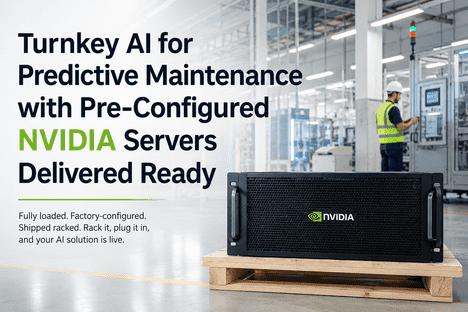
Plant managers evaluating AI predictive maintenance often ask a deceptively simple question: "Do I buy NVIDIA servers separately?" The short answer is no — fully-loaded AI inference servers with NVIDIA GPUs are supplied, configured, and installed as part of iFactory's turnkey package. One vendor, one quote, one deployment team. Zero hardware procurement headaches. The longer answer matters for budgeting, IT planning, and deployment timelines: the turnkey stack includes the NVIDIA-certified edge server (pre-loaded with GPU drivers, CUDA toolkit, and container runtime), pre-installed iFactory AI software stack with Shift Logbook and predictive maintenance engine, on-site installation and network integration, and a single SLA for hardware and software support. No separate vendor negotiations, no compatibility validation, no "the GPU driver version conflicts with the AI framework" fire drills. iFactory AI's industrial software platform, including its Shift Logbook and predictive maintenance engine, delivers turnkey AI for plant floor reliability without requiring your IT team to assemble, validate, or support the hardware-software stack independently. Book a Demo to see how iFactory's turnkey AI deployment works end-to-end from server delivery to first prediction alert.
Turnkey AI · NVIDIA Infrastructure · 2026
Do I Buy NVIDIA Servers Separately? Turnkey AI FAQ for Plant Managers
Fully-loaded AI inference servers with NVIDIA GPUs supplied, configured, and installed as part of iFactory's turnkey package — one vendor, one quote, one deployment team. Zero hardware procurement. Zero compatibility risk.
What "Turnkey" Actually Means for AI Hardware Procurement
Traditional industrial IT procurement follows a familiar but painful pattern: plant engineering defines requirements, IT sources a server from Dell or HPE, a GPU card is ordered separately from NVIDIA or a distributor (often with 8–16 week lead times), an IT administrator installs the OS and GPU drivers, a data engineer or system integrator deploys the container runtime and CUDA toolkit, and finally the AI software vendor loads their application — each handoff introducing compatibility risk, configuration drift, and blame-shifting when something doesn't work. iFactory's turnkey AI eliminates every one of those handoffs. The NVIDIA GPU server arrives on your loading dock with the full iFactory AI software stack — predictive maintenance engine, Shift Logbook, data federation layer, model inference runtime — pre-installed and pre-configured on a hardened edge appliance. iFactory's deployment engineer handles on-site rack mounting, network integration with your plant LAN or cellular gateway, sensor telemetry ingestion validation, and live prediction output verification before signing off.
01
No Separate GPU Server Procurement
The NVIDIA-certified edge server is included in the turnkey quote — one line item, one price. No separate PO, no GPU lead time tracking, no compatibility validation. Your plant receives a single SKU that is ready to run.
Included: Full hardware stack
02
No Software Stack Assembly
GPU drivers, CUDA toolkit, container runtime, and the iFactory AI software stack are pre-installed and pre-configured at the factory. No "this driver version doesn't support that CUDA version" troubleshooting — the stack is validated as a single unit.
Included: Pre-loaded software
03
No Multi-Vendor Support Headaches
Single SLA covering hardware and software. When something needs attention — whether it's a GPU fan fault, a container restart, or a model update — one phone call resolves it. No "talk to the server vendor, then talk to NVIDIA, then talk to the AI vendor" escalation loops.
Included: Single SLA
04
No IT Team Time Sink
iFactory's deployment engineer handles on-site installation — rack mounting, network integration, sensor telemetry validation, prediction output verification. Your IT team provides network port and power. That's the full extent of their involvement.
Included: On-site deployment
The Turnkey AI Stack — What's in the Box
The iFactory turnkey AI deployment includes every hardware and software component required to go from server delivery to live predictive maintenance alerts operating on your plant floor. There are no optional add-ons, no "recommended but not included" line items, and no "you'll also need to purchase" surprises at the bottom of the proposal.
Component
What You Get
Why It Matters
NVIDIA GPU Server
NVIDIA-certified edge appliance with appropriate GPU (A2, L4, or A100 depending on sensor count and model complexity)
Inference compute at the edge — no cloud dependency, no data egress costs, sub-100ms prediction latency
GPU Drivers + CUDA
Pre-installed NVIDIA GPU drivers and CUDA toolkit — version-validated against iFactory AI model runtime
Eliminates the most common AI deployment failure: driver-framework version mismatch
Container Runtime
Docker or containerd pre-installed with iFactory AI inference containers ready to deploy
Isolated, reproducible AI model execution environment — update models without touching the OS
iFactory AI Software
Predictive maintenance engine, Shift Logbook, data federation layer, mobile dashboards, CMMS connector
Full platform — from sensor ingestion to shift-ready work orders — pre-loaded and configured
Network Integration
Plant LAN connection (or cellular gateway if no wired network available at the machine location)
Your sensor telemetry and operator Shift Logbook entries flow to the edge server over existing plant networks
Your team focuses on operations while iFactory handles deployment — 2–3 day on-site engagement
Three Reasons Plant Managers Ask This Question
The question "Do I buy NVIDIA servers separately?" surfaces during virtually every turnkey AI evaluation. It reflects three legitimate concerns rooted in industrial IT procurement experience that plant managers have learned the hard way.
1
Past Experience with Partial Solutions
Most plant managers have been burned by vendors who quote software-only and leave hardware procurement, IT integration, and compatibility validation as the customer's problem. The "hidden procurement trap" is so common in industrial AI that asking this question has become a standard qualification filter.
iFactory includes the full stack
2
Budget Structure Uncertainty
In capital-constrained plants, server hardware comes from a different budget line (often CapEx) than software subscriptions (OpEx). Knowing whether the NVIDIA server is included or separate determines whether the project fits within the current fiscal year's spending authority.
Single quote, single line item
3
IT Integration Anxiety
The NVIDIA GPU driver and CUDA toolkit version matrix is notoriously complex. Plant managers dread the scenario where the AI vendor blames the GPU driver and the IT vendor blames the AI framework — with production downtime as the collateral damage of the finger-pointing.
Single SLA — no finger-pointing
Turnkey AI FAQs — What Plant Managers Ask Next
Q1
"Can we use our existing server infrastructure instead?"
Your IT team must install GPU drivers, CUDA toolkit, Docker, and the iFactory container stack
iFactory provides remote installation support — your team follows the runbook
iFactory recommends the turnkey option for first-time deployments to eliminate setup risk
Turnkey eliminates deployment risk. Bring-your-own-server is available for experienced IT teams.
Q2
"What GPU model do we get in the turnkey package?"
iFactory deploys NVIDIA A2 (entry), L4 (mid-range), or A100 (high-capacity) depending on sensor count
Standard deployment: one L4 GPU serving 200–500 sensors with sub-100ms per prediction
Multi-machine plants with 500+ sensors may receive an A100 for higher throughput
iFactory right-sizes the GPU to your sensor count and model complexity at no extra design cost
GPU is right-sized to your plant's sensor count — not over-provisioned, not under-powered.
Q3
"Is the data processed on-premise or in the cloud?"
All sensor data processing and AI model inference happens on the on-premise NVIDIA edge server
No raw sensor telemetry leaves your plant network — zero data egress costs
Anonymized model performance metrics (prediction accuracy, false positive rate, no sensor data) may be sent to iFactory cloud for fleet-wide model improvement
Full air-gapped deployment available for classified or high-security facilities
On-premise inference with optional anonymized telemetry for model improvement — air-gap option available.
Q4
"What if we need more GPU compute capacity later?"
iFactory's edge server is designed for GPU upgrades — swap modules without replacing the entire appliance
Upgrade path: A2 → L4 → A100 with zero changes to the iFactory software stack
iFactory monitors GPU utilization and proactively recommends upgrades when capacity exceeds 75% sustained usage
CPU-only inference is available for non-time-critical models (e.g., daily trend analysis) to free GPU for real-time prediction
GPU-upgradeable appliance design. iFactory monitors utilization and recommends when to scale.
Get Your Turnkey AI Quote — Hardware Included
iFactory provides a single quote covering the NVIDIA GPU server, pre-installed AI software stack, on-site deployment, and first-year support. No hidden hardware line items. No "you'll also need to purchase" surprises. One vendor. One SLA. One deployment team.
The Economics: Why Turnkey Beats Assemble-Your-Own
Some plant managers still consider the build-your-own path: purchase a server from Dell or HPE, buy a separate NVIDIA GPU from a distributor, have IT install the OS and GPU drivers, and then contract a system integrator to deploy the AI software stack. When the costs of procurement time, IT engineering hours, compatibility troubleshooting, and multi-vendor SLA management are factored in, the assemble-your-own path typically costs 20–35% more than the turnkey package — before accounting for the 6–10 week longer deployment timeline and the risk of a failed compatibility validation that resets the clock.
20–35%
Higher cost of assemble-your-own
When procurement time, IT engineering hours, compatibility troubleshooting, and multi-vendor SLA management are included, build-your-own costs more than the turnkey package.
6–10 wk
Faster deployment with turnkey
Turnkey deploys in 2–3 weeks from order. Assemble-your-own takes 8–14 weeks including GPU lead time, IT staging, and compatibility validation.
Zero
Compatibility risk
Pre-validated GPU driver + CUDA + container runtime + AI model stack. No "this driver doesn't support that framework" failures — the entire stack is tested as a unit before shipping.
Single
SLA — hardware + software
One phone number for everything. GPU fan fault, container restart, model update, Shift Logbook issue — iFactory owns the resolution. No multi-vendor escalation loops.
Deployment Timeline — What to Expect
The iFactory turnkey AI deployment follows a predictable timeline from order placement to live prediction alerts. The critical path is not the hardware delivery (NVIDIA GPU servers ship from iFactory's stocked inventory within 5 business days) — it's the sensor telemetry integration and model calibration, which requires 1–2 weeks of data collection after the server is installed on-site. Your plant receives a fully operational predictive maintenance platform with Shift Logbook integration within 3–5 weeks of order placement.
Week 1
Order & Ship
5 business days
iFactory configures the NVIDIA GPU server with pre-installed GPU drivers, CUDA toolkit, container runtime, and iFactory AI software stack. Server ships from stocked inventory — no GPU lead time delays.
What your team does
Provide network port and power location near the plant LAN junction for the edge server
Week 2
On-Site Installation
2–3 days on-site
iFactory deployment engineer arrives on-site, racks the server, connects to plant LAN, validates sensor telemetry ingestion, configures Shift Logbook access, and verifies live prediction output end-to-end.
What your team does
Introduce the deployment engineer to the maintenance team, provide plant network access, assign a point of contact for Shift Logbook operator training
Week 3–5
Model Calibration
1–2 weeks
iFactory AI models ingest live sensor data and calibrate to your specific machine operating conditions. Initial prediction alerts begin flowing to Shift Logbook within 7–10 days. Full model accuracy achieved by week 5.
What your team does
Operators continue normal Shift Logbook usage — the AI learns from their observations and sensor data in parallel
What Plant Managers Say After Deploying Turnkey AI
"I've been through three 'AI for manufacturing' evaluations in the last five years. Every single one ended with a software license quote and a 'you'll need to purchase a GPU server separately, here's the recommended spec sheet.' The iFactory turnkey approach was the first time someone sent me a single number that covered the server, the software, and the installation. No hidden procurement. No 'talk to IT' handoff. The server arrived pre-configured — I plugged in power and network, the iFactory engineer handled the rest. Two weeks later we had live bearing failure predictions flowing to our maintenance team's Shift Logbook. That's what 'turnkey' should mean."
From order to live prediction alerts on the plant floor
1 PO
Covers server, software, installation, and support — single procurement line item
Zero
GPU driver or CUDA compatibility issues — pre-validated stack ships ready to run
Still wondering whether the turnkey approach fits your plant's procurement model and IT infrastructure? Book a Demo for a 30-minute turnkey AI walkthrough with iFactory's deployment team — we'll show you the exact hardware configuration, deployment timeline, and single-quote breakdown for your plant.
Frequently Asked Questions
Do I have to purchase NVIDIA servers separately or are they included in the iFactory turnkey package?
NVIDIA GPU servers are included in the iFactory turnkey package — supplied, pre-configured, and installed as part of a single quote. You do not purchase servers separately. The turnkey line item covers the NVIDIA-certified edge appliance with pre-installed GPU drivers, CUDA toolkit, container runtime, and the full iFactory AI software stack including Shift Logbook and predictive maintenance engine. One vendor. One PO. One SLA.
Can iFactory deploy on our existing servers instead of using the turnkey hardware?
Yes — iFactory supports bring-your-own-server deployments for plants with existing GPU-equipped infrastructure. Your server must meet minimum specifications: NVIDIA GPU (any compute capability 7.0+), 32 GB RAM, 500 GB SSD, Ubuntu 22.04 LTS. Your IT team installs GPU drivers, CUDA toolkit, and Docker following iFactory's deployment runbook. iFactory provides remote installation support. However, iFactory recommends the turnkey option for first-time deployments based on deployment success rate data: turnkey deployments go live in 2–3 weeks on average, compared to 6–10 weeks for bring-your-own-server including IT staging and compatibility troubleshooting.
What NVIDIA GPU model is included in the turnkey package — and can I choose a different one?
iFactory right-sizes the GPU to your sensor count and model complexity. Standard deployment uses the NVIDIA L4 (24 GB VRAM) for plants with 200–500 sensors, providing sub-100ms per prediction inference latency. Smaller installations (under 200 sensors) may use the NVIDIA A2 (16 GB VRAM). Large deployments (500+ sensors or multiple simultaneous models) may receive the NVIDIA A100 (80 GB VRAM). iFactory's proposal specifies the exact GPU model for your plant. You can request an upgrade at quote stage — the pricing adjusts accordingly. All GPUs are NVIDIA-certified and pre-installed at iFactory's configuration facility before shipping.
How long does turnkey AI deployment take from order to live predictions?
The standard turnkey deployment timeline is 3–5 weeks from order placement: Week 1 — server configuration and shipping (5 business days from stocked inventory), Week 2 — on-site installation by iFactory deployment engineer (2–3 days on-site), Weeks 3–5 — model calibration and initial predictions (1–2 weeks of sensor telemetry ingestion). Your plant receives live AI prediction alerts flowing to the Shift Logbook within 7–10 days of the on-site installation date. Bring-your-own-server deployments typically take 6–10 weeks depending on IT team availability and infrastructure readiness.
Is sensor data processed on the turnkey server or sent to the cloud?
All sensor data processing and AI model inference happens on the on-premise NVIDIA edge server. Raw sensor telemetry — vibration data, temperature readings, motor current signatures, pressure transducer outputs — never leaves your plant network. Anonymized model performance metrics (prediction accuracy, false positive rate, model confidence distributions — no sensor data, no machine identifiers, no plant location) may be sent to iFactory's cloud infrastructure for fleet-wide model improvement if your plant opts in. Full air-gapped deployment is available for classified or high-security facilities where zero external data transmission is required.
Ready for a Single-Quote Turnkey AI Deployment?
iFactory provides a single quote covering the NVIDIA GPU server, pre-installed AI software stack with Shift Logbook, on-site installation by iFactory deployment engineers, and first-year hardware and software support. One vendor. One SLA. One deployment team. No hidden hardware line items. No "you'll also need to purchase" surprises.