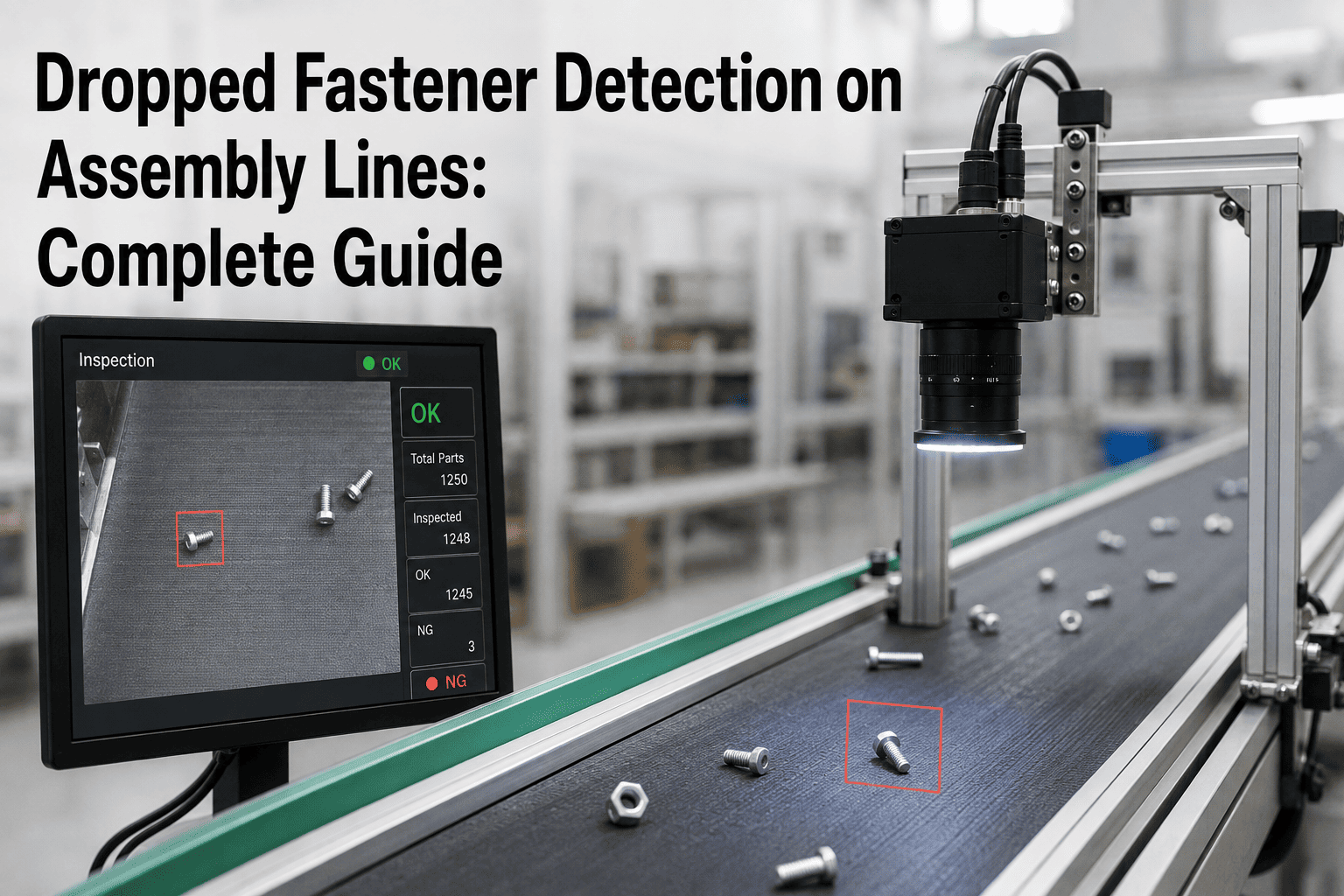
A single dropped fastener on an assembly line is a small event with an outsize downstream cost. In aerospace it becomes a Foreign Object Debris (FOD) incident that can force a full search of the assembly, invoke SAE AS9146 procedures, and in the worst cases trigger a teardown. In EV battery and electronics manufacturing, a loose screw in the wrong cavity means a shorted cell, a scrapped module, or a recall exposure. And in high-volume automotive assembly, the same event shows up as unplanned line stops, missing-fastener rework loops, and warranty claims that trace back weeks later to the exact station where the screw was dropped. AI vision changes that geometry — a camera watching the workstation floor, the tray, and the assembly cavity can catch the drop the moment it happens. Teams evaluating dropped-fastener detection for their own line can start by reaching out to the iFactory support team.
Every Dropped Screw Is Either Caught in Seconds or Found in a Field Failure
Between those two outcomes sits AI vision. iFactory's platform watches the fastener trays, the tool cradle, and the assembly cavity — and catches the drop at the station where it happened, before the assembly moves on.
Where Dropped Fasteners Actually Come From
A dropped screw is almost never a one-off mistake. It traces back to a small number of recurring root causes across the shift — and knowing the pattern is what lets a detection system be tuned to catch the drop as it happens instead of finding the shortfall at the end of the assembly.
The Real Cost of Missing the Drop
The cost of a dropped fastener is not the fastener. It is what happens between the drop and the discovery — and the further downstream the discovery, the more expensive the recovery.
The Four Zones an AI Vision Stack Watches
Effective dropped-fastener detection is not a single camera pointed at the operator. It is four cameras watching four different regions of the workstation, each catching a different failure mode. A detection system that only covers one zone systematically misses the others.
The Fastener Tray
A count of what came out of the tray, tracked against what was issued in the kit. The camera sees the inventory drop by one every time a fastener leaves and flags a mismatch before the assembly closes.
The Driver and Tool Cradle
The camera watches the driver bit and the tool return position. A fastener that arrives at the driver but never reaches the workpiece — because it slipped off the bit in transit — is flagged in real time.
The Workpiece Cavity
A model trained on the assembly geometry confirms each fastener is seated at the required location. Missing fasteners at the seat position are flagged, and so are any that landed in an unintended cavity nearby.
The Workstation Floor
A downward-facing camera watches the floor and the catch tray beneath the station. Anything that falls off the workpiece or the operator's bench is detected, and the station is held until the fastener is retrieved.
See a Four-Zone Detection Stack Running on a Real Assembly Line
Book a 30-minute walkthrough and we will show you how iFactory's cameras cover the tray, driver, cavity, and floor of a live station — and how the alerts route into the operator display in seconds.
Detection Approach by Industry
A dropped-fastener stack for an aerospace fuselage station looks different from one on a high-volume automotive line, and both are different again from an EV battery module cell. The core idea is shared; the priorities, cadence, and integration points are not.
| Industry | Primary FOD Risk | Detection Priority | Response Trigger |
|---|---|---|---|
| Aerospace | Fastener trapped in a closed structure | Cavity coverage and floor tracking | Assembly hold until the count reconciles per AS9146 |
| EV Battery | Metallic debris causing internal short | Cavity and cell tray coverage | Cell isolation and quarantine of the module |
| Electronics | Loose fastener shorting a live PCB | Cavity and floor coverage under the board | Station stop and operator retrieval prompt |
| Automotive | Missing or unseated fastener in trim or safety-critical joint | Tray count vs. torqued-fastener count | Torque tool interlock on count mismatch |
| Medical Devices | Fastener contamination in a cleanroom-assembled device | Full four-zone coverage per station | Cleanroom hold and documented recovery search |
What Happens in the Seconds After a Drop Is Detected
Detection is only the first step. What the system does in the next thirty seconds is what decides whether the drop becomes a recorded event or an assembly hold — and whether the record is defensible in an audit.
Real-Time Alert to the Operator
The station's operator display shows a red state with the drop location — tray, driver, cavity, or floor — so the operator knows exactly where to look without stopping to interpret the alert.
Conveyor or Tool Interlock
The station's conveyor is held and the powered driver is disabled through PLC integration, so the assembly cannot move forward until the drop is resolved and the count reconciles.
Fastener Retrieval and Count Reconciliation
The operator retrieves the dropped fastener. The system confirms the fastener count in the kit is back to expected, or logs the specific serial or lot that could not be recovered for the missing-item search procedure.
Event Logged for Audit and Root Cause
Every drop, retrieval, and time-to-resolve figure is written to the station's quality record. The video clip of the drop is retained so root-cause reviews can watch exactly what happened rather than reconstruct it from memory.
Trend Analysis Back to the Cause
Repeated drops on the same station, shift, or fastener type feed back into engineering — driving process changes, captive-hardware substitutions, or tooling upgrades that eliminate the root cause instead of catching it repeatedly.
A Composite Scenario: The EV Battery Line That Stopped Quarantining Modules
An EV battery module line running roughly 1,800 modules per shift was experiencing an average of two dropped-fastener events per week that were caught only at end-of-line inspection. Each one triggered a full module quarantine while the assembly was searched, and roughly a quarter of the events ended in a scrapped module because the fastener could not be located. The line was carrying an internal scrap cost of over $300,000 a year, plus the throughput drag from an average of six hours of quarantine time per event.
A four-zone AI vision stack was installed at the two stations where the drops most often originated — the busbar torque station and the cell-fixation station. Within eight weeks of go-live, drops were being caught at the source in an average of under three seconds, with the operator retrieving the fastener before the module moved to the next station in 94% of events. The remaining 6% still triggered a search, but the search was scoped to a single station instead of the full line, and average recovery time fell from six hours to under twenty minutes.
The trend data also surfaced a repeating root cause: the specific busbar screw that accounted for over 40% of the drops had a magnetic-bit compatibility issue. Swapping to a captive-head version eliminated most of the remaining events entirely — the kind of engineering fix the plant could not have made without the drop-by-drop record the vision system produced.
Common Mistakes That Undermine a Detection Program
Covering Only One Zone
A single overhead camera catches drops that fall in the open but misses blind-cavity fumbles, tray miscounts, and floor escapes. A single-zone stack will always leave one failure mode uncovered.
Alerting the Operator Without Interlocking the Line
An alert with no conveyor or tool hold leaves resolution to operator discipline under production pressure. Every dropped-fastener stack should be wired into the PLC so the line physically cannot move forward until the count reconciles.
No Trend Loop Back to Engineering
Detecting drops event by event is valuable, but detecting the pattern behind them is where the real fix lives. Without a trend loop, the same drop keeps happening on the same fastener at the same station.
Not Retaining the Video Evidence
Root-cause reviews built from memory and log entries take longer and produce weaker conclusions than reviews built from the actual video clip of the drop. Retention should extend at least through the assembly's warranty window.
Ignoring Kit Miscounts at Issue
A fastener that was never in the kit cannot be dropped, but it will still show up as missing at closeout. Detection should include kit verification at issue, not only during assembly.
Treating Detection as a Substitute for Design
The best drop is one that cannot happen. Captive hardware, tang-less inserts, and fastener geometry changes are permanent fixes that vision-based detection should be pointing engineering toward, not replacing.
Is Your Line Ready for Dropped Fastener Detection
You know which two or three stations account for most of your drops
A pilot deployment starts at the stations where the drops actually happen, so knowing the pattern from prior FOD incidents or scrap records is the fastest starting point. Where that data is thin, a two-week baseline observation can produce it.
Your workstation layout can accept overhead and side-angle cameras
A four-zone stack needs unobstructed sightlines to the tray, driver, cavity, and floor. Where lighting or overhead cranes interfere, station-level tweaks are usually enough — a full workstation redesign is rarely required.
Your PLC or line control can accept a hold signal from a vision system
Interlocking the conveyor or the torque driver is what turns detection into prevention. A PLC or SCADA interface that can take a real-time hold from an external system is the integration surface a proper dropped-fastener stack needs.
Quality leadership wants the trend data, not just the alerts
The bigger value of the stack is the per-fastener, per-station, per-shift trend record — and using it to drive engineering changes. Buying the cameras without deciding who owns the trend loop leaves most of the value on the table.
Frequently Asked Questions
How is AI vision better than a scale-based or count-based dropped fastener check?
Scale and count checks tell you the final tally at the end of the station, but they do not tell you where or when the fastener was lost — so if the count is short, the entire station has to be searched. A vision stack watches the event as it happens, points the operator directly at the drop location, and holds the line before the assembly moves on. The result is a fraction of the search effort per event and a per-drop video record that count-based systems cannot produce. Teams can walk through the difference on their own line by contacting iFactory support.
Do we need cameras on every station or only the highest-risk ones?
Most deployments start with two or three high-risk stations — typically the ones producing the majority of prior FOD incidents or scrap records — before expanding to the rest of the line. That focused start delivers the ROI that funds the wider rollout, and the model tuning done on the first stations transfers to subsequent ones with a fraction of the effort. Full-line coverage is the eventual goal for safety-critical assemblies; a phased rollout is almost always the right sequencing.
How does the system handle small or dark fasteners that are hard to see?
Fastener visibility is a capture-layer problem before it is a model problem. The camera choice, resolution, and lighting geometry are matched to the smallest fastener in scope at the station, using structured lighting (typically darkfield or coaxial) that makes the fastener contrast reliably with the tray, driver, or floor background. Where physical constraints make one angle insufficient, a second camera at a complementary angle is added to close the blind spot. The detection model is then trained specifically on the plant's fastener geometry rather than on generic imagery.
Can the system integrate with existing torque tools and PLCs on the line?
Yes — that integration is what turns detection from an alert into an interlock. The vision system communicates with standard industrial PLCs and torque controllers so that a drop event can hold the conveyor, disable the driver, and force count reconciliation before the assembly moves. On lines already running MES or SCADA, the drop event is also written back to the assembly's quality record with the timestamp, station, and video clip attached. Book a demo to see the interlock behaviour on a live station.
How does dropped fastener detection fit alongside our AS9146 FOD program?
AI vision does not replace the AS9146 procedural framework — it strengthens it by adding real-time detection, automated event logging, and video-based root-cause evidence to the tool-control and inspection-point discipline the standard already requires. The event record produced by the vision stack is designed to feed directly into the FOD investigation and corrective-action workflow AS9146 defines, so audits benefit from a stronger evidence trail without adding manual paperwork for the shop floor.
Catch Every Dropped Fastener at the Station It Happened
iFactory's dropped-fastener detection stack watches the four zones a real FOD program needs, interlocks with your line control, and turns every event into a trend the engineering team can act on. Book a walkthrough to see the stack on lines running today.