Integrating AI Vision with WMS, ERP and TMS Systems

By Johnson on July 31, 2026

integrating-ai-vision-wms-erp-tms-systems

An AI camera that counts inventory accurately but never tells the warehouse management system what it saw is a very expensive way to watch a wall. The value of vision data only compounds once it flows automatically into the systems that already run the operation — updating stock levels in the WMS the moment a pallet is put away, triggering a purchase order in the ERP when a bin drops below threshold, and confirming shipment accuracy to the TMS before a truck ever leaves the yard. Integration is the difference between AI vision as a standalone monitoring tool and AI vision as the sensory layer for the entire operational stack. A demo can show how this connects into your specific WMS, ERP, or TMS environment.

Systems Integration
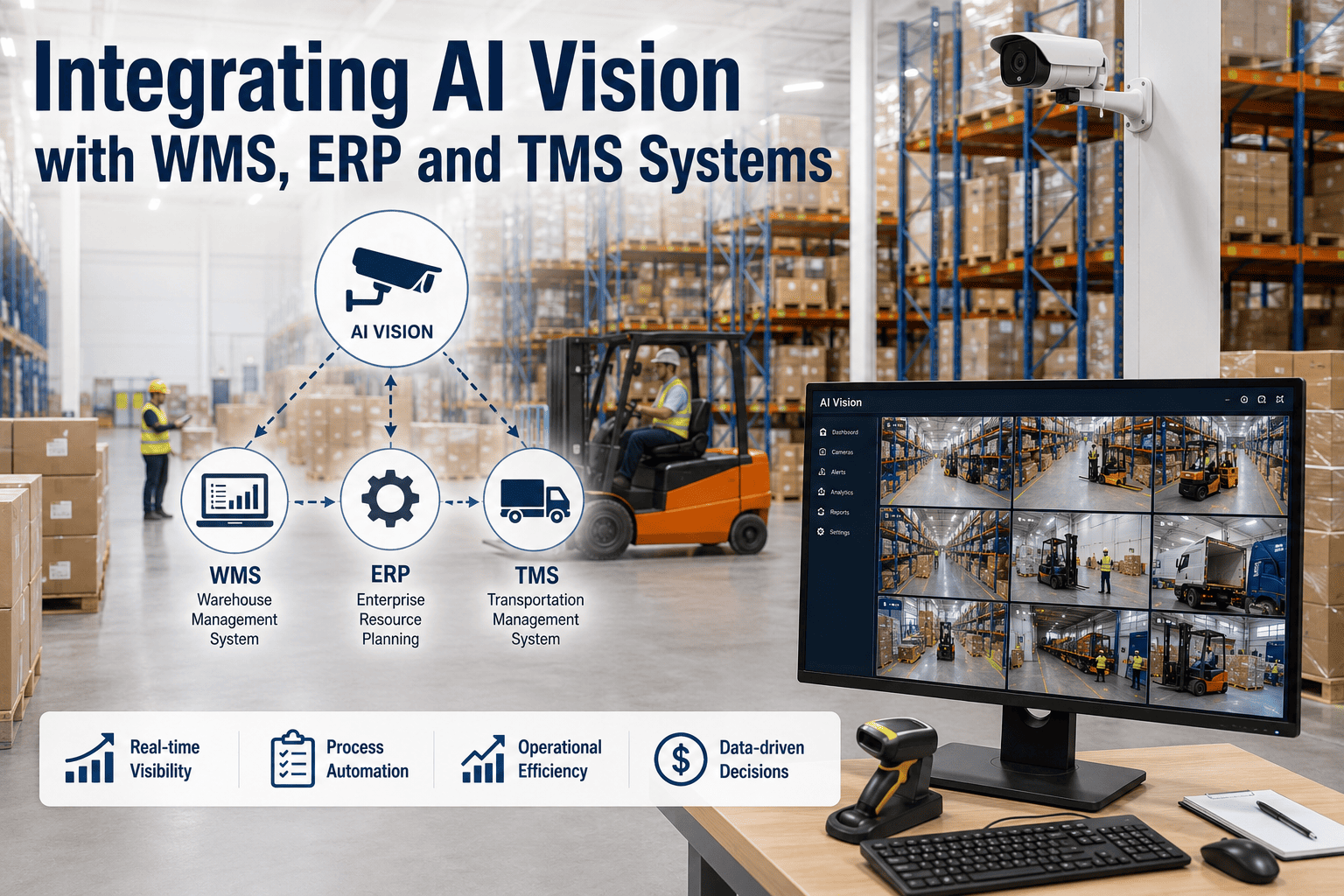
Integrating AI Vision with WMS, ERP and TMS Systems
Real-time inventory data flows to your WMS, purchase triggers flow to ERP, and shipment verification flows to TMS, connected through REST API and MQTT rather than a separate dashboard nobody checks.

Why a Standalone Vision Dashboard Isn't Enough

Plenty of AI vision deployments stall at the same point: the cameras work, the counts are accurate, and the dashboard looks impressive in a demo, but none of that data actually changes what happens in the warehouse day to day because it lives in a separate system nobody's workflow touches. A picker still checks the WMS to decide where to go next, a buyer still checks the ERP to decide what to reorder, and a dispatcher still checks the TMS to decide what ships — if the vision system isn't feeding those exact systems, its insight has to be manually re-entered or it simply doesn't get used. Integration isn't a nice-to-have layered on top of AI vision, it's what turns accurate detection into an actual operational change.

The Three Connections That Matter Most

Not every system integration carries equal weight. Three connections consistently drive the majority of operational value, because they map directly onto decisions that are already being made dozens of times a day across the warehouse floor, the purchasing desk, and the dispatch office.

AI Vision Layer
Continuous counting, location verification, load and pick confirmation

WMS
Live stock levels and bin location updates, no manual reconciliation
ERP
Automatic purchase order triggers when verified stock drops below threshold
TMS
Shipment verification and load documentation before dispatch
See Your Stack Connected
Map This Onto Your Current Systems
A short walkthrough shows how vision data would flow into your specific WMS, ERP, and TMS setup.

REST API vs. MQTT: Which Connection for Which System

The two integration protocols aren't interchangeable, and choosing the right one for each system matters for both reliability and latency. REST API calls are well suited to systems that need structured, on-demand data exchange — a WMS pulling a current stock count, or an ERP receiving a purchase order trigger — where the exchange happens in discrete, request-response events. MQTT is built for continuous, lightweight streaming, which fits real-time alerting and status updates far better, such as a dock door sensor or a load verification event that needs to reach the TMS the moment it happens rather than on the next scheduled pull.

ProtocolBest FitTypical Use Case
REST APIStructured, on-demand data exchangeWMS stock queries, ERP purchase order creation
MQTTContinuous, lightweight event streamingReal-time alerts, dock status, load confirmation events
Webhook (REST-based)Event-triggered one-way notificationTMS shipment confirmation, exception alerts

What Changes Once the Systems Are Connected

The operational shift is easiest to see by comparing the same event before and after integration. A pallet arriving at receiving used to require a person to scan it, key the count into the WMS, and separately flag the ERP if the arrival satisfied an open purchase order. Once vision and the WMS are connected, the same event updates stock automatically the moment the camera confirms it, no scanning or manual entry required, and the ERP can be notified in the same data flow if that arrival closes out a pending order.

Before Integration
Manual scan and count entry at receiving
Separate system check to confirm PO fulfillment
Shipment accuracy confirmed after the truck departs
Discrepancies discovered days later during reconciliation
After Integration
Stock count updates automatically the moment vision confirms arrival
ERP purchase order closes out in the same data flow
Shipment verified against the manifest before the truck leaves the dock
Discrepancies flagged in real time, while they're still correctable

What a Deployment Requires From Your Existing Systems

Most modern WMS, ERP, and TMS platforms already expose some form of API access, which is the main technical requirement for integration to work cleanly. Legacy systems without a documented API can often still be connected through a middleware layer, though this typically adds time to the integration phase and is worth flagging early rather than discovering partway through a rollout. The practical first step in any integration project is a short technical audit of what each existing system currently supports, so the integration approach is designed around real constraints rather than assumptions.

1
System Audit
Confirm what API or middleware access each existing WMS, ERP, and TMS platform currently supports.
2
Connection Mapping
Define which events trigger which system update, matched to REST or MQTT depending on the data pattern.
3
Parallel Run
Vision data flows alongside existing manual processes for a short verification period before manual entry is retired.
4
Full Cutover
Manual data entry steps are retired once accuracy is confirmed against the parallel run, and the system operates on vision data directly.
Start With a System Audit
Find Out What Your Stack Already Supports
Support can review your current WMS, ERP, and TMS setup to scope what an integration would actually involve.

Data Security and Governance Across Connected Systems

Connecting AI vision data into a WMS, ERP, and TMS means that operational and inventory data now flows across more systems than before, which makes governance worth planning deliberately rather than treating as an afterthought once the integration is technically working. This isn't unique to vision data, but the volume and continuous nature of the data flow makes clear boundaries especially important.

1
Encrypted Data in Transit
All API and MQTT connections between vision systems and downstream platforms are encrypted, so inventory and shipment data can't be intercepted as it moves between systems.
2
Role-Based Access Control
Access to vision-derived data is scoped by role, so a dispatcher sees shipment verification data while a buyer sees stock-level triggers, rather than every user having blanket access to everything.
3
Audit Logging on Every Trigger
Every automated action, such as a purchase order triggered by a stock threshold, is logged with a timestamp and the underlying vision event, so any automated decision can be traced back and reviewed.
4
Defined Data Retention Policy
How long raw vision data and derived records are retained is defined upfront and aligned with the facility's own compliance and record-keeping requirements, rather than left as an undocumented default.

Frequently Asked Questions

Does our WMS, ERP, or TMS need to be a specific brand or version to integrate?
No specific brand is required, since integration depends primarily on whether the platform exposes API access rather than which vendor built it. Most modern cloud-based WMS, ERP, and TMS platforms support REST API connections out of the box, and older on-premise systems can often still connect through a middleware layer, though that typically adds some time to the setup phase. A demo can confirm compatibility with your specific systems.
What happens if the connection to one of our systems goes down temporarily?
Vision data continues to be captured and logged locally even if a downstream system connection drops, and once the connection is restored, queued updates sync automatically rather than being lost. Facilities are also alerted immediately when a connection failure is detected, so the gap can be addressed before it affects a shift's operations.
How long does a typical WMS, ERP, and TMS integration take to complete?
A single-system integration, such as connecting vision data to a WMS alone, typically takes two to four weeks including the parallel run verification period. A full three-system integration covering WMS, ERP, and TMS generally takes six to ten weeks, depending on how much middleware work legacy systems require.
Why run a parallel period instead of switching over immediately?
Running vision-fed data alongside the existing manual process for a few weeks lets a facility verify accuracy against real operational conditions before manual entry is retired, which significantly reduces the risk of a data gap during cutover. Most facilities find this verification period also builds staff confidence in the new system faster than an immediate full switch would.
Can the ERP purchase order trigger be adjusted after it's set up?
Yes, reorder thresholds and trigger logic are configurable and typically get refined during the first few months of live data, since actual consumption patterns often reveal that an initial threshold was set too conservatively or too aggressively for a specific SKU. Support can help tune these thresholds as real usage data comes in.

A camera that sees accurately but reports to nowhere is a monitoring tool, not an operational one. The real return on AI vision in a warehouse shows up once that data becomes the trigger for what the WMS, ERP, and TMS already do every day — updating stock, ordering more, and confirming a shipment is right before it ever leaves the dock.
Ready When You Are
Connect Vision Data to the Systems You Already Run
Book a session and get a scoped integration plan for your specific WMS, ERP, and TMS environment.

Share This Story, Choose Your Platform!