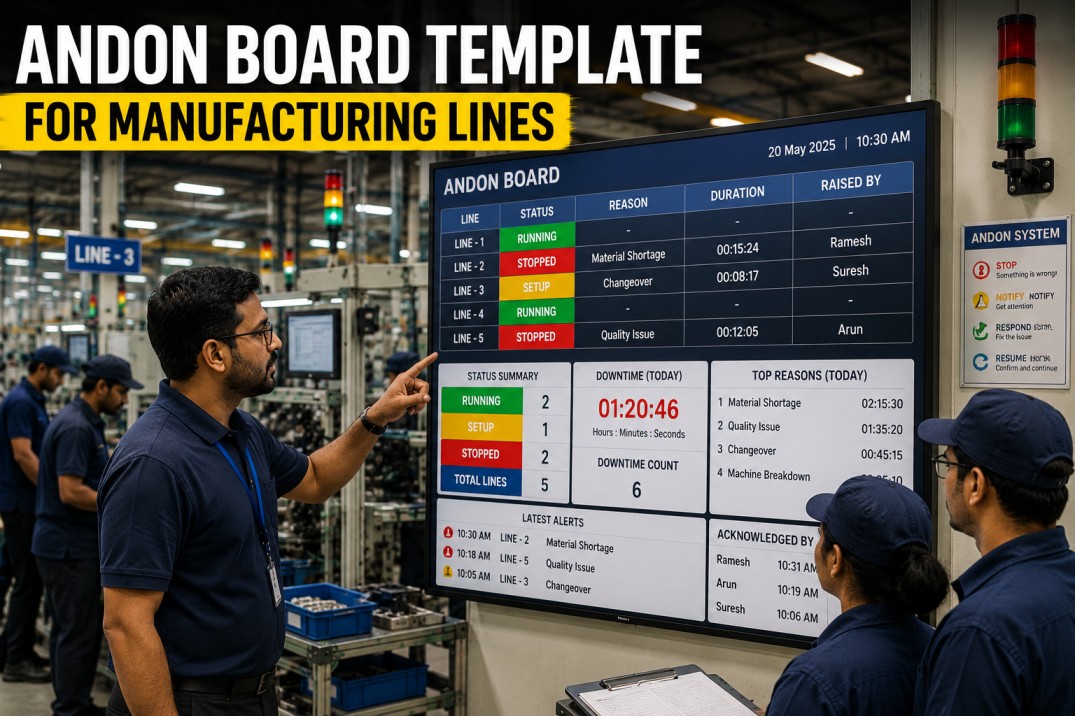
An andon board template is the operational nerve centre of any lean manufacturing line. Originating from the Toyota Production System, the andon system gives every operator the authority to stop the line when a quality or safety issue arises — and the andon board is the visual display that makes those alerts visible to the entire production team, shift supervisors, and support functions in real time. A well-designed digital andon board template goes beyond a simple green/yellow/red traffic light: it shows the exact call type, the elapsed response time, the escalation tier, and the path to resolution — all updated automatically from the plant-floor alert system. This page breaks down the seven essential visual structures of a production-grade andon board template, the same format used by iFactory to power digital andon workflows across discrete and process manufacturing environments.
Get Started
Turn Your Andon Board into a Live Digital Alert Workflow
iFactory connects to your plant-floor andon pull-cord, button, or mobile alert system and displays every call in real time — with automatic escalation, response-time tracking, and a complete digital audit trail for every alert event.
Andon Status Scoreboard
The andon scoreboard is the top-level summary that every production team sees first. Four large-format metric cards display the current state of the andon system: active alerts that have not yet been acknowledged, the average response time across all call types, the number of alerts that have escalated beyond the first responder tier, and the total alerts resolved during the current shift. The scoreboard auto-refreshes every time a new andon call is pulled, ensuring the team always knows the current state at a glance.
Production Line Health Gauges
Each production line that uses the andon system should have a visible health indicator that shows whether the line is running normally, has an active alert, or is in an escalated state. The SVG radial gauges below represent five production lines — each gauge shows the current andon status as a colour-coded arc: green for normal operation, amber for an active alert within the first responder window, and red for an escalated alert that has breached the response SLA. The numerical centre value shows the count of active alerts on that line.
Live Visibility
See Every Andon Call Across All Lines in Real Time
iFactory's andon board consolidates every alert from every production line into a single live view — with colour-coded status, elapsed time since the call was pulled, and automatic escalation when response targets are breached.
Escalation Flow Timeline
A production-grade andon board must enforce a clear escalation policy so that every alert is resolved before it impacts production targets. The escalation flow below defines three tiers: the first responder (typically the line technician or team lead) who must acknowledge the call within the SLA window, the shift supervisor who is automatically notified if the first responder does not resolve the issue in time, and the area manager who is alerted if the problem escalates further. Each tier sets clear expectations for response time and resolution authority.
Andon Call Type Reference Cards
Every andon call belongs to a specific type — quality, maintenance, safety, material, or setup — and each type has its own response SLA, escalation threshold, and support team. The reference cards below define the five standard andon call types used across most manufacturing plants. Displaying these cards alongside the live andon board helps operators, technicians, and supervisors quickly understand the expected response for each call type without referring to a separate procedural document.
Standardise Calls
Define and Enforce Andon Call Types with Response SLAs
iFactory's andon board template comes pre-configured with the five standard call types — quality, maintenance, safety, material, and setup — each with its own SLA targets, escalation rules, and support team routing. Customise any parameter directly from the board configuration panel.
Response Time Benchmark Bars
Tracking actual response times against SLAs is critical for andon system effectiveness. Each horizontal bar card below compares the actual average response time against the target SLA for one andon call type. A green bar indicates the call type is consistently met within the target, amber signals a near-miss that needs attention, and red shows a consistent SLA breach that requires process improvement. The overall averages row gives the plant-wide view.
Andon Alert Workflow Kanban
The andon alert kanban board gives the production team a live view of every active, in-progress, and resolved alert on the plant floor. Alerts are grouped into three columns: New (unacknowledged alerts that have not yet been picked up), Acknowledged (alerts that a responder has accepted but not yet closed), and Resolved (alerts that have been closed with a documented resolution). Each alert card displays the originating line, call type, elapsed time since the call was pulled, and current responder — giving complete transparency into andon system performance at every stage of the workflow.
Track Workflow
See Every Alert from Pull to Close in Real Time
iFactory's andon alert workflow kanban tracks every call from the moment the operator pulls the cord to the moment the alert is closed with a documented resolution — including every acknowledgement, escalation, and responder assignment along the way.
Daily Andon Summary Highlight Cards
The daily summary cards close the loop on andon system performance by surfacing the most important shift-level statistics. Each card highlights a key metric with a large number, a descriptive label, a trend direction arrow, and a contextual annotation. The summary is designed for the end-of-shift handover — giving the incoming team a complete picture of the andon activity they are inheriting without having to scan the full board.
Frequently Asked Questions
What is an andon board template?
An andon board template is a pre-designed visual layout for displaying real-time production line alerts in a manufacturing environment. It typically includes sections for active alerts, response-time tracking, escalation status, call-type classification, and resolution workflow. A digital andon board template connects to the plant-floor andon system — pull cords, buttons, or mobile alerts — and updates automatically, providing complete visibility into every alert from the moment it is triggered to the moment it is resolved.
What are the five standard andon call types?
The five standard andon call types used across most manufacturing plants are: Quality (defects, out-of-spec conditions, gauge alarms), Maintenance (breakdowns, jams, sensor faults), Safety (spills, guard breaches, injuries), Material (stock-outs, wrong material, shortages), and Setup (changeover delays, tooling issues). Each call type has its own response SLA, escalation threshold, and assigned support team. Some plants also add custom call types for specific production areas or processes.
How does andon escalation work?
Andon escalation follows a tiered response model. When an operator pulls the andon cord or triggers an alert, it appears on the board as a new call. The first responder (line technician or team lead) is expected to acknowledge and begin resolving within the SLA window for that call type. If the alert is not resolved within the SLA, the board automatically escalates to the shift supervisor, changing the status colour and triggering an audible alert. If the supervisor cannot resolve it within the escalation window, it escalates further to the area manager. Each escalation tier resets the response timer and broadens the authority to resolve the issue.
What is the difference between a physical and digital andon board?
A physical andon board typically uses coloured lights or an electronic display panel mounted on the production line — it shows the current status but does not log historical data, track response times, or enforce escalation rules automatically. A digital andon board, like the iFactory template shown on this page, connects to the plant-floor alert system and displays every call on a live screen with elapsed time tracking, automatic escalation, response SLA monitoring, and a complete digital audit trail. Digital boards also enable remote visibility, shift handover reports, and trend analysis that physical boards cannot provide.
How do I measure andon system effectiveness?
Andon system effectiveness is typically measured using four key metrics: average response time (how long after an alert is pulled before a responder acknowledges), escalation rate (percentage of alerts that require escalation beyond the first responder), resolution time (total time from alert pull to close), and alerts per shift per line (volume trend indicating whether the system is being used appropriately). Leading plants track these metrics on the andon board itself and review them during daily standups to identify systemic issues that drive repeat alerts.
What data sources does a digital andon board need?
A digital andon board connects to the plant-floor alert system — typically an andon pull-cord network, push-button stations, mobile app-based alerts, or MES-based alarm events. Each alert event must carry: the originating line or station ID, the call type (quality, maintenance, safety, material, or setup), the timestamp when the call was triggered, and the operator ID who pulled the call. The andon board then adds system-generated data: acknowledgement timestamp, responder ID, escalation timestamps, and resolution details. iFactory connects to all major andon hardware systems and MES platforms to capture this data automatically.
Get Your Template
Deploy a Digital Andon Board on Your Plant Floor
iFactory's andon board template connects to your existing andon pull-cord system, push-button stations, or mobile alert app — turning every call into a tracked, escalated, and resolved event with a complete digital record. See it running in a 30-minute personalised demo on your plant data.