Free manufacturing dashboard tools look irresistible on paper: zero license cost, full code access, no vendor lock-in. GitHub hosts dozens of open-source OEE dashboards, Grafana stacks, and lightweight MES projects that promise production visibility at no financial cost. The gap between "the code is available" and "we have live OEE on our production lines" is where the real cost lives — in development time, hardware sourcing, integration engineering, and ongoing maintenance that adds up to a five-year TCO that typically exceeds the commercial SaaS alternative. This guide maps exactly where free tools deliver, where they break, and how to know when it is time to pay.
Know Whether Free Is Enough — or Costing You More
Get a no-obligation assessment of your current dashboard setup and a clear recommendation: keep what you have, upgrade one tier, or move to iFactory's integrated platform. 30-minute call, no slides.
Three Common Routes and Where Each One Breaks
Most manufacturers evaluating free dashboard tools end up on one of three paths. Each has a genuine use case — and a specific point where the "free" label stops being true.
Grafana + InfluxDB
Time-series DB + dashboarding + custom PLC connectors
OpenMES
Open-source MES with work order tracking and batch management
BI Free Tiers (Looker / Power BI)
Free versions of enterprise BI platforms with basic dashboarding
What Free Actually Costs Over Five Years
License cost is zero. Everything else is not. When you add up the engineering, hardware, methodology, and maintenance line items, the five-year total of open-source dashboard stacks consistently exceeds commercial alternatives for most manufacturers.
When Free Works — and When to Pay
Two variables determine whether free tools are a smart choice or a false economy: the complexity of your operation and the scale at which you run.
Simple Ops, Small Scale
Free tools work
- Single site, 1-5 lines
- In-house dev capability
- No compliance requirements
Simple Ops, Large Scale
Paid platform required
- Multi-site, 10+ lines
- Needs consolidated reporting
- Manual processes no longer scale
Complex Ops, Small Scale
Paid platform required
- Regulated industry (FDA, ISO)
- Needs PLC/sensor integration
- Compliance audit trail required
Complex Ops, Large Scale
Enterprise platform
- Multi-site, regulated, integrated
- AI-driven analytics required
- Vendor SLA non-negotiable
Free vs Paid: What Each Tier Actually Delivers
A side-by-side look at the capabilities that separate free dashboard tools from integrated manufacturing platforms like iFactory.
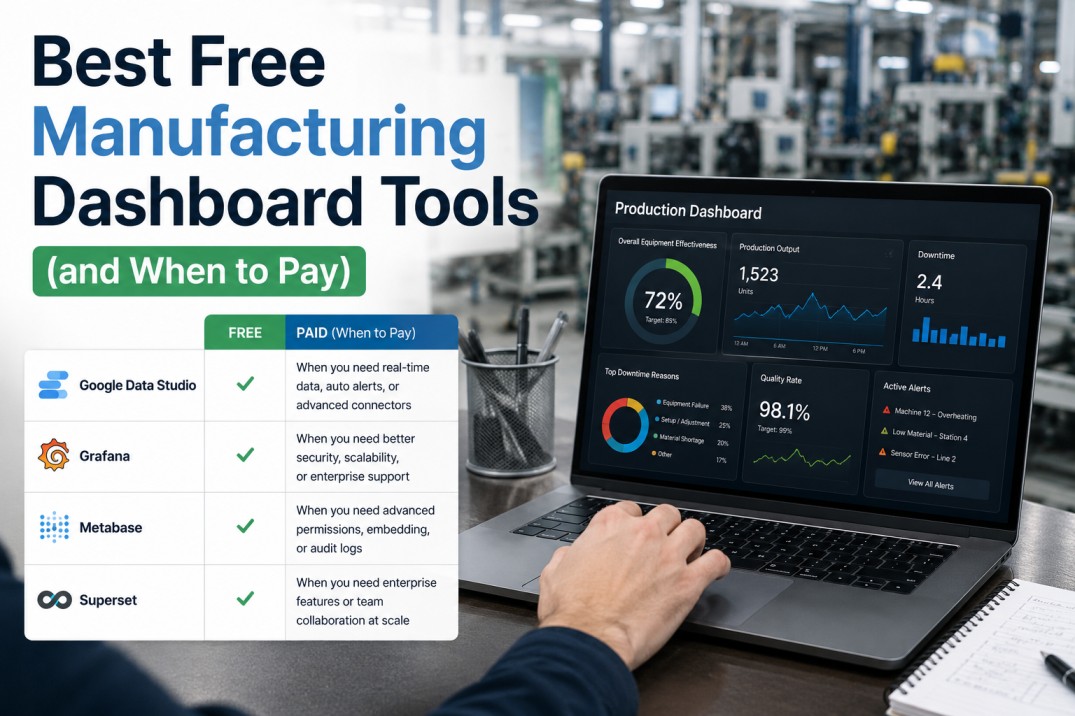
| Capability | Free / Open Source | iFactory Platform |
|---|---|---|
| Real-time OEE | Requires custom build | Built-in, sub-second refresh |
| Machine Connectivity | Manual PLC/MQTT integration | Pre-built connectors, 200+ protocols |
| Operator UI | Must be developed from scratch | Role-based views for all tiers |
| OEE Methodology | DIY or consultant-designed | ISO 22400-2 compliant out of box |
| Mobile Access | Not included in free tier | Native mobile for all roles |
| Alerting & Escalation | Query-based, complex setup | Pre-configured tiered alerts |
| Multi-Site Management | Separate instances per site | Unified, cross-plant views |
| Compliance & Audit Trail | Not available | Built-in audit and compliance docs |
| Support SLA | Community forums only | Dedicated support, guaranteed uptime |
Still Evaluating Your Options?
See What a Purpose-Built Dashboard Platform Looks Like
In a 30-minute demo, we will show you iFactory's tiered dashboards on your production data — real-time operator views, supervisor trend panels, and executive summaries — and compare them directly against your current setup or free-tool shortlist.
Should You Upgrade? A 30-Second Checklist
Answer six questions. If you check three or more, a paid platform will save you money within the first year.
Your operation runs across more than one site or shift
Free tools manage a single site well. Multi-site requires data consolidation that open-source stacks cannot handle without significant custom engineering.
Unplanned downtime costs more than $500 per month
If a single stoppage costs more than your monthly tool subscription, the ROI case for a paid platform is already proven before you factor in any other benefit.
Your facility operates under FDA, OSHA, or ISO compliance
Free tools cannot generate the compliance audit trail that regulators require. A failed audit costs exponentially more than any paid platform subscription.
You need real-time machine data, not batch reports
Free BI tools refresh hourly or daily. If operators need sub-minute data to make shift decisions, free tools introduce latency that directly costs production output.
You have no dedicated in-house dev team for manufacturing IT
Free tools shift the engineering burden onto your team. If you do not have developers maintaining the stack, the "free" platform quickly becomes an operational liability.
You plan to scale production within the next 18 months
The cost of migrating from a free tool to a paid platform mid-growth is higher than starting with a scalable solution. Future-proofing matters in this decision.
Common Questions
Can open-source dashboards handle real-time manufacturing data?
Most open-source dashboard tools (Grafana, Metabase, Looker Studio) are designed for time-series or batch data, not real-time production events. They can display data that refreshes every 30–60 seconds if you build the pipeline yourself, but they lack the OEE calculation engine, operator input interface, and stop-reason coding that make real-time data actionable on the shop floor. Grafana connected to InfluxDB can show real-time telemetry, but turning that into OEE with root-cause analysis requires significant custom development.
What is the true cost of deploying an open-source dashboard stack?
The five-year total cost of ownership for an open-source OEE dashboard stack ranges from $180,000 to $500,000 when you include development labor ($80K–$200K), edge hardware procurement ($20K–$60K), annual maintenance at 2–4 FTEs ($250K–$800K over five years), and OEE methodology design ($10K–$30K). Commercial platforms like iFactory include all of these in a single subscription that typically costs $80K–$250K over five years — less than the open-source alternative and operational from day one.
When does a free BI tool like Looker Studio stop being enough?
Looker Studio and Power BI free tiers work well for weekly production reports and trend analysis using batch data. They stop being sufficient the moment you need sub-minute refresh, live machine connectivity, operator-facing shift views, or automated alerts based on production thresholds. These tools are designed for analytical BI, not operational real-time use. For shift-level decision-making, a purpose-built manufacturing dashboard platform is required.
Does iFactory offer a free tier or trial?
iFactory offers a 30-day demo environment configured with your production data — not a crippled free tier, but a fully functional instance running on your equipment types, shift patterns, and KPIs. This gives you the same experience a paid customer has, on your timeline, with no commitment. After the demo, you can choose to subscribe or walk away. Most plants are live within two weeks of signing up.
How long does it take to move from a free tool to iFactory?
iFactory deploys in 30 days or less. The platform includes pre-built connectors for 200+ industrial protocols, role-based dashboards for operators/supervisors/executives, and an onboarding process that requires no custom code. Data migration from existing spreadsheets or basic BI tools is handled during the first week of the deployment. By week two, your first line is live with real-time OEE. By week four, all lines are configured and your team is trained.
You Have the Data. Now See the Difference.
Book a 30-Minute Demo — Your Data, Your Lines, No Commitment
We will configure iFactory on your production environment and show you live operator dashboards, supervisor trend panels, and the executive digest — all pulling from your actual machine data. No generic walkthroughs, no slide decks. See exactly what you are getting before you decide.
No credit card · Fully configured on your data · Up and running in 30 days