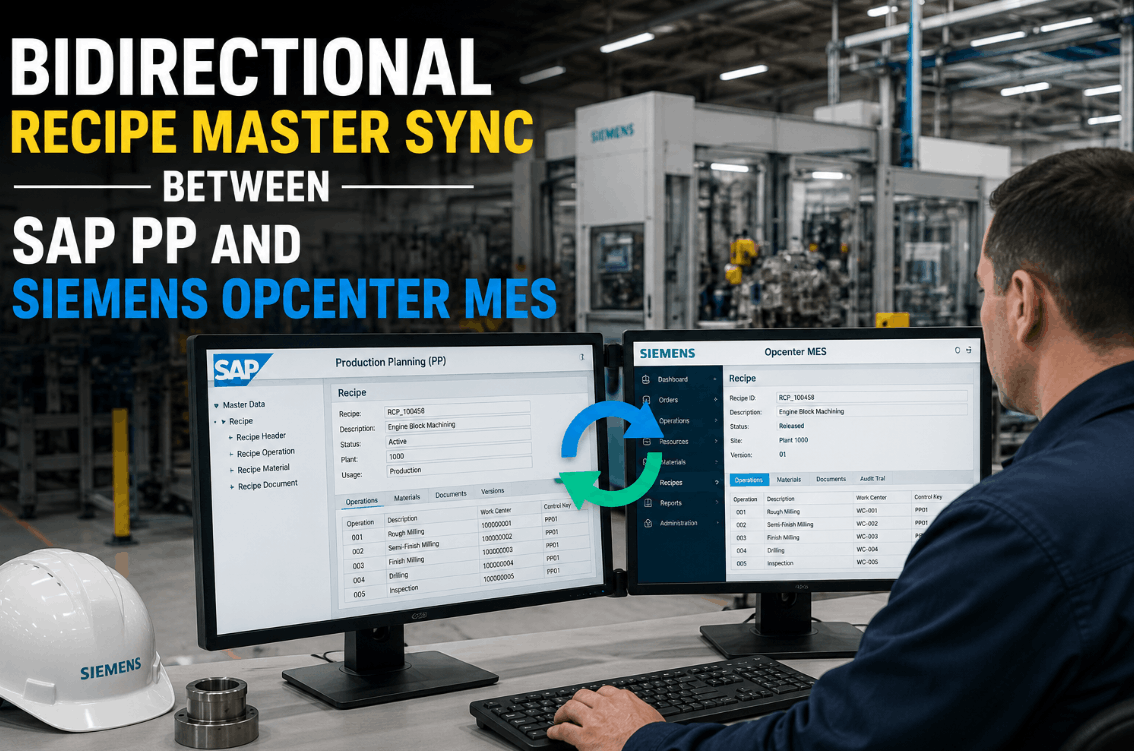
Bidirectional recipe master synchronization between SAP PP and Siemens Opcenter MES is one of the most demanding integration challenges in discrete and process manufacturing. When recipe parameters — gauge tolerances, mechanical limits, thermal setpoints, surface specifications — live in two separate systems, the gap between what SAP PP says and what the PLC actually executes becomes the root cause of batch failures, rework events, and compliance exposure. iFactory's Recipe Master Library closes this gap with a bidirectional sync engine that pushes every approved SAP PP recipe change directly to the Opcenter MES layer and then down to the PLC — in sequence, with two-person approval, and with a complete audit trail. No spreadsheets. No manual re-entry. No version drift. Book a Demo to see the architecture live.
Why Recipe Master Sync Fails in Most SAP PP + MES Environments
The structural problem in most SAP PP and Opcenter MES deployments is not the absence of recipe data — it is the absence of a sync mechanism that enforces consistency across all three layers: ERP, MES, and control layer. Process engineers update the SAP PP master recipe. The change goes through SAP change control. But the MES recipe is updated manually by a configuration engineer who may be days behind. The PLC download happens on the next work order, sometimes using a recipe that hasn't been updated at all. The result is a three-way version mismatch that only surfaces when a batch fails quality inspection or an audit reveals the executed parameters don't match the approved specification.
iFactory's recipe sync architecture eliminates this mismatch by treating the SAP PP master recipe as the authoritative source and propagating every approved change — through the MES recipe layer to the PLC — automatically, in sequence, with enforced two-person approval before any parameter reaches the machine. The same pipeline works in reverse: parameter adjustments captured at the MES layer during production are surfaced to the SAP PP change request queue for formal review, keeping both systems in sync without manual intervention.
The Four Recipe Parameter Categories iFactory Syncs Across Every Layer
Not all recipe parameters carry the same consequence. iFactory's Recipe Master Library organizes parameters into four categories — gauge, mechanical, thermal, and surface — each with distinct sync behavior, tolerance checking logic, and escalation rules calibrated to the consequence of a parameter deviation in that category. Understanding how each category flows through the SAP PP to Opcenter to PLC pipeline is essential for MES architects designing a reliable sync architecture.
Gauge Parameter Synchronization
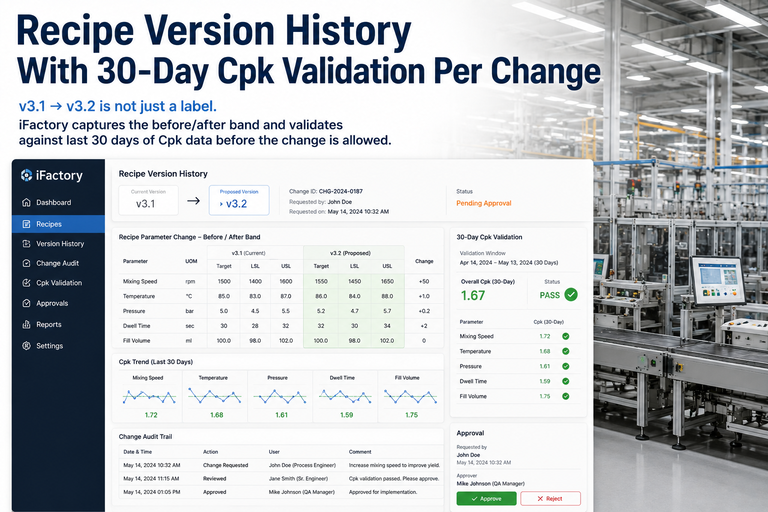
Gauge parameters — nominal dimension, upper tolerance, lower tolerance, measurement frequency — are the most frequently edited recipe elements in discrete manufacturing. iFactory monitors the SAP PP material master and process order recipe for gauge changes at 30-second intervals. When a change is detected and approved through the two-person sign-off workflow, the updated gauge specification is pushed to the Opcenter MES recipe version and queued for PLC download on the next order release. Gauge changes that fall outside pre-configured tolerance bands are flagged for engineering review before entering the approval queue, preventing parameter creep from propagating to production without scrutiny.
Mechanical Parameter Synchronization
Mechanical parameters — torque specifications, force limits, speed setpoints, pressure ranges — drive the PLC execution logic more directly than any other recipe category. iFactory maps each mechanical parameter in the SAP PP process order to its corresponding Opcenter operation resource parameter and PLC register address. Changes approved in SAP PP are propagated through the MES recipe layer with a parameter-level change record, and the PLC download is gated behind the two-person approval checkpoint. For safety-classified mechanical parameters — those whose deviation creates an equipment or personnel hazard — the escalation logic requires a shift supervisor acknowledgment before the download is released.
Thermal Parameter Synchronization
Thermal parameters — temperature setpoints, ramp rates, soak times, cooling profiles — are the most consequence-weighted recipe elements in heat treatment, coating, and forming operations. iFactory maintains a complete thermal profile version history in the Recipe Master Library, with every change linked to the SAP PP change request that authorized it. Thermal parameter changes trigger the strictest approval pathway: two-person sign-off plus a process engineer validation step before the updated profile is released to the Opcenter recipe and subsequently downloaded to the furnace or heating zone PLC controller.
Surface Parameter Synchronization
Surface parameters — roughness specifications, coating thickness, finish codes, cleanliness standards — are the most audit-sensitive recipe elements in automotive, aerospace, and defense supply chain operations. iFactory syncs surface specifications from the SAP PP material master and inspection plan to the Opcenter quality recipe, where they drive inspection plan generation and SPC control limits. Surface parameter changes are cross-referenced against customer-approved specification levels before entering the approval workflow, with automatic flagging when a proposed change would push the specification outside the customer-approved window.
The Bidirectional Sync Architecture: From SAP PP Approval to PLC Execution
Most MES recipe sync implementations are unidirectional — ERP pushes to MES, and that is where the automation stops. The PLC download remains a manual step, creating the version gap that produces the most serious compliance and quality incidents. iFactory's architecture extends the sync pipeline all the way to the control layer, with the MES acting as the orchestration layer that manages both the downward push to the PLC and the upward feedback loop to SAP PP for parameter adjustments captured during production.
Recipe Version Control and Audit Trail: What Every FDA, IATF, and AS9100 Auditor Will Ask For
Recipe version control is not a feature — it is a compliance requirement in virtually every regulated manufacturing environment. FDA 21 CFR Part 11 requires electronic records of recipe changes with individual accountability. IATF 16949 requires documented evidence that production parameters match approved specifications. AS9100 requires configuration control of all production-critical parameters with traceability to the authorizing document. iFactory's Recipe Master Library satisfies all three frameworks from a single audit record, with no manual documentation required.
| Compliance Requirement | Regulation / Standard | iFactory Record Generated | Audit Evidence Produced |
|---|---|---|---|
| Electronic change records with individual accountability | FDA 21 CFR Part 11 | Time-stamped, user-attributed change record for every parameter edit | Electronic signature log exportable for FDA inspection |
| Production parameters match approved specification | IATF 16949 Clause 8.5.1 | PLC execution confirmation linked to approved MES recipe version | Order-level parameter conformance report for IATF audit |
| Configuration control of production-critical parameters | AS9100 Rev D Clause 8.5.1 | Version-archived parameter snapshot for every recipe release | Configuration baseline report with authorizing change request reference |
| Two-person rule for critical process changes | GMP Annex 11 / 21 CFR | Dual-signature approval record stored against recipe version | Approval audit trail with reviewer identity and timestamp |
| Traceability from batch to recipe version executed | ISO 9001 Clause 8.5.2 | Batch record links executed recipe version with parameter actuals | Lot traceability report covering full parameter execution history |
How iFactory Compares to Manual Recipe Management and Point-Solution Sync Tools
MES architects evaluating recipe sync options typically face three approaches: fully manual processes, standalone recipe management tools that sync only to the MES layer, and integrated platforms that extend the sync pipeline to the PLC with built-in approval and audit. The comparison below covers the dimensions that matter most for a production architecture decision. Book a Demo to see how iFactory maps to your specific SAP PP and Opcenter configuration.
Expert Perspective: Why Bidirectional Sync Is the Missing Link in Most MES Deployments
In two decades of MES architecture work across automotive, aerospace, and pharmaceutical manufacturing, the most common recipe management failure I encounter is not a technology failure — it is a scope failure. Organizations invest in SAP PP configuration and Opcenter deployment, but they draw the integration boundary at the MES layer. The PLC download remains manual, the feedback loop from production back to the ERP doesn't exist, and the audit trail stops at the MES database. The result is a system that looks integrated on the architecture diagram but behaves like three independent systems in practice. The fix is not more middleware — it is a platform that treats the recipe as a single object that must stay consistent from the ERP master data all the way to the executed parameter in the PLC data block, with every change event documented and every approval enforced. That is what a properly architected bidirectional sync delivers, and it is the difference between a system that satisfies an auditor and one that actually prevents the batch failures that cost the organization far more than the integration project ever did.
Conclusion: One Approved Recipe, One Source of Truth, Zero Version Drift
Bidirectional recipe master synchronization between SAP PP and Siemens Opcenter MES is not an incremental improvement to recipe management — it is a fundamental change in how production parameters are governed across the manufacturing technology stack. When the recipe that SAP PP approves is the recipe that Opcenter executes and the PLC receives, the entire class of batch failures, audit findings, and rework events caused by version drift is eliminated at the source.
iFactory's Recipe Master Library delivers this capability — with two-person approval, complete version audit trail, and automatic PLC download on every approved order — in an architecture that integrates with existing SAP PP and Opcenter deployments without rip-and-replace. The investment is recovered on the first prevented batch failure. Book a Demo and see the sync pipeline against your production environment.
Frequently Asked Questions
iFactory connects to SAP PP via standard RFC function modules and BAPIs — no custom ABAP required. The integration reads process order and master recipe data through SAP's standard remote-enabled interfaces, keeping the SAP system clean and the integration maintainable across SAP upgrades.
iFactory queues the approved recipe download and retries on reconnection. The order cannot be released to production until the PLC confirms receipt and version checksum match — preventing execution against an unverified recipe under any connectivity condition.
Yes. Approval workflows are configurable per parameter category and consequence classification — thermal and safety-critical parameters can require three-step approval while minor gauge tolerance adjustments within pre-approved bounds can follow a simplified single-reviewer path.
iFactory supports multi-site Opcenter deployments with a single SAP PP connection — recipe changes approved centrally can be selectively pushed to designated plant MES instances with site-specific parameter overrides where local process conditions require variation.
A standard deployment covering SAP PP connection, Opcenter recipe sync, and PLC download pipeline for one production line runs 8 to 12 weeks — including parameter mapping, approval workflow configuration, and validation testing against live production orders.