Steel Plant IIoT Integration with PLC, SCADA and Historians

By James C on October 26, 2026

steel-plant-iiot-integration-plc-scada-historians

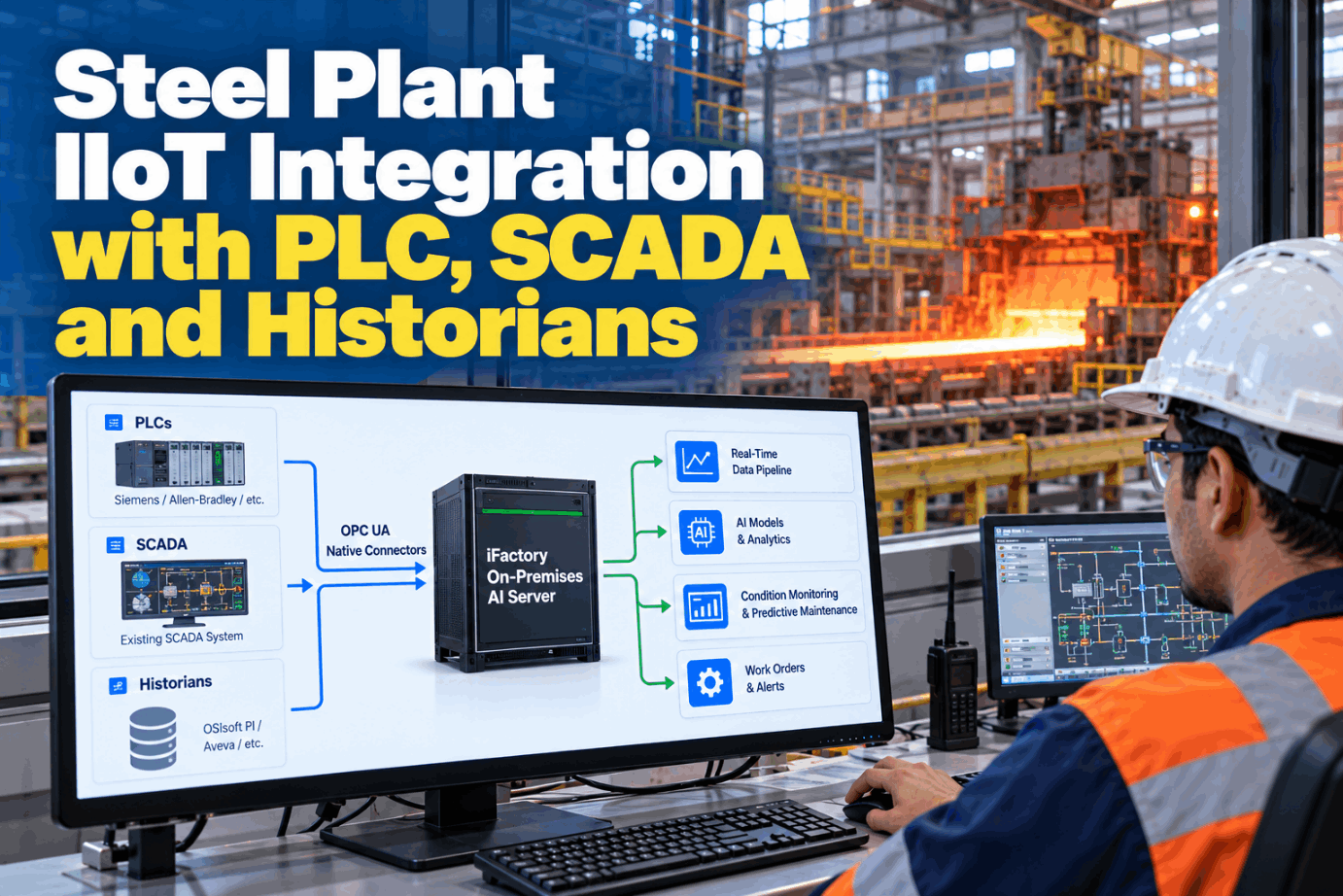
Most steel plants already collect more data than they use. PLCs, Level 2 process computers, SCADA and historians record every heat, pass and alarm, but each system speaks its own protocol and sits in its own network zone. Steel plant IIoT integration connects those sources to AI without replacing them and without opening a path back into control. See how a read-only tie-in would work at your site in a short integration walkthrough.

TURNKEY INTEGRATION · STEEL PLANTS

Connect PLCs, SCADA and Historians to On-Site AI, No Rip-and-Replace

iFactory Turnkey Integration Services cover OPC UA and historian connectors, PLC and SCADA tie-ins, network setup and cabling. Data flows read-only to an on-premises NVIDIA AI server, and your control systems keep running exactly as they do today.

Integration status · Hot strip millRead-only
Week 4 · tag mapping and checks
Level 2 serverOPC UA, signed and encrypted
Connected
Process historianHistory pull for model training
Running
Coiler PLC, legacySerial to Ethernet gateway
Mapping
Time sourcePlant clock, all sources aligned
In sync
1,840 of 2,300 tags mapped and checked
ISA-95 LEVELS IN A STEEL PLANT

Where Steel Plant Data Already Lives

ISA-95 splits a plant into levels, from sensors at Level 0 up to business systems at Level 4. Steel plants use the same numbers with one twist: "Level 2" usually means the process computer. Its physics-based models calculate the mill or caster setup, send references to Level 1 and collect process feedback for every coil or heat. That makes it one of the richest sources for AI. Sort your own sources by level with our integration team.

L4
Business planningERP orders, costs and shipments. Read for context, rarely needed for maintenance models.
L3
Site operationsMES, historians and quality systems. Long history for training models.
L2
Process computers and SCADASetup models, pass schedules, heat and coil records, operator screens. The key source per product.
L1
PLCs and drivesFast signals: currents, speeds, pressures, positions, alarms. Read through a server, never written.
L0
Sensors and actuatorsThermocouples, load cells, valves, motors. Reached through Level 1, plus new sensors where gaps exist.
OPC UA INTEGRATION AND PLC DATA CONNECTION

Six Protocol Families, One Rule: Read, Never Write

A steel plant built over decades usually runs several protocol families at once. Each needs a different connector, but the rule is the same everywhere: the integration reads values and has no way to change a setpoint or force an output. OPC UA, published as IEC 62541, is the preferred route where it exists, because it carries security and user roles. Review your protocol mix in a tie-in planning call.

Protocol
Where it shows up in steel
How the connector reads
How it stays read-only
OPC UA (IEC 62541)
Newer PLCs, Level 2 servers, SCADA
Subscribes to tags over opc.tcp, default port 4840
Read-only user role, Sign or SignAndEncrypt
Modbus TCP
Power meters, small drives, water plants
Polls input and holding registers on TCP 502
Read function codes only
S7 (ISO-on-TCP)
Siemens S7 PLCs in melt shops and mills
Reads data blocks on TCP 102, or the CPU's own OPC UA server where it has one
Read-only tag list, no write calls
EtherNet/IP (CIP)
Rockwell controllers on finishing lines and utilities
Explicit messages reading controller tags on TCP 44818
Read-only tag list, no write calls
PROFINET
Drive and I/O networks on Siemens-based lines
Real-time frames are Layer 2 I/O (EtherType 0x8892), so values are read from the controller, not the I/O network
Nothing joins the I/O network
Serial (Modbus RTU, PROFIBUS, DH+)
Older PLCs, drives and analysers
Protocol gateway converts to Ethernet
Gateway set to read
HISTORIAN CONNECTOR SOFTWARE

Reading the Historian You Already Run

The historian holds years of process data, which is exactly what AI models need for training. There is no reason to replace it. The connector reads from it with its own account, at a pace the historian owner agrees, and never writes back. Talk through your historian setup with our support team.

Long-term process history
OSIsoft PI, now AVEVA PI SystemCommon in integrated works for plant-wide history across melt shop, caster and mills.
SCADA-linked history
Wonderware Historian, now AVEVA HistorianOften found beside the SCADA and HMI layer on finishing and processing lines.
DCS-linked history
Honeywell PHDOften found where Honeywell control systems run utilities or process units.
Connector approaches, chosen with the historian owner

The vendor's own web or SDK interface, OPC historical access, a SQL or ODBC view, or scheduled file exports. The choice depends on your version, licences and IT rules. Large history pulls run off-peak so trending screens stay fast.

Your Control System Stays in Charge

iFactory reads from PLCs, SCADA and historians through accounts and gateways that cannot write. The AI runs on a server inside your plant, and the mill keeps running as before if that server stops.

Controls engineer and iFactory · Design review
Controls engineerCan your server write to the F5 stand PLC?
iFactoryNo. The OPC UA account has read access only, and the connector has no write function configured.
Controls engineerWhat happens if the link to Level 2 goes down?
iFactoryThe mill is unaffected. The edge buffer holds readings and sends them, with their original timestamps, when the link returns.
READ-ONLY ACCESS AND OT SECURITY

Four Ways to Read Mill Data With No Path Back

Read-only is a design choice made at several layers, not a single setting. The stronger the separation your security team asks for, the further down this list you go. Many sites combine two of them. Agree the pattern with your controls and IT teams in a security design session.

01
Read-only accountsThe OPC UA, SCADA or historian server gives the connector a role that can browse and read, nothing else.
02
Read a copyThe connector reads a historian or OPC server copy kept outside the control zone, not the live controller.
03
Firewall by conduitOnly the agreed source, target and port are allowed, and only from the plant side outward.
04
Data diodeHardware, usually fibre, lets data flow one way only. Unidirectional gateways add software that rebuilds the historian or OPC server on the far side.
ISA/IEC 62443 zones, conduits and the DMZ

IEC 62443-3-2 groups assets with common security needs into zones and controls every connection between them as a conduit. The AI server sits in its own zone at site operations level, reading through agreed conduits, with an industrial DMZ between the plant and the business network.

TAG MAPPING TEMPLATE

One Record per Tag, Agreed Before Data Flows

Raw addresses mean nothing to a model or a planner. A tag such as DB40.DBD12 on a stand PLC becomes HSM.F5.AGC.OS.Pressure with units, range and owner attached. Naming follows the ISA-95 path of site, area, line and unit, so the same name works in the historian, the CMMS and the AI. Ask our support team for a blank tag sheet.

Source addressPLC, data block and offset, or OPC node ID
Plant pathSite, area, line, unit, asset
Standard nameHSM.F5.AGC.OS.Pressure
Units and rangebar, 0 to 300, scaling checked
Sample ruleRate or on-change, with deadband
Timestamp sourcePLC, server or connector
Quality flagGood, uncertain or bad, kept with value
OwnerWho confirms the tag is right
STEEL PLANT IIOT INTEGRATION BEST PRACTICES

Time, Sampling and Buffering Rules That Keep Data Usable

Most failed AI projects in steel trace back to data that was misaligned, sampled too slowly or lost during an outage, not to the model. A furnace trip and a drive alarm are only useful together if their clocks agree. These six rules prevent the common problems. Set them for your site in a data quality review.

Sync every clockNTP gives millisecond-level time over a LAN. PTP, IEEE 1588, reaches sub-microsecond where events must line up exactly.
Stamp at the sourceKeep the PLC or server timestamp, not the time the value arrived at the AI.
Sample by signal typeAlarms on change, temperatures every few seconds, drive currents faster, waveforms captured at the edge.
Use deadbandsSlow signals send only real changes, which saves network and storage.
Buffer at the edgeStore and forward, so a link outage leaves a delay, not a gap.
Keep quality flagsA bad or stale value is marked, so models never learn from it.
BROWNFIELD INTEGRATION FOR PLANT MANAGERS

What No Rip-and-Replace Means in Practice

Brownfield steel plants mix generations of control. A caster may run current PLCs while the coil yard still relies on Siemens S5 units, a range Siemens moved to end of life with no further support or spare parts. Serial links, PROFIBUS and older Rockwell networks are common. None of that needs replacing to feed AI, though the S5 risk should sit on your own upgrade plan. Map your brownfield sources with our brownfield specialists.

RIP-AND-REPLACE
  • Swap PLCs or SCADA just to reach the data
  • Rewrite and recommission proven control logic
  • Long outages for every change
  • Risk moved onto the process itself
NO RIP-AND-REPLACE
  • PLC programs and Level 2 models untouched
  • Data read from existing OPC UA, SCADA and historians
  • Serial and S5 sources through protocol gateways
  • Cable pulls and switch ports booked into planned stops
  • Control stays with your systems and people
STEEL PLANT IIOT INTEGRATION IMPLEMENTATION GUIDE

Six Steps From Survey to Live Data

Each step ends with something the plant can check: a source list, a signed zone drawing, a mapped tag sheet. Controls engineering signs off before anything connects. Get a step plan for your site in a rollout call.

1SurveySources, protocols, firmware and network drawings
2InventoryTags needed for each first use case
3DesignZones, conduits and read pattern approved
4ConnectRead-only links, gateways and cabling live
5Map and checkNames, units and clocks checked against screens
6Hand overTag sheet, drawings and monitoring in place
STEEL PLANT IIOT INTEGRATION COST AND ROI

Size the Mapping Effort Before You Size the Payback

Integration cost scales with the number of tags, not the number of systems. Start by sizing the tag work for your first phase, then weigh it against the hours your engineers now spend pulling and aligning data by hand. Every input below is assumed, to show the arithmetic only. Build your own case with our project team.

Assets in the first phase30, assumed
Tags per asset40, assumed
Tags to map30 × 40 = 1,200
Minutes to map and check each tag2, assumed
Mapping effort1,200 × 2 = 2,400 min, or 40 hours

On the value side, log how many hours a month engineers spend exporting and lining up data today. That number, not a vendor claim, is your baseline.

TURNKEY AI DEPLOYMENT

Integration, Cabling and an On-Premises AI Server in One Scope

A pre-configured NVIDIA AI server ships racked and ready, with iFactory, the connectors and steel models pre-loaded and tested. Our team does the tie-ins, network setup and cabling around it. You rack it, plug in power and Ethernet, and the AI is live. Scope it for your plant with a turnkey quote.

What's Included
  • Pre-configured NVIDIA AI server, racked and ready
  • OPC UA and historian connectors
  • PLC and SCADA tie-ins, with gateways for serial and legacy units
  • Network setup, firewall rules and cabling
  • Tag mapping, naming and time sync setup
  • Edge buffering for link outages
  • 24×7 remote monitoring of server and data flows
Live in 6–12 weeks
Wk 1–4
Survey and Connect

Sources listed, zones approved, server racked, read-only links running.

Wk 5–8
Map and Shadow

Tags mapped and checked, history pulled, models run silently.

Wk 9–12
Go-Live and Handover

Alerts on, teams trained, drawings and tag sheets handed over.

HOW iFACTORY FITS

Steel Plant IIoT Integration Software, Done for You

iFactory brings the connectors, the network work and the AI server as one delivery, so your team reviews and approves rather than builds. Our support team can walk you through a pilot plan.

1
OPC UA and historian connectors. Read Level 2, SCADA, PI, AVEVA Historian or PHD with read-only accounts.
2
PLC and SCADA tie-ins. S7, EtherNet/IP, Modbus and serial sources connected without touching PLC programs.
3
Network setup and cabling included. Zones, firewall rules, switch ports and fibre runs done in planned stops.
4
Data stays on site. Everything flows to the on-premises NVIDIA AI server inside your plant.
1000+
Industrial clients running iFactory
99.9%
Platform uptime for continuous mills
6-12 wks
From site survey to live connected data
FREQUENTLY ASKED QUESTIONS

What Plant Managers Ask About Steel Plant IIoT Integration

What is steel plant IIoT integration?
It is the work of connecting existing PLCs, Level 2 computers, SCADA and historians, plus any new sensors, to a platform that can analyse the data. In iFactory's case the data flows read-only to an AI server inside the plant.
Do we need new PLCs or a new SCADA?
No. Connectors read from the systems you have, using OPC UA, S7, EtherNet/IP, Modbus or the historian. Older serial and S5 units are reached through protocol gateways. PLC programs and Level 2 models are not changed.
Can the AI change setpoints in the mill?
No. Accounts and connectors are read-only, and firewall rules only allow agreed traffic. Where a site wants extra assurance, a data diode makes the one-way flow a hardware fact. Any alerts go to people, who decide what to do.
Which historians can it read?
Common ones in steel include AVEVA PI System, formerly OSIsoft PI, AVEVA Historian, formerly Wonderware, and Honeywell PHD. The connector method is agreed with the historian owner to suit the version, licences and IT rules.
How does it fit our OT security rules?
The design follows ISA/IEC 62443 zones and conduits. The AI server has its own zone, each connection is a defined conduit, and an industrial DMZ separates the plant from the business network. Your security team approves the drawing before anything connects.
How long does it take, and where do we start?
Most sites go live in 6 to 12 weeks. Start with one area where data is already good, such as the hot mill's Level 2 and stand drives, then add sources. Our support team can help pick the first area.

Connect the Mill You Already Have

Read Level 2, PLCs, SCADA and historians without replacing them, and run AI on a server inside your plant. Connectors, network work and cabling are all in scope, live in 6 to 12 weeks.
Example handover · Hot strip mill
SourcesLevel 2, stand PLCs, historian
AccessRead-only, conduits signed off
TagsMapped, named and owned
ClocksSynced to one plant time
Control systems unchanged

Share This Story, Choose Your Platform!