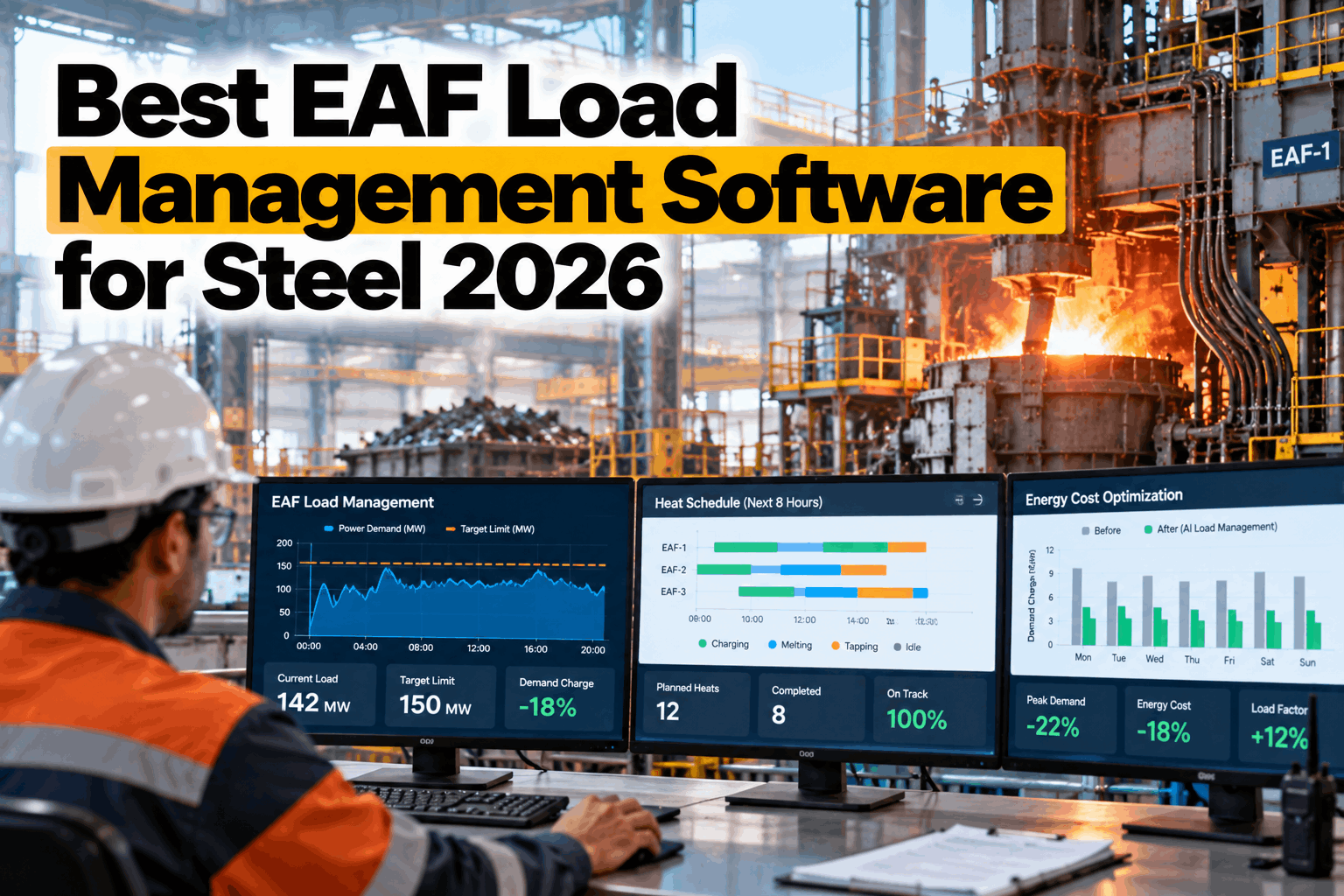
A large EAF can swing by tens of megawatts within a single heat, and when two furnaces bore in at once the whole plant peaks together. On many tariffs, that one peak sets the demand charge for the billing period. EAF load management software watches plant load live, staggers heats and shifts flexible loads, so peaks stay under limit without slowing production. To see your own load profile, book an EAF load review.
EAF Load Management Software for Steel, 2026
AI load scheduling that keeps plant peaks under limit, cuts demand charges and follows power prices across shifts, while the melt shop still hits its tonnes.
- How coincident furnace peaks drive your demand charge
- What good EAF load software does, point by point
- How to judge vendors without a sales pitch
Unmanaged
Peak 175 MW when both furnaces bore in together
Staggered by software
Peak 130 MW with about the same energy and output
Both charts use the same scale, and the dashed line marks the 140 MW limit. Dark bars break it. Moving one furnace's bore-in by a few minutes, and shifting flexible loads such as the ladle furnace, cuts the peak by 45 MW in this example.
Why EAF Load Is So Hard to Manage
The furnace load is huge, spiky and tied to a production schedule.
An EAF draws its highest power during bore-in and melting, then less during refining and almost nothing while tapping and charging. Each heat repeats that pattern in under an hour. With two furnaces, a ladle furnace and auxiliaries, those cycles overlap in ways nobody plans by hand. A few minutes of overlap can set a peak that costs more than a month of careful work. Our steel support team can help you see where your peaks come from.
Coincident peaks
Two furnaces at full power at once set the plant's highest load, often by accident.
Tariff rules
Demand charges, time-of-use prices and contract limits all differ, and change over time.
Production pressure
The caster needs steel on time, so heats cannot simply wait for cheaper power.
Manual control
Pulpit crews watch their own furnace, not the whole plant load, and nobody sees the total.
Monthly peak
Highest billing-interval average, against your limit and last year.
Near misses
Intervals that came within a few MW of the limit, and why.
Cost per tonne
Energy and demand charges per tonne of steel, by shift.
Holds that hurt
Any load hold that delayed the caster. Should be zero.
Energy charges reward using less. Demand charges punish using it all at once, even for a single interval. Load management mostly targets the second, by moving when power is drawn rather than how much, so output does not have to suffer.
What Good EAF Load Management Software Does
Not a ranking of vendors. Seven things to check in any tool.
The best tool for you is the one that fits your tariff, your furnaces and your caster schedule, and that your crews will actually use. Use these seven points to judge any option, including your current energy system. To compare a shortlist, book a software review session.
Live plant load
Every furnace, ladle furnace and large auxiliary, second by second, in one view.
Billing-period forecast
The rolling 15- or 30-minute average, and where it will land before the interval ends.
Heat-phase awareness
Knows when each furnace will bore in, melt, refine and tap, from live heat data.
Stagger advice
Suggests the smallest delays or shifts needed to avoid coincident peaks.
Flexible loads
Moves ladle furnace, pumps and fans within safe windows that you set.
Price following
Plans heavy load for cheaper hours where the schedule and contract allow.
Caster protection
Never delays steel the caster needs to keep its sequence going.
Loads you can move, and loads you should not
Three kinds of tool, and where each fits
Demand controllers
Alarm or shed load near a limit. Simple and cheap, but blind to heat phases and the schedule.
Furnace automation
Optimizes each furnace's power profile, but not the plant total or the price.
Plant-wide AI
Sees every load, price and the schedule together. This is where iFactory sits.
What One Lower Peak Can Be Worth
Here is a simple demand charge example. Tariffs vary widely, so treat it as a shape to fill with your own numbers.
Load Management Across Shifts
Peaks do not respect shift boundaries. Neither should the plan.
Shift changes, caster sequence starts and maintenance windows all change the load picture, often within the same hour. A plan that works on day shift can break at night when crews, priorities and prices differ. Good software carries one plan across all shifts, so every crew sees the same limits. If you want help aligning shifts, our engineers can help.
If day shift holds heats to protect the peak and night shift does not, the peak is simply set at night. One plan, one limit and one set of prompts for every crew is the only way the savings last.
Across a 24-hour day
- Price windows. Heavier melting in cheaper hours.
- Peak periods. Extra care when tariffs are highest.
- Handover. Plan carried from one crew to the next.
- Maintenance. Stops used to reset headroom.
Demand Response and Price Signals
Flexible load is worth money twice: lower bills, and payments for flexibility.
Many grids now pay large users to cut load when the system is stressed, or charge far more for power at peak times. Steel plants are among the largest flexible loads on many grids. A melt shop that knows exactly which loads it can move, and by how much, can take part safely instead of guessing.
Time-of-use
Plan heavier melting in cheaper hours where the schedule allows, and lighter loads in dear ones.
Demand response
Agree to cut load on request, for a payment or a lower tariff, within limits you set.
Real-time prices
Follow live prices with short shifts, always within production and safety limits.
Before signing any demand response contract, measure how much load you can actually move without hurting the caster. Research on EAF scheduling shows the value of good forecasts, but also that shared power limits and production constraints set the true ceiling.
Common Mistakes in EAF Load Management
Most failed projects did not lack data. They lacked trust or timing.
Load management fails when crews ignore it, when it slows the caster, or when it only reacts after a peak has already been set and nothing can be done. These mistakes are easy to avoid if they are planned for from the start.
Mistakes to avoid
- Alarms too late. A warning in the last minute of an interval cannot undo it.
- One plant total only. Crews need to know which furnace to hold.
- Ignoring the caster. One broken sequence wipes out months of savings.
- Too many alerts. Crews stop reading them within a week.
What works instead
- Forecasts several minutes ahead
- Advice that names the furnace and the minutes
- Caster slack shown next to every hold
- A handful of clear prompts per shift
Some tariffs carry a high peak forward for months, through a ratchet clause. On those contracts, a single unmanaged interval is far more expensive than it looks, which makes early warning even more valuable.
Rolling It Out Safely
Start with advice. Earn trust. Then automate only what crews agree to.
Load management changes how crews start heats, so it needs their trust and their input from the first week. The safest path starts with advice only, compares it with what crews actually did, and adds automation step by step.
Watch
Live load and forecasts, no advice yet, so crews get used to the view.
Advise
Suggestions shown on the pulpit, crews decide every time.
Review
Weekly check of peaks, holds and any caster impact.
Automate
Only agreed actions, with clear overrides for the crew.
How iFactory Manages EAF Load
One live view of plant load, heat phases and price, with advice crews can act on.
iFactory's EAF Peak Demand AI reads furnace power, heat phases, ladle furnace and auxiliary loads, plus your tariff and price data. It forecasts the billing average, warns before a peak, and suggests the smallest delay or load shift that keeps you under limit, naming the furnace and the minutes. Load Optimization then plans across shifts and price windows. To see it on your data, book a load planning session.
Watch
Live load for every furnace and big auxiliary.
Forecast
Rolling billing average and peak risk, minutes ahead.
Advise
Smallest stagger or shift to stay under limit.
Plan
Heats aligned with price windows across shifts.
What crews see
- Live plant load against the limit
- A clear go or hold for the next bore-in
- Minutes of slack left for the caster
What energy managers see
- Peaks avoided and their value
- Cost per tonne by shift and price window
- Flexibility available for demand response
Savings depend on your tariff, furnaces and schedule. We measure them on your own load data during the pilot. Questions on fit go to our support desk.
Turnkey AI: Delivered, Connected and Live in 6–12 Weeks
You do not build this. It arrives ready.
iFactory ships as a pre-configured NVIDIA AI server, racked and ready, with the software pre-loaded. Rack it, plug in power and Ethernet, and the AI is live on your network.
Our team handles cabling, network setup, PLC and SCADA integration, operator training and 24×7 remote monitoring. The server sits inside your own network, so power and production data stay on site. For a scope matched to your plant, request a turnkey quote.
Ship, network and data
Server installed. Furnace, power meters and tariff data connected. Load limits and caster rules agreed with your team.
Model training and pilot
Load forecasts tested in the background. Advice compared with what crews actually did on each heat.
Go-live and training
Advice live on the pulpit for every heat. Melt shop crews, schedulers and the energy team trained. 24×7 remote monitoring begins.
Frequently Asked Questions
What is EAF load management software?
Software that watches plant electrical load live, forecasts the billing average, and helps time furnace heats and flexible loads so peaks stay under limit and power is used when it is cheaper. It sits above furnace automation, looking at the whole plant.
How does it reduce demand charges?
Mostly by stopping two furnaces from drawing peak power at the same moment, and by shifting flexible loads such as the ladle furnace or pumps. The energy used stays about the same. The peak gets lower, and so does the demand charge.
Will it slow production?
It should not. Good software works within caster and ladle slack, using delays of minutes, not hours. Any hold that would break the casting sequence should never be suggested, and crews can always override.
Which is the best EAF load management software?
The one that fits your tariff, furnaces and schedule. Check that it sees every big load, forecasts the billing average, knows heat phases, protects the caster and gives crews clear advice. Ask for a trial on your own data before you buy.
Can it follow real-time power prices?
Yes, where your contract allows. It can plan heavier melting for cheaper hours and lighter loads for expensive ones, always within production limits and your contract terms.
Does it control the furnaces automatically?
It advises first. Crews decide, and their choices are logged. Any automatic link, such as holding a heat start, is agreed with your team and goes through your change process.
What data does it need?
Power meters for furnaces and big loads, heat phase signals, your tariff and contract limits, and the production schedule, including caster sequence plans. To check your set-up, contact our team.
See Where Your Peaks Come From
In thirty minutes we look at your load data and tariff, show which overlaps set your highest peaks, and estimate what staggering them could be worth. You keep the findings whether or not you go further with iFactory.
- 1A few months of 15-minute load data
- 2Your electricity tariff and contract
- 3Recent bills showing demand charges
- 4Heat logs for each furnace
- 5Your caster sequence rules