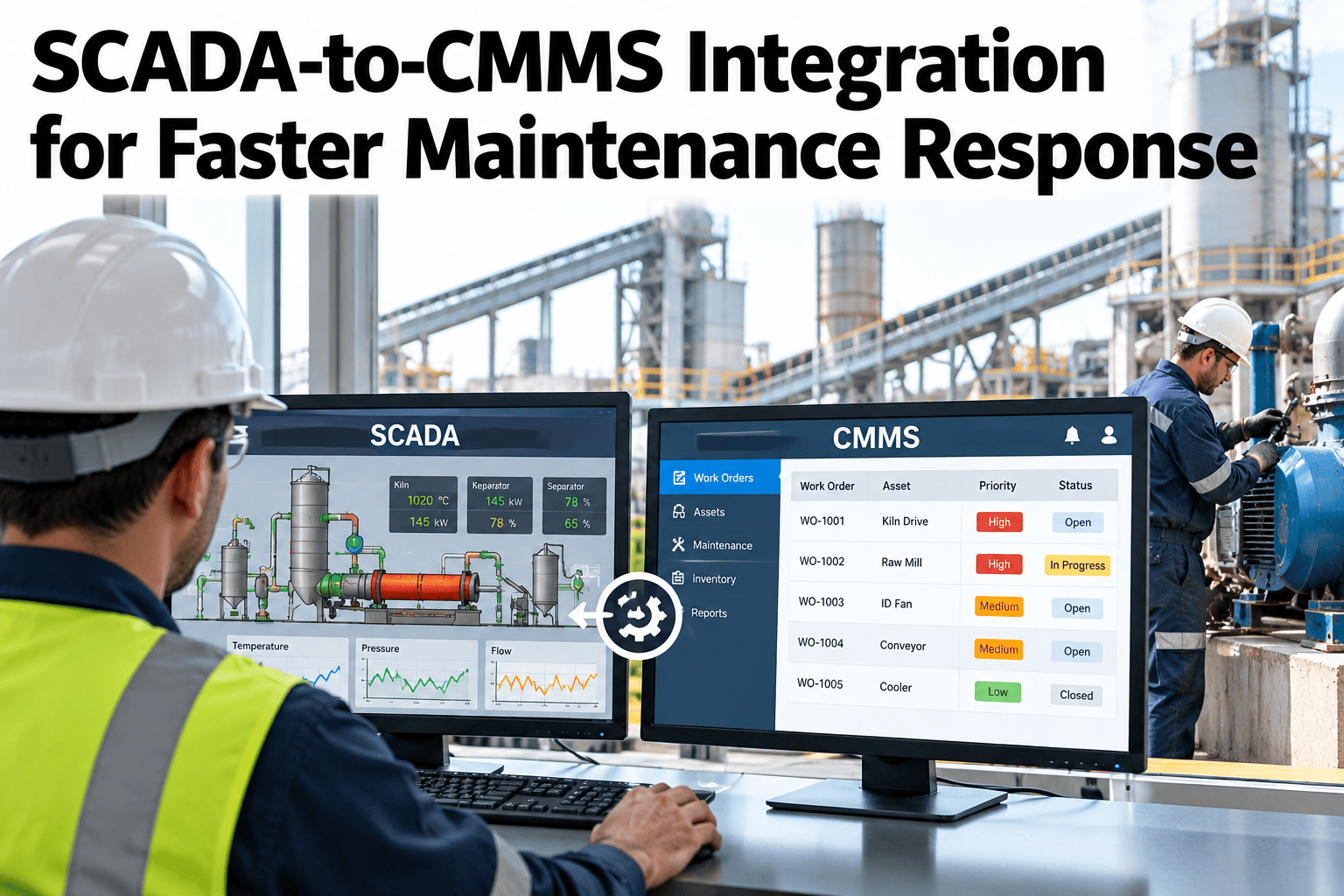
A SCADA alarm firing at 2 AM does nothing on its own; someone still has to see it, decide it needs a work order, open the CMMS, enter the details, and assign a technician, and every one of those manual steps adds minutes a critical asset may not have. Most plants have SCADA and CMMS as two separate systems that technicians bridge by hand, which works until a shift is short-staffed or an alarm fires outside normal monitoring hours. Connecting the two directly, so a qualifying alarm generates a work order automatically with the relevant asset and alarm history already attached, removes the manual bridge entirely. Maintenance and controls teams rethinking this gap can see a SCADA alarm generate a CMMS work order automatically live before the next off-hours alarm goes unanswered.
SCADA-to-CMMS Integration for Faster Maintenance Response
A qualifying alarm becomes a work order automatically, with asset and alarm history already attached.
Why the Manual Bridge Fails Under Pressure
A human bridge between SCADA and CMMS works until the exact moments it matters most.
An alarm outside normal monitoring hours can sit unresolved until the next shift arrives.
Re-typing alarm details into the CMMS by hand adds minutes to every response.
A technician dispatched without full alarm history arrives less prepared to diagnose the issue.
Automatic work order generation closes all three gaps at once, without changing how technicians actually do the repair.
Which Alarms Should Trigger a Work Order
Not every alarm needs a work order. The rules should match alarm severity to response type.
| Alarm Type | Typical Response | Work Order Behavior |
|---|---|---|
| Informational | Logged for trend review | No work order generated |
| Warning | Operator acknowledges and monitors | Work order generated if unresolved within a set window |
| Critical | Immediate technician dispatch | Work order generated immediately, technician notified |
Map Your Own Alarms to This Response Model
Book a 30-minute session and bring your current alarm list. iFactory AI will show how automatic work order rules would apply.
What iFactory AI Supports
The integration connects SCADA alarm data directly to CMMS work order creation, with no manual re-entry step.
Automatic Work Order Creation
A qualifying alarm generates a work order with asset and alarm data pre-filled.
Severity-Based Routing
Alarm severity determines whether a work order is generated immediately or after a delay.
Technician Notification
The assigned technician is notified with full alarm history attached, not just a bare alert.
Closed-Loop Tracking
Work order resolution status feeds back to confirm the alarm condition has cleared.
iFactory AI connects existing SCADA and CMMS systems. Scope covers alarm rule mapping, integration setup, team training and ongoing support.
Expert Review
The gain from this integration shows up most clearly on the night shift, which is exactly when a plant has the fewest people watching a SCADA screen. Automatic work order generation does not replace a technician's judgment, it just makes sure the alarm reaches them without depending on someone noticing it first.
Getting severity-based routing right matters more than most teams expect going in. Generating a work order for every informational alarm floods the CMMS with noise and trains technicians to ignore it, which defeats the entire purpose of the integration.
Frequently Asked Questions
Does this work with our existing CMMS platform?
The integration connects to common CMMS platforms through their standard APIs, pulling and pushing work order data without requiring a CMMS replacement. Ask about your specific CMMS platform in a working session.
Can alarm-to-work-order rules be adjusted over time?
Yes, rules can be refined as the team learns which alarms genuinely need a work order and which were generating unnecessary noise, without requiring a full system rebuild to adjust. Ask support about adjusting rules after initial go-live.
What happens if the same alarm fires repeatedly for the same asset?
Repeat alarms on the same asset can be grouped into a single work order rather than generating duplicates, which also helps surface a recurring issue that might otherwise look like several unrelated stops. Request a repeat-alarm handling demo.
Can technicians still create work orders manually alongside this?
Yes, automatic work order generation adds to the existing manual process rather than replacing it, so technicians and supervisors can still open a work order directly when needed. Contact support about keeping manual work order creation available.
How long before the integration is reliably matching our alarm priorities?
Most plants have the severity-based routing tuned and validated within five to eight weeks, including a period comparing automatic work orders against what a human dispatcher would have created. Book a session to estimate your own timeline.
Close the Gap Between an Alarm and a Technician on the Way
iFactory AI connects SCADA alarms to CMMS work orders automatically, day or night. Book a walkthrough on your own systems.