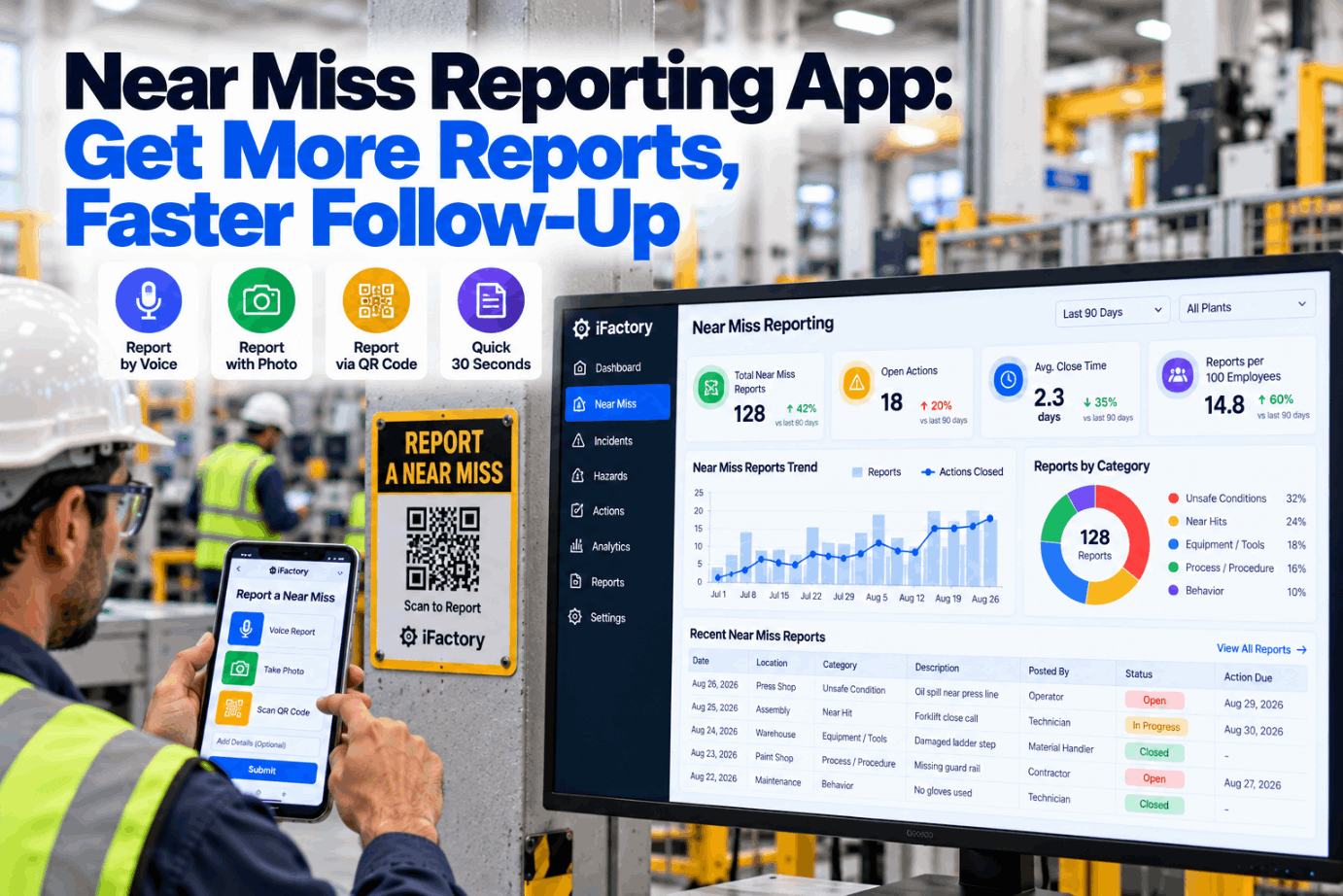
A pallet slides off the forks and lands a foot from someone’s boot. Everyone sees it, nobody is hurt, and nothing is written down because the form takes ten minutes and lives in the office. This guide shows how a near miss reporting app takes 30 seconds, by voice, photo or QR code, so the hazard gets fixed. Try a 30-second report.
Near Miss Reporting App: Get More Reports, Faster Follow-Up
Workers report by voice, photo or a QR code on the asset. AI sorts severity and potential, routes the report to the area owner and tracks the fix on the EHS kanban until it is closed and the reporter hears back.
- Why near misses go unreported
- How to design a 30-second report
- How to show workers their reports led to change
Why Near Misses Go Unreported
People do not skip reporting because they do not care.
The National Safety Council describes a near miss as an unplanned event that did not cause injury or damage but had the potential to. Every one is a free lesson. Workers skip them for three reasons: the form takes too long, they fear blame, and past reports seemed to disappear. Fix those three and reporting rises. Our safety team can review your current form.
Too slow
A paper or desktop form takes ten minutes.
Fear of blame
Reporters worry it will be held against them.
No feedback
Past reports seemed to go nowhere.
Unclear scope
People are not sure what counts.
Design a 30-Second Report
Meet people where the hazard is.
A good report captures what happened, where and what could have happened. Everything else, like classification, routing and owner, can be worked out by the system. The fewer fields the reporter fills in, the more reports you get. Try the channels in a short demo.
Speak it
Describe what happened in a sentence or two, hands-free.
Show it
One photo often says more than a form.
Scan the asset
A code on the machine fills in location and equipment.
Shared screen
For areas where phones are not allowed.
Optional name
Reporters can leave their name off.
No signal needed
Reports sync when the phone reconnects.
Do not ask the reporter to pick a severity, a root cause or a category code. Ask what happened, where, and what could have happened. Let the safety team and the AI do the sorting.
From Report to Fix
A near miss is only useful if something changes.
Each report moves along the EHS kanban like a work order: classified, routed, fixed and closed, with the reporter told what happened. Reports with serious potential jump the queue. Ask our support desk how routing maps to your areas.
Report
Voice, photo or QR in about 30 seconds.
Classify
AI scores actual and potential severity.
Route
Sent to the area owner on the kanban.
Fix
Action or work order planned.
Close and tell
Reporter gets a note on what changed.
Make Reporting Easier Than Ignoring
Start with two areas and one channel. Most sites see reporting habits change within weeks once feedback reaches the reporter.
Severity Is Not the Same as Potential
What happened is less important than what could have.
Two near misses with no injury can carry very different risk. Sorting reports by potential, not just outcome, puts the high-energy events at the top of the list. Review your classification rules in a classification session.
Heinrich’s 1931 ratio of 300 near misses to one major injury is widely quoted, but later research shows the events that cause serious injuries often have different causes from minor ones. That is why potential, not volume alone, should drive priority.
Building a Reporting Culture
What leaders do decides what workers report.
An app makes reporting easy. Leaders make it worth doing. The habits below matter more than any feature, and the system can remind leaders to keep them. Talk to our safety coaches about rollout.
Leaders do
- Thank people for every report
- Share fixes at shift huddles
- Fix serious-potential items first
- Show monthly what changed
Leaders avoid
- Asking who was at fault first
- Setting report quotas
- Letting reports sit unanswered
- Using reports in performance reviews
Measuring Reporting Health
Count what shows trust and action.
Report numbers alone can mislead. Track a small set of measures that show whether people trust the system and whether reports lead to change. Agree the measures in a pilot planning call.
Reports per area per month
Rising reports usually mean rising trust, not rising danger.
Time to first action
Hours from report to an owner taking action.
Closure with feedback
Share of closed reports where the reporter was told what changed.
Near Miss Program Mistakes to Avoid
Small habits decide whether reports keep coming.
Most programs that fade do so quietly: reports fall away, nobody notices, and the app becomes another unused tool. A quick program check spots the warning signs.
What works
- 30-second reporting by voice or QR
- Routing to the area owner
- Priority by potential
- Feedback to every reporter
What fails
- Long forms with category codes
- Reports sent to one central inbox
- Treating every report the same
- Silence after a report
How iFactory Runs Near Miss Reporting
Multi-channel reporting on one EHS kanban.
iFactory takes reports by voice, photo, QR code at the asset or kiosk. AI classifies severity and potential, routes each report to the area owner and tracks closure on the EHS kanban, all on an on-prem server. Fit questions go to our solutions team.
Voice reports
Speak a report hands-free in plain language.
QR at the asset
Location and equipment filled in automatically.
Potential scoring
Serious-potential reports flagged and moved up.
Smart routing
Each report sent to the owner of that area.
EHS kanban
Reports tracked like work orders until closed.
Reporter feedback
Closure notes sent back to the reporter.
Reporting rates depend on leadership habits and feedback as much as on the app. We measure reporting volume, time to action and closure with feedback during the pilot.
Turnkey AI: Delivered, Connected and Live in 6–12 Weeks
You do not build this. It arrives ready.
iFactory ships as a pre-configured NVIDIA AI server with the software pre-loaded, racked and ready. Rack it, plug in power and Ethernet, and the AI is live on your network. Our team handles cabling, network setup, PLC, SCADA and CMMS integration, QR code placement and area mapping, operator training and 24×7 remote monitoring. Data stays on your network. For a scope matched to your plant, request a turnkey quote.
Ship, network and data
Server installed. Areas, owners and assets loaded. QR codes placed.
Classification and pilot
Severity and potential rules tuned on two pilot areas.
Go-live and training
Live plant-wide. Supervisors trained on routing. 24×7 monitoring begins.
Frequently Asked Questions
What is a near miss reporting app?
It is a mobile tool that lets workers report events that could have caused harm, by voice, photo or QR code, and routes each report to the person who can fix the hazard.
Can reports be anonymous?
Yes. Anonymous reporting can be switched on, and the reporter can still receive feedback through the app.
How does the AI judge potential?
It looks at the energy involved, such as moving equipment, heights or pressure, and what could reasonably have happened, then suggests a potential rating for the safety team to confirm.
Does more reporting mean the plant is less safe?
Usually the opposite. Rising reports often reflect rising trust, especially when serious injuries are flat or falling.
Can a near miss become a work order?
Yes. If the fix is a maintenance job, it becomes a work order linked to the report and the asset.
Does it work without a signal?
Yes. Reports are stored on the device and sent when it reconnects.
How do we start?
Pick two areas, place QR codes on key assets and run a short pilot. To plan it, contact our team.
Hear About Hazards Before They Hurt
In thirty minutes we look at how near misses are reported today, where they stall and what workers hear back. You keep the notes either way.
- 1Your current near miss form
- 2Report counts for the last year
- 3A list of area owners
- 4A plant map
- 5One report that never got a fix